Vetur: vs code, code formatting is not working.
Info
- Platform: Win
- Vetur version: 0.11.5
- VS Code version: 1.19.1
Problem
I uninstalled all the extensions and reinstalled vetur several times, vue code formatter still doesn't work.
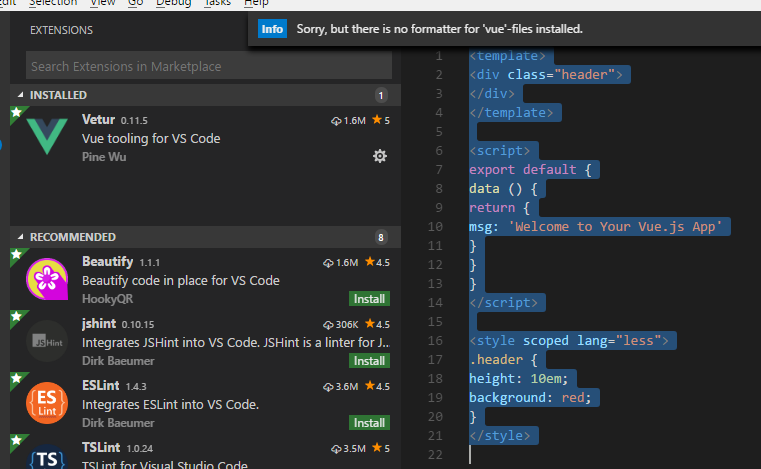
{
    "window.openFilesInNewWindow": "off",
    "explorer.confirmDelete": false,
    "[vue]": {
        "editor.formatOnSave": true,

    },
    "files.associations": {
        "*.vue": "vue"
    }
}
Reproducible Case
 lzl124631x
All 13 comments
I found that formatting will happen when I save file, but only formats JS and CSS, html is not formatted.

But still ctrl+k, ctrl+f(command for code formatting) doesn't work.
lzl124631x
on 5 Jan 2018
https://github.com/vuejs/vetur/blob/master/docs/formatting.md. Where is this setting?
"vetur.format.defaultFormatter": {
"html": "none",
"css": "prettier",
"postcss": "prettier",
"scss": "prettier",
"less": "prettier",
"js": "prettier",
"ts": "prettier",
"stylus": "stylus-supremacy"
}
I added the following setting to .vscode/settings.json.
{
    "vetur.format.defaultFormatter.html": "js-beautify-html"
}
The formattingOnSave for HTML does work.
- Why is the default html formatter disabled?
- Can you add "where to add those json config"? You only listed those json but didn't say where to put it.
--
update: How to edit .vscode/settings.json?
ctrl + shift + p > Configure Language Specific Settings > Vue > Edit the file.
My current settings:
{
    "window.openFilesInNewWindow": "off",
    "explorer.confirmDelete": false,
    "[vue]": {
        "editor.formatOnSave": true,

    },
    "files.associations": {
        "*.vue": "vue"
    },
    "vetur.format.defaultFormatter.html": "js-beautify-html"
}
I think this has some more info about why it is disabled: https://github.com/vuejs/vetur/issues/484
 cmnzs
on 10 Jan 2018
cmnzs
on 10 Jan 2018
me too,Ctrl+K,Ctrl+F doesnot work, it has been resolved??
 liuguangyong93
on 12 Jan 2018
liuguangyong93
on 12 Jan 2018
As @cmnzs has said, html formatting is disabled by default because our formatter doesn't work well enough.
 HerringtonDarkholme
on 14 Jan 2018
HerringtonDarkholme
on 14 Jan 2018
@lzl124631x
I'm curious about why you are getting "No formatter installed" error.
If you remove this:
"files.associations": {
"*.vue": "vue"
}
Do you still get that error?
 octref
on 16 Jan 2018
octref
on 16 Jan 2018
@percy507 That is WRONG advice. You should not associate Vue with html.
octref
on 31 Jan 2018
I solved this by removing all parameters in template tag (e.g. src, lang)
 MrFoxPro
on 26 May 2018
MrFoxPro
on 26 May 2018
Mine is fixed.
- Install Prettier extension.
URL - https://marketplace.visualstudio.com/items?itemName=esbenp.prettier-vscode - Go to File > Preferences > Settings
- Add below,
"prettier.singleQuote": true,
"prettier.semi": false,
"prettier.eslintIntegration": true - Save.
- Try Alt + Shift + F
 gayanSandamal
on 16 Jun 2018
gayanSandamal
on 16 Jun 2018
Try go to vetur configuration, and change => "vetur.format.defaultFormatter.html": "js-beautify-html"
 arturmaiz
on 17 Jun 2018
arturmaiz
on 17 Jun 2018
me too,Ctrl+K,Ctrl+F doesnot work, it has been resolved??
this problem has been resolved?
 songfs
on 28 Oct 2020
songfs
on 28 Oct 2020
I added the following setting to .vscode/settings.json.
{
    "vetur.format.defaultFormatter.html": "js-beautify-html"
}
The
formattingOnSavefor HTML does work.
- Why is the default html formatter disabled?
- Can you add "where to add those json config"? You only listed those json but didn't say where to put it.
--
update: How to edit .vscode/settings.json?
ctrl + shift + p> Configure Language Specific Settings > Vue > Edit the file.My current settings:
{
    "window.openFilesInNewWindow": "off",
    "explorer.confirmDelete": false,
    "[vue]": {
        "editor.formatOnSave": true,

    },
    "files.associations": {
        "*.vue": "vue"
    },
    "vetur.format.defaultFormatter.html": "js-beautify-html"
}
its work, thank you...
 yogithesymbian
on 25 Dec 2020
yogithesymbian
on 25 Dec 2020
Related issues
 thibautguedou3
·
3Comments
thibautguedou3
·
3Comments
 LawrenceQxy
·
3Comments
octref
·
3Comments
LawrenceQxy
·
3Comments
octref
·
3Comments
 tczhangzhi
·
3Comments
tczhangzhi
·
3Comments
 deangoku
·
3Comments
deangoku
·
3Comments
Most helpful comment
I added the following setting to .vscode/settings.json.
The
formattingOnSavefor HTML does work.--
update: How to edit .vscode/settings.json?
ctrl + shift + p> Configure Language Specific Settings > Vue > Edit the file.My current settings: