Vetur: [vue-language-server] '<template>' should have end tag.
Info
- Platform: Win10
- Vetur version:0.11.4
- VS Code version:1.19.0
Problem
Hello
i've started learn vue today with vetur package and i'm having the following issue:

I tried to search for this particular issue but i couldn't find anything useful online.
I would be very happy to hear any solutions how to fix it.
Thank you!
 NoamGoren
All 32 comments
Same problem here, worked fine in 0.11.3
 SquareBeard
on 14 Dec 2017
SquareBeard
on 14 Dec 2017
Same issue here.
Info
Platform: MacOS 10.13.1
Vetur version: 0.11.4
VS Code version: 1.19.0
 coltborg
on 14 Dec 2017
coltborg
on 14 Dec 2017
Does it happen to you on https://github.com/octref/veturpack?
Can you make a repro case based on it?
 octref
on 14 Dec 2017
octref
on 14 Dec 2017
Same problem, worked in 0.11.3, but broken in 0.11.4
VS Code: 1.19.0
 slavap
on 14 Dec 2017
slavap
on 14 Dec 2017
Same here.
MacOS 10.13.1
VS Code 1.19.0
 bobmoff
on 14 Dec 2017
bobmoff
on 14 Dec 2017
You can disable it temporarily by setting vetur.validation.template: false.
Or roll back to 0.11.3.
https://github.com/vuejs/vetur/issues/579#issuecomment-351839757
I can repro and will fix it soon.
octref
on 14 Dec 2017
Same issue here!
 chelopme
on 14 Dec 2017
chelopme
on 14 Dec 2017
@octref Thank you very much!
Issue closed
NoamGoren
on 14 Dec 2017
Let's keep it open. This is probably an upstream bug with eslint-plugin-vue that needs to be fixed.
octref
on 14 Dec 2017
I'll push a proper fix later today.
octref
on 14 Dec 2017
Are you able to provide the .vsix download url for 0.11.3 by any chance?
 bhigginsuk
on 14 Dec 2017
bhigginsuk
on 14 Dec 2017
Found it
edit: how-to
- Disable extension auto-updating
- Uninstall vetur
- Download this and change the extension from .VSIXPackage to .VSIX
- Install from VSIX
These options can be found with the 3 dots menu in the Extensions window
bhigginsuk
on 14 Dec 2017
Same problem.
MacOS 10.13.2
VS Code 1.19.0
Vetur 0.11.4
 sunhaoxiang
on 15 Dec 2017
sunhaoxiang
on 15 Dec 2017
m
 LIAISON-ambition-spoon-shrove-construe
on 15 Dec 2017
LIAISON-ambition-spoon-shrove-construe
on 15 Dec 2017
I have the same problem,hope to solve it quickly
 Hufe921
on 15 Dec 2017
Hufe921
on 15 Dec 2017
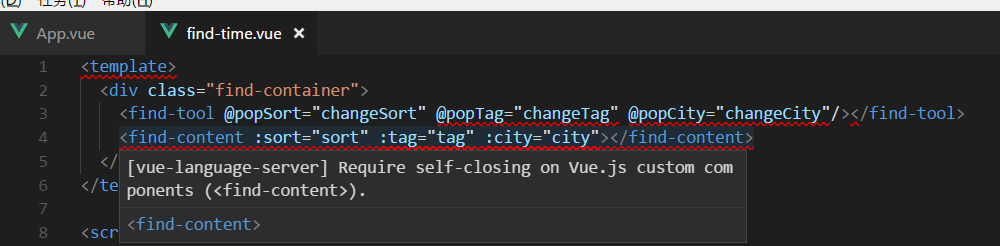
Hufe921
on 15 Dec 2017
same error.
 ruxf
on 15 Dec 2017
ruxf
on 15 Dec 2017
same error here. 😱
 chanlito
on 15 Dec 2017
chanlito
on 15 Dec 2017
Can modify vue-language-service config myself that a like es-lint?
It isn't apply all the same rule for everybody.
Otherwise vetur can support auto fix template error.
 kinanson
on 15 Dec 2017
kinanson
on 15 Dec 2017
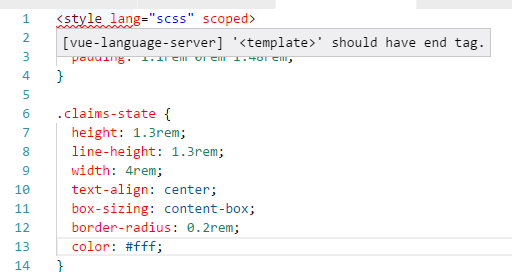
This issue occoured not only in <template>, but also in <style>
 Cheng007
on 15 Dec 2017
Cheng007
on 15 Dec 2017
I fixed that by set vetur config, you can set "vetur.validation.template": false to your vscode user setting
 mingyec
on 15 Dec 2017
mingyec
on 15 Dec 2017
Thanks for the hard work.
but why release a so buggy version? Need more developer to help?
 transtone
on 15 Dec 2017
transtone
on 15 Dec 2017
@mingyec This method will make the <template> error not found
Hufe921
on 15 Dec 2017
You need to add ' lang="html" ' , but it's too troublesome and regrets to update it. Hope that the official can fix it.
 leaper1
on 15 Dec 2017
leaper1
on 15 Dec 2017
same error.
Platform: Win7
Vetur version: 0.11.4
VS Code version: 1.19.0
 LeoLun
on 15 Dec 2017
LeoLun
on 15 Dec 2017
@leaper1
But after adding 'lang="html"', template will lose emmet support. For me, it's even worse.
 AchillesG
on 15 Dec 2017
AchillesG
on 15 Dec 2017
Same here, but was working yesterday before VC & Vetur update.
Adding lang="html" to template fixes issue.
@AchillesG, my Emmet stills works although on further testing, it's because I have following in my settings:
    "emmet.includeLanguages": {
        "blade.php": "html",
        "vue": "html"
    }
OS: Win10x64
VC: 1.19.0
Vetur: 0.11.4
 tyler36
on 15 Dec 2017
tyler36
on 15 Dec 2017
@tyler36
Yes, adding lang="html" can fix this issue, but after adding it, VS Code will not prompt close tags.
For example: without lang="html", when i have already input <div>, and after type <, VS Code will prompt the close tag </div>, and i can just click enter to insert the close tag.
Not sure if this is Vetur's issue or other plugin's issue?
 shevchenic
on 15 Dec 2017
shevchenic
on 15 Dec 2017
@shevchenic
Yep, confirmed here too.
I'm new to VC and am using an extension auto-close to ... well ... auto-close html tags.
It was a featured I missed from Sublime and have been using from day 1 so never knew about the feature you're talking about.
tyler36
on 15 Dec 2017
Do not listen to people saying lang="html". Do not set "vue": "html" in emmet.IncludeLanguages.
This has been fixed and I'll publish a new version soon.
octref
on 15 Dec 2017
same error in 0.11.4
i hope to fix it quickly.
thanks
 w3313003
on 15 Dec 2017
w3313003
on 15 Dec 2017

OS: Win10x64
VC: 1.19.0
Vetur: 0.11.4
there are so many pages need to add lang="html", i don't wanna do that
 zouhangwithsweet
on 15 Dec 2017
zouhangwithsweet
on 15 Dec 2017
Related issues
 KokoDoko
·
3Comments
KokoDoko
·
3Comments
 tczhangzhi
·
3Comments
tczhangzhi
·
3Comments
 muhajirdev
·
3Comments
muhajirdev
·
3Comments
 deangoku
·
3Comments
deangoku
·
3Comments
 thibautguedou3
·
3Comments
thibautguedou3
·
3Comments
Most helpful comment
You can disable it temporarily by setting
vetur.validation.template: false.Or roll back to 0.11.3.
https://github.com/vuejs/vetur/issues/579#issuecomment-351839757
I can repro and will fix it soon.