Vetur: prettier does not read `tabWidth` from prettierrc for script section
Info
Platform:
OS X 10.11.6Vetur version:
0.11.3VS Code version:
1.18.1
Problem
Hello,
For my formatting I like to use tabs (the tab character) for indentation with 4 spaces. My VSCode settings are:
{
    "editor.insertSpaces": false,
    "editor.detectIndentation": false
}
When I use the vue-cli to create a new project, it auto creates an app.vue file using 2 spaces. If I right click on the document to bring up the context menu, and select "Format Document", the document will not be formatted and will be left as-is. (aka the 2 spaces indentation)
However, when I use the same command (Format Document) on any other file (html, css, js), it will correctly format the document (using tab character for tab, with 4 spaces).
I am using the default settings for vetur and I'm not sure why the document is not getting formatted. Any ideas? Thanks.
 pentool
All 12 comments
Hi, vetur's default formatter is "prettier". You need to add prettier's config. You can also configure vetur to use "vscode-typescript" as the formatter.
 HerringtonDarkholme
on 30 Nov 2017
HerringtonDarkholme
on 30 Nov 2017
That was not a very helpfull answer...
I can't get .vue file formatting to work correctly either =|
And yes I have a prettierrc file, not much in it thought as I mostly use standard prettier settings.
 lauhakari
on 3 Dec 2017
lauhakari
on 3 Dec 2017

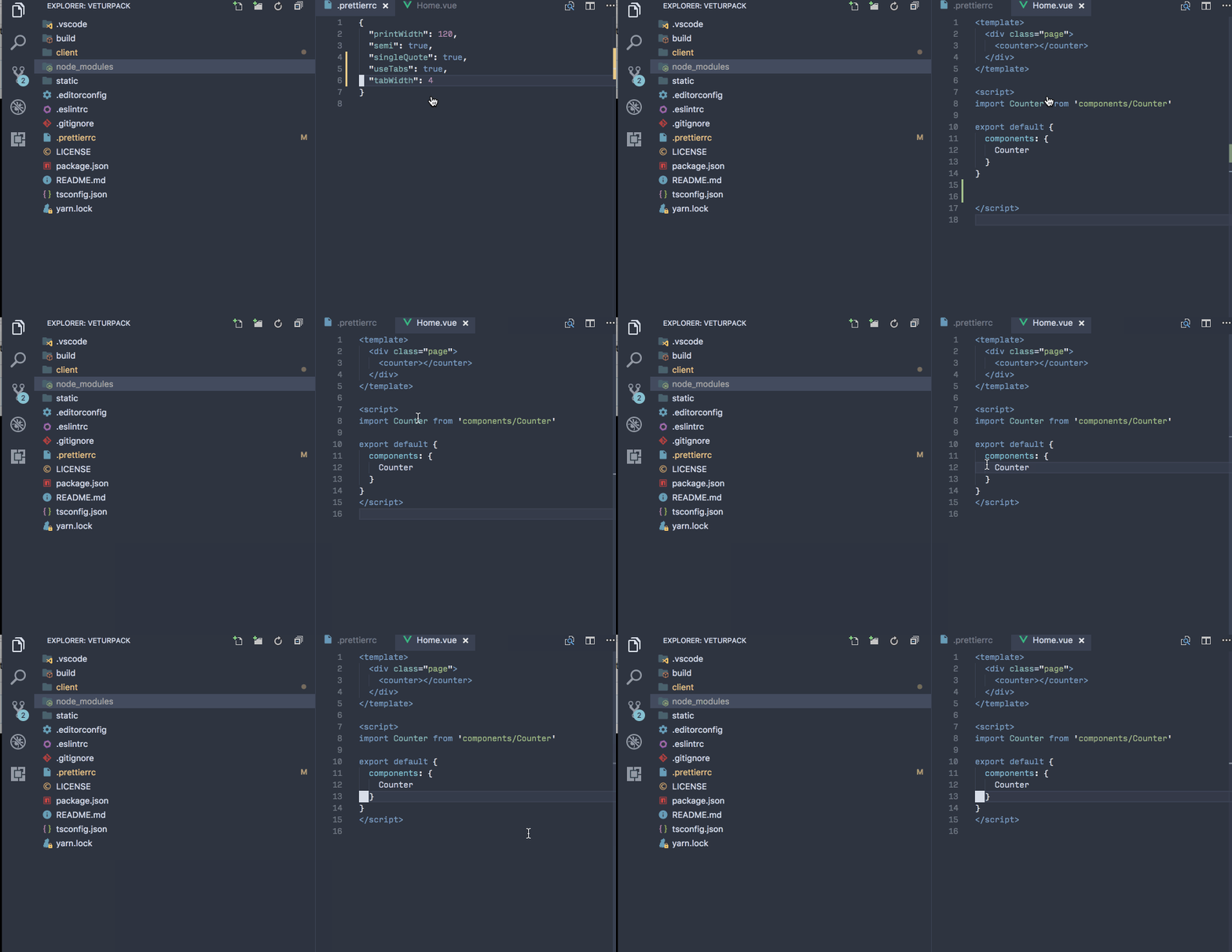
This is working on https://github.com/octref/veturpack.
It's following useTab but not tabWidth. For that I'll take a look.
 octref
on 3 Dec 2017
octref
on 3 Dec 2017
OK licecap is not working on my external monitor. Here is the gif
octref
on 3 Dec 2017
Well, prettier already did the replacement. You need to use Cmd+Shift+P -> Indent Using Tabs -> Select 4 to use 4 space tab, or you can change the global setting to
{
"editor.tabSize": 4,
"editor.insertSpaces": false,
"editor.detectIndentation": false,
}
See this comment https://github.com/Microsoft/vscode/issues/28277#issuecomment-307708175 for explanation on detectIndentation.
octref
on 5 Dec 2017
I tried everything mentioned here and elsewhere, and nothing worked. I finally tried setting from use spaces to use tabs and after clicking on the "Tab Size: x" footer several times, it took. It now shows 4 and seems to be respecting that. I switched to use spaces afterwards and tab size remains at 4. I think there are subtle bugs in the extension interface between vscode and "prettier" ... but I have no interest in dealing with it. Hopefully someone will spot the bug and get rid of it one day.
EDIT: A second file was refusing to adjust itself. The footer said spaces: 2, which of course was "remembered" by the auto detect, which was on when I first created the file. Clicking the tab / spce setting to 4 and formatting did nothing as before. But ... when you see Tab Space: 4 in the footer and then restart vscode, the format command finally works.
So my opinion is now that there is a bug in the detect mechanism where it stays with what it detected even after detect has gone off, which freezes the formatter at the wrong spacing.
EDIT 2: WOW!!! No matter what I do, loading the file into the editor again remembers "spaces: 2", and then running format document on it sets it back to that. The detect feature does not understand the implications of what it means for detect to be off and spacing to be different from the file's originally detected spacing oh so long ago. As in, please stop torturing the user.
The workaround (hack) should be to create a new file and copy/paste the code into it with the correct space settings and detect off. BUT ... that creates files with "Spaces:2" set, despite me checking every tab size setting multiple times. I think vscode is just completely broken in this area. Or maybe "prettier", but my money is on vscode for this mess.
 kletkeman
on 20 Nov 2018
kletkeman
on 20 Nov 2018
@kletkeman That's literally what I just said in the comment above you. detectIndentation doesn't work 100% of times. When it doesn't work it overrides your insertSpaces and detectIndentations settings. You can configure Workspace Settings to make VS Code respect the local tabSize and inserteSpace settings.
octref
on 21 Nov 2018
@octref You must not have read my comments thoroughly ... vscode does not respect it with workspace settings, at least not when you first do it. And I did it a dozen times. Every time I go back, the settings are correct but the behavior is nonsense.
VScode EVENTUALLY seems to have an uneasy truce with the numbers and I am getting the spacing I prefer ... for now. But it took hours to finally stop doing the 2 space thing and it just acts fragile and finicky.
YMMV, and obviously does.
kletkeman
on 21 Nov 2018
@kletkeman I read through it. Can you describe issues clearly and provide repro steps?
I just pushed a branch to veturpack. https://github.com/octref/veturpack/commit/5748b921a863108f1ea265233f69ae990fb69b09 is all change you need to do for changing indentation to 4 spaces.
If you have issues, fork https://github.com/octref/veturpack to provide a repro case and include repro steps. If you have issues for VS Code, open issues at https://github.com/Microsoft/vscode.
octref
on 21 Nov 2018
Try 0.14.0. Changelog here: https://vuejs.github.io/vetur/CHANGELOG.html#_0-14-0-2018-11-26-vsix
Vetur formatter no longer uses detected formatting options. Instead, you can specify
{
  "vetur.format.options.useTabs": false,
  "vetur.format.options.tabSize": 2
}
I'm having the same issue on v1.35.0.
I tried everything but tabWitdth goes back to 4. VSCode or Prettier seems to ignore detectIndentation and tabWidth.
It's very frustrating.
 matheusrufca
on 6 Jun 2019
octref
on 19 Jun 2019
matheusrufca
on 6 Jun 2019
octref
on 19 Jun 2019
Related issues
 LukeLin
·
3Comments
LukeLin
·
3Comments
 muhajirdev
·
3Comments
octref
·
3Comments
muhajirdev
·
3Comments
octref
·
3Comments
 yoyoys
·
3Comments
yoyoys
·
3Comments
 pdanpdan
·
3Comments
pdanpdan
·
3Comments
Most helpful comment
Try 0.14.0. Changelog here: https://vuejs.github.io/vetur/CHANGELOG.html#_0-14-0-2018-11-26-vsix
Vetur formatter no longer uses detected formatting options. Instead, you can specify