- [x] I searched through existing issues.
- [x] I have looked through docs at https://vuejs.github.io/vetur/
Info
- Platform: Win/Linux
- Vetur version: 0.9.3
- VSCode version: 1.14.2
Problem
This problem has three parts:
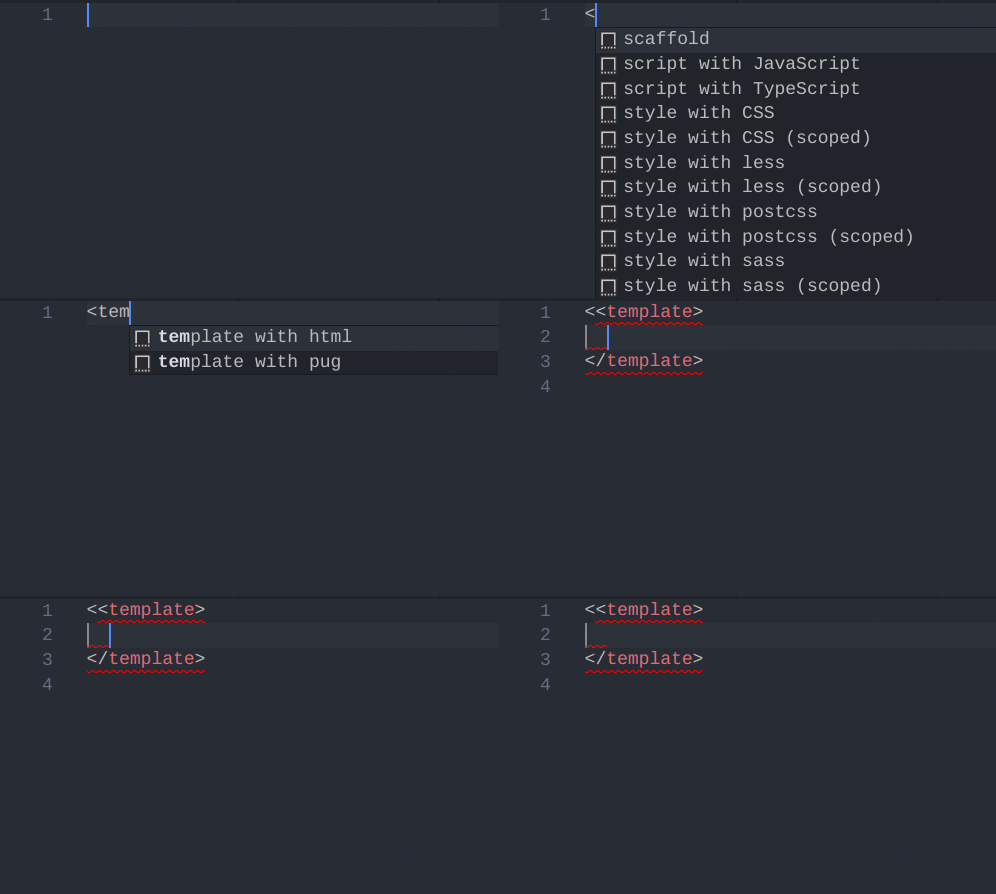
When you start typing the opening
<template>, the suggestions for<arescaffold+ others. If you selectscaffold, you end up with<<template>...(double less-than character). The suggestions for<taretemplate with html+ others. If you select that one, the same happens:
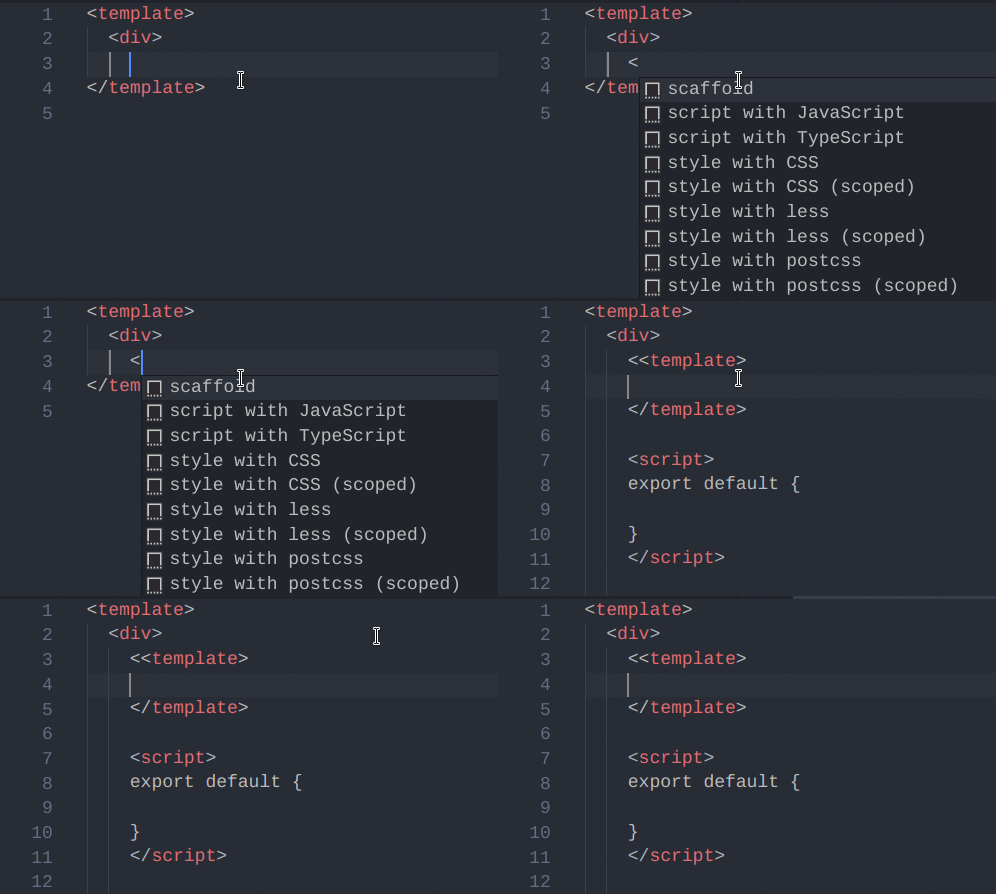
When you have a root or nested
<template>with both opening and closing tags or just the opening tag, the autocomplete after the first element inside it will not be to close that element, but to scaffold the entire.vuefile, or just the<template>depending on how much you wrote:

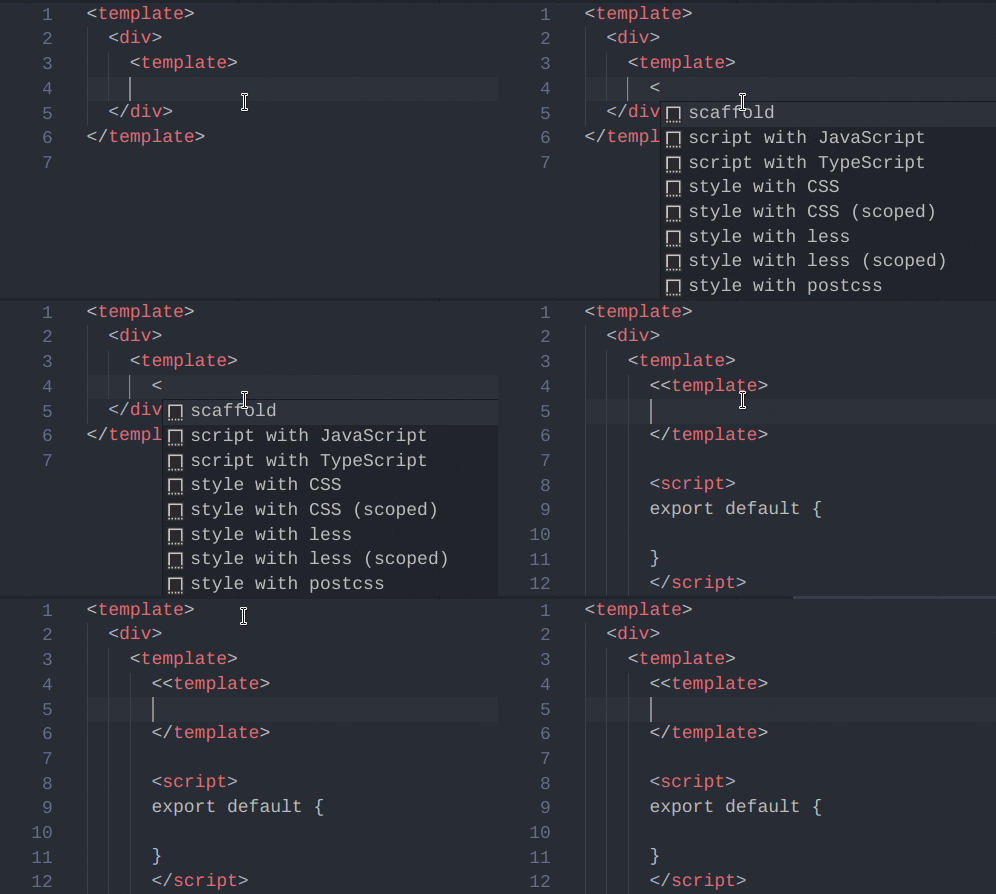
Autocomplete for any nested
<template>tags also tries to scaffold the entire.vuefile or<template>:
 rhyek
rhyek
All 11 comments
Thanks for the report.
We will fix nested template issue. However, I cannot reproduce the second GIF. Can you provide more info?
@octref do you have any idea about repeated brackets?
 HerringtonDarkholme
on 8 Aug 2017
HerringtonDarkholme
on 8 Aug 2017
@HerringtonDarkholme, what additional info would you need? In your case, does it actually suggest the closing tag </div>?
rhyek
on 9 Aug 2017
I cannot repro 2 or 3 either.
@HerringtonDarkholme I'm sure there is an option in CompletionItem that let's you configure that. I'll have time to look into it this weekend.
 octref
on 10 Aug 2017
octref
on 10 Aug 2017
@octref I also have investigated the completion error.
The problem is we don't set textEdit properly in completionItem. When textEdit is absent, vscode will fallback to wordPattern option to compute completion start position.
Sadly, vscode cannot handle embedded langauge's wordPattern. https://github.com/vuejs/vetur/issues/369 is an example. $hyphenate-variable is a word in stylus, but vscode does not recognize. So completion is bad.
So we might need to provide textEdit for every completion item. But note, some client does not support textEdit, ike vim. A best solution is quite hard to find.
HerringtonDarkholme
on 10 Aug 2017
Only the extra bracket issue is addressed, correct?
rhyek
on 11 Aug 2017
Nope. Nested template is fixed.
Extra bracket requires more refactoring.
HerringtonDarkholme
on 11 Aug 2017
Great! I will test whenever you make the next release. Thanks.
rhyek
on 11 Aug 2017
I can repro this problem when nested template,it always generate something like
<<template>

</template>
 justid
on 2 Jan 2018
justid
on 2 Jan 2018
vscode version 1.19.1,should I open a new issues? or it's just some setting problem?
justid
on 2 Jan 2018
We haven't released a new version, please wait patiently.
HerringtonDarkholme
on 2 Jan 2018
+1 VSCode auto completes/auto closes my markup in react, not my markup in .vue files though. using vetur v0.13.0
 tetreault
on 16 Nov 2018
tetreault
on 16 Nov 2018
Related issues
octref
·
3Comments
 LukeLin
·
3Comments
LukeLin
·
3Comments
 muhajirdev
·
3Comments
muhajirdev
·
3Comments
 thibautguedou3
·
3Comments
thibautguedou3
·
3Comments
 gabrielboliveira
·
3Comments
gabrielboliveira
·
3Comments
Most helpful comment
Nope. Nested template is fixed.
Extra bracket requires more refactoring.