Vetur: Request textDocument/completion failed
- [x] I searched through existing issues.
- [x] I have looked through docs at https://octref.github.io/vetur/
Info
- Platform: macOS
- Vetur version:0.8.6
- VSCode version:1.13.1
Problem
when coding on *.vue , vue language server frequently show errors below. it feels bad

Reproducible Case
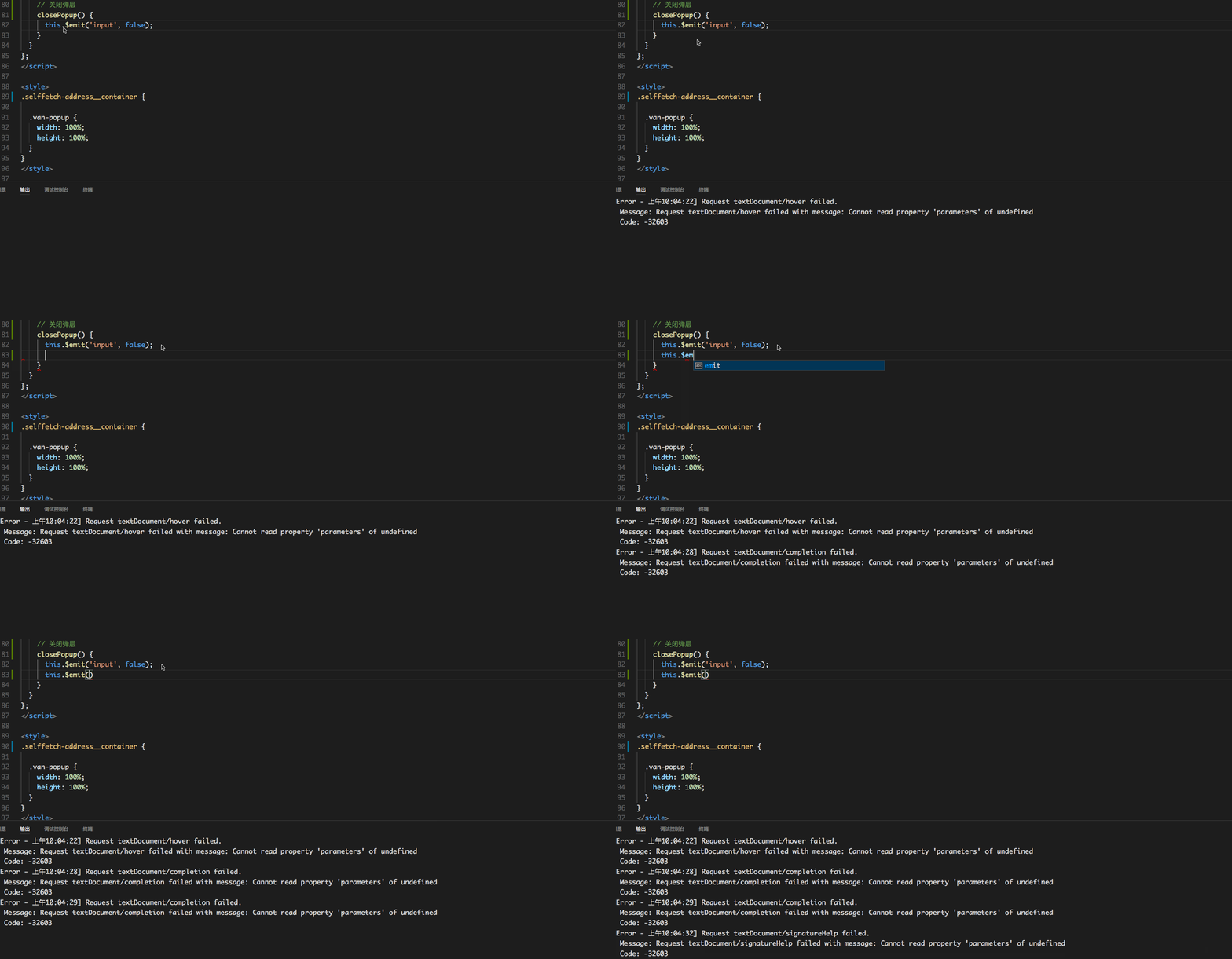
 kobestyle
All 19 comments
Sorry, I cannot reproduce it.
Can you provide a minimal .vue file or repository?
 HerringtonDarkholme
on 28 Jun 2017
HerringtonDarkholme
on 28 Jun 2017
I have the same error
Platform: Windows 10
Vetur version:0.8.6
VSCode version:1.13.1
it happens when i wrote the computed property , but even if I delete, it still there

 topul
on 28 Jun 2017
topul
on 28 Jun 2017
Please provide an example vue file
HerringtonDarkholme
on 28 Jun 2017
@HerringtonDarkholme it's business code, i cannot reproduce it in single file, but i do some tests,

I don't know if that helps
topul
on 28 Jun 2017
I think it's easy to reproduce this issue after upgrade vetur to v0.8.6.
Just click like a monkey...
Because it will automatically open the OUTPUT console, It makes me crazy!!
 BelinChung
on 28 Jun 2017
BelinChung
on 28 Jun 2017
If you only provide a screenshot there isn't much we can do.
Please try to modify https://github.com/octref/veturpack or one of vue-cli's template for a repro case so we can help you.
@kobestyle Meanwhile, what's your vue version? It seems IntelliSense is not working for you at all.
 octref
on 28 Jun 2017
octref
on 28 Jun 2017
<template>
  <div class="page">
    <counter></counter>
    <p>
      To get started, edit files in <code>./client</code> and save.
    </p>
  </div>
</template>

<script>
import Counter from 'components/Counter'

export default {
  components: {
    Counter
  },
  computed: {
    taxInfo (val) {
      this.gs.loading = false
      this.ds.loading = false
      this.gs.model.pwd = ''
      this.ds.model.pwd = ''
      // 国地税都没有验证的情况下,默认展示验证表单
      this.showVerify = !+val.gsState && !+val.dsState
      this.taxInfo = val
      this._getRegion()
    }
  }
}
</script>
@octref just modify the Home.vue like this, click this.taxInfo = val, the bug reproduced
topul
on 28 Jun 2017
@octref the version is 2.3.4
kobestyle
on 28 Jun 2017
@topul OK I was able to repro both the hover and completion errors. Will take a look later tonight.
octref
on 28 Jun 2017
how to prevent Vetur open the output console?
 tangdw
on 29 Jun 2017
tangdw
on 29 Jun 2017
Sadly, this is TypeScript comiler's insufficiency. If you feed it wrong code like
var a = {
    test(val) {
        this.test = val // reassigning method `test`
    }
}
It breaks. Consider pasting your script code to a plain JS. If the bug is reproducible in JS, you probably need to open an issue in VSCode.
HerringtonDarkholme
on 29 Jun 2017
@HerringtonDarkholme It's ok in JS, how can we prevent Vetur open the output console automatically? I am so trouble with it all the time.
kobestyle
on 29 Jun 2017
No, it's not ok. VSCode just hides the error output.
@octref do you have any idea if we can suppress error output?
HerringtonDarkholme
on 29 Jun 2017
@HerringtonDarkholme https://github.com/vuejs/vetur/blob/master/client/src/htmlMain.ts#L25
F12 into LanguageClientOptions. We can set revealOutputChannelOn to never.
Think we should do that. When user finds something not working then we can ask them to open the output.
octref
on 30 Jun 2017
From the next version on, error will be suppressed unless you check it in output.
The root problem is as @HerringtonDarkholme suggested, TS can't handle code like.
var a = {
    test(val) {
        this.test = val // reassigning method `test`
    }
}
It's breaking both hover and completion.
@HerringtonDarkholme do you have a TS bug that tracks this?
And I think this is only for @topul, @kobestyle can you paste your whole vue file?
octref
on 30 Jun 2017
<template>
  <div class="selffetch-address__container">
    <div>for test</div>
  </div>
</template>

<script>
export default {
  name: 'SelfFetchAddress',

  data() {
    return {
      pageTitle: '更换提货地址',
      // 是否展示提货地址弹层
      showAddress: false,
      // 当前坐标经纬度
      currentPosition: {},
      // 通过当前坐标获取到的城市信息
      locateCityInfo: {},
      // 当前城市信息
      cityInfo: {}
    };
  },

  props: {
    // v-model 双向绑定, 决定是否展示
    value: {
      type: Boolean,
      default: false
    },
    // 弹层展示位置
    position: {
      type: String,
      default: 'right'
    }
  },

  computed: {
    cityName() {
      return this.cityInfo.cityName;
    }
  },

  watch: {
    value(val) {
      this.showAddress = val;
    },
    showAddress(val) {
      this.$emit('input', val);
    }
  }
};
</script>
@octref , mine is similiar with topul's, click _this.showAddress_ repro the bug.
kobestyle
on 30 Jun 2017
TS bug issue https://github.com/Microsoft/TypeScript/issues/16815
HerringtonDarkholme
on 30 Jun 2017
Uploading QQ20170712-144336.mp4.zip…
I have the same error
 Moerj
on 12 Jul 2017
Moerj
on 12 Jul 2017
It should be fixed in newer TS.
HerringtonDarkholme
on 29 Sep 2017
Related issues
 ghost
·
3Comments
ghost
·
3Comments
 KokoDoko
·
3Comments
KokoDoko
·
3Comments
 AnnAngela
·
3Comments
AnnAngela
·
3Comments
 OsterHuang
·
3Comments
OsterHuang
·
3Comments
 tczhangzhi
·
3Comments
tczhangzhi
·
3Comments
Most helpful comment
@octref just modify the Home.vue like this, click this.taxInfo = val, the bug reproduced