Vetur: 'v-for' directives require 'v-bind:key' directives.
All 92 comments

 ideal123
on 23 Jun 2017
ideal123
on 23 Jun 2017
I have with this problem. I did not understand why.


 emrekaranfil
on 23 Jun 2017
emrekaranfil
on 23 Jun 2017
In 2.2.0+, when using v-for with a component, a key is now required.
 topul
on 23 Jun 2017
topul
on 23 Jun 2017
but, this is still a bug


topul
on 23 Jun 2017
@ideal123 This is intended ESLint feature. You can turn off eslint check in future release. See https://github.com/octref/vetur/pull/235#issuecomment-310528300
@emrekaranfil Would you mind provide an example repo for this problem? It seems eslint is reporting at wrong location.
@topul This is a valid bug! Ping @mysticatea, any idea? An upstream pull request is already here. https://github.com/vuejs/eslint-plugin-vue/pull/45
 HerringtonDarkholme
on 23 Jun 2017
HerringtonDarkholme
on 23 Jun 2017
@topul I use v-for with a html element, and a key is unnecessary
@HerringtonDarkholme I disabled ESlint Plugin, but there is the same error.
ideal123
on 23 Jun 2017
@ideal123 ESLint support is builtin with vetur. Please peruse #235. Closing vetur's builtin eslint has already been scheduled.
For the bug in this issue, it has been extracted in #263 and fixed in #264.
So close this issue now.
HerringtonDarkholme
on 23 Jun 2017
I think that this is still issue with vetur version 0.8.6.
"In 2.2.0+, when using v-for with a component, a key is now required."
-> key is required with a component, but it should not be required with a html element like <li> (in ideal123's case) or <option> (in my case), etc.
 Villae
on 7 Jul 2017
Villae
on 7 Jul 2017
I'll publish a new version soon!
 octref
on 7 Jul 2017
octref
on 7 Jul 2017
I see v0.0.10 was released 12 days ago, but I'm not sure it contained a fix for this. If it did not, perhaps this issue should be reopened since it seems it is still a problem currently.
 SmileyChris
on 24 Jul 2017
SmileyChris
on 24 Jul 2017
Forgot to update dependency for eslint...
Try 0.9.3 or upgrade local eslint-plugin-vue@beta.
octref
on 24 Jul 2017
I am still getting a form of this error. I have Vetur 0.9.3 installed as plug-in to VS Code. I have globally installed eslint-plugin-vue@beta and eslint4.3.0. But in my .vue file I have

[vue-language-server] Elements in iteration expect to have 'v-bind:key' directives.
I should point out that VS Code gives me complaint when I copy&paste the basic usage code directly frrom the Vue.js documentation..
 grugknuckle
on 2 Aug 2017
grugknuckle
on 2 Aug 2017
The behavior only depends on eslint-plugin-vue@beta installed locally.
octref
on 2 Aug 2017
@grugknuckle This is intended feature from eslint-vue.
https://github.com/vuejs/eslint-plugin-vue/pull/45/files#diff-b013f11a89eed99206147599342d1bbdR51
You can turn off vetur's lint and use vscode-eslint to customize your rules. Also, raising a proposal for eslint-plugin-vue is a good choice.
HerringtonDarkholme
on 2 Aug 2017
Ok. Thank you. I can see that this is working as intended in the sense that there is a unit test for it.
Can anyone explain why this test is here? What is the purpose of throwing an invalid warning on code which is identical to what it suggested in the vue.js documentation for the v-for directive? See for example, the basic usage code here
https://vuejs.org/v2/guide/list.html#Basic-Usage
I'm just curious as to what code pattern this is supposed to prevent. So that I can do it right.
grugknuckle
on 2 Aug 2017
There are 2 rules about v-for and v-bind:key. One is vue/no-invalid-v-for in "Possible errors" category. This reports custom components which don't have v-bind:key. One is vue/require-v-for-keys in "Best practice" category. This reports normal elements which don't have v-bind:key.
Vue core team has recommended to use v-bind:key at all, but it's not errors on non custom components which don't have v-bind:key, so you can disable vue/require-v-for-keys.
 mysticatea
on 2 Aug 2017
mysticatea
on 2 Aug 2017
Perfect! Thank you.
grugknuckle
on 2 Aug 2017
maybe vscode only, webstorm have not report this error
 think2cat
on 25 Aug 2017
think2cat
on 25 Aug 2017
The behavior only depends on eslint-plugin-vue@beta installed locally.
@octref so does it come as a dependency? Does it have to be updated in some specific way?
 hryamzik
on 30 Aug 2017
hryamzik
on 30 Aug 2017
@grugknuckle ,
add v-bind:key="the key property" on your li item
 RobinHerbots
on 4 Sep 2017
RobinHerbots
on 4 Sep 2017
Suuuper annoying! Everytime I opened the vue files developed by other colleagues, the red lines
blinded my eyes!
 aprilandjan
on 8 Sep 2017
aprilandjan
on 8 Sep 2017
I don't want to be rude. But I hope someone can read the doc before complaining about their visual handicap.
https://github.com/vuejs/vetur/blob/master/docs/linting-error.md#linting
Again, VueJS recommend to add key to every element and component. Adding an eslint step to your project and teaching your teammate is a good choice.
It is recommended to provide a key with v-for whenever possible, unless the iterated DOM content is simple, or you are intentionally relying on the default behavior for performance gains.
HerringtonDarkholme
on 8 Sep 2017
@HerringtonDarkholme , I agree with what you said, but for an old vue project that's not easy to do.
aprilandjan
on 8 Sep 2017
Thanks for understanding.
My point is current default setting is legitimate. As a tool for everyone, default setting should reflect best practice.
Please configure your editor for your project. Thanks.
HerringtonDarkholme
on 8 Sep 2017
Why is binding a key necessary? This error shouldn't appear imho, since v-for works without binding a key
 samayo
on 25 Sep 2017
samayo
on 25 Sep 2017
It is recommended to provide a key with v-for whenever possible
HerringtonDarkholme
on 25 Sep 2017
I've tried to add a :key to my template which v-for sits on but that causes the following error:
<template> cannot be keyed. Place the key on real elements instead.
Guess in this case it makes sense to just ignore the Vetur triggered warning, but would be nice if this warning was disabled for template elements.
 Matt-Dionis
on 28 Sep 2017
HerringtonDarkholme
on 29 Sep 2017
Matt-Dionis
on 28 Sep 2017
HerringtonDarkholme
on 29 Sep 2017
In 2.2.0+, when using v-for with a component, a key is now required.
from vue.org
 od61
on 12 Oct 2017
od61
on 12 Oct 2017
@Yawytya Yes, but the error still appears when you aren't using a component, but an HTML component.
 lukeramsden
on 17 Oct 2017
lukeramsden
on 17 Oct 2017
If your component or element has no keys, you can do this:
<p v-for='(person, index) in people' :key='index'> </p>
you can disable
vue/require-v-for-keys
Where? 😕
 ADTC
on 26 Nov 2017
ADTC
on 26 Nov 2017
@ADTC in your .eslintrc file, in rules
 nickforddesign
on 15 Dec 2017
nickforddesign
on 15 Dec 2017
@samayo Where can I learn more about this syntax of including index in the parens with the current iteration item title? I haven't seen that before.
 MadMaxMcKinney
on 12 Jan 2018
MadMaxMcKinney
on 12 Jan 2018
@MaxMcKinney https://vuejs.org/v2/guide/list.html second code example
nickforddesign
on 12 Jan 2018
https://github.com/vuejs/vetur/issues/261#issuecomment-337227336
documentation: https://vuejs.org/v2/guide/list.html#v-for-with-an-Object
looks like you have use that syntax even if you're iterating through an Array of Objects
 lmj0011
on 20 Jan 2018
lmj0011
on 20 Jan 2018
@samayo Thank you very much!!
 danawesome
on 8 Feb 2018
danawesome
on 8 Feb 2018
This error is because Vue recommends use v-bind:key="". If you don't want a see the error just put the key there. See more here:
 deveplon
on 5 Mar 2018
deveplon
on 5 Mar 2018
Why I see the error again and again?? Isn't it easier to resolve the core reason. It's obvious that validation rules are not right
 bagermen
on 8 Mar 2018
bagermen
on 8 Mar 2018
@bagermen when you use a linter with a config, it's going to show you errors if you don't follow the rules of the config. if you don't like the rules, you change the rules.
you can either include the key attribute, or add 'vue/require-v-for-keys': 0 to the rules of your eslintrc file.
nickforddesign
on 8 Mar 2018
It seems to me that this is really an issue with Vue.js's documentation. See what I mean in the docs here, under v-for on a template, the example provided does NOT use v-bind:key="".
<ul>
<template v-for="item in items">
<li>{{ item.msg }}</li>
<li class="divider"></li>
</template>
</ul>
Yet in the same documentation, way up here it says
It is recommended to provide a key with v-for whenever possible, unless the iterated DOM content is simple, or you are intentionally relying on the default behavior for performance gains.
My point is that the examples provided by the Vue.js documentation do not follow their own recommended practices. Thus the confusion about why this linting rule exists. In any case, I think @nickforddesign hit the nail on the head. If you don't want to use this rule, just disable it.
grugknuckle
on 8 Mar 2018
@chrisvfritz
Do you think the documentation could be improved per @grugknuckle's suggestion?
octref
on 8 Mar 2018
@octref Yes it can. 🙂 Adding it to the list.
 chrisvfritz
on 10 Mar 2018
chrisvfritz
on 10 Mar 2018
simple to add
In 2.2.0+, when using v-for with a component, a key is now required.
 foo614
on 4 Apr 2018
foo614
on 4 Apr 2018
Even better solution would be: <div v-for="(item, index) in items" :key="index">
so you don't need any unique property in your object.
 antcosic
on 5 Apr 2018
antcosic
on 5 Apr 2018
@antcosic Saved our project , best solution ever!
 marsostar
on 5 Apr 2018
marsostar
on 5 Apr 2018
@antcosic how is that different from what I said?
samayo
on 5 Apr 2018
@samayo Because with @marsostar 's solution, you don't need to pass the id data back and forth. The index is generated by vue's renderer only when it's needed.
<div v-for="(item, index) in items" :key="index">
compare to your solution where the item.id data has to be passed around.
<div v-for="item in items" :key="item.id">
EDIT: Of course, if your data already has a unique id, it's fine. But suppose that it didn't? Suppose you could have repeated items in items?
EDIT AGAIN: Disregard @samayo , I mistook you for @foo614.
grugknuckle
on 5 Apr 2018
@antcosic solution work but it unnecessary. how to fix this globally
 sudhir600
on 7 May 2018
sudhir600
on 7 May 2018
Please read https://vuejs.github.io/vetur/linting-error.html#linting-for-template
HerringtonDarkholme
on 8 May 2018
@HerringtonDarkholmeI
I gone through the link and added code snippet in package.json. But still its throwing error if i am not adding :key
In html-
<div class="iteamBox" v-for="n in 10"> ...</div>
And in package.json
"extends": [
    "eslint:recommended",
    "plugin:vue/recommended"
  ],
  "rules": {
    "vue/html-self-closing": "off"
  }
and Here is the error -
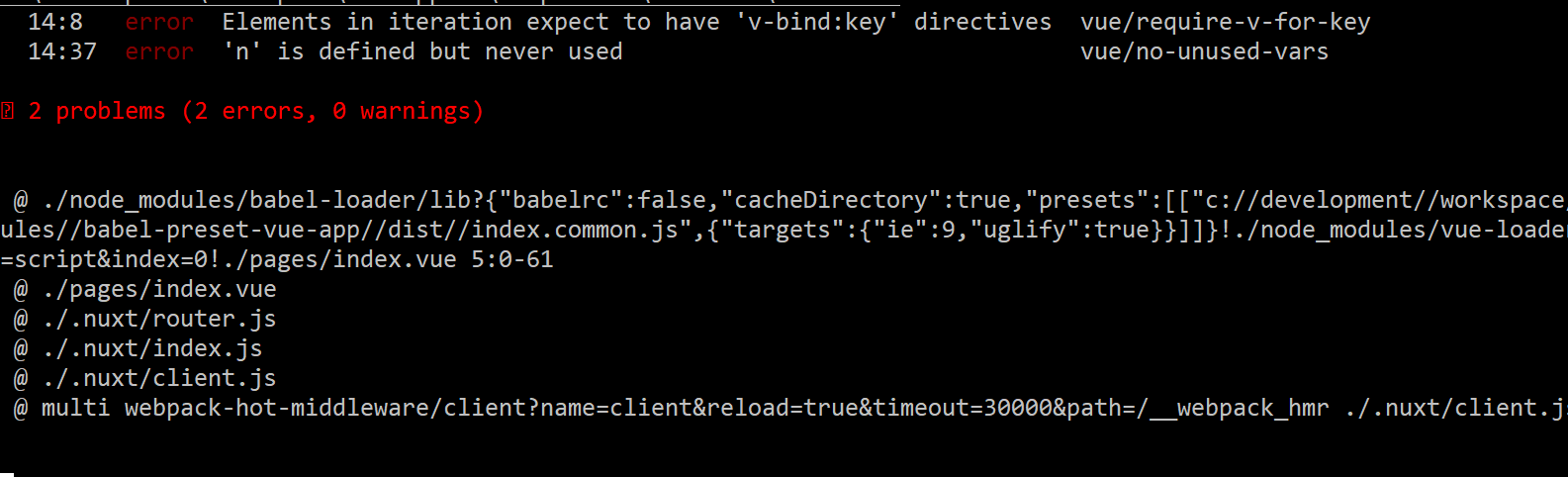
Note Its only worked if use like this - v-for="(item, index) in 10" :key="index"
sudhir600
on 8 May 2018
Change the specific line
"vue/html-self-closing": "off"
to
"vue/require-v-for-keys": "off".
HerringtonDarkholme
on 8 May 2018
"vetur.validation.template": false is work for me
 Binaryify
on 8 May 2018
Binaryify
on 8 May 2018
@HerringtonDarkholme @Binaryify
both soltion is not working.
I have created a repo.
may you please solve in that repo?
sudhir600
on 8 May 2018
Set ESLint rules in .eslintrc.
https://vuejs.github.io/vetur/linting-error.html#linting-for-template
Not in package.json. https://github.com/sudhir600/nuxt-v-for-key-false/blob/master/package.json#L25-L32
Please use our forum, chat room or StackOverflow to ask usage question since issue tracker is exclusively for bug reports and feature requests. Thanks.
HerringtonDarkholme
on 8 May 2018
@sudhir600 I set that on vscode settings.json file

Binaryify
on 8 May 2018
@Binaryify, where i will find settings.json file. i didn't see my directory. And if i have to create new file then where i have to mention (like in nuxt.config or middleware) ?
sudhir600
on 8 May 2018
Please use our forum, chat room or StackOverflow to ask usage question since issue tracker is exclusively for bug reports and feature requests. Thanks.
GitHub issue will notify all people in this thread so please use forum/stackoverflow for questions. Thanks.
HerringtonDarkholme
on 8 May 2018
ok @HerringtonDarkholme
thanks
sudhir600
on 8 May 2018
I found that the only solution that worked for me here was to set:
"vue/require-v-for-key": "off"
In my .eslintrc.js - note "key" vs "keys".
 iwootten
on 17 May 2018
iwootten
on 17 May 2018
For me this worked. just add the :key="item.id" to your loop
<div v-for="item in items" :key="item.id">
  <!-- content -->
</div>
 Hujjat
on 19 May 2018
Hujjat
on 19 May 2018
Maybe work!
<template>
  <ul>
      <li v-for="(item, index) in itemArray" :key="index"> {{ item }} </li>
  </ul>
</template>
 tvviem
on 20 Jun 2018
tvviem
on 20 Jun 2018
Just setup :key="xxx" (eg: v-for="(item, index) in itemArray" :key="index"), its working for vue 2.5.11 !!!
 DamengRandom
on 21 Jun 2018
DamengRandom
on 21 Jun 2018
It is recommended to provide a key with v-for whenever possible, unless the iterated DOM content is simple, or you are intentionally relying on the default behavior for performance gains.
That the above statement exists in the docs clearly implies this is a bug and NOT a valid error. At best this can be a warning, the fact that this is an error means it's a bug that needs to be fixed.
 samarth-math
on 15 Jul 2018
samarth-math
on 15 Jul 2018
I just want clarify again that this is _not_ a bug in Vetur. They're just applying the essentials category of the official eslint-plugin-vue by default. We've chosen to include a rule called require-v-for-key in that category, which warns about all instances of missing keys, because there's a sizable list of scenarios where a missing key _can_ cause an error and it's easier to quickly add a key every time you use v-for than try to remember when it might be necessary.
We're considering updating this rule to warn specifically about those scenarios and provide more specific warnings about why a key is necessary in those cases. In the meantime though, trust me that the rule in its current form helps people avoid _many_ difficult-to-debug problems in exchange for a relatively minor inconvenience.
chrisvfritz
on 15 Jul 2018
<li v-for="item in items" :key="item.xxx">
xxx是对象数组中的属性
 xiaomizhou66
on 30 Jul 2018
xiaomizhou66
on 30 Jul 2018
@chrisvfritz Awesome, will track it.
octref
on 1 Aug 2018
i dont understand why this is REQUIRED when the docs say its recommended, even more
<div :id="'tag-' + index" v-for="tag in tags" :key="index">
results in an id of "tag-undefined" while
<div :id="'tag-' + index" v-for="(tag, index) in tags">
results in "tag-0" etc but with error in the IDE, and adding both
<div :id="'tag-' + index" v-for="(tag, index) in tags" :key="index">
feels stupid and not necesary since its defining the key twice (?)
(and no, you cant add :key to a template tag, so thats not a solution)
 SaphiLC
on 7 Sep 2018
SaphiLC
on 7 Sep 2018
@SaphiLC You're not _defining_ the key twice, you're choosing to use it twice. Why not skip the ID altogether? 99% of the time, unless you are dealing with <label> for inputs, there is a better solution than using ids.
nickforddesign
on 7 Sep 2018
please view more at:
https://github.com/vuejs/eslint-plugin-vue/blob/master/docs/rules/require-v-for-key.md
tvviem
on 8 Sep 2018
please check official doc (v-for) part, solution was add :key="item.id".
DamengRandom
on 6 Oct 2018
The error:: [vue/require-v-for-key] Elements in iteration expect to have 'v-bind:key' directives
This error appears when the editor wants you to provide the 'v-bind:key'.
As, this error doesnot effect the execution of the code, you can easily run the code.But if you want to resolve this error, then use the 'key' for v-for.
Example::::
<li v-for="details in retrieve_Allusers" :key="details"></li>
The above code contains a key for 'v-for' directive. If you want to resolve the error, providing the key in v-for will be the best solution.
 Anzimanpkp
on 12 Oct 2018
Anzimanpkp
on 12 Oct 2018
@Anzimanpkp's solution worked like a magic for me.
Just add :key="somekey" to you code.
<li v-for='hero in heros' v-on:click='hero.show = !hero.show' :key="hero">
Thanks @Anzimanpkp
 lytecode
on 15 Oct 2018
lytecode
on 15 Oct 2018
Code like this: <div v-for="x in list" :key="x.id"></div>
https://github.com/mysticatea/eslint-plugin-vue-trial/blob/master/docs/rules/require-v-for-key.md
 tvquangdn
on 24 Oct 2018
tvquangdn
on 24 Oct 2018
You should add :key="x.id" or :key="other". "It is recommended to provide a key with v-for whenever possible, unless the iterated DOM content is simple, or you are intentionally relying on the default behavior for performance gains." form Vue documents.
 bincute
on 17 Jan 2019
bincute
on 17 Jan 2019
this work for me
<div :class="sliderClass()" v-for="(slide,index) in slides" :key="index">
<div :class="sliderClass()" v-for="slide in slides" :key="slide.SliderID">
 omid265
on 5 Mar 2019
omid265
on 5 Mar 2019
<li v-for="categoria in arrayCategoria" :key="categoria.id"> ✅
 gvargash
on 7 Apr 2019
gvargash
on 7 Apr 2019
Just add the :key ...
If that wasn't obvious...
The following is not an uncommon usage of v-for. How would the vue/require-v-for-key check be satisfied?
<table>
  <template v-for="row in rows">
    <tr><td>{{row.text}}</td></tr>
  </template>
</table>
 tvkit
on 11 Apr 2019
tvkit
on 11 Apr 2019
The following is not an uncommon usage of v-for. How would the vue/require-v-for-key check be satisfied?
@tvkit It's an easy modification of your code. Assuming that rows is an array, you can add this.
<table>
  <template v-for="(row, index) in rows" :key="index">
    <tr><td>{{row.text}}</td></tr>
  </template>
</table>
See my comment above about why this is really a problem with the vue.js documentation and NOT a problem with the vetur implementation of this rule.
grugknuckle
on 11 Apr 2019
I'm getting the error message when I don't need a key.
      <ul class="dropdown">
        <template v-for="(item, index) in items">
          <li v-bind:key="item.value">
            <a href>{{ item.text }}</a>
          </li>
          <template v-if="items[index + 1]">
            <li class="divider" v-if="item.group !== items[index + 1].group">a</li><!-- error -->
          </template>
        </template>
      </ul>
 incompletude
on 9 May 2019
incompletude
on 9 May 2019
@grugknuckle your code gives the error - <template> cannot be keyed. Place the key on real elements instead.
 paulcdejean
on 16 May 2019
paulcdejean
on 16 May 2019
I think this lint should be disabled. It clearly doesn't work properly.
:keyis NOT required in general. It is only required if your elements have state, so that Vue can keep track of them. If they are stateless (e.g. a simple<li>,<a>or<p>) then it is NOT required.- You can work around it by using the index as a key:
v-for="(el, idx) in items" :key="idx". This is equivalent to not including a key at all and shouldn't be necessary.
This lint can be disabled until it can reliably detect that the elements contain state.
 Timmmm
on 20 Dec 2019
Timmmm
on 20 Dec 2019
I found this rule to not be helpful with the project I am working in and have disabled it. I am using VS Code and set up the ESLint extension. https://eslint.org/docs/user-guide/getting-started
In settings.json I disabled vetur's validation for templates with "vetur.validation.template": false"
And then in my rules for es lint (.eslintrc.js for me) I set "vue/require-v-for-key": "off"
I think this is less disruptive than changing each v-for when we are only iterating through data that will be static for the purpose of displaying. I haven't managed to get it to work with ignoring line below or entire file as they would be more preferable for some.
 sam-spain
on 9 Jan 2020
sam-spain
on 9 Jan 2020
Keys are used as hashes to optimise DOM rendering. If incorrectly used they will _slow performance and use more memory_ over automatically generated keys. People who don't understand what makes a good key will be generating poorer performance UIs than auto generated keys. That's why keys should be optional. Apart from the fact it's very annoying getting these errors and existing code shows errors.
 jdspugh
on 24 Jan 2020
jdspugh
on 24 Jan 2020
I've also tried adding this to my .eslintrc.js file's rules section, but it seems to be ignored by Vetur:
"vue/require-v-for-key": "off",
As mentioned previously, we need to bind the key prop to a value. For example:
<div v-for="(item, index) in items">
  <!-- do stuff -->
 </div>
But is there a way to disable this rule ? There are multiple situations where it should be put off, for example when we work with slots.
 begueradj
on 27 Feb 2020
begueradj
on 27 Feb 2020
~Is there some other extension which doesn't make these squiggly lines?~
AHA! I figured out my personal issue - I never used parentheses ever! Now that I put parentheses in, the squiggly lines go away!
Thank you dear Vetur developers for your hard work. If someone else is frustrated with this, I will tell them my solution!
 Silly-V
on 3 Mar 2020
Silly-V
on 3 Mar 2020
Just adding my simple solution down to this just in case runs into it later on.
To the initial question <li class="item-right" v-for="n in 19">{{ n }}</li>
After Vue 2.2 this does not work in the latest Vue and throws an error. It needs have a v-bind:key directive
The fix is as simple as adding a key like this: <li class="item-right" v-for="n in 19" :key="n">{{ n }}</li>
 bmaca
on 5 Apr 2020
bmaca
on 5 Apr 2020
You should be using older version of VueJS but in latest versions key binding is mandatory to improve the performance of rendering the v-for elements. So please update your VueJS and check this.
To add v-bind:key you have to do something like this.
Hope this answers your question.
 poonamrani
on 7 May 2020
poonamrani
on 7 May 2020
in latest versions key binding is mandatory
No. See https://vuejs.org/v2/api/#v-for
 exse2
on 13 Jul 2020
exse2
on 13 Jul 2020
+1 - Key does not seem to be mandatory, so why is an error forced here?
 calumk
on 26 Jan 2021
calumk
on 26 Jan 2021
Reason: https://github.com/vuejs/vetur/issues/261#issuecomment-319755178
If you don't need this rule, you can disable vetur.validation.template: false and use ESLint for validate template.
I will lock this issue.
Please open a new issue when you have problem.
 yoyo930021
on 26 Jan 2021
yoyo930021
on 26 Jan 2021
Related issues
 tczhangzhi
·
3Comments
tczhangzhi
·
3Comments
 pdanpdan
·
3Comments
octref
·
3Comments
octref
·
3Comments
pdanpdan
·
3Comments
octref
·
3Comments
octref
·
3Comments
 deangoku
·
3Comments
deangoku
·
3Comments
Most helpful comment
If your component or element has no keys, you can do this: