Vetur: Enable the use of the new emmet feature in vscode 1.13
With the new emmet configured I lose the feature completley in template sections in .vue files. It would be super awesome to get this back!
Link to the new feature in the update post:
https://code.visualstudio.com/updates/v1_13#_emmet-abbreviation-expansion-in-suggestion-list
 MWallin
All 54 comments
I'm interested in doing that too.
@ramya-rao-a Wondering if I need to extract extensions/emmet (hope not, I don't want to keep manually updating it), or will new emmet continue to support syntaxProfiles.
I do have vue file regions marked correctly with their embedded lang.
Previously this worked fine:
"emmet.syntaxProfiles": {
"vue": "html",
"vue-html": "html"
}
 octref
on 19 Jun 2017
octref
on 19 Jun 2017
@ramya-rao-a NVM didn't see it on the May iteration issue, but saw on Microsoft/vscode#27697.
To all others: syntax profile seem to be on the agenda for VSCode June release.
octref
on 19 Jun 2017
Yes, actually supporting syntaxProfiles was the next thing in my list of to-dos for emmet. You will see this in the next few days in the Insiders.
 ramya-rao-a
on 20 Jun 2017
ramya-rao-a
on 20 Jun 2017
If you get it before 22nd I can demo its awesomeness at VueConf 😉
octref
on 20 Jun 2017
haha, sure I'll try
ramya-rao-a
on 20 Jun 2017
@octref I just pushed in the changes required to support this. It didn't make it to Tuesday's Insiders build though. Can you test from master and see if it works as expected for you?
I need a second pair of eyes for testing :)
ramya-rao-a
on 20 Jun 2017
👍 👍 👍

octref
on 20 Jun 2017
Closing since this will be available in VSCode's June release.
octref
on 20 Jun 2017
@ramya-rao-a
I'll just report issues here instead of opening new ones at VSCode.


octref
on 20 Jun 2017
Logged https://github.com/Microsoft/vscode/issues/29114
Cant guarantee this one by the 22nd :)
ramya-rao-a
on 20 Jun 2017
Reopen to keep track of integrating https://www.npmjs.com/package/vscode-emmet-helper
octref
on 26 Jun 2017
@ramya-rao-a
Took a look but the helper presumes access to vscode which Vetur can't include in its LS.
To make it usable by other LS, it should take types from vscode-languageserver-types.
octref
on 13 Jul 2017
@octref Good point.
I am out for the week at a conference, won't have time to make the change.
If you don't mind, can you send a PR to the helper?
ramya-rao-a
on 14 Jul 2017
@octref I have updated the helper.
Language servers can now call doComplete(document, position, syntax, emmetConfig);
where emmetConfig is an object following the interface. I'll add types soon
export interface EmmetConfiguration {
useNewEmmet: string;
showExpandedAbbreviation: string;
showAbbreviationSuggestions: boolean;
syntaxProfiles: object;
variables: object;
}
Can you give it a try?
ramya-rao-a
on 18 Jul 2017
Thanks a lot. Just landed in China from Warsaw -- I'll give it a try soon.
octref
on 19 Jul 2017
@octref On second thoughts, it would be much better if we include this completion provider in html and css language service. That way vue and other languages that already have html/css completions using the built-in html/css extensions get it for free.
Let me know if you want to collaborate on that
ramya-rao-a
on 27 Jul 2017
I'd want to collaborate on that. But OTOH our plan is to rewrite / extend on the html LS for supporting Vue's js-in-template like <div v-if="this.foo > 5">, instead of keep depending on html LS.
Believe that's the same case for ember / angular templates, so I don't know if it's worth it.
It's just China internet gives me a hard time + I'm busy traveling...I'll give it a shot tonight.
octref
on 27 Jul 2017
I found this works.
  "emmet.includeLanguages": {
    "vue": "html",
    "vue-html": "html"
  }
Strangely, style tag in vue file doesn't have emmet completion as that in html file.
@ramya-rao-a Would you like kindly tell us something about embedded language support in emmet2?
 HerringtonDarkholme
on 14 Aug 2017
HerringtonDarkholme
on 14 Aug 2017
@HerringtonDarkholme It works, this setting fixed my problem, thanks!
 lkangd
on 14 Aug 2017
lkangd
on 14 Aug 2017
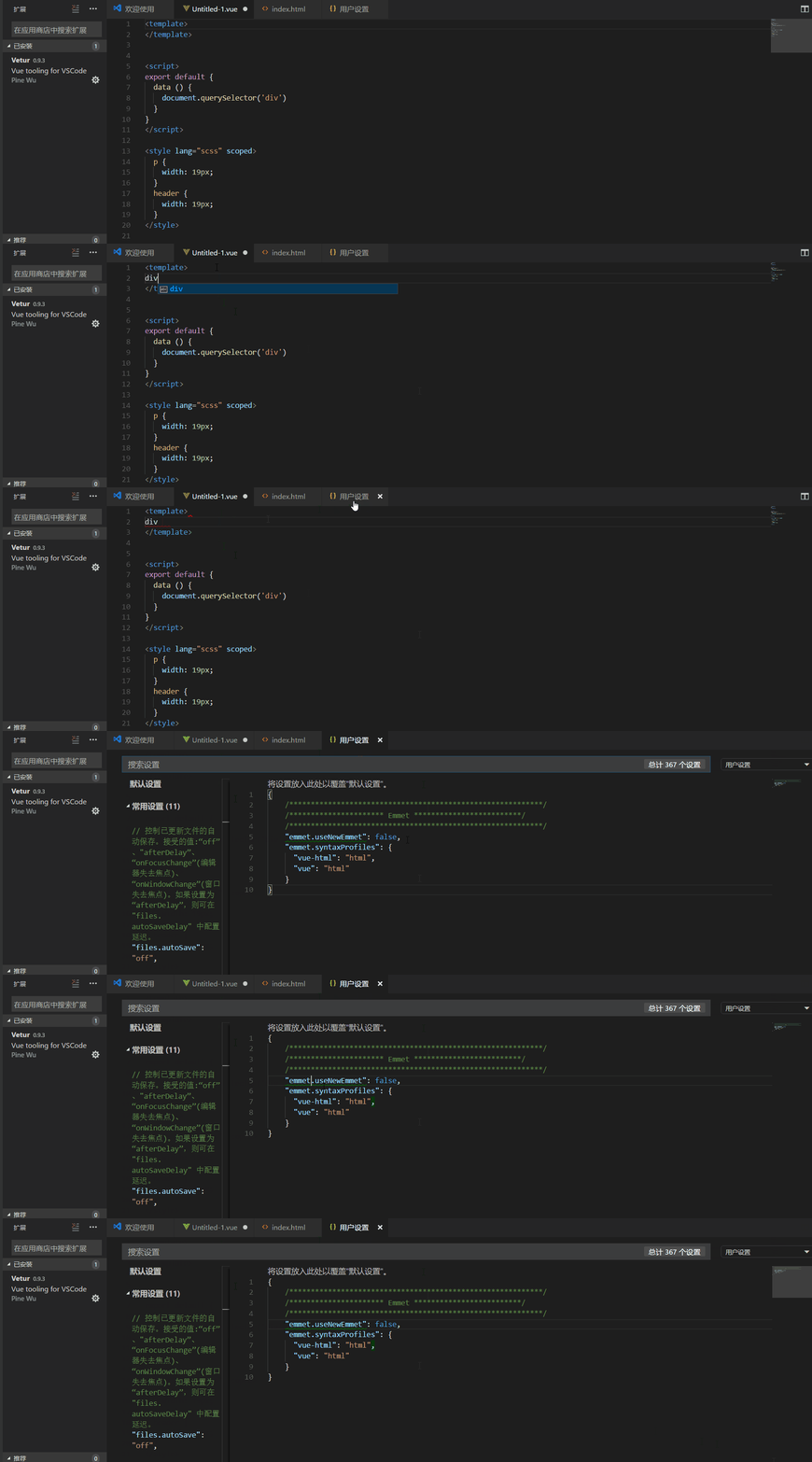
since i install the vscode of 1.15, vetur does not work any more. Before the detected language is vue component, now it's vue, but does not work
 zhuqingguang
on 14 Aug 2017
zhuqingguang
on 14 Aug 2017
@zhuqingguang you can see the solution above the comments. just use the follow code in setting
  "emmet.includeLanguages": {
    "vue": "html",
    "vue-html": "html"
  }
instead of use emmet.syntaxProfiles. And you can see my comments in details.
 chulinyin
on 14 Aug 2017
chulinyin
on 14 Aug 2017
In this case the documentation might need to be updated, in order to reflect the support for new Emmet, since most users will be referencing the current (outdated) documentation on https://vuejs.github.io/vetur/emmet.html when they install the vetur extension in vscode.
(I realise that the current documentation is referencing this issue, but the configuration information above was not available at the time when I opened issue #383.)
 wernerm
on 14 Aug 2017
wernerm
on 14 Aug 2017
I get confused with settings below:
"emmet.includeLanguages": {
    "vue": "html",
    "vue-html": "html"
  }
I found that if i add "vue": "html" to the setting, emmet also works in script tag(*.vue). If i remove it, emmet doesn't work in both template tag and script tag. Does it work conrectly?
 doommm
on 14 Aug 2017
doommm
on 14 Aug 2017
@doommm No, it is current limitation of emmet. Emmet does not recognize embedded languages like style and script. At least for now, embedded language support needs vetur's implementation.
HerringtonDarkholme
on 14 Aug 2017
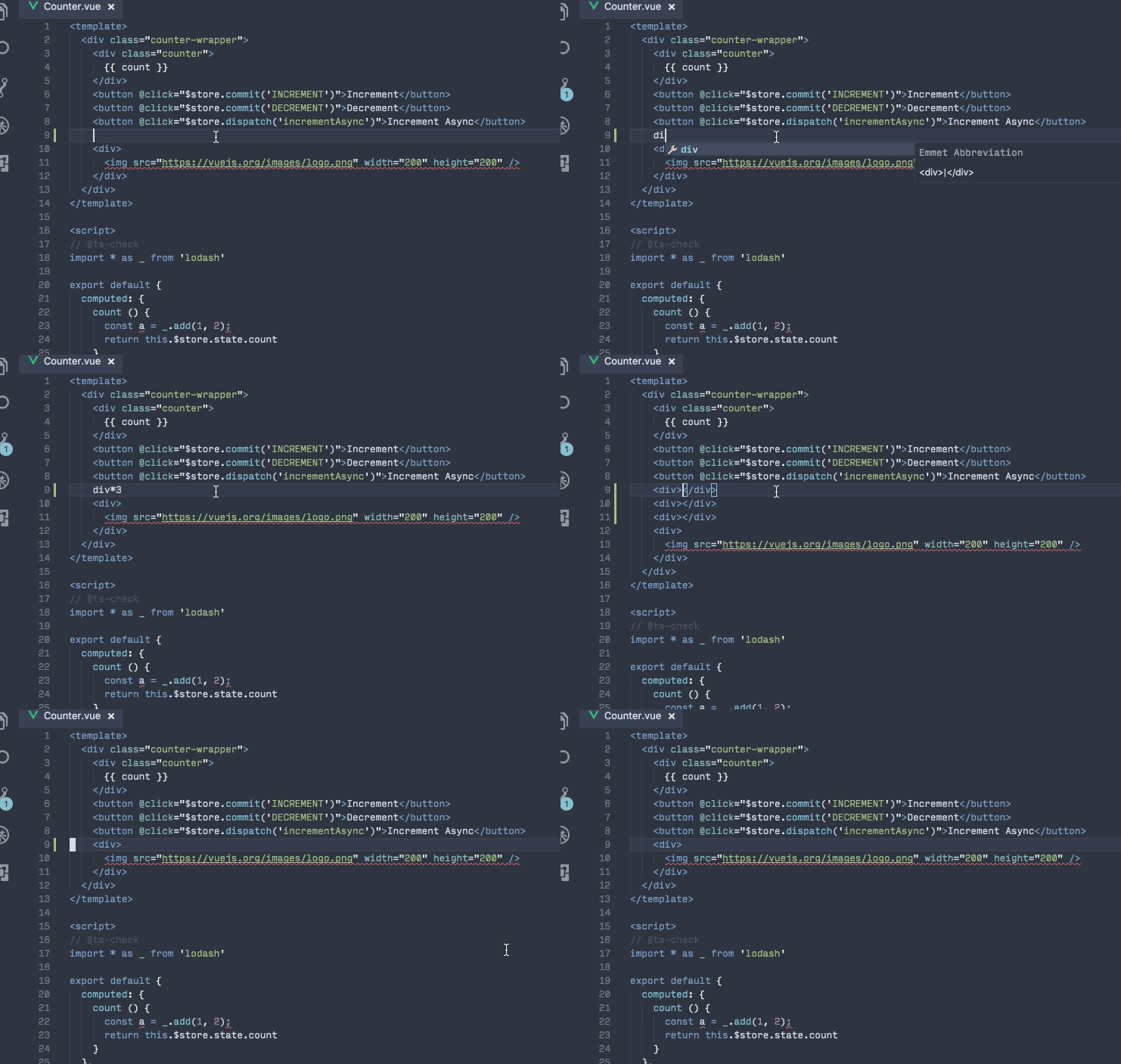
@ramya-rao-a Is this https://github.com/Microsoft/vscode/issues/29758 solvable by passing in any parameters to vscode-emmet-helper? I have the emmet almost ready but after typing out the div* in div*3, completion list disappears.
I can manually trigger completion using Ctrl+Space, though.
octref
on 14 Aug 2017
Thx for Ctrl+Space. That helps me through this rough time.
 heygambo
on 15 Aug 2017
heygambo
on 15 Aug 2017
@octref Do you have wordPattern defined for vue?
I saw something similar for twig and after defining the wordPattern, the suggestions worked as expected. See https://github.com/Microsoft/vscode/issues/32438
ramya-rao-a
on 15 Aug 2017
Hi @ramya-rao-a. We do have wordPattern defined for Vue. https://github.com/vuejs/vetur/blob/master/client/src/htmlMain.ts#L42
But we cannot rely on it because word patterns are different across script/style/template parts in Vue. Defining one pattern to suit all parts is almost impossible.
A better approach is using wordPattern based on syntax highlight group, that is, if users typing in style tags, we take the wordPattern of CSS, not Vue. Similarly script/template can have the same behavior.
I don't know if vscode can do this, though.
HerringtonDarkholme
on 16 Aug 2017
Thanks @HerringtonDarkholme
@octref I think what is missing in your case is the trigger characters. These are the trigger chars I use for html: https://github.com/Microsoft/vscode/blob/master/extensions/emmet/src/util.ts#L14
Since * is generally not considered part of a word, quick suggestions stop as soon as you type *
Including it in the trigger chars while declaring your completion provider will ensure that your completion provider is triggered when * is typed
ramya-rao-a
on 16 Aug 2017
Found it.
https://github.com/vuejs/vetur/blob/master/server/src/vueServerMain.ts#L54
@ramya-rao-a
But I'm wondering what are the ! and } for in your list of trigger chars for html.
octref
on 16 Aug 2017
@octref I found that I needed ! for the few emmet snippets that start with ! like ! and !!!.
} is needed for cases like span{This is text inside the span}
ramya-rao-a
on 16 Aug 2017
@ramya-rao-a
If I change this line https://github.com/Microsoft/vscode/blob/master/extensions/emmet/src/defaultCompletionProvider.ts#L22
to
if (syntax === 'html'), then emmet in Vue's style part correctly provides style completion.
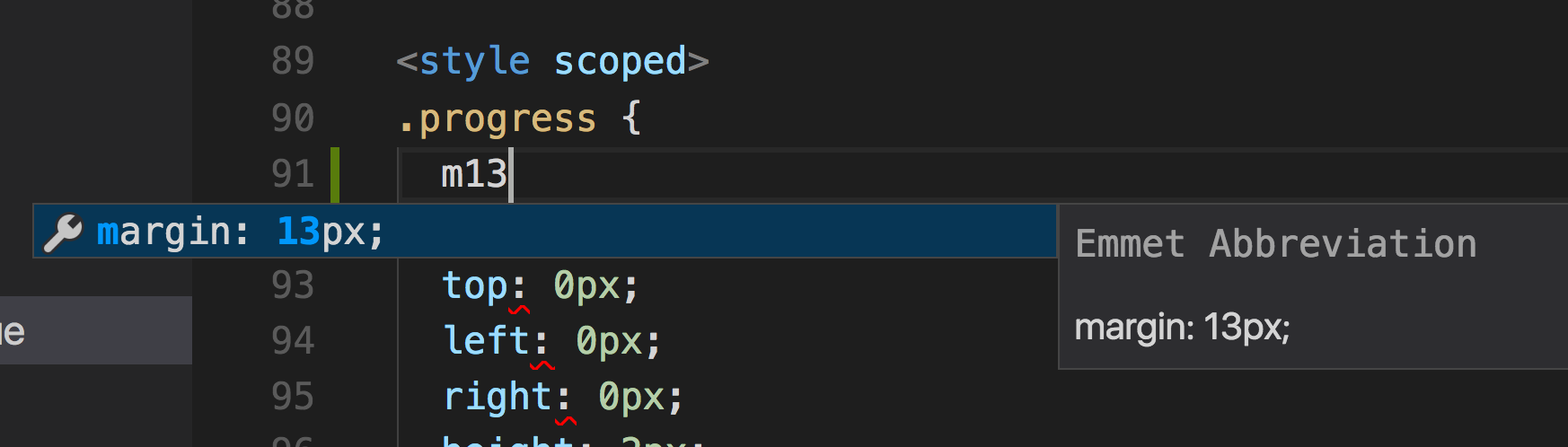
The reason here is if one filetype's syntax is html compatible, it can also include sub part like script / style. So we can apply same logic to the filetype as html's to dynamically set completion candidate.
HerringtonDarkholme
on 16 Aug 2017
@HerringtonDarkholme That if is to check if the file can be parsed using the Emmet parser.
syntax can be html for a javascript file too, in which case parsing can fail.
But since I have a check for failed parsing later on inside syntaxHelper we should be good
Feel free to send a PR with your suggested change.
But also remember to return the syntax as is when parsing fails at https://github.com/Microsoft/vscode/blob/master/extensions/emmet/src/defaultCompletionProvider.ts#L66
ramya-rao-a
on 16 Aug 2017
@octref What happens when users have mapped vue-html to html and are getting emmet suggestions out of the box?
ramya-rao-a
on 17 Aug 2017
That works partially. vue-html is only for the template region, so they wouldn't have it for css/less/scss/stylus emmet, which I already added and will release soon.
octref
on 17 Aug 2017
I get that, I am wondering if they will get double suggestions in the vue-html region
ramya-rao-a
on 17 Aug 2017
Just tested https://github.com/Microsoft/vscode/issues/22585#issuecomment-318791783, for includeLanguages,
vue-htmltohtml: no effect at all. dunno why he added thisvuetohtml: works fine in template. With my new change, having this setting will have double suggestions intemplatebut not in other regions
octref
on 17 Aug 2017
With a fresh install of everything from yesterday, the following seems to be working without double suggestions:
    "emmet.includeLanguages": {
        "vue": "html"
    }
The caveat being that emmet suggestions also show up in <script> and <style> sections, which can be annoying when using <style lang="stylus"> as hitting enter after typing a selector expands the emmet suggestion.
 yyx990803
on 18 Aug 2017
yyx990803
on 18 Aug 2017
@yyx990803 Got u sir.
0.9.4 should work with html/css/scss/less/stylus, without includeLanguages.
(With your current setting there will be duplicate emmet suggestions in <template>.)

octref
on 18 Aug 2017
Just tested and it works perfectly now (without any emmet settings)! :100:
yyx990803
on 18 Aug 2017
It now works for me too in Vue template, however I can only seem to complete valid HTML5 elements - custom element names do not get completed, eg: <my-element> does not get completed, but <div> does.
wernerm
on 18 Aug 2017
@wernerm That is intentional. Emmet has no way of differentiation custom element names from text that are not meant to be abbreviations. We needed to avoid suggesting every word ever typed as a tag.
So we maintain a white list for commonly used HTML5 elements (So div, span etc will trigger emmet suggestions)
Keep in mind my-element.my-class will expand as expected
To expand just the custom element, use Emmet: Expand Abbreviation command directly or via a key binding or set emmet.triggerExpansionOnTab to true to expand on tab
ramya-rao-a
on 18 Aug 2017
@ramya-rao-a Thanks for the information.
Since custom element names are quite common in Vue it would be nice if we could somehow add to the white-list of element names. (One of the main purposes of Emmet is to save keystrokes after all.)
wernerm
on 18 Aug 2017
You can add it to your custom snippets. See Custom Snippets in Emmet on how to have custom snippets in Emmet.
In your case it would look like
{
    "html":
         "snippets": {
                     "my-element": "my-element"
          }
}
Which feels a little silly actually....
Or we could have a new setting emmet.suggestions.additionalHtmlElements where you can provide tags that should be considered in suggestions
ramya-rao-a
on 18 Aug 2017
@ramya-rao-a Thanks. Having a setting available would be a nice way to address the issue.
wernerm
on 18 Aug 2017
It might be ideal for various contexts to customize emmet expansion by language setting to either utilize a whitelist of tag names or enable some kind of tag regex. In the vue context, custom tags almost contain a namespace prefix, so it could be something like match: [/^el-*/, /^b-*/].
 alexsasharegan
on 24 Aug 2017
alexsasharegan
on 24 Aug 2017
@alexsasharegan Can you try the latest Insiders? You can get it from https://code.visualstudio.com/insiders
There I have enabled emmet suggestions for tag completion when the tag contains a single - or : in between text. That should help
ramya-rao-a
on 24 Aug 2017
Whoa... fancy new insiders icon! I like it 😉
So, it's sort of working. Basic tag names are functioning:

Here we have a more verbose component name that is failing to suggest tag completion:

UPDATE
Potentially relevant info... I've been using this settings config:
{
  "emmet.includeLanguages": {
      "mjml": "html",
      "php": "html",
      "vue": "html",
      "vue-html": "html"
    }
}
@alexsasharegan added support for tags with multiple - in them with https://github.com/Microsoft/vscode-emmet-helper/commit/8517fe7d373a2455bf9411434c8afe073b55a22b
Tomorrow's Insiders will have the fix
ramya-rao-a
on 28 Aug 2017
I'll give it a whirl tomorrow. Thank you!
alexsasharegan
on 28 Aug 2017
@alexsasharegan The vetur extension will need to use the latest version(1.0.22) for the emmet helper though.
ramya-rao-a
on 29 Aug 2017
Thank @ramya-rao-a for continuous support!
HerringtonDarkholme
on 29 Aug 2017
@yyx990803 Thanks!!! That solved my TAB problem with those last versions!
 lucaskatayama
on 14 Sep 2017
lucaskatayama
on 14 Sep 2017
the css emmet expansion in *.vue file works perfectly!
But the user CSS snippets for emmet in *.vue file not working ( user HTML snippets works fine!)
Could you please have a look?
i define a css snippet:

it works fine in *.styl file:

but the user snippets now shown in *.vue file:

 onezhaoyn
on 23 Feb 2020
onezhaoyn
on 23 Feb 2020
Related issues
 yoyoys
·
3Comments
yoyoys
·
3Comments
 sacki5
·
3Comments
sacki5
·
3Comments
 deangoku
·
3Comments
octref
·
3Comments
deangoku
·
3Comments
octref
·
3Comments
 OsterHuang
·
3Comments
OsterHuang
·
3Comments
Most helpful comment
I found this works.
Strangely, style tag in vue file doesn't have emmet completion as that in html file.
@ramya-rao-a Would you like kindly tell us something about embedded language support in emmet2?