Vetur: [0.6.10] Vue Language Server failed to start.

Open a vue project. It can not start vue language server.
 Moerj
Moerj
All 20 comments
Now I can't to work. Can you give me a 0.6.9 version ?
Moerj
on 22 May 2017
 ppasieka
on 22 May 2017
ppasieka
on 22 May 2017
Thanks @ppasieka
Moerj
on 22 May 2017

Unfortunately. 0.6.9 has the same problem 😔
Moerj
on 22 May 2017
Do you have a repro case that you could share with me?
It seems TS gets a lot of such reports: https://github.com/Microsoft/TypeScript/search?q=rangeerror+maximum&type=Issues&utf8=%E2%9C%93
So it's probably a TS error in resolving your project's dependency.
 octref
on 29 May 2017
octref
on 29 May 2017
https://github.com/Moerj/GOPIGGY
When I have Chinese Files Name. This problem will be come. I'm not sure
Moerj
on 30 May 2017
It's not crashing for me...
Are you using cnpm for this one too?
octref
on 4 Jun 2017

@octref Yes. But I try to remove cnpm node_modules. And use npm install again. The problem is still
Moerj
on 4 Jun 2017
@octref Are you find the way to fix the bug? The current version it often crashes. ☹️
Moerj
on 11 Jun 2017
I can't repro the bug with https://github.com/Moerj/GOPIGGY no matter how I try, so there isn't anything I can do yet.
Meanwhile, give it a try building the project and run it in debug mode (F5 with target all), and tick all exceptions
 to see the stack trace of the error.
octref
on 12 Jun 2017
这个问题解决了吗?
 pawoma
on 10 Jul 2017
Moerj
on 10 Jul 2017
pawoma
on 10 Jul 2017
Moerj
on 10 Jul 2017
321 哥们帮忙看下这个问题 怎么解决的,我英文不好
pawoma
on 10 Jul 2017
@BruceLpc
里面并没有解决, 我尝试修改的jsconfig也只是让它不报错了,但是相应的所有this.提示都没有了
Moerj
on 10 Jul 2017
I will just add my issue here rather than opening another one.
Error: ENOENT: no such file or directory, lstat 'f:\collective-front\node_modules\vue-slider-component\src\vue2-slider.vue.ts'
    at fs.lstatSync (fs.js:902:18)
    at Object.fs.lstatSync (ELECTRON_ASAR.js:244:16)
    at Object.realpathSync (fs.js:1542:21)
    at Object.fs.realpathSync (ELECTRON_ASAR.js:321:29)
    at Object.realpath (C:\Users\devli\.vscode\extensions\octref.vetur-0.9.0\client\node_modules\vue-language-server\node_modules\typescript\lib\typescript.js:3989:32)
    at realpath (C:\Users\devli\.vscode\extensions\octref.vetur-0.9.0\client\node_modules\vue-language-server\node_modules\typescript\lib\typescript.js:26373:42)
    at tryResolve (C:\Users\devli\.vscode\extensions\octref.vetur-0.9.0\client\node_modules\vue-language-server\node_modules\typescript\lib\typescript.js:26360:87)
    at nodeModuleNameResolverWorker (C:\Users\devli\.vscode\extensions\octref.vetur-0.9.0\client\node_modules\vue-language-server\node_modules\typescript\lib\typescript.js:26342:68)
    at nodeModuleNameResolver (C:\Users\devli\.vscode\extensions\octref.vetur-0.9.0\client\node_modules\vue-language-server\node_modules\typescript\lib\typescript.js:26321:16)
    at Object.resolveModuleName (C:\Users\devli\.vscode\extensions\octref.vetur-0.9.0\client\node_modules\vue-language-server\node_modules\typescript\lib\typescript.js:26110:30)
[Error - 12:38:26 AM] Connection to server got closed. Server will not be restarted.
And in my jsconfig.json
{
    "include": [
        "*.vue"
    ],
    "exclude": [
        "node_modules"
    ]
}
 iamdevlinph
on 10 Jul 2017
iamdevlinph
on 10 Jul 2017
I don't know if it's the plugin looking for this file. But we're just using vanilla JS in our project.
iamdevlinph
on 11 Jul 2017
Just checked the code of the plugin there doesn't seem to be any call to a .ts file
iamdevlinph
on 11 Jul 2017
Same problem. I have checked all paths and find nothing in Chinese. This issue occurred since I updated Vetur to 0.9.0, before when it worked great. So I wonder if the problem is caused by the new version.
Problem solved.
Quote:
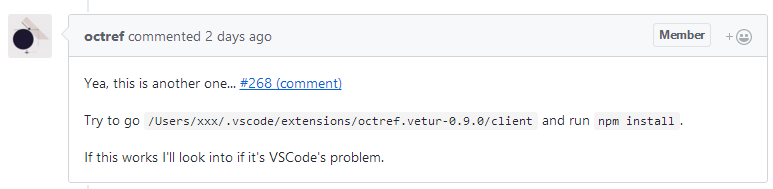
 wangliverpool
on 12 Jul 2017
wangliverpool
on 12 Jul 2017
I tried the npm install. Didn't work on my end.
iamdevlinph
on 12 Jul 2017
@iamdevlinph Your issue is #321, is fixed, and will be published in the next version.
octref
on 12 Jul 2017
Related issues
 gabrielboliveira
·
3Comments
gabrielboliveira
·
3Comments
 AnnAngela
·
3Comments
AnnAngela
·
3Comments
 tczhangzhi
·
3Comments
tczhangzhi
·
3Comments
 KokoDoko
·
3Comments
KokoDoko
·
3Comments
 thibautguedou3
·
3Comments
thibautguedou3
·
3Comments
Most helpful comment
@iamdevlinph Your issue is #321, is fixed, and will be published in the next version.