HI, i just updated to 0.6.6 and now the language server does no more start
node v7.9.0
vscode 1.12.1
Windows 10 64bit
i have no other vue or html plugins installed
what i have is numso.prettier-standard-vscode
0.6.5 worked fine and i dont have a ts / js config
no console errors in devtool
thx for this awesome plugin 💃
here is a screen from my sturcture
https://i.gyazo.com/2aef2ac643f7adcf69c118110d34a84a.png
Root {
 client/src <-- here is the vue stoff
 server <- other stuff
}
 cannap
All 28 comments
Any error log? What do you mean by "now the language server does no more start"?
0.6.5 and 0.6.6 should be almost identical.
 octref
on 7 May 2017
octref
on 7 May 2017
i downgraded to 0.6.5 same not sure its my project stucture when i open a single vue file it works :/
//e when i open the src folder with vscode i dont see server running when i open single vue.js file yes but crashes
cannap
on 7 May 2017
When i open single file the server say
0.6.6
[Error - 03:38:29] Server initialization failed.
  Message: Request initialize failed with message: Cannot read property 'substr' of null
  Code: -32603
this is the file
<style lang="scss" type="text/scss">

</style>

<template>
    <div class="not-found"><h1>404</h1></div>
</template>

<script>
  export default {
    name: 'NotFound',
  }

</script>
Full error
Request initialize failed with message: Cannot read property 'substr' of null: Error: Request initialize failed with message: Cannot read property 'substr' of null
    at new ResponseError (C:\Users\marko\.vscode\extensions\octref.vetur-0.6.6\client\node_modules\vscode-jsonrpc\lib\messages.js:40:28)
    at handleResponse (C:\Users\marko\.vscode\extensions\octref.vetur-0.6.6\client\node_modules\vscode-jsonrpc\lib\main.js:305:48)
    at ChildProcess.callback (C:\Users\marko\.vscode\extensions\octref.vetur-0.6.6\client\node_modules\vscode-jsonrpc\lib\main.js:486:13)
    at emitTwo (events.js:106:13)
    at ChildProcess.emit (events.js:191:7)
    at process.nextTick (internal/child_process.js:752:12)
    at _combinedTickCallback (internal/process/next_tick.js:67:7)
    at process._tickCallback (internal/process/next_tick.js:98:9)
I have a trouble in .vue file. The code format and IntelliSense can't work. But it work in router/index.js.
node v7.9.0
vscode 1.12.1
Windows 10 64bit
 NaccOll
on 7 May 2017
NaccOll
on 7 May 2017
This is probably Windows specific in path handling. @cannap With 0.6.5 I'm guess you are still not seeing any IntelliSense for your Vue project (not single file), right?
octref
on 7 May 2017
@octref yes damn i know it worked some times :D
Found something same error other package
https://github.com/Microsoft/vscode-tslint/issues/194
cannap
on 7 May 2017
@cannap Can you help me identify what's wrong so I can fix it?
- Go to
C:\Users\marko\.vscode\extensions\octref.vetur-0.6.6\client\server\modes\javascriptMode.js - Find line 146, which should look like this:

- Before
return { isIncomplete: false, items: [] };, add these two lines:

which is
            console.log(jsLanguageService.getProgram().getRootFileNames())
            console.log(filename)
Let me know what's the output of vetur when reopening VSCode on your Vue project.
octref
on 7 May 2017
it never reach this
https://gyazo.com/6b9fda37753995da33f50707384f2f81
//i added the test on the top of the file
the "test" on the screen is never output
js
console.log('test')
Object.defineProperty(expo
js
cannap
on 7 May 2017
Interesting...It's not the bug I thought it was.
I do have a Windows machine. Let me test on it later today.
octref
on 7 May 2017
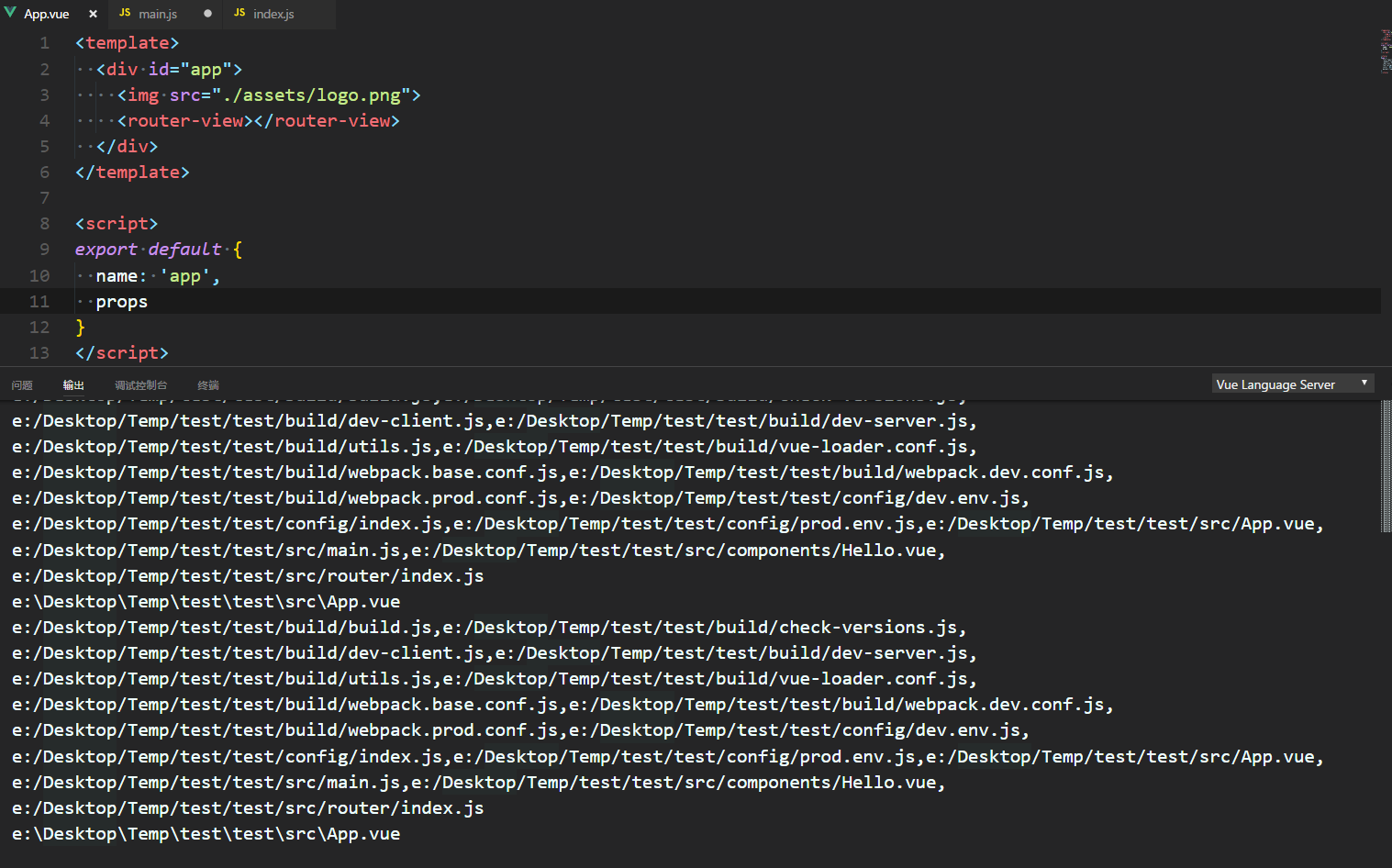
@octref
I add the code based on your information. The screen will be shown as follows:
NaccOll
on 7 May 2017
@NaccOll Yep that's the problem. I didn't handle filename for Windows. Thanks a lot!
octref
on 7 May 2017
@octref Sorry to bother you, but could you please publish a patch as soon as possible? 🙏
 qiansen1386
on 8 May 2017
qiansen1386
on 8 May 2017
This is already fixed and will published in 0.6.7. However MarketPlace's server seems to be down now and I can't publish.
octref
on 8 May 2017
It's published. Let me know if there it doesn't work with Windows.
octref
on 8 May 2017
0.6.7 Couldn't work with Windows.
Please publish a new version. @octref
vetur initialized
C:\Users\zju_wjf.vscode\extensions\octref.vetur-0.6.7\client\server\node_modules\typescript\lib\typescript.js:85887
throw new Error("Could not find file: '" + fileName + "'.");
^
Error: Could not find file: '/d:/wjs-git/app-weex/src/page/account-history-detail.vue'.
at getValidSourceFile (C:\Users\zju_wjf.vscode\extensions\octref.vetur-0.6.7\client\server\node_modules\typescript\lib\typescript.js:85887:23)
at Object.getSyntacticDiagnostics (C:\Users\zju_wjf.vscode\extensions\octref.vetur-0.6.7\client\server\node_modules\typescript\lib\typescript.js:86095:52)
at Object.doValidation (C:\Users\zju_wjf.vscode\extensions\octref.vetur-0.6.7\client\server\modes\javascriptMode.js:137:49)
at C:\Users\zju_wjf.vscode\extensions\octref.vetur-0.6.7\client\server\htmlServerMain.js:107:43
at Array.forEach (native)
at validateTextDocument (C:\Users\zju_wjf.vscode\extensions\octref.vetur-0.6.7\client\server\htmlServerMain.js:105:59)
at Timeout._onTimeout (C:\Users\zju_wjf.vscode\extensions\octref.vetur-0.6.7\client\server\htmlServerMain.js:99:9)
at ontimeout (timers.js:365:14)
at tryOnTimeout (timers.js:237:5)
at Timer.listOnTimeout (timers.js:207:5)
[Info - 下午12:55:35] Connection to server got closed. Server will restart.
vetur initialized
C:\Users\zju_wjf.vscode\extensions\octref.vetur-0.6.7\client\server\node_modules\typescript\lib\typescript.js:85887
throw new Error("Could not find file: '" + fileName + "'.");
^
Error: Could not find file: '/d:/wjs-git/app-weex/src/page/account-history-detail.vue'.
at getValidSourceFile (C:\Users\zju_wjf.vscode\extensions\octref.vetur-0.6.7\client\server\node_modules\typescript\lib\typescript.js:85887:23)
at Object.getSyntacticDiagnostics (C:\Users\zju_wjf.vscode\extensions\octref.vetur-0.6.7\client\server\node_modules\typescript\lib\typescript.js:86095:52)
at Object.doValidation (C:\Users\zju_wjf.vscode\extensions\octref.vetur-0.6.7\client\server\modes\javascriptMode.js:137:49)
at C:\Users\zju_wjf.vscode\extensions\octref.vetur-0.6.7\client\server\htmlServerMain.js:107:43
at Array.forEach (native)
at validateTextDocument (C:\Users\zju_wjf.vscode\extensions\octref.vetur-0.6.7\client\server\htmlServerMain.js:105:59)
at Timeout._onTimeout (C:\Users\zju_wjf.vscode\extensions\octref.vetur-0.6.7\client\server\htmlServerMain.js:99:9)
at ontimeout (timers.js:365:14)
at tryOnTimeout (timers.js:237:5)
at Timer.listOnTimeout (timers.js:207:5)
[Info - 下午12:55:41] Connection to server got closed. Server will restart.
vetur initialized
C:\Users\zju_wjf.vscode\extensions\octref.vetur-0.6.7\client\server\node_modules\typescript\lib\typescript.js:85887
throw new Error("Could not find file: '" + fileName + "'.");
^
Error: Could not find file: '/d:/wjs-git/app-weex/src/page/account-history-detail.vue'.
at getValidSourceFile (C:\Users\zju_wjf.vscode\extensions\octref.vetur-0.6.7\client\server\node_modules\typescript\lib\typescript.js:85887:23)
at Object.getSyntacticDiagnostics (C:\Users\zju_wjf.vscode\extensions\octref.vetur-0.6.7\client\server\node_modules\typescript\lib\typescript.js:86095:52)
at Object.doValidation (C:\Users\zju_wjf.vscode\extensions\octref.vetur-0.6.7\client\server\modes\javascriptMode.js:137:49)
at C:\Users\zju_wjf.vscode\extensions\octref.vetur-0.6.7\client\server\htmlServerMain.js:107:43
at Array.forEach (native)
at validateTextDocument (C:\Users\zju_wjf.vscode\extensions\octref.vetur-0.6.7\client\server\htmlServerMain.js:105:59)
at Timeout._onTimeout (C:\Users\zju_wjf.vscode\extensions\octref.vetur-0.6.7\client\server\htmlServerMain.js:99:9)
at ontimeout (timers.js:365:14)
at tryOnTimeout (timers.js:237:5)
at Timer.listOnTimeout (timers.js:207:5)
[Info - 下午12:55:45] Connection to server got closed. Server will restart.
vetur initialized
C:\Users\zju_wjf.vscode\extensions\octref.vetur-0.6.7\client\server\node_modules\typescript\lib\typescript.js:85887
throw new Error("Could not find file: '" + fileName + "'.");
^
Error: Could not find file: '/d:/wjs-git/app-weex/src/page/account-history-detail.vue'.
at getValidSourceFile (C:\Users\zju_wjf.vscode\extensions\octref.vetur-0.6.7\client\server\node_modules\typescript\lib\typescript.js:85887:23)
at Object.getSyntacticDiagnostics (C:\Users\zju_wjf.vscode\extensions\octref.vetur-0.6.7\client\server\node_modules\typescript\lib\typescript.js:86095:52)
at Object.doValidation (C:\Users\zju_wjf.vscode\extensions\octref.vetur-0.6.7\client\server\modes\javascriptMode.js:137:49)
at C:\Users\zju_wjf.vscode\extensions\octref.vetur-0.6.7\client\server\htmlServerMain.js:107:43
at Array.forEach (native)
at validateTextDocument (C:\Users\zju_wjf.vscode\extensions\octref.vetur-0.6.7\client\server\htmlServerMain.js:105:59)
at Timeout._onTimeout (C:\Users\zju_wjf.vscode\extensions\octref.vetur-0.6.7\client\server\htmlServerMain.js:99:9)
at ontimeout (timers.js:365:14)
at tryOnTimeout (timers.js:237:5)
at Timer.listOnTimeout (timers.js:207:5)
[Info - 下午12:55:49] Connection to server got closed. Server will restart.
vetur initialized
C:\Users\zju_wjf.vscode\extensions\octref.vetur-0.6.7\client\server\node_modules\typescript\lib\typescript.js:85887
throw new Error("Could not find file: '" + fileName + "'.");
^
Error: Could not find file: '/d:/wjs-git/app-weex/src/page/account-history-detail.vue'.
at getValidSourceFile (C:\Users\zju_wjf.vscode\extensions\octref.vetur-0.6.7\client\server\node_modules\typescript\lib\typescript.js:85887:23)
at Object.getSyntacticDiagnostics (C:\Users\zju_wjf.vscode\extensions\octref.vetur-0.6.7\client\server\node_modules\typescript\lib\typescript.js:86095:52)
at Object.doValidation (C:\Users\zju_wjf.vscode\extensions\octref.vetur-0.6.7\client\server\modes\javascriptMode.js:137:49)
at C:\Users\zju_wjf.vscode\extensions\octref.vetur-0.6.7\client\server\htmlServerMain.js:107:43
at Array.forEach (native)
at validateTextDocument (C:\Users\zju_wjf.vscode\extensions\octref.vetur-0.6.7\client\server\htmlServerMain.js:105:59)
at Timeout._onTimeout (C:\Users\zju_wjf.vscode\extensions\octref.vetur-0.6.7\client\server\htmlServerMain.js:99:9)
at ontimeout (timers.js:365:14)
at tryOnTimeout (timers.js:237:5)
at Timer.listOnTimeout (timers.js:207:5)
[Error - 下午12:55:53] Connection to server got closed. Server will not be restarted.
 zjuwjf
on 8 May 2017
zjuwjf
on 8 May 2017
I thought the first character '/' is not needed to describe path for Windows.
Error: Could not find file: '/d:/wjs-git/app-weex/src/page/account-history-detail.vue'.
zjuwjf
on 8 May 2017
I'm getting a server restart error as follows:
vetur initialized
C:\Users\Grant\.vscode\extensions\octref.vetur-0.6.7\client\server\node_modules\typescript\lib\typescript.js:85887
                throw new Error("Could not find file: '" + fileName + "'.");
                ^

Error: Could not find file: '/f:/fm-app/src/App.vue'.
    at getValidSourceFile (C:\Users\Grant\.vscode\extensions\octref.vetur-0.6.7\client\server\node_modules\typescript\lib\typescript.js:85887:23)
    at Object.getSyntacticDiagnostics (C:\Users\Grant\.vscode\extensions\octref.vetur-0.6.7\client\server\node_modules\typescript\lib\typescript.js:86095:52)
    at Object.doValidation (C:\Users\Grant\.vscode\extensions\octref.vetur-0.6.7\client\server\modes\javascriptMode.js:137:49)
    at C:\Users\Grant\.vscode\extensions\octref.vetur-0.6.7\client\server\htmlServerMain.js:107:43
    at Array.forEach (native)
    at validateTextDocument (C:\Users\Grant\.vscode\extensions\octref.vetur-0.6.7\client\server\htmlServerMain.js:105:59)
    at Timeout._onTimeout (C:\Users\Grant\.vscode\extensions\octref.vetur-0.6.7\client\server\htmlServerMain.js:99:9)
    at ontimeout (timers.js:365:14)
    at tryOnTimeout (timers.js:237:5)
    at Timer.listOnTimeout (timers.js:207:5)
[Info  - 3:13:16 pm] Connection to server got closed. Server will restart.
The above error repeats five times in the console then it fails completely.
Note I am mounting a SAMBA share from a headless Debian Linux VM to my local F:\ drive on Windows 10.
It looks like a Windows path issue as people above have stated.
 grantcarthew
on 8 May 2017
grantcarthew
on 8 May 2017
Try 0.6.8.
octref
on 8 May 2017
0.6.8 fixed the path bug for Windows.
But still couldn't format for the script part in vue.
zjuwjf
on 8 May 2017
@zjuwjf For files not included in tsconfig / jsconfig, language features are disabled. But I guess formatting can be provided anyway.
It's fixed in https://github.com/octref/vetur/commit/b695472992ad9dfbd5356cd6235afdced80cfa93 and will be available for the next release.
octref
on 8 May 2017
Vetur works fine anyway, except the formatting for js part in vue.
So I add the jsconfig to my project,
jsconfig.json
{
    "files": ["page/*.we", "page/*.vue", "components/*.we", "components/*.vue"]
}
I got a new error
vetur initialized
C:\Users\zju_wjf.vscode\extensions\octref.vetur-0.6.8\client\server\node_modules\vetur-vls\lib\parser\htmlScanner.js:46
this.len = source.length;
^
TypeError: Cannot read property 'length' of undefined
at new MultiLineStream (C:\Users\zju_wjf.vscode\extensions\octref.vetur-0.6.8\client\server\node_modules\vetur-vls\lib\parser\htmlScanner.js:46:30)
at Object.createScanner (C:\Users\zju_wjf.vscode\extensions\octref.vetur-0.6.8\client\server\node_modules\vetur-vls\lib\parser\htmlScanner.js:188:22)
at Object.getDocumentRegions (C:\Users\zju_wjf.vscode\extensions\octref.vetur-0.6.8\client\server\modes\embeddedSupport.js:9:35)
at C:\Users\zju_wjf.vscode\extensions\octref.vetur-0.6.8\client\server\modes\languageModes.js:11:125
at Object.get (C:\Users\zju_wjf.vscode\extensions\octref.vetur-0.6.8\client\server\languageModelCache.js:30:33)
at C:\Users\zju_wjf.vscode\extensions\octref.vetur-0.6.8\client\server\modes\javascriptMode.js:16:43
at Object.get (C:\Users\zju_wjf.vscode\extensions\octref.vetur-0.6.8\client\server\languageModelCache.js:30:33)
at Object.getScriptKind (C:\Users\zju_wjf.vscode\extensions\octref.vetur-0.6.8\client\server\modes\javascriptMode.js:74:33)
at Object.getScriptKind (C:\Users\zju_wjf.vscode\extensions\octref.vetur-0.6.8\client\server\node_modules\typescript\lib\typescript.js:71209:31)
at HostCache.createEntry (C:\Users\zju_wjf.vscode\extensions\octref.vetur-0.6.8\client\server\node_modules\typescript\lib\typescript.js:85685:36)
[Info - 下午2:20:23] Connection to server got closed. Server will restart.
zjuwjf
on 8 May 2017
*.we files aren't supported if that's what you are trying to do.
octref
on 8 May 2017
I could rename *.we to *.vue, but the formatting still didn't work.
And I got the same error above.
I deleted the jsconfig.json, i got no error, except the formatting didn't work for js part.
zjuwjf
on 8 May 2017
@zjuwjf I tested it on my machine. Once I added a proper jsconfig.json file, the formatting works fine again. The output of Vue Language Server is empty.
qiansen1386
on 8 May 2017
@zjuwjf Can you post a screenshot of your code?
Also, try renaming your project folder & reload the project with VSCode and see if it works. When updating between versions, old language cache stays there.
octref
on 8 May 2017
screenshot :
http://chuantu.biz/t5/81/1494227231x2890171480.png
I restart VSCode many times.
Formatting worked fine with html/css parts except js part.
I runned my project on Windows machine, and my teammates have the same issue.
zjuwjf
on 8 May 2017
I deleted my jsconfig.json & renamed my project & reload my project, It worked!
Thank you very much @octref @qiansen1386
zjuwjf
on 8 May 2017
0.6.8 fixed it for me thanks. It wasn't available yesterday.
grantcarthew
on 9 May 2017
Related issues
 LukeLin
·
3Comments
LukeLin
·
3Comments
 pdanpdan
·
3Comments
pdanpdan
·
3Comments
 gabrielboliveira
·
3Comments
octref
·
3Comments
octref
·
3Comments
gabrielboliveira
·
3Comments
octref
·
3Comments
octref
·
3Comments
Most helpful comment
Interesting...It's not the bug I thought it was.
I do have a Windows machine. Let me test on it later today.