Vesta: Cron crash when writte "\" in command box.
Operating System (OS/VERSION): Ubuntu 16.04
VestaCP Version: 0.9.8-18
Steps to Reproduce:
In tab "Tasks", when configure cron, if you write in command box "\\" and random time, the ALL tasks from cron remove.
Once this happens, when you try to add a new record to cron, it does not appear.
 Zagur
Zagur
All 13 comments
Can you showme exactly cron you add ?
This character -> \ is not commonin cron commands
 Skamasle
on 17 Jan 2018
Skamasle
on 17 Jan 2018
hi there! :)
2 days ago i was about finding a cron related issue (in my custom variant of vesta), you can check out that the related bash works fine, the index page at the beginning calling it successfully the $output is fine however parsing the json going wrecked so the $data will be empty - at least for me, but im almost sure u have the same illness... mine came as it have been hacked like realescapeshellarg('wget -q '. realescapeshellarg($v_cmd)) that is an uri... cuz once escaped for a passing bash and 2nd time for wget against putting ; && || in the uri for making bad things... i just now talked with my boss, he said its a chroot environment and my task is not to make things bulletproof but foolproof (my whole job is about making a dummy vesta for dummies :D ) its nice clean responsive and dumb like wget for cron with a dropdown for some preset periods and there is only letsncrypt and whatsoever...
btw i hope i could give u a good entrance point and maybe you will even come back with something useful for me, however im about validating uri without the care that it wont left a way to execute any commands....
any ideas about this madness? :D
thx! :)
 hippi777
on 18 Jan 2018
hippi777
on 18 Jan 2018
btw it took some testing for these: ' \' \\\' \\\' " \" \ \\ to put me into trouble :D
hippi777
on 18 Jan 2018
Hi,
@Skamasle I add this command in cron:
find /tmp/ -name "MG_TMP_MIME*" -exec rm {} \;
When added to cron, it appears on the web without the bar:
I have checked the cron file on the server and it appears like this:
less /var/spool/cron/crontabs/admin
23 6 * * * sudo /usr/local/vesta/bin/v-update-sys-vesta-all
53 6 * * * sudo /usr/local/vesta/bin/v-update-letsencrypt-ssl
*/2 * * * * find /tmp/ -name "MG_TMP_MIME*" -exec rm {} ;
But in the cron.conf file of user vesta it appears like this:
cat /usr/local/vesta/data/users/admin/cron.conf
JOB='11' MIN='*/2' HOUR='*' DAY='*' MONTH='*' WDAY='*' CMD='find /tmp/ -name "MG_TMP_MIME*" -exec rm {} \;' SUSPENDED='no' TIME='10:40:24' DATE='2018-01-18'
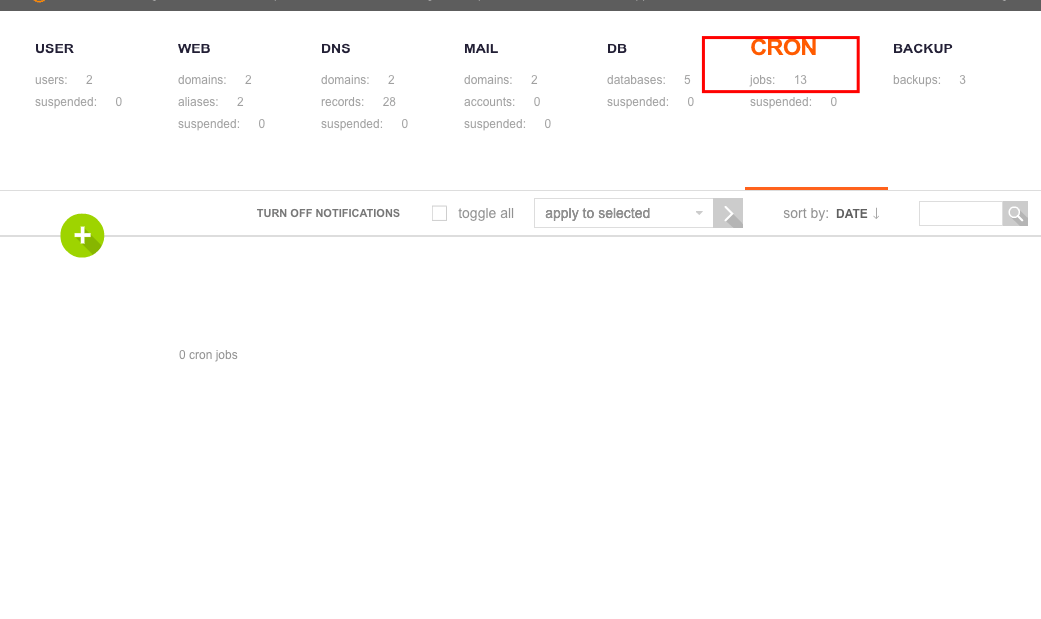
Testing characters randomly, I tried to add in the option of the command "\\", and in the web of vesta all the records disappear:
When I detele last line in /usr/local/vesta/data/users/admin/cron.conf all records appear again.
Zagur
on 18 Jan 2018
@Zagur Pretty logical if you assume that the backslash is being escaped. The double-backslash "\" may cause error in evaluating the expression. Since escaping with backslash is built into php (any pretty much every language), it's difficult to perfectly fix this issue. It's even a problem in this github editor. I put a double slash in there and it only show up one slash. And even if you can fix it, there's still issue with the way cron work with command that may be hard to troubleshoot.
If you work with cron alot, you know that the best thing to do is to create shell script and execute that shell script instead of trying to fit that entire script in there.
 noogen
on 20 Jan 2018
noogen
on 20 Jan 2018
I have experienced the exact same issue. I went to crontab and removed command containing \ character. Yet, my cron tab in vestacp is empty. How can it be fixed?
 fatih-yavuz
on 3 Aug 2018
fatih-yavuz
on 3 Aug 2018
Removing necessary lines in /usr/local/vesta/data/users/admin/cron.conf fixed my issue
fatih-yavuz
on 3 Aug 2018
Will be fixed
 anton-reutov
on 4 Aug 2018
anton-reutov
on 4 Aug 2018
Hi
All who have problems and need add crons with backslash -> \
Can modify /usr/local/vesta/func/main.sh
Find this function:
sync_cron_jobs()
Search for this line
while read line; do
Then change it for this one:
while read -r line; do
And your problem will solved
@Zagur
cat /var/spool/cron/admin
CONTENT_TYPE="text/plain; charset=utf-8"
15 02 * * * sudo /usr/local/vesta/bin/v-update-sys-queue disk
10 00 * * * sudo /usr/local/vesta/bin/v-update-sys-queue traffic
30 03 * * * sudo /usr/local/vesta/bin/v-update-sys-queue webstats
*/5 * * * * sudo /usr/local/vesta/bin/v-update-sys-queue backup
10 05 * * * sudo /usr/local/vesta/bin/v-backup-users
20 00 * * * sudo /usr/local/vesta/bin/v-update-user-stats
*/5 * * * * sudo /usr/local/vesta/bin/v-update-sys-rrd
* * * * * find /tmp/ -name "MG_TMP_MIME*" -exec rm {} \;
This fix crontab functionability so READ THIS
If you add backslash \ now is added to cron and cron will work, but in vesta GUI / INTERFACE you will still see this:
find /tmp/ -name "MG_TMP_MIME*" -exec rm {} ;
Why ?
Because this just fix part when vesta read file before add it to cron, but when vesta list crons in interface use orther function -> $VESTA/bin/v-list-cron-jobs and this need be fixed in diferent way
So whit -r you can add your backslash, not is the best solution maybe but is the easiest for now, because v-list-cron-jobs can befixed in same way or similar way but the problem there is PHP when process json and not parece backslash
Skamasle
on 8 Aug 2018
We encountered a similar parsing issue with the Cron panel. A command which contains % symbols doesn't convert the % to \% in the crontab. Example:
/usr/bin/curl "https://www.example.com/export.csv" -o /tmp/`date +%Y-%m-%d`.csv
In the crontab the line should read:
* * * * * /usr/bin/curl "https://www.example.com/export.csv" -o /tmp/`date +\%Y-\%m-\%d`.csv
When you subsequently want to edit this line, the command is emptied. If you edit the crontab manually, and add the backslashes, the command is shown in Vesta but with the backslashes trimmed. After saving, the backslashes are gone and the cron will not be executed anymore.
 jstsch
on 2 Jan 2019
jstsch
on 2 Jan 2019
In this case I recomend you a bash script for this kind of cron jobs
Skamasle
on 10 Jan 2019
Thank you. That's the workaround we used, but it's still a parsing bug that would be good to have fixed. Or at least throw an error/warning when a % is encountered in the command.
jstsch
on 10 Jan 2019
Yes, is a good idea not accept this characters in vesta gui, is easy way to do it.
Skamasle
on 10 Jan 2019
Related issues
 TKaluza
·
8Comments
TKaluza
·
8Comments
 tlcd96
·
5Comments
tlcd96
·
5Comments
 marii89
·
4Comments
marii89
·
4Comments
 luizjr
·
8Comments
luizjr
·
8Comments
 albasyir
·
7Comments
albasyir
·
7Comments
Most helpful comment
@Zagur Pretty logical if you assume that the backslash is being escaped. The double-backslash "\" may cause error in evaluating the expression. Since escaping with backslash is built into php (any pretty much every language), it's difficult to perfectly fix this issue. It's even a problem in this github editor. I put a double slash in there and it only show up one slash. And even if you can fix it, there's still issue with the way cron work with command that may be hard to troubleshoot.
If you work with cron alot, you know that the best thing to do is to create shell script and execute that shell script instead of trying to fit that entire script in there.