Verdaccio: package-lock.json - Resolved field points to npmjs registry
Describe the bug
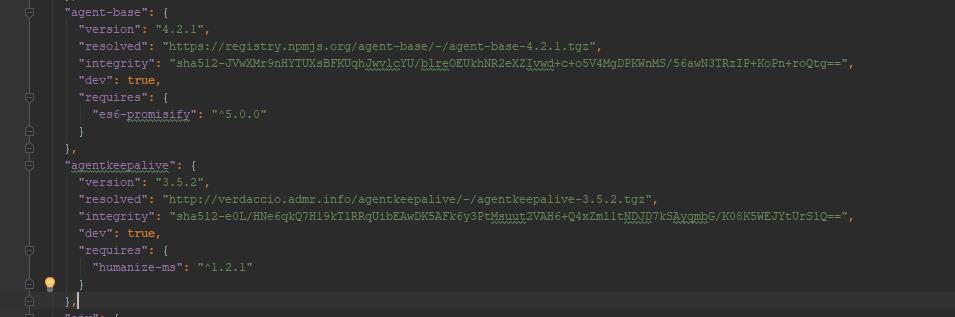
Resolved filed sometimes point to npmjs registry instead of the installed registry verdaccio (see example below)
To Reproduce
Steps to reproduce the behavior:
- npm i on some project with a registry set to verdaccio
- Check package-lock.json
- Check resolved fields
Example below at screenshot section
Expected behavior
All resolved field should point to verdaccio registry
Screenshots
Docker || Kubernetes (please complete the following information):
Not able to provide info (no acces to verdaccio installation)
Configuration File (cat ~/.config/verdaccio/config.yaml)
Not able to provide info (no acces to verdaccio installation)
Debugging output
$ NODE_DEBUG=request verdacciodisplay request calls (verdaccio <--> uplinks)$ DEBUG=express:* verdaccioenable extreme verdaccio debug mode (verdaccio api)$ npm -dddprints:
npm info it worked if it ends with ok
npm verb cli [ 'C:\\Program Files\\nodejs\\node.exe',
npm verb cli   'C:\\Users\\PP01-YOOP\\AppData\\Roaming\\npm\\node_modules\\npm\\bin\\npm-cli.js',
npm verb cli   '-ddd' ]
npm info using [email protected]
npm info using [email protected]

Usage: npm <command>

where <command> is one of:
    access, adduser, audit, bin, bugs, c, cache, ci, cit,
    completion, config, create, ddp, dedupe, deprecate,
    dist-tag, docs, doctor, edit, explore, get, help,
    help-search, hook, i, init, install, install-test, it, link,
    list, ln, login, logout, ls, outdated, owner, pack, ping,
    prefix, profile, prune, publish, rb, rebuild, repo, restart,
    root, run, run-script, s, se, search, set, shrinkwrap, star,
    stars, start, stop, t, team, test, token, tst, un,
    uninstall, unpublish, unstar, up, update, v, version, view,
    whoami

npm <command> -h  quick help on <command>
npm -l            display full usage info
npm help <term>   search for help on <term>
npm help npm      involved overview

Specify configs in the ini-formatted file:
    C:\Users\PP01-YOOP\.npmrc
or on the command line via: npm <command> --key value
Config info can be viewed via: npm help config

[email protected] C:\Users\PP01-YOOP\AppData\Roaming\npm\node_modules\npm
$ npm config get registryprints:
Point to our verdaccio (cf screenshot)
Additional context
 dlarr
dlarr
All 3 comments
Please, remove lock file and node_modules. Then, ensure registry is set to your verdaccio instance and finally install again to regenerate the lock file. Ensure that every url points to verdaccio instance and not to npmjs registry
 sergiohgz
on 3 May 2019
sergiohgz
on 3 May 2019
Worked like a charm thanks a lot
dlarr
on 3 May 2019
🤖This thread has been automatically locked 🔒 since there has not been any recent activity after it was closed.
We lock tickets after 90 days with the idea to encourage you to open a ticket with new fresh data and to provide you better feedback 🤝and better visibility 👀.
If you consider, can attach this ticket 📨to the new one as a reference for better context.
Thanks for being a part of the Verdaccio community! 💘
![lock[bot] picture](https://avatars.githubusercontent.com/in/6672?v=4&s=40) lock[bot]
on 1 Aug 2019
lock[bot]
on 1 Aug 2019
Related issues
 lope
·
3Comments
lope
·
3Comments
 priscilawebdev
·
3Comments
priscilawebdev
·
3Comments
 kopax
·
3Comments
kopax
·
3Comments
 rmi7
·
4Comments
rmi7
·
4Comments
 kenske
·
4Comments
kenske
·
4Comments
Most helpful comment
Worked like a charm thanks a lot