Velero: Scheduled backups automatically deleted when ArgoCD deploys Velero
What steps did you take and what happened:
We are trying to use ArgoCD to deploy most resources into our clusters, and we're using the vmware-tanzu/velero helm chart to enable that. We include schedule definitions in the chart's values.yaml so that they are created automatically.
A Backup resource created from the resulting Schedule resource inherits all of the tags from the Schedule resource, including one that ArgoCD uses to identify resources it directly creates: argocd.argoproj.io/instance. ArgoCD then sees the Backup resource, sees that it is not part of the set of resources ArgoCD continues to need to create, and then prunes it. As a result, scheduled backups fail.
Note that backups created manually not using one of the automatically created Schedule resources as a template work correctly. They are not seen by ArgoCD and can persist indefinitely.
What did you expect to happen:
Backup resources are ignored by ArgoCD so that they can complete and persist.
Anything else you would like to add:
Including the ability to define the tags (and potentially annotations) for Backup resources via the Schedule template as an alternative to only pulling them from the Schedule resource itself would avoid this problem. To preserve backward compatibility, continue with the current behavior unless a list of labels (potentially empty) is provided. If the list is provided, even if empty, use that list to set the labels for the Backup resource that is created.
Environment:
- Velero version (use
velero version):
Client: Version: v1.4.2 Git commit: 56a08a4d695d893f0863f697c2f926e27d70c0c5 Server: Version: v1.4.2 - Velero features (use
velero client config get features):features: <NOT SET> - Kubernetes version (use
kubectl version):
Client Version: version.Info{Major:"1", Minor:"19", GitVersion:"v1.19.2", GitCommit:"f5743093fd1c663cb0cbc89748f730662345d44d", GitTreeState:"clean", BuildDate:"2020-09-16T13:41:02Z", GoVersion:"go1.15", Compiler:"gc", Platform:"linux/amd64"} Server Version: version.Info{Major:"1", Minor:"19", GitVersion:"v1.19.1", GitCommit:"206bcadf021e76c27513500ca24182692aabd17e", GitTreeState:"clean", BuildDate:"2020-09-09T11:18:22Z", GoVersion:"go1.15", Compiler:"gc", Platform:"linux/amd64"} - Kubernetes installer & version: cluster-api v0.3.9
- Cloud provider or hardware configuration: AWS
- OS (e.g. from
/etc/os-release): Ubuntu 18.04
Vote on this issue!
This is an invitation to the Velero community to vote on issues, you can see the project's top voted issues listed here.
Use the "reaction smiley face" up to the right of this comment to vote.
- :+1: for "I would like to see this bug fixed as soon as possible"
- :-1: for "There are more important bugs to focus on right now"
 javanthropus
All 5 comments
One way to solve this is using ArgoCD resource.exclusions as stated in this issue.
The best solution would be to configure this at the application level, but at cluster scope also solves the problem.
 igorcezar
on 6 Oct 2020
igorcezar
on 6 Oct 2020
3127 fixes the problem of Backups resources being pruned. Backups will now be synced in ArgoCD by inserting OwnerReference of Schedules, just the same way that Pods and Deployments works.
igorcezar
on 18 Dec 2020
Ah, thanks for bringing that up @igorcezar!
There were quite a few upvotes on this, it would be great to get an additional confirmation if that code change will solve this issue. It will be released on v1.6, some point in January, or please try it from source.
 carlisia
on 18 Dec 2020
carlisia
on 18 Dec 2020
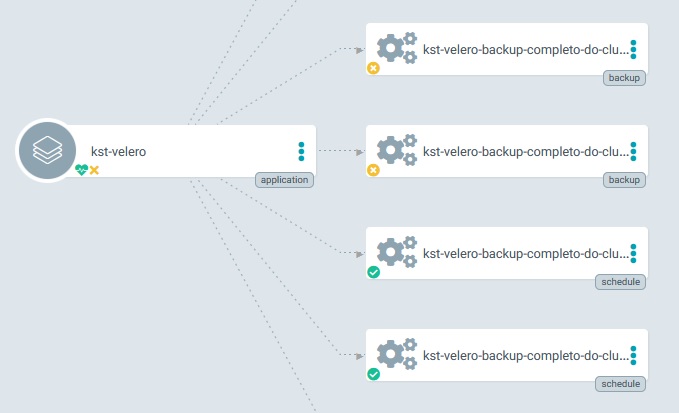
Before the fix in #3127 ArgoCD detected Backups resources (because of the labels Backups inherits from Schedule) but they were all Out of Sync because they don't exist in Git Repo that ArgoCD is syncing.
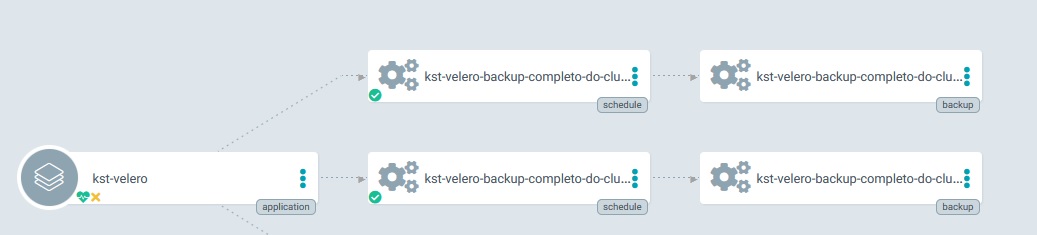
After the fix, Backups resources created by Schedules have the OwnerReference parameter in their manifest, which makes it a child resource of the Schedule, so ArgoCD sees no problem in it.
igorcezar
on 18 Dec 2020
Alright, this seems to have resolved it. We can always look into this again "in case" someone has a different outcome.
Thank you for this!
carlisia
on 19 Dec 2020
Related issues
 abh
·
4Comments
abh
·
4Comments
 concaf
·
3Comments
concaf
·
3Comments
 Marki4711
·
3Comments
Marki4711
·
3Comments
 Berndinox
·
3Comments
Berndinox
·
3Comments
 archmangler
·
3Comments
archmangler
·
3Comments