Velero: Velero backup location stuck in unknown on GCP
What steps did you take and what happened:
Install Velero using the helm chart (version 2.12.15, velero 1.4.2). Backup not created because there is no matching backup location.
What did you expect to happen:
Backup created.
The output of the following commands will help us better understand what's going on:
(Pasting long output into a GitHub gist or other pastebin is fine.)
kubectl get backupstoragelocations -o yaml
apiVersion: v1
items:
- apiVersion: velero.io/v1
  kind: BackupStorageLocation
  metadata:
    creationTimestamp: "2020-09-09T14:49:21Z"
    generation: 19
    labels:
      component: velero
    name: default
    namespace: velero
    resourceVersion: "205320678"
    selfLink: /apis/velero.io/v1/namespaces/velero/backupstoragelocations/default
    uid: 5650fba8-62c9-4846-ba20-30564d2d3719
  spec:
    config:
      serviceAccount: <>
    objectStorage:
      bucket: <>
    provider: gcp
  status:
    lastSyncedTime: "2020-09-09T15:20:14.388282234Z"
kind: List
metadata:
  resourceVersion: ""
  selfLink: ""
velero backup-location get
NAME      PROVIDER   BUCKET/PREFIX            PHASE     LAST VALIDATED   ACCESS MODE
default   gcp        <>   Unknown   Unknown          ReadWrite
For some reason the phase is stuck on unknown. When moving to try velero 1.5.0, there is a different error:
velero-85fbb5547c-wbtbh velero time="2020-09-09T14:58:47Z" level=error msg="Error patching backup location's last-synced time" backupLocation=default controller=backup-sync error="the server could not find the requested resource (patch backupstoragelocations.velero.io default)" error.file="/go/src/github.com/vmware-tanzu/velero/pkg/controller/backup_sync_controller.go:311" error.function="github.com/vmware-tanzu/velero/pkg/controller.(*backupSyncController).run" logSource="pkg/controller/backup_sync_controller.go:311"
velero-85fbb5547c-wbtbh velero time="2020-09-09T14:59:17Z" level=error msg="Error patching backup location's last-synced time" backupLocation=default controller=backup-sync error="the server could not find the requested resource (patch backupstoragelocations.velero.io default)" error.file="/go/src/github.com/vmware-tanzu/velero/pkg/controller/backup_sync_controller.go:311" error.function="github.com/vmware-tanzu/velero/pkg/controller.(*backupSyncController).run" logSource="pkg/controller/backup_sync_controller.go:311"
velero-85fbb5547c-wbtbh velero time="2020-09-09T14:59:47Z" level=error msg="Error patching backup location's last-synced time" backupLocation=default controller=backup-sync error="the server could not find the requested resource (patch backupstoragelocations.velero.io default)" error.file="/go/src/github.com/vmware-tanzu/velero/pkg/controller/backup_sync_controller.go:311" error.function="github.com/vmware-tanzu/velero/pkg/controller.(*backupSyncController).run" logSource="pkg/controller/backup_sync_controller.go:311"
velero-85fbb5547c-wbtbh velero time="2020-09-09T15:00:01Z" level=info msg="Checking for existing backup locations ready to be verified; there needs to be at least 1 backup location available" controller=backupstoragelocation logSource="pkg/controller/backupstoragelocation_controller.go:45"
velero-85fbb5547c-wbtbh velero time="2020-09-09T15:00:02Z" level=error msg="Error updating backup location phase to Available" backupstoragelocation=default controller=backupstoragelocation error="the server could not find the requested resource (patch backupstoragelocations.velero.io default)" logSource="pkg/controller/backupstoragelocation_controller.go:87"
Environment:
- Velero version (use
velero version): 1.4.2 - Velero features (use
velero client config get features): - Kubernetes version (use
kubectl version): 1.13 - Kubernetes installer & version: GKE
- Cloud provider or hardware configuration:
- OS (e.g. from
/etc/os-release):
I think this is the same problem as reported here (vmware-tanzu/helm-charts#102), and I am not sure this is a chart problem. Reproduced also when installing velero with the CLI.
Vote on this issue!
This is an invitation to the Velero community to vote on issues, you can see the project's top voted issues listed here.
Use the "reaction smiley face" up to the right of this comment to vote.
- :+1: for "I would like to see this bug fixed as soon as possible"
- :-1: for "There are more important bugs to focus on right now"
 omerlh
All 13 comments
I am seeing a similar issue on the v1.5.0-beta.1 release.
time="2020-09-09T16:12:33Z" level=error msg="Error patching backup location's last-synced time" backupLocation=gcp controller=backup-sync error="backupstoragelocations.velero.io \"gcp\" not found" error.file="/go/src/github.com/vmware-tanzu/velero/pkg/controller/backup_sync_controller.go:311" error.function="github.com/vmware-tanzu/velero/pkg/controller.(*backupSyncController).run" logSource="pkg/controller/backup_sync_controller.go:311"
With my backup locations as the following
NAME PROVIDER BUCKET/PREFIX PHASE LAST VALIDATED ACCESS MODE
gcp gcp [BUCKET_NAME_REMOVED]/cluster-wp-nonprod Unknown Unknown ReadWrite
Reverting to the v1.4.0 image allowed backups to complete without failure.
 doughepi
on 9 Sep 2020
doughepi
on 9 Sep 2020
@omerlh and @doughepi I tried to repro this. Here is what I did:
- Installed Velero using the latest velero helm chart version
2.12.17
bash helm install vmware-tanzu/velero --namespace velero \ --set-file credentials.secretContents.cloud=<gke-creds-file> \ --set configuration.provider=gcp \ --set configuration.backupStorageLocation.name=default \ --set configuration.backupStorageLocation.bucket=<velero-bucket-name> \ --set configuration.backupStorageLocation.prefix=velero-backup \ --set configuration.volumeSnapshotLocation.name=default \ --set configuration.volumeSnapshotLocation.config.region=us-west1 \ --set image.repository=velero/velero \ --set image.tag=v1.4.2 \ --set image.pullPolicy=IfNotPresent \ --set initContainers[0].name=velero-plugin-for-gcp \ --set initContainers[0].image=velero/velero-plugin-for-gcp:v1.1.0 \ --set initContainers[0].volumeMounts[0].mountPath=/target \ --set initContainers[0].volumeMounts[0].name=plugins \ --name-template velero - Created a sample workload to backup
- Backed up the sample workload and restored it from the backup.
I was able to run all of this successfully.
However, I ran into the issue you are reporting here when I updated the velero image from 1.4.2 to 1.5.1 without following the upgrade process documented at https://velero.io/docs/v1.5/upgrade-to-1.5/
If you are upgrading your velero installations, can you please follow our upgrade instructions that are available at https://velero.io/docs/v1.5/upgrade-to-1.5/.
 ashish-amarnath
on 25 Sep 2020
ashish-amarnath
on 25 Sep 2020
For me it happened on a clean Velero install, not an upgrade
omerlh
on 27 Sep 2020
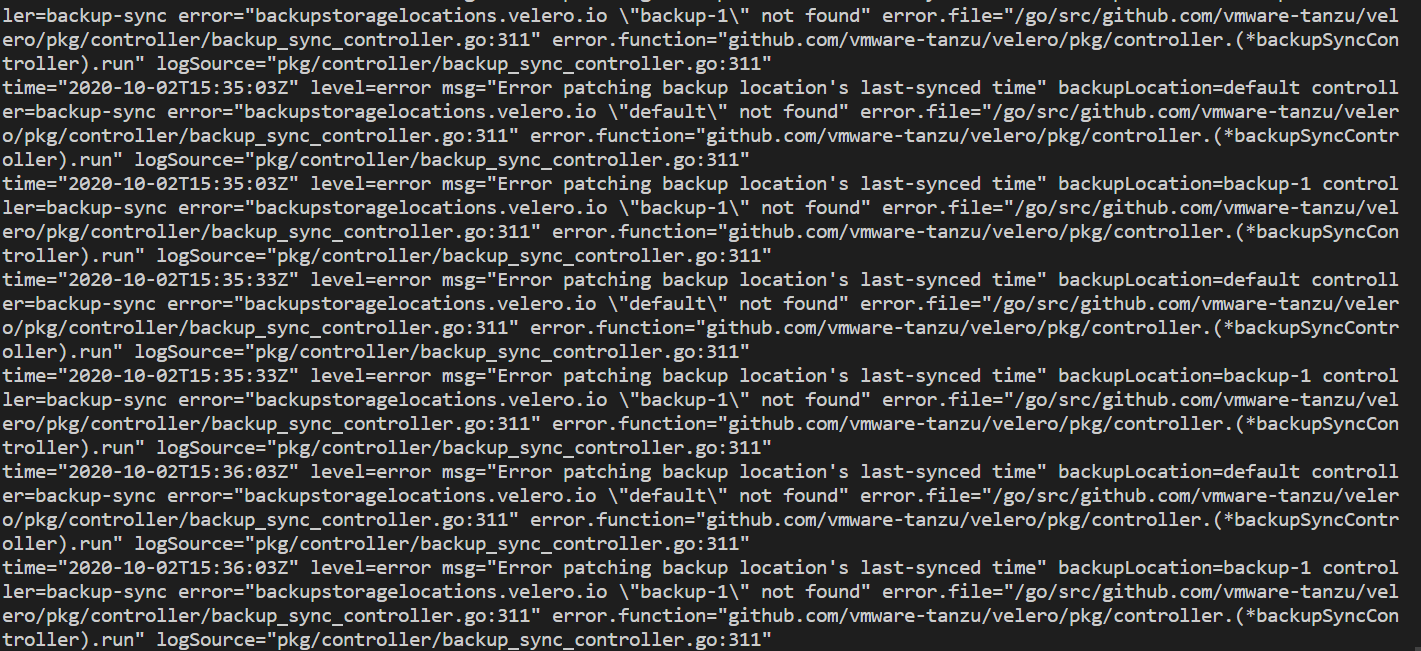
Hi. I am facing the same issue too. Also, I am not able to delete the failed backups and they are stuck after uninstalling and reinstalling the helm chart. Related to https://github.com/vmware-tanzu/velero/issues/2980
 tvvignesh
on 2 Oct 2020
tvvignesh
on 2 Oct 2020
Any updates on this issue? Just installed Velero with CLI and Plugin using Docker Image, but could not connect to S3 bucket.
 ksummersill2
on 5 Oct 2020
ksummersill2
on 5 Oct 2020
I'm using these values:
│ Spec:
│   Config:
│     Region:            fr-par
│     s3ForcePathStyle:  true
│     s3Url:             https://s3.fr-par.scw.cloud
│   Object Storage:
│     Bucket:  my-bucket
│   Provider:  aws
with velero/velero-plugin-for-aws:v1.1.0.
I removed everything and reinstalled from scratch, emptied the bucket.
after the upgrade to v1.5.1 and velero/velero-plugin-for-aws:v1.1.0 from its -beta
time="2020-10-07T22:45:18Z" level=info msg="Checking for existing backup locations ready to be verified; there needs to be at least 1 backup location available" controller=backupstoragelocation logSourc
│ e="pkg/controller/backupstoragelocation_controller.go:58"
│ time="2020-10-07T22:45:18Z" level=info msg="No backup locations were ready to be verified" controller=backupstoragelocation logSource="pkg/controller/backupstoragelocation_controller.go:120"
│
 masterkain
on 8 Oct 2020
masterkain
on 8 Oct 2020
So I could create a backup. So the S3 bucket connected even though I get the same error above. So not sure why it keeps showing that message.
ksummersill2
on 8 Oct 2020
I'm using the IBM Cloud Object Storage as backup. I'm following the steps as wiki https://velero.io/docs/v1.4/contributions/ibm-config/#install-and-start-velero. There is an issue according to logs deployment/velero, I'm not sure the root cause.
- velero version
velero version
Client:
Version: v1.5.1
Git commit: -
Server:
Version:
- OpenShift version
4.3.35_1539
oc get nodes
NAME STATUS ROLES AGE VERSION
10.65.216.173 Ready master,worker 117d v1.16.2
10.65.216.174 Ready master,worker 117d v1.16.2
10.65.216.188 Ready compute,cp-management,cp-master,cp-proxy,infra,master,worker 154d v1.16.2
- velero installation
velero install
--provider aws --plugins velero/velero-plugin-for-aws:v1.0.0
--bucket dswesb-dev-project
--secret-file ./cloud-credentials
--use-volume-snapshots=false
--use-restic
--backup-location-config region=us-east,s3Url=http://s3.us-east.cloud-object-storage.appdomain.cloud
kubectl logs deployment/velero -n velero
time="2020-10-14T02:39:05Z" level=error msg="Unable to update the request" controller=serverstatusrequest error="serverstatusrequests.velero.io "velero-cli-hbc49" not found" error.file="/go/src/github.com/vmware-tanzu/velero/internal/velero/serverstatusrequest.go:49" error.function="github.com/vmware-tanzu/velero/internal/velero.(ServerStatus).PatchStatusProcessed" logSource="pkg/controller/server_status_request_controller.go:89" phase= serverStatusRequest=velero/velero-cli-hbc49
time="2020-10-14T02:39:27Z" level=error msg="Error patching backup location's last-synced time" backupLocation=default controller=backup-sync error="backupstoragelocations.velero.io "default" not found" error.file="/go/src/github.com/vmware-tanzu/velero/pkg/controller/backup_sync_controller.go:311" error.function="github.com/vmware-tanzu/velero/pkg/controller.(backupSyncController).run" logSource="pkg/controller/backup_sync_controller.go:311"
time="2020-10-14T02:39:58Z" level=error msg="Error patching backup location's last-synced time" backupLocation=default controller=backup-sync error="backupstoragelocations.velero.io "default" not found" error.file="/go/src/github.com/vmware-tanzu/velero/pkg/controller/backup_sync_controller.go:311" error.function="github.com/vmware-tanzu/velero/pkg/controller.(backupSyncController).run" logSource="pkg/controller/backup_sync_controller.go:311"
time="2020-10-14T02:40:28Z" level=error msg="Error patching backup location's last-synced time" backupLocation=default controller=backup-sync error="backupstoragelocations.velero.io "default" not found" error.file="/go/src/github.com/vmware-tanzu/velero/pkg/controller/backup_sync_controller.go:311" error.function="github.com/vmware-tanzu/velero/pkg/controller.(backupSyncController).run" logSource="pkg/controller/backup_sync_controller.go:311"
time="2020-10-14T02:40:58Z" level=error msg="Error patching backup location's last-synced time" backupLocation=default controller=backup-sync error="backupstoragelocations.velero.io "default" not found" error.file="/go/src/github.com/vmware-tanzu/velero/pkg/controller/backup_sync_controller.go:311" error.function="github.com/vmware-tanzu/velero/pkg/controller.(backupSyncController).run" logSource="pkg/controller/backup_sync_controller.go:311"
time="2020-10-14T02:41:28Z" level=error msg="Error patching backup location's last-synced time" backupLocation=default controller=backup-sync error="backupstoragelocations.velero.io "default" not found" error.file="/go/src/github.com/vmware-tanzu/velero/pkg/controller/backup_sync_controller.go:311" error.function="github.com/vmware-tanzu/velero/pkg/controller.(backupSyncController).run" logSource="pkg/controller/backup_sync_controller.go:311"velero backup-location get
NAME PROVIDER BUCKET/PREFIX PHASE LAST VALIDATED ACCESS MODE
default aws dswesb-dev-project Unknown Unknown ReadWrite
- kubectl get backupstoragelocations -o yaml
apiVersion: v1
items:
- apiVersion: velero.io/v1
kind: BackupStorageLocation
metadata:
creationTimestamp: 2020-10-13T12:55:19Z
generation: 1
labels:
component: velero
name: default
namespace: velero
resourceVersion: "107563260"
selfLink: /apis/velero.io/v1/namespaces/velero/backupstoragelocations/default
uid: 670d72a3-e4e9-45d4-a99c-534b6254ed06
spec:
config:
region: us-east
s3Url: http://s3.us-east.cloud-object-storage.appdomain.cloud
objectStorage:
bucket: dswesb-dev-project
provider: aws
kind: List
metadata:
resourceVersion: ""
selfLink: ""
Levi
Thanks!
 bjlvfei
on 14 Oct 2020
bjlvfei
on 14 Oct 2020
Update on my own issue above -> we reran the manual crd step in the upgrade to 1.5 notes. It seemed to fix things up. It was kinda unexpected that we needed to do this since we're using the Helm chart.
Since our issue was an upgrade, I think it is unrelated to the issue other people are facing in this thread.
doughepi
on 16 Oct 2020
I had the same issue after upgrading from 1.4 to 1.5.1 via helm chart.
I followed upgrade instructions and now all backup locations are available.
 sagor999
on 17 Oct 2020
sagor999
on 17 Oct 2020
my issue was resolved since it's not via helm chart. Thanks!
bjlvfei
on 19 Oct 2020
If I'm reading the comments right, everyone has gotten to a working state. The "Checking for existing backup locations ready to be verified; there needs to be at least 1 backup location available" messages are being addressed with https://github.com/vmware-tanzu/velero/issues/2942. @tvvignesh Does #2993 fix your issue? Please open a new PR with your details if you are having issues.
 dsu-igeek
on 22 Oct 2020
dsu-igeek
on 22 Oct 2020
Hey, I'm using latest helm release v2.14.12 and still seeing this error,
velero v1.5.3
restic enabled
I'm not on GCP but I'm using S3 interface
 talha0324
on 2 Mar 2021
talha0324
on 2 Mar 2021
Related issues
 bhargavpss
·
34Comments
bhargavpss
·
34Comments
 ncdc
·
34Comments
ncdc
·
34Comments
 jordanwilson230
·
31Comments
jordanwilson230
·
31Comments
 immesys
·
28Comments
immesys
·
28Comments
 gianrubio
·
36Comments
gianrubio
·
36Comments
Most helpful comment
I'm using these values:
with
velero/velero-plugin-for-aws:v1.1.0.I removed everything and reinstalled from scratch, emptied the bucket.
after the upgrade to
v1.5.1andvelero/velero-plugin-for-aws:v1.1.0from its-beta