Velero: Error loading environment from AZURE_CREDENTIALS_FILE
What steps did you take and what happened:
I have followed steps from this page:
Part #3. Azure Kubernetes Services (AKS). Backup/Restore your AKS data with Velero.
What did you expect to happen:
I was expecting that Velero will be installed to my Azure AKS cluster.
The output of the following commands will help us better understand what's going on:
kubectl logs deployment/velero -n velero
time="2020-02-13T16:12:24Z" level=info msg="setting log-level to INFO" logSource="pkg/cmd/server/server.go:171"
time="2020-02-13T16:12:24Z" level=info msg="Starting Velero server v1.2.0 (5d008491bbf681658d3e372da1a9d3a21ca4c03c)" logSource="pkg/cmd/server/server.go:173"
time="2020-02-13T16:12:24Z" level=info msg="No feature flags enabled" logSource="pkg/cmd/server/server.go:177"
time="2020-02-13T16:12:25Z" level=info msg="registering plugin" command=/velero kind=BackupItemAction logSource="pkg/plugin/clientmgmt/registry.go:100" name=velero.io/pod
time="2020-02-13T16:12:25Z" level=info msg="registering plugin" command=/velero kind=BackupItemAction logSource="pkg/plugin/clientmgmt/registry.go:100" name=velero.io/pv
time="2020-02-13T16:12:25Z" level=info msg="registering plugin" command=/velero kind=BackupItemAction logSource="pkg/plugin/clientmgmt/registry.go:100" name=velero.io/service-account
time="2020-02-13T16:12:25Z" level=info msg="registering plugin" command=/velero kind=RestoreItemAction logSource="pkg/plugin/clientmgmt/registry.go:100" name=velero.io/add-pv-from-pvc
time="2020-02-13T16:12:25Z" level=info msg="registering plugin" command=/velero kind=RestoreItemAction logSource="pkg/plugin/clientmgmt/registry.go:100" name=velero.io/add-pvc-from-pod
time="2020-02-13T16:12:25Z" level=info msg="registering plugin" command=/velero kind=RestoreItemAction logSource="pkg/plugin/clientmgmt/registry.go:100" name=velero.io/change-storage-class
time="2020-02-13T16:12:25Z" level=info msg="registering plugin" command=/velero kind=RestoreItemAction logSource="pkg/plugin/clientmgmt/registry.go:100" name=velero.io/cluster-role-bindings
time="2020-02-13T16:12:25Z" level=info msg="registering plugin" command=/velero kind=RestoreItemAction logSource="pkg/plugin/clientmgmt/registry.go:100" name=velero.io/job
time="2020-02-13T16:12:25Z" level=info msg="registering plugin" command=/velero kind=RestoreItemAction logSource="pkg/plugin/clientmgmt/registry.go:100" name=velero.io/pod
time="2020-02-13T16:12:25Z" level=info msg="registering plugin" command=/velero kind=RestoreItemAction logSource="pkg/plugin/clientmgmt/registry.go:100" name=velero.io/restic
time="2020-02-13T16:12:25Z" level=info msg="registering plugin" command=/velero kind=RestoreItemAction logSource="pkg/plugin/clientmgmt/registry.go:100" name=velero.io/role-bindings
time="2020-02-13T16:12:25Z" level=info msg="registering plugin" command=/velero kind=RestoreItemAction logSource="pkg/plugin/clientmgmt/registry.go:100" name=velero.io/service
time="2020-02-13T16:12:25Z" level=info msg="registering plugin" command=/velero kind=RestoreItemAction logSource="pkg/plugin/clientmgmt/registry.go:100" name=velero.io/service-account
time="2020-02-13T16:12:25Z" level=info msg="registering plugin" command=/plugins/velero-plugin-for-microsoft-azure kind=VolumeSnapshotter logSource="pkg/plugin/clientmgmt/registry.go:100" name=velero.io/azure
time="2020-02-13T16:12:25Z" level=info msg="registering plugin" command=/plugins/velero-plugin-for-microsoft-azure kind=ObjectStore logSource="pkg/plugin/clientmgmt/registry.go:100" name=velero.io/azure
time="2020-02-13T16:12:25Z" level=info msg="Checking existence of namespace" logSource="pkg/cmd/server/server.go:337" namespace=velero
time="2020-02-13T16:12:25Z" level=info msg="Namespace exists" logSource="pkg/cmd/server/server.go:343" namespace=velero
time="2020-02-13T16:12:27Z" level=info msg="Checking existence of Velero custom resource definitions" logSource="pkg/cmd/server/server.go:372"
time="2020-02-13T16:12:27Z" level=info msg="All Velero custom resource definitions exist" logSource="pkg/cmd/server/server.go:406"
time="2020-02-13T16:12:27Z" level=info msg="Checking that all backup storage locations are valid" logSource="pkg/cmd/server/server.go:413"
An error occurred: some backup storage locations are invalid: error getting backup store for location "default": rpc error: code = Unknown desc = error loading environment from AZURE_CREDENTIALS_FILE (/credentials/cloud): Can't separate key from value
Anything else you would like to add:
[Miscellaneous information that will assist in solving the issue.]
Environment:
- Velero version (use
velero version):
Client:
Version: v1.2.0
Git commit: 5d008491bbf681658d3e372da1a9d3a21ca4c03c - Velero features (use
velero client config get features):
features: - Kubernetes version (use
kubectl version):
Client Version: version.Info{Major:"1", Minor:"16", GitVersion:"v1.16.1", GitCommit:"d647ddbd755faf07169599a625faf302ffc34458", GitTreeState:"clean", BuildDate:"2019-10-02T17:01:15Z", GoVersion:"go1.12.10", Compiler:"gc", Platform:"windows/amd64"}
Server Version: version.Info{Major:"1", Minor:"14", GitVersion:"v1.14.5", GitCommit:"0e9fcb426b100a2aea5ed5c25b3d8cfbb01a8acf", GitTreeState:"clean", BuildDate:"2019-08-05T09:13:08Z", GoVersion:"go1.12.5", Compiler:"gc", Platform:"linux/amd64"} - Kubernetes installer & version:
1.14.5 - Cloud provider or hardware configuration:
Azure - OS (e.g. from
/etc/os-release):
Linux (ubuntu 16.04)
 azuregurus
All 40 comments
@azuregurus it sounds like something might be off in the formatting of your credentials file - did you create a file following the steps at https://github.com/vmware-tanzu/velero-plugin-for-microsoft-azure#create-service-principal, specifically:
cat << EOF  > ./credentials-velero
AZURE_SUBSCRIPTION_ID=${AZURE_SUBSCRIPTION_ID}
AZURE_TENANT_ID=${AZURE_TENANT_ID}
AZURE_CLIENT_ID=${AZURE_CLIENT_ID}
AZURE_CLIENT_SECRET=${AZURE_CLIENT_SECRET}
AZURE_RESOURCE_GROUP=${AZURE_RESOURCE_GROUP}
AZURE_CLOUD_NAME=AzurePublicCloud
EOF
 skriss
on 13 Feb 2020
skriss
on 13 Feb 2020
@skriss Yes. The content of the file is as follows (I've replaced the real data with *):
AZURE_SUBSCRIPTION_ID=********-****-****-****-************
AZURE_TENANT_ID=********-****-****-****-************
AZURE_CLIENT_ID=********-****-****-****-************
AZURE_CLIENT_SECRET=********-****-****-****-************
AZURE_RESOURCE_GROUP=MC_********************************
AZURE_CLOUD_NAME=AzurePublicCloud
I've double checked the data and it looks ok.
azuregurus
on 14 Feb 2020
@azuregurus Have you tried using the same credentials file to use with the az cli? Can you please confirm that works?
 ashish-amarnath
on 15 Feb 2020
ashish-amarnath
on 15 Feb 2020
Can you also please inspect the secret the corresponding secret and confirm that it is not malformed?
ashish-amarnath
on 15 Feb 2020
@azuregurus just checking in to see if you've resolved this or been able to try the debugging steps suggested above.
skriss
on 19 Feb 2020
Closing out as inactive, feel free to reach out again as needed!
skriss
on 21 Feb 2020
Problem was with the velero install --secret-file parameter. It created Kubernetes secret with some weird characters and formatting although the file I used had correct content and was plain text. I fixed it by copying the content of the file to some web site which does text to base64 conversion and then I updated the content of the secret using Kubernetes admin portal. I'd say this is a bug. At least add some check on the input secret file format so we can know if something is wrong there.
azuregurus
on 26 Feb 2020
@azuregurus i'm guessing you don't have the old secret around that velero install created anymore, but if you do (or could recreate it), I'd be curious to see if (a) it's base64-decodable; and (b) if so, if you can identify the diff between what was in the secret and what was in the file. Our code around this is really straightforward - read the contents of the file and put them directly into the secret - so I'm not really sure where the issue would be coming from. It has worked fine for Azure installs in the past/for other users, too.
skriss
on 26 Feb 2020
I can recreate it. The old secret is not base64-decodable. I get "Binary content can't be represented as text. Invalid UTF-8 encoded text: Invalid byte 255 at 0x0" on that web site that does the conversion. I've taken screenshots of old and new secret:
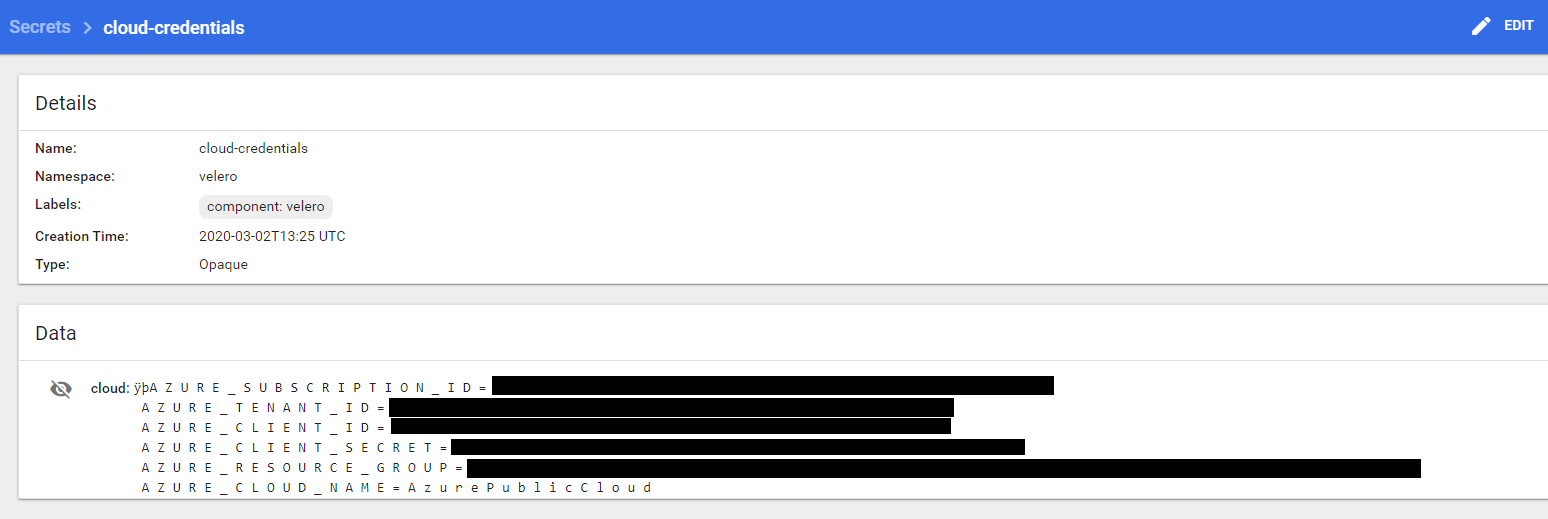
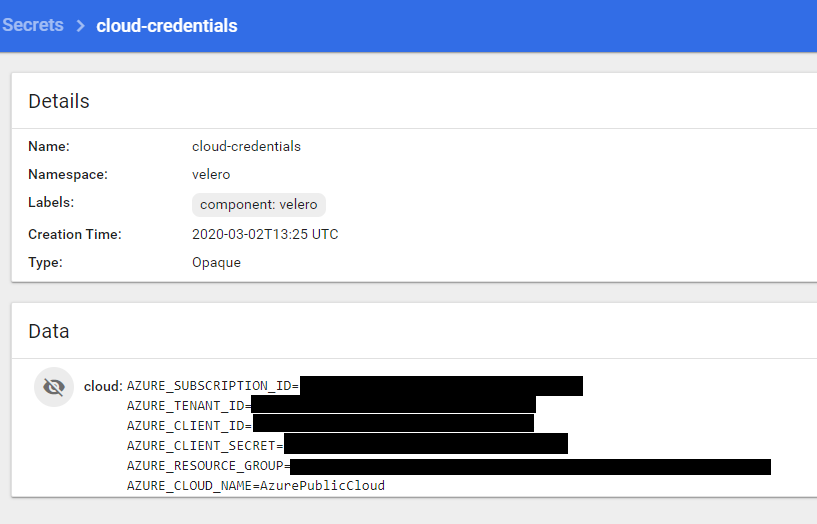
Hope this helps.
azuregurus
on 2 Mar 2020
links to relevant code:
- read secret file: https://github.com/vmware-tanzu/velero/blob/master/pkg/cmd/cli/install/install.go#L130-L140
- create Secret: https://github.com/vmware-tanzu/velero/blob/master/pkg/install/resources.go#L174-L186
skriss
on 2 Mar 2020
I am experiencing the same issue and I don't see any funky characters in my credentials-velero secrets file.
Here is the error:
An error occurred: some backup storage locations are invalid: error getting backup store for location "default": rpc error: code = Unknown desc = error loading environment from AZURE_CREDENTIALS_FILE (/credentials/cloud): Can't separate key from value
Here is the command I'm running:
./velero install --provider azure --plugins velero/velero-plugin-for-microsoft-azure:v1.0.1 --bucket velero-cluster-backups --backup-location-config resourceGroup=STORAGE-ACCOUNT-RESOURCEGROUP,storageAccount=STORAGEACCOUNT --use-volume-snapshots=false --secret-file ./credentials-velero
This is what my credentials-velero file looks like:
[default]
AZURE_STORAGE_ACCOUNT_ACCESS_KEY=MYAZURESTORAGEACCOUNTKEY
AZURE_CLOUD_NAME=AzurePublicCloud
Velero client version: v1.3.2
 k8s42
on 3 May 2020
k8s42
on 3 May 2020
I attempted Velero installation using Helm 2 and experienced the same issue:
An error occurred: some backup storage locations are invalid: error getting backup store for location "azure": rpc error: code = Unknown desc = error loading environment from AZURE_CREDENTIALS_FILE (/credentials/cloud): Can't separate key from value
k8s42
on 3 May 2020
@tabishis you don't want the [default] header - that's for an AWS file, but not valid for Azure. Please remove that line and try again!
skriss
on 4 May 2020
Now it complains that it doesn't have all the Azure information it needs:
An error occurred: some backup storage locations are invalid: error getting backup store for location "azure": rpc error: code = Unknown desc = unable to get all required environment variables: the following keys do not have values: AZURE_TENANT_ID, AZURE_CLIENT_ID, AZURE_CLIENT_SECRET, AZURE_SUBSCRIPTION_ID
However, I'm not doing PV backups, so my secret file now looks like this:
AZURE_STORAGE_ACCOUNT_ACCESS_KEY=MYAZURESTORAGEACCOUNTKEY
AZURE_CLOUD_NAME=AzurePublicCloud
k8s42
on 4 May 2020
this feature hasn't been released in a tagged version yet - if you want to use it, you'll need to change your azure plugin image tag to master.
skriss
on 4 May 2020
Are you referring to this tag:
--plugins velero/velero-plugin-for-microsoft-azure:v1.0.1
Does v1.0.1 need to be replaced with master?
--plugins velero/velero-plugin-for-microsoft-azure:master
k8s42
on 4 May 2020
Yes, if you want to use the static storage account key feature.
skriss
on 4 May 2020
Same error:
An error occurred: some backup storage locations are invalid: error getting backup store for location "default": rpc error: code = Unknown desc = unable to get all required environment variables: the following keys do not have values: AZURE_TENANT_ID, AZURE_CLIENT_ID, AZURE_CLIENT_SECRET, AZURE_SUBSCRIPTION_ID
My updated command is as follows:
velero install --provider azure --plugins velero/velero-plugin-for-microsoft-azure:master --bucket velero --secret-file .\credentials-velero --backup-location-config resourceGroup=MyResourceGroup,storageAccount=MyAzureStorageAccount--use-volume-snapshots=false
k8s42
on 4 May 2020
if you didn't uninstall/delete the velero namespace, then running this command again will not update the deployment. you can either delete the velero deployment or namespace and re-install, or manually edit the velero deployment YAML and update the azure init container to have the correct tag, which will trigger the creation of a new pod.
skriss
on 4 May 2020
I did delete the namespace, velero CRDs first and then attempted install. Let me try this using Helm instead and get back to you.
k8s42
on 4 May 2020
Same result:
An error occurred: some backup storage locations are invalid: error getting backup store for location "azure": rpc error: code = Unknown desc = unable to get all required environment variables: the following keys do not have values: AZURE_TENANT_ID, AZURE_CLIENT_ID, AZURE_CLIENT_SECRET, AZURE_SUBSCRIPTION_ID
Helm command:
helm install --name velero vmware-tanzu/velero --namespace velero
--set configuration.provider=azure
--set-file credentials.secretContents.cloud=.\credentials-velero'
--set configuration.backupStorageLocation.name='azure'
--set configuration.backupStorageLocation.config.resourceGroup='STORAGEACCOUNTRESOURCEGROUPNAME'
--set configuration.backupStorageLocation.config.storageAccount='STORAGEACCOUNTNAME'
--set configuration.backupStorageLocation.bucket='velero'
--set image.repository=velero/velero
--set image.pullPolicy=IfNotPresent
--set initContainers[0].name=velero-plugin-for-microsoft-azure
--set initContainers[0].image=velero/velero-plugin-for-microsoft-azure:v1.0.1
--set initContainers[0].volumeMounts[0].mountPath=/target
--set initContainers[0].volumeMounts[0].name=plugins
k8s42
on 4 May 2020
The Helm deployment is successful when I specify the kv pairs below . I'd prefer not to use Velero with Azure SPN as I'll not be doing PV backups.
AZURE_SUBSCRIPTION_ID=valueremoved
AZURE_TENANT_ID=valueremoved
AZURE_CLIENT_ID=valueremoved
AZURE_CLIENT_SECRET=valueremoved
AZURE_RESOURCE_GROUP=valueremoved
AZURE_CLOUD_NAME=AzurePublicCloud
Do we know if anyone has done successful velero deployments using only the following keys in the secrets file?
AZURE_STORAGE_ACCOUNT_ACCESS_KEY=storageaccountkey
AZURE_CLOUD_NAME=AzurePublicCloud
k8s42
on 4 May 2020
--set initContainers[0].image=velero/velero-plugin-for-microsoft-azure:v1.0.1
Per previous comment, this feature has not been released yet, is not available in this version of the Azure plugin. You need to use the master tag of the plugin image if you want to try out this feature.
skriss
on 4 May 2020
Sorry, it was a copy/paste error. I attempted it with master
k8s42
on 4 May 2020
To summarize:
Works
helm install --name velero vmware-tanzu/velero --namespace velero
--set configuration.provider=azure
--set-file credentials.secretContents.cloud=.\credentials-velero'
--set configuration.backupStorageLocation.name='azure'
--set configuration.backupStorageLocation.config.resourceGroup='STORAGEACCOUNTRESOURCEGROUPNAME'
--set configuration.backupStorageLocation.config.storageAccount='STORAGEACCOUNTNAME'
--set configuration.backupStorageLocation.bucket='velero'
--set image.repository=velero/velero
--set image.pullPolicy=IfNotPresent
--set initContainers[0].name=velero-plugin-for-microsoft-azure
--set initContainers[0].image=velero/velero-plugin-for-microsoft-azure:master
--set initContainers[0].volumeMounts[0].mountPath=/target
--set initContainers[0].volumeMounts[0].name=plugins
_Secrets File_
AZURE_SUBSCRIPTION_ID=valueremoved
AZURE_TENANT_ID=valueremoved
AZURE_CLIENT_ID=valueremoved
AZURE_CLIENT_SECRET=valueremoved
AZURE_RESOURCE_GROUP=valueremoved
AZURE_CLOUD_NAME=AzurePublicCloud
Does not Work
helm install --name velero vmware-tanzu/velero --namespace velero
--set configuration.provider=azure
--set-file credentials.secretContents.cloud=.\credentials-velero'
--set configuration.backupStorageLocation.name='azure'
--set configuration.backupStorageLocation.config.resourceGroup='STORAGEACCOUNTRESOURCEGROUPNAME'
--set configuration.backupStorageLocation.config.storageAccount='STORAGEACCOUNTNAME'
--set configuration.backupStorageLocation.bucket='velero'
--set image.repository=velero/velero
--set image.pullPolicy=IfNotPresent
--set initContainers[0].name=velero-plugin-for-microsoft-azure
--set initContainers[0].image=velero/velero-plugin-for-microsoft-azure:master
--set initContainers[0].volumeMounts[0].mountPath=/target
--set initContainers[0].volumeMounts[0].name=plugins
_Secrets File_
AZURE_STORAGE_ACCOUNT_ACCESS_KEY=storageaccountkey
AZURE_CLOUD_NAME=AzurePublicCloud
k8s42
on 4 May 2020
OK - it looks like you're still missing one key part of configuring this, which is that in the BackupStorageLocation's config, you need to add a key named storageAccountKeyEnvVar, whose value in this case would be AZURE_STORAGE_ACCOUNT_ACCESS_KEY. This is documented in some more detail here.
I think you can do this via the Helm chart by adding one more flag:
--set configuration.backupStorageLocation.config.storageAccountKeyEnvVar='AZURE_STORAGE_ACCOUNT_ACCESS_KEY'
If not, you can always kubectl -n velero edit backupstoragelocation azure and add storageAccountKeyEnvVar: AZURE_STORAGE_ACCOUNT_ACCESS_KEY under spec.config.
skriss
on 4 May 2020
FYI, the reason this level of indirection was added is that different BackupStorageLocations may have different storage account keys, so Velero needs a way to know which env var stores the key for each BackupStorageLocation.
skriss
on 4 May 2020
Tried this with master to no avail:
An error occurred: some backup storage locations are invalid: error getting backup store for location "azure": rpc error: code = Unknown desc = config has invalid keys [storageAccountKeyEnvVar]; valid keys are [resourceGroup storageAccount subscriptionId blockSizeInBytes bucket prefix]
k8s42
on 4 May 2020
:(
skriss
on 4 May 2020
Yep, and that's actually a bug.
I'll get a PR up later today to fix.
skriss
on 4 May 2020
Thanks a lot, @skriss. Appreciate all your help with it.
k8s42
on 4 May 2020
We got the fix merged already, so you could try getting an updated master image (note: you may need to change your image pull policy to Always for that initContainer to get the newest one).
skriss
on 4 May 2020
Made some progress. Now the error is as follows:
An error occurred: some backup storage locations are invalid: error getting backup store for location "azure": rpc error: code = Unknown desc = no storage key secret with key StorageAccountKeyRedacted found
I decoded the key from the Kubernetes secrets YAML file and it matches with what I provided in my credentials file and the Helm command (storageAccountKeyEnvVar).
k8s42
on 5 May 2020
OK, so just to be sure, can you confirm that your BackupStorageLocation contains something like this (you can use velero backup-location get -o yaml to view this):
spec:
  config:
    ....
    storageAccountKeyEnvVar: MY_STORAGE_ACCOUNT_KEY_ENV_VAR
    ...
And then your secret contains a line like:
...
MY_STORAGE_ACCOUNT_KEY_ENV_VAR=<my-actual-storage-account-key>
...
I'll work on getting an environment set up to test this as well, seems like the testing may have been lacking here.
skriss
on 5 May 2020
Yes:
selfLink: /apis/velero.io/v1/namespaces/velero/backupstoragelocations/azure
  uid: REDACTED
spec:
  config:
    resourceGroup: RG-REDACTED
    storageAccount: ACCOUNTNAME-REDACTED
    storageAccountKeyEnvVar: KEY-REDACTED
  objectStorage:
    bucket: velero
  provider: azure
status: {}
And yes:
cloud:
AZURE_STORAGE_ACCOUNT_ACCESS_KEY=KEY-REDACTED
AZURE_CLOUD_NAME=AzurePublicCloud
I just want to be super clear that in the BSL, spec.config.storageAccountKeyEnvVar should have the value AZURE_STORAGE_ACCOUNT_ACCESS_KEY, not the actual access key. It stores the name of the env var, not the access key. Can you check that?
I did try this out and it now works for me, so I'm guessing that this is the final thing blocking you.
skriss
on 5 May 2020
Voila! That was it. Thanks, @skriss
k8s42
on 5 May 2020
Glad you got it working and thanks for the patience. I'm going to try to clarify the docs some more.
skriss
on 5 May 2020
I, too, got it working with the help of this thread, thanks. The doumentation is a tad bit confusing in regards to passing one env var as reference to the var and the other by name; especially when the error message suggests that you passed the wrong value in storageAccountKeyEnvVar:
config has invalid keys [storageAccountKeyEnvVar]; valid keys are [resourceGroup storageAccount subscriptionId blockSizeInBytes bucket prefix]
 michael-niemand
on 15 May 2020
michael-niemand
on 15 May 2020
Related issues
 Yggdrasil
·
3Comments
Yggdrasil
·
3Comments
 Berndinox
·
3Comments
Berndinox
·
3Comments
 debianmaster
·
3Comments
debianmaster
·
3Comments
 my1990
·
3Comments
my1990
·
3Comments
 Marki4711
·
3Comments
Marki4711
·
3Comments
Most helpful comment
Glad you got it working and thanks for the patience. I'm going to try to clarify the docs some more.