Velero: Repository goes to “NOTREADY” after 24 Hours
What steps did you take and what happened:
[A clear and concise description of what the bug is, and what commands you ran.)
I’ve been using Restic in conjunction with Velero (used to be Heptio Ark). I have been experiencing an issue where Velero reports that the backups have partially failed after 24 hours of the repository being online. If I delete the repository and rebuild it from scratch, it returns to normal operation before crashing again (at the 24 hour mark).
What did you expect to happen:
No partially failed backups.
The output of the following commands will help us better understand what's going on:
(Pasting long output into a GitHub gist or other pastebin is fine.)
kubectl logs deployment/velero -n velero
velero-deployment.txtvelero backup describe <backupname>orkubectl get backup/<backupname> -n velero -o yaml
backup-describe.txtvelero backup logs <backupname>
backup-log.txt
Anything else you would like to add:
[Miscellaneous information that will assist in solving the issue.]
I reached out to Restic, here is the discussion with them: https://forum.restic.net/t/repository-goes-to-notready-after-24-hours/1906/4
Environment:
Velero version (use
velero version):Client:
Version: v1.0.0-rc.1
Git commit: d05f8e53d8ecbdb939d5d3a3d24da7868619ec3d
Server:
Version: v1.0.0-rc.1Kubernetes version (use
kubectl version):
Client Version: version.Info{Major:"1", Minor:"15", GitVersion:"v1.15.0", GitCommit:"e8462b5b5dc2584fdcd18e6bcfe9f1e4d970a529", GitTreeState:"clean", BuildDate:"2019-06-19T16:40:16Z", GoVersion:"go1.12.5", Compiler:"gc", Platform:"linux/amd64"}
Server Version: version.Info{Major:"1", Minor:"13", GitVersion:"v1.13.5", GitCommit:"2166946f41b36dea2c4626f90a77706f426cdea2", GitTreeState:"clean", BuildDate:"2019-03-25T15:19:22Z", GoVersion:"go1.11.5", Compiler:"gc", Platform:"linux/amd64"}
- Kubernetes installer & version: Using Rancher (latest version)
- Cloud provider or hardware configuration: S3 bucket in FreeNAS
- OS (e.g. from
/etc/os-release):
 zeieri
All 29 comments
In the deployment log, I see:
time="2019-07-10T20:40:41Z" level=warning msg="error pruning repository" ... stderr=: signal: killed
So for some reason, the prune operation is being killed. I'm guessing that a stale exclusive lock is being left around in the repo (if you look in your object storage bucket under the restic repo's locks subdir, you'll see a file). Then, all future operations against the repo because it's locked.
The thing you can do for now is delete any file(s) you find under that locks directory, since they're probably stale. We have #1511 scheduled for v1.1, but we should also figure out why that prune operation is failing.
cc @carlisia
 skriss
on 12 Jul 2019
skriss
on 12 Jul 2019
Hey @skriss,
I've deleted the lock and functionality is restored. Is there a danger to me writing a script that checks if the lock directory has any files older then one hour and if so, deleting them? (As an interim fix until another can be identified?)
Thanks!
zeieri
on 12 Jul 2019
That's probably OK, as long as you don't have any actual restic operations that you expect to take >1 hour (depends on your data volumes). The other thing you can consider is reducing the frequency of the repository maintenance operation - by default, every 24h we run "restic prune" on the repository, which deletes any unused data from it, but you could reduce the frequency of this to once a week, month, etc. based on your needs. To change this, you can kubectl -n velero edit resticrepository <NAME>, and change the spec.maintenanceFrequency value (note it needs to be expressed in hours, like it is currently).
skriss
on 12 Jul 2019
Is it possible that a scheduled backup is trying to start while the prune is still running? If so, would the scheduled operation check to see if the prune is done? Or does it just kick up and fail but also stop the pruning process?
Just a thought...
zeieri
on 12 Jul 2019
It should wait until it the prune operation has completed -- we have coordination code to handle things like that. I can't guarantee there's not a bug. I'll comb thru the logs in some more detail and see if I can figure out what's happening.
skriss
on 12 Jul 2019
So at 9:50 AM (MST) this morning, it was locked again (less then 24 hours from the last prune at 2:37 PM MST). I deleted the lock repo is now ready:
apiVersion: velero.io/v1
kind: ResticRepository
metadata:
creationTimestamp: 2019-07-07T16:36:00Z
generateName: media-default-
generation: 927
labels:
velero.io/storage-location: default
velero.io/volume-namespace: media
name: media-default-d24zg
namespace: velero
resourceVersion: "4019332"
selfLink: /apis/velero.io/v1/namespaces/velero/resticrepositories/media-default-d24zg
uid: 4da6e59e-a0d5-11e9-9200-00505687fd92
spec:
backupStorageLocation: default
maintenanceFrequency: 24h0m0s
resticIdentifier: s3:http://172.25.11.35:9000/velero/restic/media
volumeNamespace: media
status:
lastMaintenanceTime: 2019-07-09T20:29:50Z
message: ""
phase: Ready
I use the following command to run a manual backup:
velero create backup man-prod-media-sonarr-2019-07-12 --selector app="sonarr" --include-resources="*"
When I run a backup that requires restic, I get the following in the error log:
time="2019-07-12T22:18:35Z" level=info msg="Persistent volume is not a supported volume type for snapshots, skipping." backup=velero/man-prod-media-sonarr-2019-07-12 group=v1 logSource="pkg/backup/item_backupper.go:430" name=pv-downloads-storage namespace=media persistentVolume=pv-downloads-storage resource=pods
Backup worked this morning but now nothing. I've also tried to re-deploy the restic and velero containers but same thing afterwards.
Thoughts?
zeieri
on 13 Jul 2019
Do you have the logs from the ~24h prior to the repo becoming locked?
From the log you sent, it looks like one of the PVs used by your pod was being backed up with restic (time="2019-07-12T22:18:35Z" level=info msg="Skipping persistent volume snapshot because volume has already been backed up with restic." backup=velero/man-prod-media-sonarr-2019-07-12 group=v1 logSource="pkg/backup/item_backupper.go:390" name=pvc-921f897f-9644-11e9-b895-00505687981b namespace=media persistentVolume=pvc-921f897f-9644-11e9-b895-00505687981b resource=pods), but maybe not the others? Can you check to make sure the pod is annotated correctly with the volume names you're trying to back up?
skriss
on 16 Jul 2019
Hey @skriss
I've verified that the PVC's are annotated correctly. I also confirmed that I can delete everything and restore from the backup without incident.
Where would I find these logs for you? I had it happen again today so I should be able to get you more data.
Thanks!
zeieri
on 20 Jul 2019
I'm primarily interested in the output of kubectl logs -n velero deploy/velero
Sounds like you're hitting this consistently so I'm hoping we can get to the bottom of it!
skriss
on 22 Jul 2019
Do you have any CPU/memory requests/limits on any of the Velero pods?
skriss
on 22 Jul 2019
My best guess right now is that the restic prune operation run as part of repository maintenance is consuming too much memory and getting OOM-killed, leaving around the stale lock which is blocking everything up and causing cascading failure.
skriss
on 22 Jul 2019
Might be related: https://github.com/heptio/velero/issues/1541
@zeieri it'd be great to get that log if you can.
 carlisia
on 30 Jul 2019
carlisia
on 30 Jul 2019
Sorry, totally missed the message, here is the output of kubectl logs -n velero deploy/velero
Per the last updates, it broke sometime between 2019-07-29-00-30-18 and 2019-07-29-23-30-19.
Thanks!
zeieri
on 30 Jul 2019
I can get more precise:
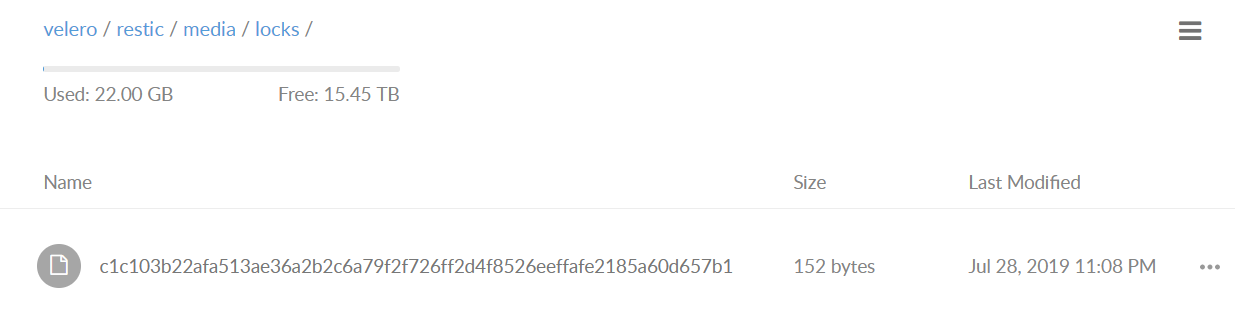
If I delete that file, redeploy velero/restic nodes, problem goes away.
Thanks!
zeieri
on 30 Jul 2019
I have the exact same issue. Removing the stale lockfile solved the problem for a few minutes, but I still have it.
I cannot delete old backups, nor create new ones.
PS
We have no CPU/Memory limits assigned to either velero or restic.
 adecarolis
on 2 Aug 2019
adecarolis
on 2 Aug 2019
Quick note, clearing the lock used to work for 24 hours, now it's about 30 minutes (varies each time).
To stop it for 24 hours, I clear the lock, restart the S3 service on FreeNAS then re-deploy the velero pod and restic pods.
Any update on a permanent fix from Velero?
zeieri
on 6 Aug 2019
@zeieri if you could attach the velero deployment logs again, that'd be helpful. We will be adding stale lock checking/clearing as a preventive measure in v1.1, but I'm not sure why you're continuing to get them.
skriss
on 6 Aug 2019
Here we are:
To note, i've stopped using schedules and the problem isn't occuring. Downside, I gotta copy/paste commands over each day. Upside, it works!
Hopefully a fix is out soon. Hard to enjoy a backup system that requires manual intervention to remain operational.
Thanks!
zeieri
on 9 Aug 2019
Can you provide the current output of velero restic repo get -o yaml?
skriss
on 12 Aug 2019
zeieri
on 13 Aug 2019
Hmm, I was hoping to find an indication of why maintenance was being run for your repository more often than every 24h, but there are no indications there or in the log. It seems like some aspect of it may be failing intermittently, then later fixing itself. It would be super-helpful if you could enable debug logging (in the velero deployment, under the container's args, add a - --log-level=debug) and send the logs again after another 24-48 hours. Hope we can get to the bottom of this!
skriss
on 13 Aug 2019
@zeieri debug logs would still be useful; it would also be great if you could upgrade to the v1.1.0 release as we've made improvements there (particularly around ensuring stale locks are cleared).
skriss
on 22 Aug 2019
Hey @skriss ,
My apologies! I was busy the last week and read your message but missed implementing it. I just added it to the container and re-implemented the schedules. I'll stay on 1.0.0 to confirm it's still broken before I upgrade to 1.1.
In other news, I read the article on upgrading to 1.1. My namespace is "velero" but it doesn't upgrade on re-deployment. Is there something else I should be doing? Article indicates it shouldn't require intervention...
Thanks for all your help!
zeieri
on 23 Aug 2019
To upgrade, you'll just need to update the image in your velero deployment & restic daemonset to be gcr.io/heptio-images/velero:v1.1.0. no other changes should be necessary
skriss
on 23 Aug 2019
Quick Update - I had mistakenly named two schedules the same piece and for some (unknown) reason, one of the schedules wound up running 48 times in 24 hours. I think it may of been because I set the schedule to "* */12 * * *". I changed it this morning to "0 */12 * * *". Just gotta give it a few days to see if it gets locked and screws up like before.
Thanks for all your help!
zeieri
on 25 Aug 2019
Quick Update, problem exists with the previous config. I've upgraded to 1.1. Going to monitor for a few days.
zeieri
on 31 Aug 2019
hey @zeieri, just following up to see how things were going here
skriss
on 12 Sep 2019
Everything is working, 0 issues on 1.1.
Thank you for all your help!
zeieri
on 17 Sep 2019
Fantastic! I'm going to go ahead and close this out, but please reach out again if you have any further issues.
skriss
on 17 Sep 2019
Related issues
 ncdc
·
27Comments
ncdc
·
27Comments
 PsychoSid
·
28Comments
ncdc
·
29Comments
PsychoSid
·
28Comments
ncdc
·
29Comments
 metal3d
·
40Comments
metal3d
·
40Comments
 mitchellmaler
·
27Comments
mitchellmaler
·
27Comments