Velero: don't error when taking a restic backup if volume is empty
restic returns an error if you try to take a snapshot of an empty directory. I think for Velero's purposes this should not be reported to the user as an error. We should either check the contents of the volume beforehand, or check for this specific error and handle it gracefully.
 skriss
All 17 comments
A few questions to reproduce this issue (with an empty snapshot directory):
- is this error on the velero server log or on the restic server log?
- do I need to deploy the ningx example?
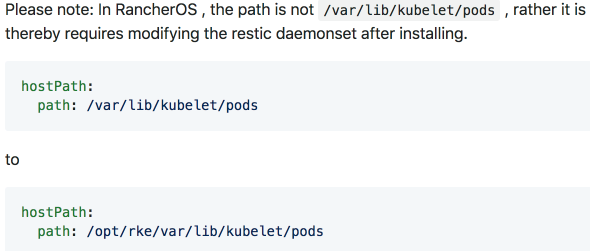
- I'm not using rancherOS, but where would the
hostPathbe?
 carlisia
on 7 May 2019
carlisia
on 7 May 2019
is this error on the velero server log or on the restic server log?
I believe you will see this error in the per-backup log, i.e velero backup logs NAME
do I need to deploy the ningx example?
That would work fine as a test case, although I think the nginx-logs dir is non-empty by default. You could easily add an emptyDir volume to the pod that doesn't have anything in it, which should surface the issue.
I'm not using rancherOS, but where would the hostPath be?
You shouldn't need to modify the hostPath - it's /var/lib/kubelet/pods by default.
skriss
on 7 May 2019
Re the hostPath, I don't see it anywhere so am wondering if I'm missing something. Where would it be so I can check?
carlisia
on 7 May 2019
it's a volume in the restic daemonset -- kubectl -n velero get daemonset restic -o yaml should show it
skriss
on 7 May 2019
Ok that's what I thought. I used the --use-restic flag but don't have any daemonset. what step did I miss?
carlisia
on 7 May 2019
that's all you should need...did you get an error?
skriss
on 7 May 2019
Nope.
carlisia
on 7 May 2019
I can run the restic server.
carlisia
on 7 May 2019
can you dump the exact velero install command you ran, the output of it, and the output of kubectl get daemonset -n velero -o yaml?
skriss
on 7 May 2019
I can run the restic server.
What do you mean by this? What server?
skriss
on 7 May 2019
velero restic server
Also, I think my copying/pasting failed and the restic flag was not included. Redoing it.
carlisia
on 7 May 2019
I suppose this is the error?
An error occurred: request failed:
NoSuchKey
carlisia
on 7 May 2019
Nope -- that looks like the log file didn't get uploaded to object storage -- is your backup Completed?
The error message you're looking for says something like "empty snapshot" -- don't remember the exact text. It's pretty clear.
skriss
on 7 May 2019
I dumped the log into a file and when searched did not find any error. I didn't deply the ningx app, just a plain deployment with the restic flag. I created a simple backup. Is there anything else that needs to be done?
carlisia
on 7 May 2019
I just repro'ed this in my test cluster. I installed velero using --with-restic, deployed the nginx example, added the backup.velero.io/backup-volumes=nginx-logs annotation to the nginx pod, and exec'ed into the pod and deleted all contents of /var/log/nginx.
Here's what I get in the backup log:
steve@steve-heptio:velero $ velero backup logs nginx-restic-empty | grep error
time="2019-05-07T15:55:01-06:00" level=info msg="1 errors encountered backup up item" backup=velero/nginx-restic-empty group=v1 logSource="pkg/backup/resource_backupper.go:265" name=nginx-deployment-84bbbd6dc7-2x4v9 namespace=nginx resource=pods
time="2019-05-07T15:55:01-06:00" level=error msg="Error backing up item" backup=velero/nginx-restic-empty error="pod volume backup failed: error running restic backup, stderr=Fatal: unable to save snapshot: snapshot is empty\n: exit status 1" error.file="/Users/steve/go/src/github.com/heptio/velero/pkg/restic/backupper.go:173" error.function="github.com/heptio/velero/pkg/restic.(*backupper).BackupPodVolumes" group=v1 logSource="pkg/backup/resource_backupper.go:269" name=nginx-deployment-84bbbd6dc7-2x4v9 namespace=nginx resource=pods
And here's an abridged version of velero backup describe for the backup:
Name:         nginx-restic-empty
Namespace:    velero
Labels:       velero.io/storage-location=default
Annotations:  <none>

Phase:  PartiallyFailed (run `velero backup logs nginx-restic-empty` for more information)

Errors:    1
Warnings:  0

...

Restic Backups:
  Failed:
    nginx/nginx-deployment-84bbbd6dc7-2x4v9: nginx-logs
If you follow all those steps and can't repro, let me know and we can pair.
skriss
on 7 May 2019
I can reproduce. But I only get an info msg with the error. I think I am on a version ahead of you. But now I can do the fix.

carlisia
on 9 May 2019
Related issues
 totemcaf
·
4Comments
totemcaf
·
4Comments
 MeghanaSrinath
·
4Comments
MeghanaSrinath
·
4Comments
 my1990
·
3Comments
my1990
·
3Comments
 doronmak
·
3Comments
doronmak
·
3Comments
 nrb
·
4Comments
nrb
·
4Comments