Vega-lite: Styling points on mark type line
The mark type line offers a boolean point property to indicate whether or not that vertices of the line should be decorated with circles. The circles created by the property seem to operate under a slightly different set of style property than expected. For instance this spec:
{
  "$schema": "https://vega.github.io/schema/vega-lite/v4.json",
  "description": "Google's stock price over time.",
  "data": {"url": "data/stocks.csv"},
  "transform": [{"filter": "datum.symbol==='GOOG'"}],
  "mark": {"type": "line", "point": true, "opacity": 0.5, "color": "red"},
  "encoding": {
    "x": {"field": "date", "type": "temporal"},
    "y": {"field": "price", "type": "quantitative"}
  }
}
Generates this image
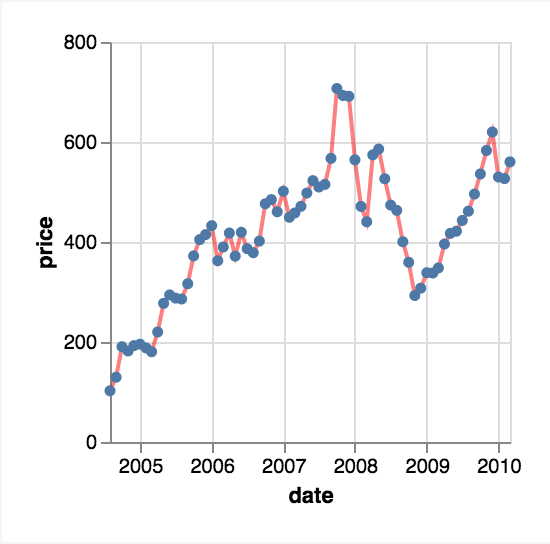
It seems like the points should be red and at 0.5 opacity as they are part of the line mark (at least that's how it reads now). While I wouldn't be surprised if there was a way to style these points and i just wasn't aware of that method (vega-lite is surprisingly big!), it seems like that type of binding of mark and style property is intuitive?
 mcnuttandrew
All 3 comments
https://vega.github.io/vega-lite/docs/line.html#properties
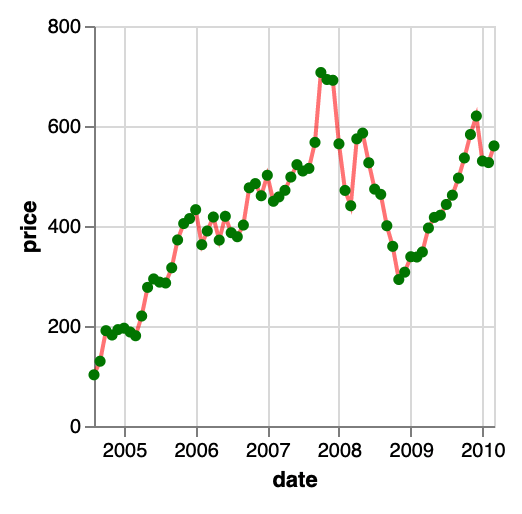
The point property can have other mark properties for the points.
For example:
{
  "$schema": "https://vega.github.io/schema/vega-lite/v4.json",
  "description": "Google's stock price over time.",
  "data": {"url": "data/stocks.csv"},
  "transform": [{"filter": "datum.symbol==='GOOG'"}],
  "mark": {"type": "line", "point": {"color": "green"}, "opacity": 0.5, "color": "red"},
  "encoding": {
    "x": {"field": "date", "type": "temporal"},
    "y": {"field": "price", "type": "quantitative"}
  }
}
 kanitw
on 16 Mar 2020
kanitw
on 16 Mar 2020
I agree that it would make sense to use the same color by default, though.
 domoritz
on 16 Mar 2020
domoritz
on 16 Mar 2020
I see
kanitw
on 24 Mar 2020
Related issues
 ijlyttle
·
3Comments
ijlyttle
·
3Comments
 rmales
·
3Comments
kanitw
·
3Comments
kanitw
·
4Comments
rmales
·
3Comments
kanitw
·
3Comments
kanitw
·
4Comments
 learnwithratnesh
·
4Comments
learnwithratnesh
·
4Comments
Most helpful comment
I agree that it would make sense to use the same color by default, though.