Vega-lite: Field name doesn't accept two or more dots
I am having trouble with field names that have two or more dots.
According to the field documentation (https://vega.github.io/vega/docs/types/#Field), _To specify field names that contain dots but are not nested lookups, escape the dot inline ("my\\.field") or enclose the field name in brackets ("[my.field]")._
I can do this only with one dot. The following example (a.b) works well in the Vega Editor:
{
  "data": {
    "values": [
      {
        "color": "default",
        "a.b": 28
      }
    ]
  },
  "mark": "bar",
  "encoding": {
    "x": {
      "field": "color",
      "type": "nominal"
    },
    "y": {
      "field": "[a.b]",
      "type": "quantitative"
    }
  }
}
However, I can't get something like a.b.c working, neither with
"y": {
      "field": "[a.b.c]",
      "type": "quantitative"
    }
nor with
"y": {
      "field": "a\\.b\\.c",
      "type": "quantitative"
    }
Is this how it is supposed to work, or is this a bug?
Hope I was clear, thanks!
 juanfkt93
All 6 comments
I have the same issue
 fgario
on 18 Sep 2019
fgario
on 18 Sep 2019
I'll take a look. Can you make a small example and illustrate what doesn't work?
 domoritz
on 18 Sep 2019
domoritz
on 18 Sep 2019
Thanks @domoritz!
Well, for example the following doesn't render a bar, like the first example.
{
"data": {
"values": [
{
"color": "default",
"a.b.c": 28
}
]
},
"mark": "bar",
"encoding": {
"x": {
"field": "color",
"type": "nominal"
},
"y": {
"field": "a\\.b\\.c",
"type": "quantitative"
}
}
}
I also tried the following, with no luck:
"field": "[a.b.c]",
juanfkt93
on 18 Sep 2019
Ahh, looks like we only replace the first ..
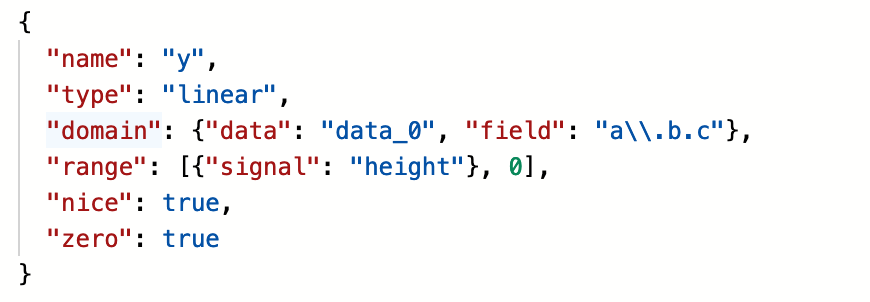
> 'a.b.c'.replace('.','\\.')
"a\\.b.c"
We need
> 'a.b.c'.replace(/\./g,'\\.')
"a\\.b\\.c"
Great, thanks!
juanfkt93
on 19 Sep 2019
Thank you for the bug report.
domoritz
on 19 Sep 2019
Related issues
 learnwithratnesh
·
4Comments
learnwithratnesh
·
4Comments
 paintdog
·
4Comments
paintdog
·
4Comments
 kanitw
·
3Comments
kanitw
·
3Comments
 iliatimofeev
·
3Comments
kanitw
·
3Comments
iliatimofeev
·
3Comments
kanitw
·
3Comments
Most helpful comment
Ahh, looks like we only replace the first
..We need