Vega-lite: Add support for clearing selection
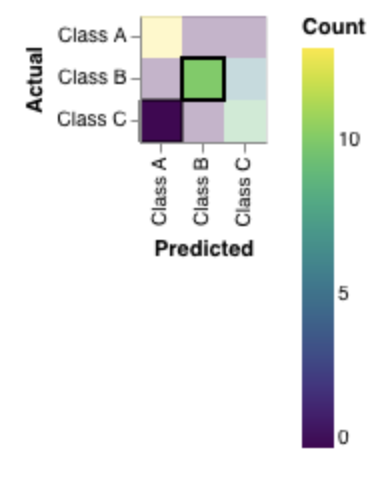
1) Cannot deselect marks in tabular heatmaps
As deselection is only triggered on the plot area, there is no area to click to deselect
{
  "data": {
    "values": [
      {
        "Actual": "Class A",
        "Predicted": "Class A",
        "Count": 13
      },
      {
        "Actual": "Class A",
        "Predicted": "Class B",
        "Count": 0
      },
      {
        "Actual": "Class A",
        "Predicted": "Class C",
        "Count": 0
      },
      {
        "Actual": "Class B",
        "Predicted": "Class A",
        "Count": 0
      },
      {
        "Actual": "Class B",
        "Predicted": "Class B",
        "Count": 10
      },
      {
        "Actual": "Class B",
        "Predicted": "Class C",
        "Count": 6
      },
      {
        "Actual": "Class C",
        "Predicted": "Class A",
        "Count": 0
      },
      {
        "Actual": "Class C",
        "Predicted": "Class B",
        "Count": 0
      },
      {
        "Actual": "Class C",
        "Predicted": "Class C",
        "Count": 9
      }
    ]
  },
  "encoding": {
    "y": {
      "field": "Actual",
      "type": "nominal"
    },
    "x": {
      "field": "Predicted",
      "type": "nominal"
    },
    "color": {
      "field": "Count",
      "type": "quantitative",
      "scale": {
        "zero": true
      }
    }
  },
  "layer": [
    {
      "mark": {
        "type": "rect",
        "cursor": "pointer",
        "filled": true
      },
      "selection": {
        "selected": {
          "type": "multi"
        },
        "highlighted": {
          "type": "single",
          "empty": "none",
          "on": "mouseover"
        }
      },
      "encoding": {
        "fillOpacity": {
          "condition": {
            "test": {
              "and": [
                "length(data(\"selected_store\"))",
                {
                  "not": {
                    "selection": "selected"
                  }
                }
              ]
            },
            "value": 0.3
          }
        }
      }
    },
    {
      "transform": [
        {
          "filter": {
            "or": [
              {
                "selection": "highlighted"
              },
              {
                "and": [
                  "length(data(\"selected_store\"))",
                  {
                    "selection": "selected"
                  }
                ]
              }
            ]
          }
        }
      ],
      "mark": {
        "type": "rect",
        "cursor": "pointer",
        "opacity": 1,
        "filled": true,
        "stroke": "black"
      },
      "encoding": {
        "strokeWidth": {
          "condition": {
            "test": {
              "and": [
                "length(data(\"selected_store\"))",
                {
                  "selection": "selected"
                }
              ]
            },
            "value": 2
          },
          "value": 1
        }
      }
    }
  ],
  "config": {
    "axis": {
      "zindex": 0
    },
    "scale": {
      "bandPaddingInner": 0,
      "bandPaddingOuter": 0
    },
    "range": {
      "ramp": {
        "scheme": "yellowgreenblue"
      }
    }
  }
}
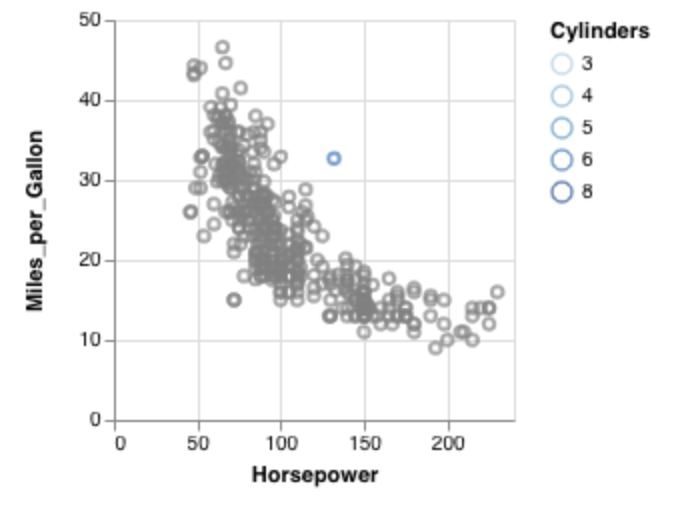
2) Similarly, when nearest: true is enabled, there is also no way to deselect mark.
{
  "$schema": "https://vega.github.io/schema/vega-lite/v3.json",
  "description": "Drag out a rectangular brush to highlight points.",
  "data": {"url": "data/cars.json"},
  "selection": {
    "sel": {
      "type": "single",
      "nearest": true
    }
  },
  "mark": "point",
  "encoding": {
    "x": {"field": "Horsepower", "type": "quantitative"},
    "y": {"field": "Miles_per_Gallon", "type": "quantitative"},
    "color": {
      "condition": {"selection": "sel", "field": "Cylinders", "type": "ordinal"},
      "value": "grey"
    }
  }
}
 kanitw
All 10 comments
@kanitw Changing field_tuple signal's source from scope to view seems to generate the expected behavior. That is, changing the deafult source to view in the below line
https://github.com/vega/vega-lite/blob/b4bc7fe2594bedb446a0a17d49daf418b6030a62/src/compile/selection/parse.ts#L45
Is there a case where we would want to avoid using view source? I ran all interactive visualizations from Vega-Lite examples. All of them worked as expected except for the Multi-view Crossfilter example. Would it be a good idea to change the default scope to view and refactor interval selection accordingly (so that examples like Crossfilter are supported)?
 djbarnwal
on 5 Dec 2018
djbarnwal
on 5 Dec 2018
@arvind?
 domoritz
on 5 Dec 2018
domoritz
on 5 Dec 2018
This issue is tricky to address because we don't have true event capturing/bubbling (vega/vega-scenegraph#53). As a result, we've had to rely on the scope source to ensure that signals only fire for the subplot a user is currently interacting with. If we were to switch it to view, we would find (as @djbarnwal) has that when selections are defined within faceted/repeated views, all signals within each subplot fire during the same cycle and would produce conflicting effects on the selection state. Moreover, once we introduced interactive legends (#4317), the view sourced signals will also fire over legends (which have a separate backing data structure) and pollute the selection state.
I've proposed a way of stopping event propagation in vega/vega-scenegraph#66 that should help us properly support this feature request.
In the interim, one workaround might be to say that for discrete selections, if only one item is in the selection store, clicking a mark that is selected would toggle the item out of the store. I'm not fully convinced that this behavior is right -- and I would need to test it out to be sure -- but I'm not able to think of any other viable workarounds right now.
 arvind
on 7 Dec 2018
arvind
on 7 Dec 2018
In the interim, one workaround might be to say that for discrete selections, if only one item is in the selection store, clicking a mark that is selected would toggle the item out of the store. I'm not fully convinced that this behavior is right -- and I would need to test it out to be sure -- but I'm not able to think of any other viable workarounds right now.
This sounds like a reasonable option.
Another option is to introduce a separate event that triggers the reset. For example, we could let one set a new property clearOn"clear" to "dblclick" so that users can reset on double click (which is quite common in many application.)
I don't think there is one correct answer for any of these so the right thing to do is probably providing a syntax to let users customize these behaviors.
For example, I could imagine having a clear property (instead of clearOn) where clear can be a string "toggle" or an object defining event streams {"on": "dblclick"}.
Finally, another reasonable option for people who build applications on top of Vega-Lite is to have a "Clear Selection" button and have the button calls a selection API. (For application use cases, this will provide the most obvious affordance compared to the two options above.)
kanitw
on 18 Dec 2018
Oh and for nearest: true case, having nearest's distance limit could help mitigate this.
kanitw
on 18 Dec 2018
I start wondering if clear is a better term than reset -- I'll amend the comment above.
kanitw
on 18 Dec 2018
This issue is extremely critical as I'm prototyping more examples.
Compared to "toggle", clear: {"on": "dbclick"}
For example, a line chart with rule on hover would need a good way to hide the rule on mouseout.
It seems like we can easily add the following to the tuple signal (highlighted_tuple in this example)
{
  "events": [{"source": "scope", "type": "mouseout"}],
  "update": "null",
  "force": true
}
and get the right mouseout effect.
kanitw
on 2 Mar 2019
I think supporting clear should be straightforward enough, and a good first feature for @allenjlee to take a shot at. We'll want to make sure that clear is not only supported by discrete selections (single/multi) but interval selections as well.
Regarding syntax, I'm not sure we need the extra nesting? Perhaps just "clear": "dblclick" is sufficient. This would mirror the syntax for the other transforms ("toggle", "translate", "zoom", etc.).
arvind
on 2 Mar 2019
Regarding syntax, I'm not sure we need the extra nesting? Perhaps just "clear": "dblclick" is sufficient. This would mirror the syntax for the other transforms ("toggle", "translate", "zoom", etc.).
Yep, that totally makes sense, esp. that "toggle" already exists. (I didn't realize that at first.)
a good first feature for @allenjlee to take a shot at
I agree this would be a good first feature to tackle as it's not too complicated.
That said, I'd like to note that I'd need this soon (likely in a week or two).
@allenjlee -- would you have time to work on this week? If so, I think it'd be a fun issue to tackle.
Note that since I will need it soon, I might take it over next weekend or so if we don't have it yet. For now, I'll work on other stuff first so you get to work on this. :)
In a follow-up PR, it might be worth defining a rules for default "clear" too.
(For example, a natural "clear" for "on": "mouseover" would be "mouseout". "dblclick" might be a reasonable default for "on": "click" (though I'm not as confident about the latter.) To make PR small and easier to get done, I think the first PR should just focus on "clear" support without defaults (and do the defaults as a follow-up PR).
kanitw
on 2 Mar 2019
Yes, @kanitw I will have time to work on it this week. Will try to take a look at it a bit today and after Wednesday. Will keep you updated if I'm not able to complete it by this Saturday.
 allenjlee
on 3 Mar 2019
allenjlee
on 3 Mar 2019
Related issues
kanitw
·
4Comments
domoritz
·
4Comments
 infai-feineis
·
3Comments
infai-feineis
·
3Comments
 learnwithratnesh
·
4Comments
domoritz
·
3Comments
learnwithratnesh
·
4Comments
domoritz
·
3Comments
Most helpful comment
Yes, @kanitw I will have time to work on it this week. Will try to take a look at it a bit today and after Wednesday. Will keep you updated if I'm not able to complete it by this Saturday.