Vee-validate: Error on date_format on inputs with type="date"
Versions
- vee-validate: [email protected]
- vue: [email protected]
Describe the bug
I attempted to use a minimal bundle - https://baianat.github.io/vee-validate/concepts/bundle-size.html#minimal-bundle, however, doing so caused a bug with chrome where the chrome format was not compatible with the validation format that is automatically assigned to type="date" inputs.
It seems that Vee-Validate is validating based on the "Presentation format" rather than the "Wire format". (https://stackoverflow.com/a/9519493)
If you see the screenshot attached, an error is being given even though the underlying value is in the correct format.
It seems that the date validation is automatically applied to inputs with the type date.

To reproduce
Steps to reproduce the behavior:
- Use the minimal bundle below.
- Add an input field with a type="date"
- Fill in the date.
Expected behavior
An error message will display even though the date is valid. It seems its being validated based on presentation format rather than the "wire format" (https://stackoverflow.com/a/9519493)
Demo link
Due to using npm I couldnt setup a codepen demo..
Desktop (please complete the following information):
- OS: Ubuntu 17.10
- Browser Tested on Chrome : Version 69.0.3497.81 (Official Build) (64-bit) & Firefox 61.0.1 (64-bit)
The exact code I used:
import { Validator, install as VeeValidate } from 'vee-validate/dist/vee-validate.minimal.esm.js';
import { required, min, max, confirmed, email, date_format} from 'vee-validate/dist/rules.esm.js';
import veeEn from 'vee-validate/dist/locale/en';

// Add the rules you need.
Validator.extend('required', required);
Validator.extend('confirmed', confirmed);
Validator.extend('email', email);
Validator.extend('date_format', date_format);
Validator.extend('min', min);
Validator.extend('max', max);

// Merge the messages.
Validator.localize('en', veeEn);

Vue.use(VeeValidate);
 JamesAnelay
All 7 comments
I'm having the same problem. Apparently is a problem with date_format and minimal bundle, since my input is type="text" and still isn't working. If I use the full bundle it works.
 hertz1
on 29 Jan 2019
hertz1
on 29 Jan 2019
Since the minimal bundle is critical for my app and I need date_format validation, I decided to investigate the problem.
The validate function of the rule expects an object with the format property (date_format.js#L3), which is the result of the _convertParamArrayToObj function (validator.js#L581).
Using the browser debugger we can see that an array being passed to the validation function, instead of an object:
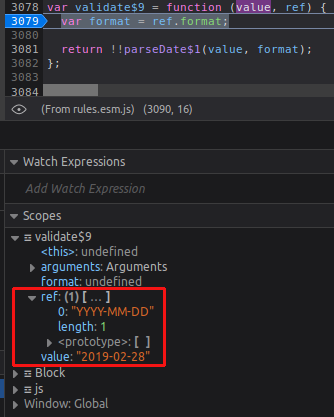
This array in being returned by the _convertParamArrayToObj function after receiving undefined in the paramNames variable, which is the return of the getParamNames function. (validator.js#L525)
So in getParamNames it returns the paramNames property of the rule (ruleContainer.js#L37), which is undefined.
The paramNames property is set in the extend method, but it tries to the get it from the options argument. (validator.js#L140).
So if I import the rule like this, it'll work:
import { Validator, install as VeeValidate } from 'vee-validate/dist/vee-validate.minimal.esm.js';
import { date_format } from 'vee-validate/dist/rules.esm.js';
Validator.extend('date_format', date_format, { paramNames: date_format.paramNames });
Acording to the docs, this is expected for custom rules, but since date_format is a "native" rule, maybe it'd be nice to auto-detect the paramNames property that is defined in the rule (date_format.js#L11), since it's not very clear in the docs which rules need paramNames (I had to debug the entire application just to figure this out 😁).
hertz1
on 5 Feb 2019
Sorry for taking a while to fix this, The issue was fixed and should be available in the next release.
 logaretm
on 12 Mar 2019
logaretm
on 12 Mar 2019
Thanks for looking at this @logaretm I can confirm that IF no additional rules are applied this does indeed fix the original issue... However, if I add even a simple rule such as v-validate="'required'" to a type="date" input on 2.2.0 then I get the following error in the console and the validation rules e.g require in this case fail to work.
RangeError: `options.awareOfUnicodeTokens` must be set to `true` to use `YYYY` token; see: https://git.io/fxCyr
    at throwProtectedError (vee-validate.esm.js:6378)
    at parse (vee-validate.esm.js:8509)
    at parseDate$1 (vee-validate.esm.js:8637)
    at validate$9 (vee-validate.esm.js:9086)
    at Validator._test (vee-validate.esm.js:3508)
    at vee-validate.esm.js:3727
    at Array.some (<anonymous>)
    at Validator._validate (vee-validate.esm.js:3725)
    at Validator.attach (vee-validate.esm.js:3093)
    at ScopedValidator.attach (vee-validate.esm.js:2654)
Current chrome version if it helps : Version 70.0.3538.77 (Official Build) (64-bit)
JamesAnelay
on 26 Mar 2019
@JamesAnelay Sorry I didn't notice your comment, I fixed this in aea95e25
logaretm
on 8 Apr 2019
@logaretm Is it not updated in official npm registry? I am still getting the error mentioned by @JamesAnelay
 piyushbeli
on 22 Apr 2019
piyushbeli
on 22 Apr 2019
I can confirm that comment here fixes the issue. Please update the document.
piyushbeli
on 22 Apr 2019
Related issues
 parweb
·
3Comments
parweb
·
3Comments
 MaxMilton
·
3Comments
MaxMilton
·
3Comments
 DanielPe05
·
3Comments
DanielPe05
·
3Comments
 jagasan
·
3Comments
jagasan
·
3Comments
 Etheryte
·
3Comments
Etheryte
·
3Comments
Most helpful comment
@JamesAnelay Sorry I didn't notice your comment, I fixed this in aea95e25