Vee-validate: updating to 2.1.0-beta.11 from 2.0.9 for nuxt fails with Cannot read property 'i18nDriver' of undefined
Versions
- vee-validate: 2.1.0-beta-11
- vue: 2.5.17
- nuxt 1.4.2
Describe the bug
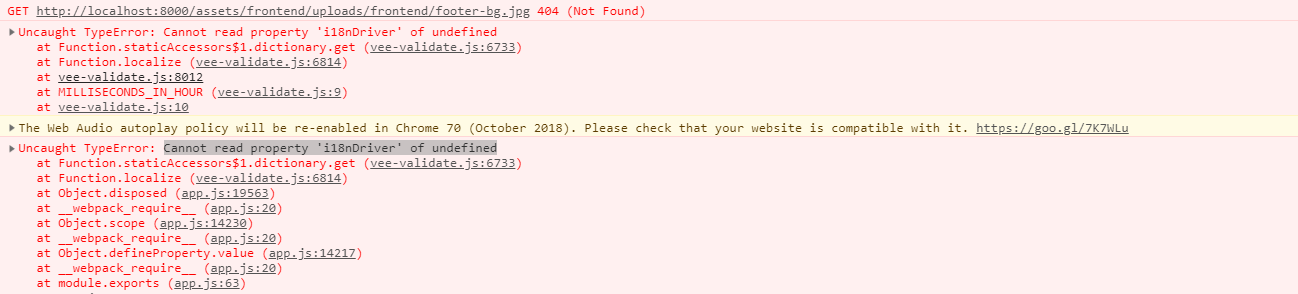
Nuxt build fails with error Cannot read property 'i18nDriver' of undefined
To Reproduce
Steps to reproduce the behavior:
- update vee-validate to 2.1.0-beta.11 from
2.0.9 - (be sure to clear node_modules to remove cache of 2.0.9)
- rerun nuxt build/
nuxt
Expected behavior
Nuxt should build properly.
 denistsoi
All 10 comments
Can resolve by reverting vee-validate to 2.0.9 and locking version in package.json
denistsoi
on 12 Oct 2018
Sorry for the inconvenience, From the release notes:
The installation method for vee-validate has been updated to be more future-proof and as such it introduces a new caveat, you now need to install the plugin before attempting to use its features like Validator.extend. This is usually trivial and shouldn't affect most setups.
tldr; Make sure you are calling Vue.use(VeeValidate); before interacting with vee-validate.
You need to defer any rule extending/localization until vee-validate is installed. I will try to see if it can be avoided/deferred by the plugin in the next release.
Here is a small snippet of a before/after of vee-validate.js plugin for some of our nuxt.js projects:
// This would fail.
import Vue from 'vue';
import VeeValidate from 'vee-validate';
import { IsEmailTaken } from '~/graphql/auth.gql';
// Extending before calling Vue.use
VeeValidate.Validator.extend('unique_email', {
getMessage (field) {
return `email is already taken.`;
},
async validate(value, [exception] = []) {
const { data } = await Vue.$api.query({
query: IsEmailTaken,
variables: { email: value, exception }
});
return {
valid: !data.isEmailTaken,
data: { email: value }
};
}
});
let installed = false;
let localized = { en: false, ar: false };
// export a function since we want access to i18n instance.
export default ({ app }) => {
if (!installed) {
Vue.use(VeeValidate, {
inject: false,
i18n: app.i18n
});
installed = true;
}
const locale = app.i18n.locale;
// skip if already localized.
if (localized[locale]) return;
// dynamically load a vee-validate locale
return import(`vee-validate/dist/locale/${locale}`).then(localeObj => {
VeeValidate.Validator.localize({ [locale]: localeObj });
localized[locale] = true;
});
};
// refactored into this, works!
import Vue from 'vue';
import VeeValidate from 'vee-validate';
import { IsEmailTaken } from '~/graphql/auth.gql';
// wrapped into a function.
function installRules () {
VeeValidate.Validator.extend('unique_email', {
getMessage(field) {
return `email is already taken.`;
},
async validate(value, [exception] = []) {
const { data } = await Vue.$api.query({
query: IsEmailTaken,
variables: { email: value, exception }
});
return {
valid: !data.isEmailTaken,
data: { email: value }
};
}
});
}
let installed = false;
let localized = { en: false, ar: false };
export default ({ app }) => {
if (!installed) {
Vue.use(VeeValidate, {
inject: false,
i18n: app.i18n
});
// extend the rules after vee-validate is installed.
installRules();
installed = true;
}
const locale = app.i18n.locale;
// skip if already localized.
if (localized[locale]) return;
// dynamically load a vee-validate locale
return import(`vee-validate/dist/locale/${locale}`).then(localeObj => {
VeeValidate.Validator.localize({ [locale]: localeObj });
localized[locale] = true;
});
};
 logaretm
on 12 Oct 2018
logaretm
on 12 Oct 2018
same issue Here
 powerpkstart
on 13 Oct 2018
powerpkstart
on 13 Oct 2018
As logaretm said, You need to defer any rule extending/localization until vee-validate is installed. For example
// wrong
Validator.localize('ar', ar);
Vue.use(VeeValidate);

// correct
Vue.use(VeeValidate);
Validator.localize('ar', ar);
 favoyang
on 15 Oct 2018
favoyang
on 15 Oct 2018
How can we use vee-validate and the verify function on the server now?
 P4sca1
on 26 Oct 2018
P4sca1
on 26 Oct 2018
@P4sca1 vee-validate was never meant to be used on the server since it always had a dependency on Vue. But I have implemented another way that removes this limitation.
Will be released soon with the new release.
logaretm
on 26 Oct 2018
I am server-rendering my Vue application and the web server + api are in the same project.
I was using vee-validate with vue on the client side and vee-validate's verify function on the server to be able to use the same validation rules, which used to work fine.
Will the next release be supporting this strategy again? (Asking because if not, I would start now to redo my logic with another library on the server)
P4sca1
on 26 Oct 2018
Yes, the new release will address having to install vee-validate. The validator should be working again without having to install the plugin.
logaretm
on 26 Oct 2018
This is working with the new release, however would it be possible to still get i18n translations for the verify result?
P4sca1
on 30 Oct 2018
If you are using VueI18n it's unlikely, if you plan to use the built-in i18
driver then it should work.
On Tue, 30 Oct 2018, 19:16 Pascal Sthamer, notifications@github.com wrote:
This is working with the new release, however would it be possible to
still get i18n translations for the verify result?—
You are receiving this because you modified the open/close state.
Reply to this email directly, view it on GitHub
https://github.com/baianat/vee-validate/issues/1646#issuecomment-434389542,
or mute the thread
https://github.com/notifications/unsubscribe-auth/AF-KSkeJSuqMQFIXPR9itQGncyNwy-3dks5uqImAgaJpZM4XYzo1
.
logaretm
on 30 Oct 2018
Related issues
 yyyuuu777
·
3Comments
yyyuuu777
·
3Comments
 parweb
·
3Comments
parweb
·
3Comments
 kidox
·
3Comments
kidox
·
3Comments
 jagasan
·
3Comments
jagasan
·
3Comments
 YamenSharaf
·
3Comments
YamenSharaf
·
3Comments
Most helpful comment
As logaretm said, You need to defer any rule extending/localization until vee-validate is installed. For example