Vee-validate: Date 08/10/2000 in DD/MM/YYYY format is invalid
Versions
- vee-validate: 2.1.0-beta.9
- vue: 2.5.2
Describe the bug
I have fields set in v-validate="{date_format: 'DD/MM/YYYY'}", but when I enter the date 10/8/2000 the validation returns an error saying that the date is not in DD/MM/YYYY format
To Reproduce
Steps to reproduce the behavior:
- Go to https://baianat.github.io/vee-validate/guide/rules.html#date-format. In my browser, the default format is DD/MM/YYYY (pt-br)
- Type the date 08/10/2000
- See error
Demo Link

Desktop (please complete the following information):
- OS: [e.g. Windows]
- Browser [chrome]
- Version [69]
 woodyalan
All 16 comments
I tested your examples on Windows Chrome and Firefox and it's working fine for me, are you sure about your code samples? Are you leaving out any additional details about the issue?
 logaretm
on 4 Oct 2018
logaretm
on 4 Oct 2018
I have the same problem.
The date he used does not work here either.
Another example is: 04/11/2018
 viniazvd
on 8 Oct 2018
viniazvd
on 8 Oct 2018
Same here, i have another dates too:
08/10/2000, 06/10/1996, 06/10/1997, ...
http://prntscr.com/l5o7v0
@woodyalan, @viniazvd and i are brazilians, maybe have some connection with the language of the browser
 georgerodrigues
on 13 Oct 2018
georgerodrigues
on 13 Oct 2018
Have the same problem. I noticed that seems to occur only in chrome, using firefox some dates validate without any problem.
 gdmramos
on 18 Oct 2018
gdmramos
on 18 Oct 2018
@logaretm the reproduction has been updated, for me the problem still happens:

woodyalan
on 19 Oct 2018
I can't reproduce it by using your link but I encountered similar issue with date_format.
Not sure if it's programmatic validation only but that's my case. I encountered it by using $validator.attach()
Steps to reproduce:
- Import
vee-validate.minimal.esmpost beta.9 - Name import a rule that relies on
paramNamesfromrules.esm(date_formatfor example) - Imported rule is an object
{ validate, options, paramNames }
_Prior to beta.9 it was { validate, options } but there was no dependency onparamNames_ - Since you've never had to write a complex rule that takes a parameter (which is my case 😛) you simply use
Validator.extend('date_format', date_format)and it doesn't work since you've lostparamNames
It's not a bug, just a change in API
Change was made in https://github.com/baianat/vee-validate/commit/21657547b1db00f28bb68d9216243d7ca962786d#diff-41be0caf6b7db8122ef83bff240e0222
Solution:
.extend doesn't handle object argument you have to do it either line by line or adopt @logaretm code from https://github.com/baianat/vee-validate/blob/master/src/index.js#L7-L10
The change is mentioned in documentation and briefly in beta.9 changelog
I suggest making the change more explicit for the rules that must have paramNames
I don't want to do a PR as I'm having a hard time understanding API internals and limitations of old vs new.
 mrv1k
on 23 Oct 2018
mrv1k
on 23 Oct 2018
I'm having the same problem with the date 25/10/1992 (firefox and chrome on linux)

 leonatoieiri
on 25 Oct 2018
leonatoieiri
on 25 Oct 2018
I have the same issue with the date 04/11/2018.
Versions
- vee-validate: 2.1.2
- vue: 2.5.17
Describe the bug
I have fields set in v-validate="'required|date_format:DD/MM/YYYY'" but when I enter the date 04/11/2018 the validation returns an error saying that the date is not in DD/MM/YYYY format.
To Reproduce
- Go to https://baianat.github.io/vee-validate/guide/rules.html#date-format
- Type the date 04/11/2018
- See error
Desktop
- OS: Windows 10
- Browser: Chrome (pt_BR)
- Version: 70.0.3538.77
 fabianosobreira
on 4 Nov 2018
fabianosobreira
on 4 Nov 2018
Same here, i have another dates too:
08/10/2000, 06/10/1996, 06/10/1997, ...
http://prntscr.com/l5o7v0
@woodyalan, @viniazvd and i are brazilians, maybe have some connection with the language of the browser
Given the people who reported this problem really seems to have some connection with environments configured with the Brazilian Portuguese language.
fabianosobreira
on 6 Nov 2018
I have rule for validation:
buyerBirthdayRules () {
        let maxDate = new Date();
        maxDate.setFullYear(maxDate.getFullYear() - 18);
        maxDate = helpers.formatDate(maxDate, true)

        return `required|date_format:DD.MM.YYYY|after:01.01.1900|before:${maxDate}`;
},
Input any dates triggering error: The buyerBirthday must be after 01.01.1900. Even if I input 01.01.1990 of near dates.
I get error only in Firefox 63. In Chrome 70 all ok.
 glutaminefree
on 6 Nov 2018
glutaminefree
on 6 Nov 2018
This issue is a pain to debug properly since firefox and chrome seem to have different opinions on what new Date() should return. This offsets the date validation.
This is related to #1693
VeeValidate uses [email protected] to validate dates, but the library isn't equipped (yet) to deal with timezones and overflown dates eg: 22/33/2013. So we account for that by parsing the date, then formatting the parsed result and match it with the input. If nothing changes then its a valid date, if something changed (day, hour, or whatever) then the date was manipulated in some way (overflow or timezone offset by new Date()) the latter wasn't accounted for.
The new versions seem to address this issue, as the offset isn't observed in firefox anymore, there is a PR that introduces the pkg update #1698 Which introduces a breaking change to the format.
I would appreciate testing the PR against your environments:
- Clone the repo
- Checkout the
update-date-fnsbranch. - install the dependencies:
yarnand build the project:yarn build - Run the local docs version:
yarn docs:dev - Test the page
logaretm
on 7 Nov 2018
This issue is a pain to debug properly since firefox and chrome seem to have different opinions on what
new Date()should return. This offsets the date validation.This is related to #1693
VeeValidate uses
[email protected]to validate dates, but the library isn't equipped (yet) to deal with timezones and overflown dateseg: 22/33/2013. So we account for that by parsing the date, then formatting the parsed result and match it with the input. If nothing changes then its a valid date, if something changed (day, hour, or whatever) then the date was manipulated in some way (overflow or timezone offset bynew Date()) the latter wasn't accounted for.The new versions seem to address this issue, as the offset isn't observed in firefox anymore, there is a PR that introduces the pkg update #1698 Which introduces a breaking change to the format.
I would appreciate testing the PR against your environments:
* Clone the repo

* Checkout the `update-date-fns` branch.

* install the dependencies: `yarn` and build the project: `yarn build`

* Run the local docs version: `yarn docs:dev`

* Test the page
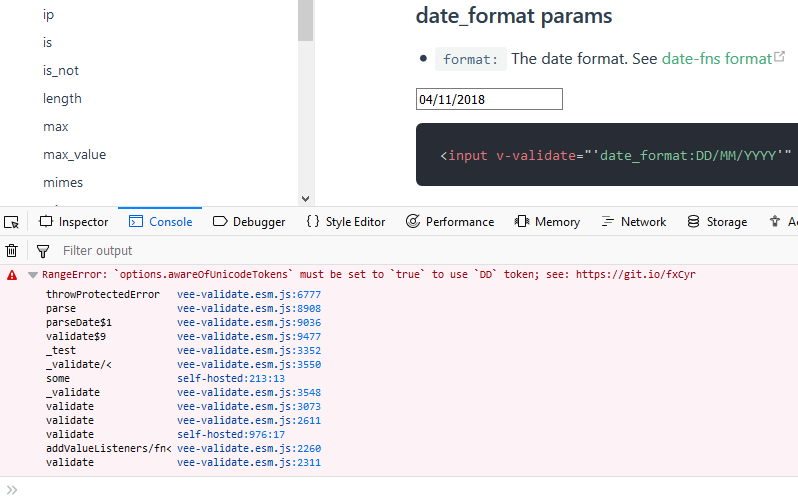
It looks like in this branch the validation stopped working.
Tested on:
Firefox 63.0.1 (locale pt_BR) - Windows 10
Chrome 70.0.3538.77 (locale pt_BR) - Windows 10
fabianosobreira
on 7 Nov 2018
I believe the problem is just the documentation. Changing date_format from "DD/MM/YYYY" to "dd/MM/yyyy" worked fine.
fabianosobreira
on 7 Nov 2018
@fabianosobreira yep the docs haven't been updated yet in the branch, it "breakingly" changes the format.
logaretm
on 8 Nov 2018
I am having the same problem. Valid dates are not validating. Has this been merged in yet?
 danielclariondoor
on 5 Feb 2019
danielclariondoor
on 5 Feb 2019
closed by #1698
logaretm
on 12 Mar 2019
Related issues
 DanielPe05
·
3Comments
DanielPe05
·
3Comments
 Youdaman
·
3Comments
Youdaman
·
3Comments
 YamenSharaf
·
3Comments
YamenSharaf
·
3Comments
 MaxMilton
·
3Comments
MaxMilton
·
3Comments
 saintplay
·
3Comments
saintplay
·
3Comments
Most helpful comment
Same here, i have another dates too:
08/10/2000, 06/10/1996, 06/10/1997, ...
http://prntscr.com/l5o7v0
@woodyalan, @viniazvd and i are brazilians, maybe have some connection with the language of the browser