Vee-validate: data-vv-id not updated on properly on redraw.
Versions:
- VueJs: 2.3.3
- Vee-Validate: 2.0.0-rc.17 && 2.0.0-rc.23
Description:
data-vv-id does not change when a field is re-arraged on the screen.
Inside of a table I use a sort function and all the values for the input field are changed except for the data-vv-id.
Steps To Reproduce:
Please message me with @ if more info or a demo is required. Will need to put something together to demonstrate it that isn't my original code.
 Dahje
Dahje
All 4 comments
@Dahje data-vv-id is always static for the same field, it will never change. The plugin uses it to identify the element/component against the in memory field. What are you trying to use the data-vv-id for?
 logaretm
on 21 Nov 2017
logaretm
on 21 Nov 2017
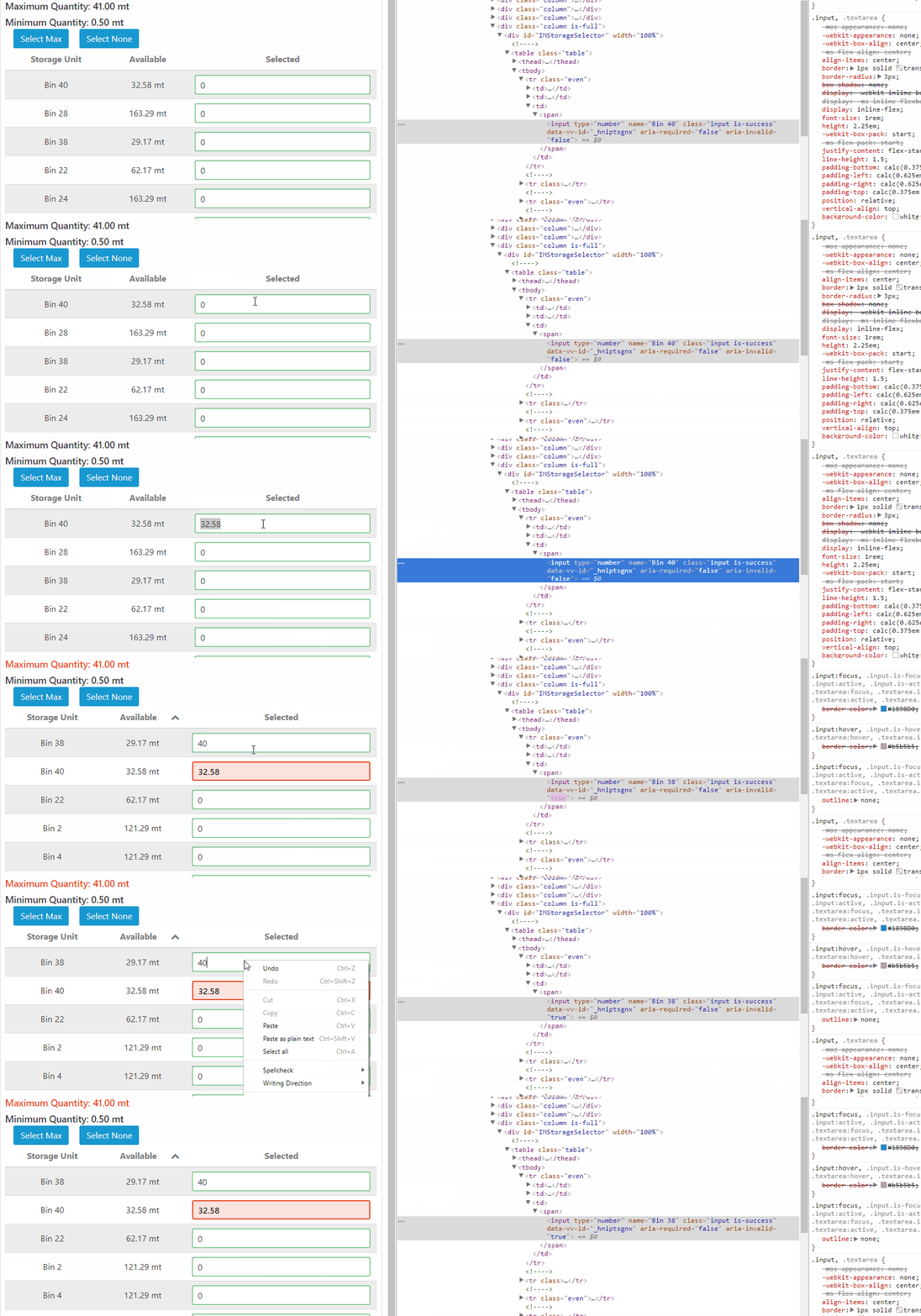
Hope this explains what is happening well enough. As you can see, the name and value move, but the data-vv-id stays and does not move with the rest of the values associated with the input box.
Just FYI I have it set to check for a max value that is equal to amount available in the row. I used 40 as it is greater than 32.58mt.
Dahje
on 21 Nov 2017
If you are using v-for try to add key attribute on each field and bind it to some unique value for each input like an ID. This is not related to vee-validate but rather to how Vue reuses the inputs.
logaretm
on 21 Nov 2017
You were 100% correct on this! I was using a v-for in my table row construction, and did have v-bind:key set. However I found a bug in my table settings where the default settings and props (passed in) settings were not being combined properly and my v-bind:key was being set to undefined. Thanks for the help!
Dahje
on 22 Nov 2017
Related issues
 parweb
·
3Comments
parweb
·
3Comments
 kidox
·
3Comments
kidox
·
3Comments
 saintplay
·
3Comments
saintplay
·
3Comments
 biapar
·
3Comments
biapar
·
3Comments
 YamenSharaf
·
3Comments
YamenSharaf
·
3Comments
Most helpful comment
If you are using
v-fortry to addkeyattribute on each field and bind it to some unique value for each input like an ID. This is not related to vee-validate but rather to how Vue reuses the inputs.