Host Environment
- OS: Windows 10
- Compiler: vcpkg install curl:x64-windows
To Reproduce
Steps to reproduce the behavior:
D:\Root\vcpkg>vcpkg install curl:x64-windows
Failure logs
D:\Root\vcpkg>vcpkg list
curl:x86-windows 7.73.0#1 A library for transferring data with URLs
curl[non-http]:x86-windows Enables protocols beyond HTTP/HTTPS/HTTP2
curl[schannel]:x86-windows SSL support (Secure Channel)
curl[ssl]:x86-windows Default SSL backend
curl[sspi]:x86-windows SSPI support
curl[winssl]:x86-windows Legacy name for schannel
curlpp:x86-windows 2018-06-15-3 C++ wrapper around libcURL
zlib:x64-windows 1.2.11#9 A compression library
zlib:x86-windows 1.2.11#9 A compression library
D:\Root\vcpkg>
/* CURL X86 SUCCESSFULLY BUILT AND USED IN VC2019
NEED 64 BIT LIB
*/
D:\Root\vcpkg>vcpkg install curl:x64-windows
Computing installation plan...
The following packages will be built and installed:
curl[core,non-http,schannel,ssl,sspi,winssl]:x64-windows
- zlib[core]:x64-windows
Additional packages (*) will be modified to complete this operation.
Detecting compiler hash for triplet x64-windows...
Starting package 1/2: zlib:x64-windows
Building package zlib[core]:x64-windows...
Could not locate cached archive: C:\Users\joshj\AppData\Local\vcpkg\archives\75\754327760bb3df9aedbcd853251661c4a31832d4.zip
-- Using cached D:/Root/vcpkg/downloads/zlib1211.tar.gz
-- Cleaning sources at D:/Root/vcpkg/buildtrees/zlib/src/1.2.11-63309e48e5.clean. Use --editable to skip cleaning for the packages you specify.
-- Extracting source D:/Root/vcpkg/downloads/zlib1211.tar.gz
-- Applying patch cmake_dont_build_more_than_needed.patch
-- Applying patch 0001-Prevent-invalid-inclusions-when-HAVE_-is-set-to-0.patch
-- Applying patch add_debug_postfix_on_mingw.patch
-- Using source at D:/Root/vcpkg/buildtrees/zlib/src/1.2.11-63309e48e5.clean
-- Configuring x64-windows
-- Building x64-windows-dbg
-- Building x64-windows-rel
-- Using msys root at D:/Root/vcpkg/downloads/tools/msys2/c809757c94447846
-- Fixing pkgconfig file: D:/Root/vcpkg/packages/zlib_x64-windows/lib/pkgconfig/zlib.pc
-- Fixing pkgconfig file: D:/Root/vcpkg/packages/zlib_x64-windows/debug/lib/pkgconfig/zlib.pc
-- Installing: D:/Root/vcpkg/packages/zlib_x64-windows/share/zlib/copyright
-- Performing post-build validation
-- Performing post-build validation done
Stored binary cache: C:\Users\joshj\AppData\Local\vcpkg\archives\75\754327760bb3df9aedbcd853251661c4a31832d4.zip
Building package zlib[core]:x64-windows... done
Installing package zlib[core]:x64-windows...
Installing package zlib[core]:x64-windows... done
Elapsed time for package zlib:x64-windows: 1.774 min
Starting package 2/2: curl:x64-windows
Building package curl[core,non-http,schannel,ssl,sspi,winssl]:x64-windows...
Could not locate cached archive: C:\Users\joshj\AppData\Local\vcpkg\archives\6f\6f15b9c19f491bd7747e84048d3423eea4f3df5f.zip
-- Using cached D:/Root/vcpkg/downloads/curl-curl-315ee3fe75dade912b48a21ceec9ccda0230d937.tar.gz
-- Cleaning sources at D:/Root/vcpkg/buildtrees/curl/src/da0230d937-b280319101.clean. Use --editable to skip cleaning for the packages you specify.
-- Extracting source D:/Root/vcpkg/downloads/curl-curl-315ee3fe75dade912b48a21ceec9ccda0230d937.tar.gz
-- Applying patch 0002_fix_uwp.patch
-- Applying patch 0004_nghttp2_staticlib.patch
-- Applying patch 0005_remove_imp_suffix.patch
-- Applying patch 0006_fix_tool_depends.patch
-- Applying patch 0007_disable_tool_export_curl_target.patch
-- Applying patch 0009_fix_openssl_config.patch
-- Applying patch 0010_fix_othertests_cmake.patch
-- Applying patch 0011_fix_static_build.patch
-- Using source at D:/Root/vcpkg/buildtrees/curl/src/da0230d937-b280319101.clean
-- Configuring x64-windows
/* Machine hangs here
START AGAIN
*/
D:\Root\vcpkg>vcpkg install curl:x64-windows
Computing installation plan...
The following packages will be built and installed:
curl[core,non-http,schannel,ssl,sspi,winssl]:x64-windows
Detecting compiler hash for triplet x64-windows...
Starting package 1/1: curl:x64-windows
Building package curl[core,non-http,schannel,ssl,sspi,winssl]:x64-windows...
Could not locate cached archive: C:\Users\joshj\AppData\Local\vcpkg\archives\6f\6f15b9c19f491bd7747e84048d3423eea4f3df5f.zip
-- Using cached D:/Root/vcpkg/downloads/curl-curl-315ee3fe75dade912b48a21ceec9ccda0230d937.tar.gz
-- Cleaning sources at D:/Root/vcpkg/buildtrees/curl/src/da0230d937-b280319101.clean. Use --editable to skip cleaning for the packages you specify.
-- Extracting source D:/Root/vcpkg/downloads/curl-curl-315ee3fe75dade912b48a21ceec9ccda0230d937.tar.gz
-- Applying patch 0002_fix_uwp.patch
-- Applying patch 0004_nghttp2_staticlib.patch
-- Applying patch 0005_remove_imp_suffix.patch
-- Applying patch 0006_fix_tool_depends.patch
-- Applying patch 0007_disable_tool_export_curl_target.patch
-- Applying patch 0009_fix_openssl_config.patch
-- Applying patch 0010_fix_othertests_cmake.patch
-- Applying patch 0011_fix_static_build.patch
-- Using source at D:/Root/vcpkg/buildtrees/curl/src/da0230d937-b280319101.clean
-- Configuring x64-windows
-- Building x64-windows-dbg
CMake Error at scripts/cmake/vcpkg_execute_build_process.cmake:142 (message):
Command failed: D:/Root/vcpkg/downloads/tools/cmake-3.18.4-windows/cmake-3.18.4-win32-x86/bin/cmake.exe --build . --config Debug --target install -- -v -j5
Working Directory: D:/Root/vcpkg/buildtrees/curl/x64-windows-dbg
See logs for more information:
D:\Root\vcpkg\buildtrees\curl\install-x64-windows-dbg-out.log
Call Stack (most recent call first):
scripts/cmake/vcpkg_build_cmake.cmake:93 (vcpkg_execute_build_process)
scripts/cmake/vcpkg_install_cmake.cmake:24 (vcpkg_build_cmake)
ports/curl/portfile.cmake:77 (vcpkg_install_cmake)
scripts/ports.cmake:135 (include)
Error: Building package curl:x64-windows failed with: BUILD_FAILED
Please ensure you're using the latest portfiles with .\vcpkg update, then
submit an issue at https://github.com/Microsoft/vcpkg/issues including:
Package: curl:x64-windows
Vcpkg version: 2020.06.15-nohash
Additionally, attach any relevant sections from the log files above.
D:\Root\vcpkg>
Additional context
vcpkg successfully built the CURL X86 windows Library
Need the X64-windows lib.
Issued vcpkg install curl:x64-windows
ran until it hung for 24hrs. Machine seemed to have run out of contiguous memory and had notepad, VC2019 & word open were running, 8Gb installed ram on i7 Lenovo X1 laptop.
Rebooted machine
re-ran vcpkg install curl:x64-windows
Failed, console log requests raising issue.
Contemplating removing the existing working CURL x86 lib, and re-running vcpkg install curl:x64-windows
 JoshAXP
All 23 comments
There seems to be dozens of open issues about cURL (and/or where cURL is mentioned).
Do not know what's going on!
I have had no issues building it from source on Windows 10 x64. It took a few mins on an old laptop.
Most probably your environment is broken somehow.
Let us know if we can be of further assistance.
 sfhacker
on 11 Nov 2020
sfhacker
on 11 Nov 2020
@JoshAXP Please attach the file D:\Root\vcpkg\buildtrees\curl\install-x64-windows-dbg-out.log to this issue in order for us to review.
 StarGate-One
on 11 Nov 2020
StarGate-One
on 11 Nov 2020
Thanks John,
Tried it on 3 diff machines, same result.
Did you run vcpkg install curl:x64-windows?
32bit version builds fine, but 64 bit only Part 1 (zlib) builds. Part 2/2 fails after applying patch 11
going to a line that says
configuring x64-windows...
What I found is even on an i7 with 16Gb the sys resources seem to get used up and not released, to the point where you cannot even start notepad!
Josh
Sent from my iPhone.
On 11 Nov 2020, at 17:24, John Sheppard notifications@github.com wrote:
There seems to be dozens of open issues about cURL (and/or where cURL is mentioned).
Do not know what's going on!I have had no issues building it from source on Windows 10 x64. It took a few mins on an old laptop.
Most probably your environment is broken somehow.Let us know if we can be of further assistance.
—
You are receiving this because you authored the thread.
Reply to this email directly, view it on GitHub, or unsubscribe.
JoshAXP
on 11 Nov 2020
There are some open issues about zlib.
There are also reported issues that vcpkg takes many hours to build a simple or small port.
No idea what's going on here.
As I said, on my old laptop it builds just fine.
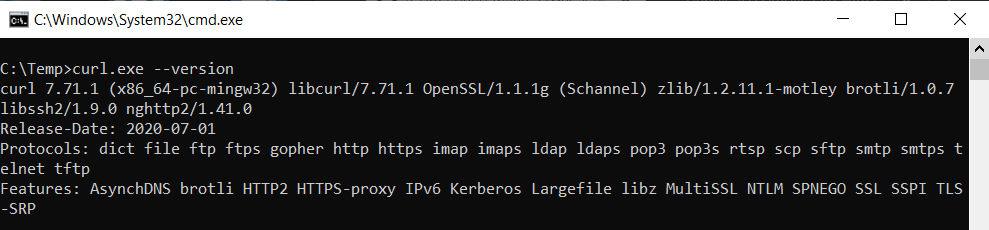
Can you post the screenshot showing the error messages you get when building this port?
sfhacker
on 11 Nov 2020
@JoshAXP Please attach the file
D:\Root\vcpkg\buildtrees\curl\install-x64-windows-dbg-out.logto this issue in order for us to review.
install-x64-windows-dbg-out.log
Here is the log file requested.
@sfhacker, The X86-windows version built perfectly ok, even though it took 8 hours, however the x64 windows build would only work by completing part 1, the zlib, Part 2/2 which comprises Curl[core, ssl, winssl, schannel etc] produced the following output:
D:\Root\vcpkg>vcpkg install curl:x64-windows
Computing installation plan...
The following packages will be built and installed:
curl[core,non-http,schannel,ssl,sspi,winssl]:x64-windows
zlib[core]:x64-windows
Additional packages (*) will be modified to complete this operation.
Detecting compiler hash for triplet x64-windows...
Starting package 1/2: zlib:x64-windows
Building package zlib[core]:x64-windows...
Could not locate cached archive: C:\Users\joshj\AppData\Local\vcpkg\archives\75\754327760bb3df9aedbcd853251661c4a31832d4.zip
-- Using cached D:/Root/vcpkg/downloads/zlib1211.tar.gz
-- Cleaning sources at D:/Root/vcpkg/buildtrees/zlib/src/1.2.11-63309e48e5.clean. Use --editable to skip cleaning for the packages you specify.
-- Extracting source D:/Root/vcpkg/downloads/zlib1211.tar.gz
-- Applying patch cmake_dont_build_more_than_needed.patch
-- Applying patch 0001-Prevent-invalid-inclusions-when-HAVE_-is-set-to-0.patch
-- Applying patch add_debug_postfix_on_mingw.patch
-- Using source at D:/Root/vcpkg/buildtrees/zlib/src/1.2.11-63309e48e5.clean
-- Configuring x64-windows
-- Building x64-windows-dbg
-- Building x64-windows-rel
-- Using msys root at D:/Root/vcpkg/downloads/tools/msys2/c809757c94447846
-- Fixing pkgconfig file: D:/Root/vcpkg/packages/zlib_x64-windows/lib/pkgconfig/zlib.pc
-- Fixing pkgconfig file: D:/Root/vcpkg/packages/zlib_x64-windows/debug/lib/pkgconfig/zlib.pc
-- Installing: D:/Root/vcpkg/packages/zlib_x64-windows/share/zlib/copyright
-- Performing post-build validation
-- Performing post-build validation done
Stored binary cache: C:\Users\joshj\AppData\Local\vcpkg\archives\75\754327760bb3df9aedbcd853251661c4a31832d4.zip
Building package zlib[core]:x64-windows... done
Installing package zlib[core]:x64-windows...
Installing package zlib[core]:x64-windows... done
Elapsed time for package zlib:x64-windows: 1.774 min
Starting package 2/2: curl:x64-windows
Building package curl[core,non-http,schannel,ssl,sspi,winssl]:x64-windows...
Could not locate cached archive: C:\Users\joshj\AppData\Local\vcpkg\archives\6f\6f15b9c19f491bd7747e84048d3423eea4f3df5f.zip
-- Using cached D:/Root/vcpkg/downloads/curl-curl-315ee3fe75dade912b48a21ceec9ccda0230d937.tar.gz
-- Cleaning sources at D:/Root/vcpkg/buildtrees/curl/src/da0230d937-b280319101.clean. Use --editable to skip cleaning for the packages you specify.
-- Extracting source D:/Root/vcpkg/downloads/curl-curl-315ee3fe75dade912b48a21ceec9ccda0230d937.tar.gz
-- Applying patch 0002_fix_uwp.patch
-- Applying patch 0004_nghttp2_staticlib.patch
-- Applying patch 0005_remove_imp_suffix.patch
-- Applying patch 0006_fix_tool_depends.patch
-- Applying patch 0007_disable_tool_export_curl_target.patch
-- Applying patch 0009_fix_openssl_config.patch
-- Applying patch 0010_fix_othertests_cmake.patch
-- Applying patch 0011_fix_static_build.patch
-- Using source at D:/Root/vcpkg/buildtrees/curl/src/da0230d937-b280319101.clean
-- Configuring x64-windows
This last bit never finishes... even after 24 hours. It saps the system of all resources, so much so that you can't even open notepad, and have to shutdown to start anything.
JoshAXP
on 11 Nov 2020
BTW @SFhacker, I could not post a screenshot as I had copied the console text as above, but couldn't start paint to save the screenshot.
JoshAXP
on 11 Nov 2020
@sfhacker, can you try running vcpkg install curl:x64-windows to see if you get the same issue? The console will produce the above long list of log entries, but i would hope at some point it would end!
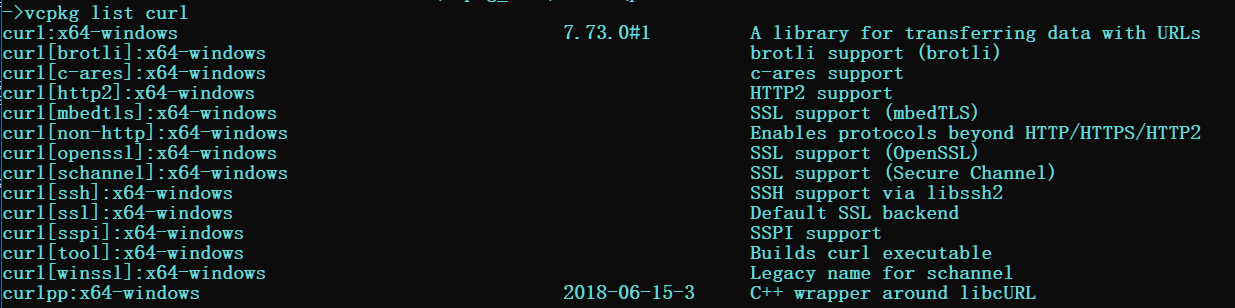
Note: I am trying to build the 64bit libraries for use in a C++ project. Can you *vcpkg list curl
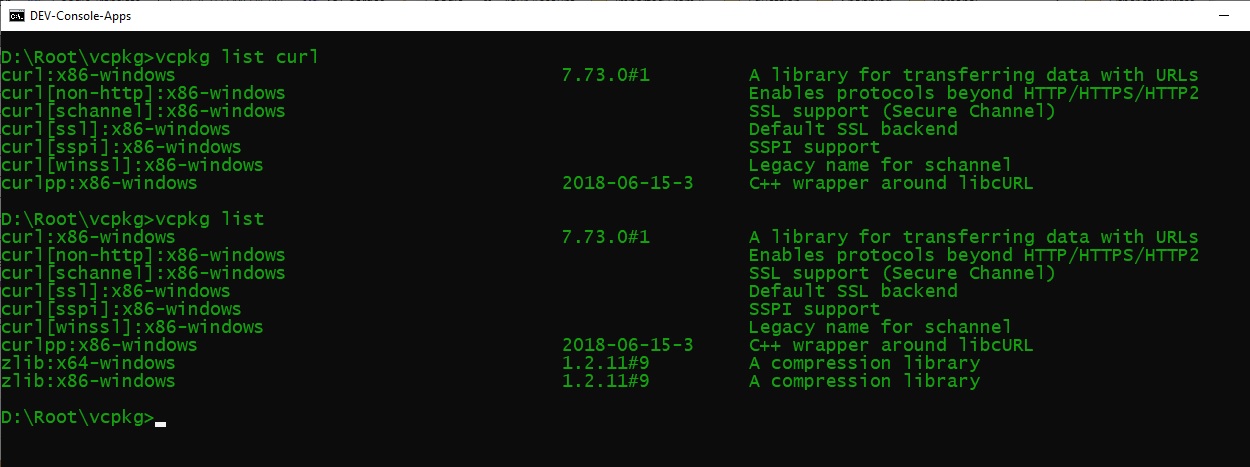
* to see what libs you have installed? I am unable to tell if you have 64bit or 32 bit from your screenshot.
JoshAXP
on 12 Nov 2020
@sfhacker Sorry, just noticed (it's late here), yes of course you have the 64bit curl exe built. I have no idea what I need to do to fix this, as its the same failed result on 3 different machines!
JoshAXP
on 12 Nov 2020
- The log file
D:\Root\vcpkg\buildtrees\curl\install-x64-windows-dbg-out.logshows:
>failed (exit code 1168) with the following output:
>LINK : fatal error LNK1168: cannot open lib\libcurl-d.dll for writing - Something else (most likely that antivirus scanner) is opening the file or scanning it - see https://docs.microsoft.com/en-us/cpp/error-messages/tool-errors/linker-tools-error-lnk1168?view=msvc-160
- You may need to either temporarily disable the antivirus and/or added path/file scan exemptions to the antivirus software.
- Either that or there are bad permissions from when you first tried to install libcurl and the file is left in limbo land
- Open a administrative command prompt
cd [vcpkg-root]\buildtreesrmdir /q /s .\curl(This deletes the curl folder/directory under buildtrees)- If you cannot delete the folder/directory you may need to take ownership of the folder - see https://www.laptopmag.com/articles/take-ownership-folder-windows-10-using-file-explorer
- Then once the folder/directory and all files within are deleted, try to install curl again.
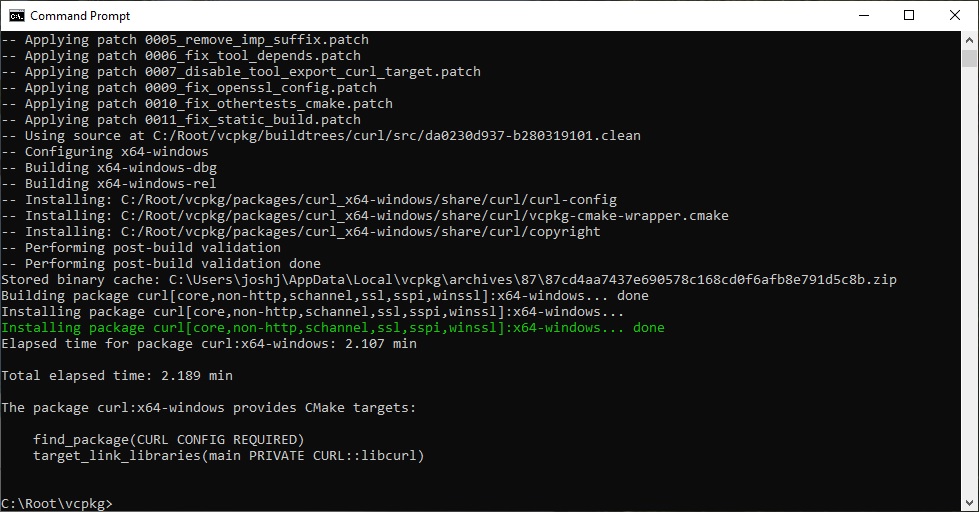
- vcpkg curl x64-windows installs fine, about a minute:
Starting package 15/40: curl:x64-windows
Building package curl[brotli,c-ares,core,http2,mbedtls,non-http,openssl,schannel,ssh,ssl,sspi,tool,winssl]:x64-windows...
-- Using cached D:/vcpkg_x64/vs2019/prod/downloads/curl-curl-315ee3fe75dade912b48a21ceec9ccda0230d937.tar.gz
-- Extracting source D:/vcpkg_x64/vs2019/prod/downloads/curl-curl-315ee3fe75dade912b48a21ceec9ccda0230d937.tar.gz
-- Applying patch 0002_fix_uwp.patch
-- Applying patch 0004_nghttp2_staticlib.patch
-- Applying patch 0005_remove_imp_suffix.patch
-- Applying patch 0006_fix_tool_depends.patch
-- Applying patch 0007_disable_tool_export_curl_target.patch
-- Applying patch 0009_fix_openssl_config.patch
-- Applying patch 0010_fix_othertests_cmake.patch
-- Applying patch 0011_fix_static_build.patch
-- Using source at D:/vcpkg_x64/vs2019/prod/buildtrees/curl/src/da0230d937-b280319101
-- Configuring x64-windows
-- Building x64-windows-dbg
-- Building x64-windows-rel
-- Installing: D:/vcpkg_x64/vs2019/prod/packages/curl_x64-windows/share/curl/curl-config
-- Installing: D:/vcpkg_x64/vs2019/prod/packages/curl_x64-windows/share/curl/vcpkg-cmake-wrapper.cmake
-- Installing: D:/vcpkg_x64/vs2019/prod/packages/curl_x64-windows/share/curl/copyright
-- Performing post-build validation
-- Performing post-build validation done
Building package curl[brotli,c-ares,core,http2,mbedtls,non-http,openssl,schannel,ssh,ssl,sspi,tool,winssl]:x64-windows... done
Installing package curl[brotli,c-ares,core,http2,mbedtls,non-http,openssl,schannel,ssh,ssl,sspi,tool,winssl]:x64-windows...
Installing package curl[brotli,c-ares,core,http2,mbedtls,non-http,openssl,schannel,ssh,ssl,sspi,tool,winssl]:x64-windows... done
Elapsed time for package curl:x64-windows: 53.27 s
 StarGate-One
on 12 Nov 2020
StarGate-One
on 12 Nov 2020
Thanks SG1 ! I'll give that a go. I tried re-running as-is, before I saw your informative answer... I'll try your suggestions and report back
JoshAXP
on 12 Nov 2020
I navigated to the e:\root\vckpg where the vckpg is based. cd'd to the buildtrees and saw the curl directory, executed your command to delete. But when I tried to run the install it gave a new error, I would guess the curl folder was important for something!
E:\root\vcpkg>vcpkg install curl x64-windows
Computing installation plan...
Error: while loading port x64-windows: Port definition not found
E:\root\vcpkg>
JoshAXP
on 12 Nov 2020
Apologies General Jack O'Neil, ... (I would never have guessed Jack would know about C++, Sam, yes). :)
I was being dumb, forgot the : in curl:x64-windows
JoshAXP
on 12 Nov 2020
Paused Kaspersky Scanning ... but it looks like its going to die in the same place as before. What I don't get is why the x86 libs had no problem running.
JoshAXP
on 12 Nov 2020
What I have also noticed is that something rather toxic happens after the 64bit build has started, the machine grinds to a crawl, and after that nothing else will work the longer I leave the build process unattended. This has happened on 3 different windows 10 machines. I seem to be able to build 32bit libcurl, but not 64bit. Any ideas?
JoshAXP
on 12 Nov 2020
@JoshAXP I am at a loss at what else it could be 🤔
- The vcpkg instances on the different machines - were they all cloned from github or did you clone one on your network and clone and/or copy it to the rest? Maybe a corrupt clone from vcpkg if you cloned once to your network then either cloned/copied to the other machines, but if you cloned all
github.com/microsoft/vcpkg.gitthen chances would be slim you have a corrupt vcpkg. - What happens if you build vcpkg as 64-bit binary? Run
.\bootstrap-vcpkg -win64from the [vcpkg-root], although it should not make any difference. - Also try running
.\vcpkg.exe install --debug curl:x64-windowsand post back here.
StarGate-One
on 12 Nov 2020
I really appreciate your thoughts on this & well considered & helpful answers.
That’s a great suggestion, to run 64bit vcpkg, although it shouldn’t make a difference as you said. The bizarre thing is
of the 3 fails, one machine is a new windows build with nothing but office 2019 installed and a fresh download of VC2019.
I cloned from github each time, was your build from a previous working version of curl 64?
VC19? Or fresh download initiated by vcpkg?
I was looking at processes and did notice multiple instances of cmake which made me think that these are rapidly being spawned as each attempt fails, or an attempt is made to write before locks are released. If enough processes are spawned & terminated memory would become fragmented quite quickly, making it impossible to start even notepad.
I have only ever seen this once, on software that tripped over itself when multi threaded running on an SSD would start writing to a file before a prior process had released it. Mechanical drives having a natural delay didn’t require a pause before starting the next thread.
Is there any way of building it from VC2019 GUI?
Josh
Sent from my iPhone.
On 12 Nov 2020, at 01:10, StarGate-One notifications@github.com wrote:
@JoshAXP I am at a loss at what else it could be 🤔The vcpkg instances on the different machines - were they all cloned from github or did you clone one on your network and clone and/or copy it to the rest? Maybe a corrupt clone from vcpkg if you cloned once to your network then either cloned/copied to the other machines, but if you cloned all github.com/microsoft/vcpkg.git then chances would be slim you have a corrupt vcpkg.
What happens if you build vcpkg as 64-bit binary? Run .\bootstrap-vcpkg -win64 from the [vcpkg-root], although it should not make any difference.
—
You are receiving this because you were mentioned.
Reply to this email directly, view it on GitHub, or unsubscribe.
JoshAXP
on 12 Nov 2020
@JoshAXP, could you try to add 'DISABLE_PARALLEL_CONFIGURE' under line https://github.com/microsoft/vcpkg/blob/67a9305c75f89c6a7e229c94d1800b598f0666b3/ports/curl/portfile.cmake#L107, and see if the issue persist?
For the possible reason for LNK1168, see https://docs.microsoft.com/en-us/cpp/error-messages/tool-errors/linker-tools-error-lnk1168?view=msvc-160
Failures:
LINK : fatal error LNK1168: cannot open lib\libcurl-d.dll for writing
ninja: build stopped: subcommand failed.
 PhoebeHui
on 12 Nov 2020
PhoebeHui
on 12 Nov 2020
... even though it took 8 hours
@JoshAXP Just for comparison purposes, have you tried other package managers?
sfhacker
on 12 Nov 2020
DISABLE_PARALLEL_CONFIGURE
@PHOEBE Thank you very much for the suggestion. I have added although my portfile must be different as in notepad++ the PREFER_NINJA line appears much earlier, around 60.
I attach the file.
JoshAXP
on 12 Nov 2020
Dear all,
Thank you for being totally brilliant with excellent suggestions that eventually led me to success. In particular, @StarGate-One Gen Jack O'Neil, for the extensive help. I performed the following actions, but will need to isolate exactly which one led to success:
ran VCPKG from C: drive, instead of an external USB
Disabled Windows Search
Uninstalled Kaspersky Antivirus
Excluded the VCPKG and git root folders from Windows Defender scans
One of these is obviously the key, but I will have to test each separately and will report back, hopefully no one else will have to go through the same frustration.
Thank you all very much, for now, I owe, I owe, so its off to work I go, but will come back and report this evening.
JoshAXP
on 12 Nov 2020
@JoshAXP Glad you figured it out... Antivirus programs, can live with them, but you better not live without them LOL.
I am truly sorry for all the issues you have had, but it does build on the experience base.
Take care, and have a wonderful week.
StarGate-One
on 12 Nov 2020
Thanks SG1, no need to be sorry, its just what it is, a thorny problem. As for figuring it out, I am not sure I have, I got lucky on 1 PC, but trying to repeat the same steps on a clone laptop seems rather less successful so far. Uninstalled Kaspersky, put in the folder exception on win defender, disabled search. That alone was not enough.
So even rebuilt vcpkg with the -x64 switch and Phoebe's DISABLE_PARALLEL_CONFIGURE suggestion, after PREFER_NINJA, this seems to be progressing further, albeit very slowly.
I will leave it to run for a an hour or so to see if it works...
JoshAXP
on 13 Nov 2020
It worked, but with a whopping 18min run time. Will try without the parallel config to see what difference that makes. VCPKG.EXE is 64bit

JoshAXP
on 13 Nov 2020
Related issues
 PhilLab
·
3Comments
PhilLab
·
3Comments
 grandprixgp
·
3Comments
grandprixgp
·
3Comments
 pakdel
·
3Comments
pakdel
·
3Comments
 angelmixu
·
3Comments
angelmixu
·
3Comments
 tzbo
·
3Comments
tzbo
·
3Comments
Most helpful comment
It worked, but with a whopping 18min run time. Will try without the parallel config to see what difference that makes. VCPKG.EXE is 64bit
