Vcpkg: [boost ports] `vcpkg install` or `vcpkg upgrade` "Error: Unrecognized identifer name v120. Add to override list in triplet file."
Describe the bug
When performing vcpkg upgrade or vcpkg install on the boost ports the following error message occurs since commit Fix [boost] MSVC 2013 v120 Build (#10645)
Environment
- OS: [Microsoft Windows [Version 10.0.19041.488]]
- Compiler: Visual Studio Version: 16.7.2 VS Tools Version: 14.27.29110
To Reproduce
Steps to reproduce the behavior:
git pullas of 20200905 @ 21:00 GMT.\bootstrap-vcpkg.bat -verbose -disableMetrics -win64 -withVSPath "'C:\Program Files (x86)\Microsoft Visual Studio\2019\Community'"vcpkg upgrade- Console output:
Error: Unrecognized identifer name v120. Add to override list in triplet file.
Error: Unrecognized identifer name v120. Add to override list in triplet file.
The following packages will be rebuilt:
* bigint[core]:x64-windows
* boost[core,mpi]:x64-windows
* boost-accumulators[core]:x64-windows
... 100 more ports...
* python3[core]:x64-windows
* shiva[core]:x64-windows
* spdlog[benchmark,core]:x64-windows
* tmx[core]:x64-windows
Additional packages (*) will be modified to complete this operation.
If you are sure you want to rebuild the above packages, run this command with the --no-dry-run option. vcpkg upgrade --debug
[DEBUG] Feature flag 'binarycaching' = off
[DEBUG] Feature flag 'manifests' unset
[DEBUG] Feature flag 'compilertracking' unset
[DEBUG] Feature flag 'registries' unset
[DEBUG] Using vcpkg-root: D:\vcpkg_x64\vs2019\prod
[DEBUG] Using installed-root: D:\vcpkg_x64\vs2019\prod\installed
[DEBUG] Using buildtrees-root: D:\vcpkg_x64\vs2019\prod\buildtrees
[DEBUG] Using downloads-root: D:\vcpkg_x64\downloads
[DEBUG] Using packages-root: D:\vcpkg_x64\vs2019\prod\packages
[DEBUG] Using scripts-root: D:\vcpkg_x64\vs2019\prod\scripts
[DEBUG] Default binary cache path is: C:\Users\Tim.Autry\AppData\Local\vcpkg/archives
[DEBUG] Found path: C:\Program Files\CMake\bin/cmake.exe
[DEBUG] Found path: C:\Program Files (x86)\Microsoft Visual Studio\2019\Community\Common7\IDE\CommonExtensions\Microsoft\CMake\CMake\bin/cmake.exe
[DEBUG] CreateProcessW("C:\Program Files\CMake\bin/cmake.exe" --version)
[DEBUG] cmd_execute_and_stream_data() returned 0 after 21896 us
[DEBUG] CreateProcessW("C:\Program Files\CMake\bin/cmake.exe" -DVCPKG_ROOT_DIR=D:/vcpkg_x64/vs2019/prod -DPACKAGES_DIR=D:/vcpkg_x64/vs2019/prod/packages -DBUILDTREES_DIR=D:/vcpkg_x64/vs2019/prod/buildtrees -D_VCPKG_INSTALLED_DIR=D:/vcpkg_x64/vs2019/prod/installed -DDOWNLOADS=D:/vcpkg_x64/downloads -DVCPKG_MANIFEST_INSTALL=OFF -P "D:\vcpkg_x64\vs2019\prod\buildtrees\0.vcpkg_dep_info.cmake")
[DEBUG] cmd_execute_and_stream_data() returned 0 after 19191 us
Error: Unrecognized identifer name v120. Add to override list in triplet file.
Error: Unrecognized identifer name v120. Add to override list in triplet file.
[DEBUG] CreateProcessW("C:\Program Files\CMake\bin/cmake.exe" -DVCPKG_ROOT_DIR=D:/vcpkg_x64/vs2019/prod -DPACKAGES_DIR=D:/vcpkg_x64/vs2019/prod/packages -DBUILDTREES_DIR=D:/vcpkg_x64/vs2019/prod/buildtrees -D_VCPKG_INSTALLED_DIR=D:/vcpkg_x64/vs2019/prod/installed -DDOWNLOADS=D:/vcpkg_x64/downloads -DVCPKG_MANIFEST_INSTALL=OFF -P "D:\vcpkg_x64\vs2019\prod\buildtrees\1.vcpkg_dep_info.cmake")
[DEBUG] cmd_execute_and_stream_data() returned 0 after 13041 us
The following packages will be rebuilt:
* bigint[core]:x64-windows
* boost[core,mpi]:x64-windows
* boost-accumulators[core]:x64-windows
... 100 more ports...
* python3[core]:x64-windows
* shiva[core]:x64-windows
* spdlog[benchmark,core]:x64-windows
* tmx[core]:x64-windows
Additional packages (*) will be modified to complete this operation.
If you are sure you want to rebuild the above packages, run this command with the --no-dry-run option.
[DEBUG] D:\vcpkg_x64\vs2019\prod\toolsrc\src\vcpkg\commands.upgrade.cpp(177)
[DEBUG] Exiting after 121982 us (121363 us)
Repro code when
Expected behavior
The should be no Error referencing to VS2013 build tools v120, when using VS2015, VS2017 and/or VS2019.
Failure logs
- None
Additional context
- This error also occurs when doing
vcpkg install boostlibraries. - The error does not appear to stop the
vcpkg install boostprocess - I do not know if it stops or effects the
vcpkg upgrade --no-dry-runupgrade process as I have a customized script that actually removes all the ports to be upgraded and then installs the ports again since thevcpkg upgradedoes not have the--editableor--x-use-aria2switches like thevcpkg install.
 StarGate-One
All 5 comments
Found this on the x64-windows pipeline run for this change....
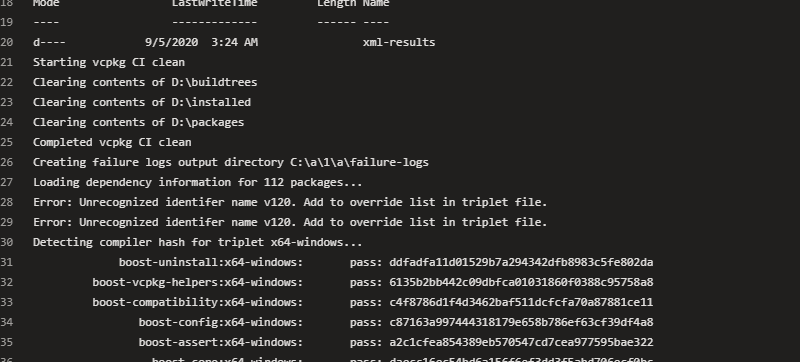
It seems the CI pipeline failed to detect this error.
StarGate-One
on 5 Sep 2020
@StarGate-One, thanks for reporting this issue!
The root cause is invalid identifier '!v120' added to CONTROl file in https://github.com/microsoft/vcpkg/pull/10645.
 PhoebeHui
on 7 Sep 2020
PhoebeHui
on 7 Sep 2020
cc @ManuelKugelmann
I would revert the invalid identifiler v120 for unblocking boost, and keep others changes in PR #10645 for futher fix from contributor.
PhoebeHui
on 7 Sep 2020
@BillyONeal @strega-nil @ras0219-msft
Just an FYI if it is something the CI azure-pipelines should catch as an error in the future, when an invalid identified is added to the CONTROL or vcpkg.json file-
See paragraph screen grab above: https://github.com/microsoft/vcpkg/issues/13373#issuecomment-687666521
StarGate-One
on 7 Sep 2020
Thanks @StarGate-One for your suggestions!
PhoebeHui
on 8 Sep 2020
Related issues
 F0I0l0I0P
·
3Comments
F0I0l0I0P
·
3Comments
 spindensity
·
3Comments
spindensity
·
3Comments
 LilyWangL
·
3Comments
LilyWangL
·
3Comments
 PhilLab
·
3Comments
PhilLab
·
3Comments
 tzbo
·
3Comments
tzbo
·
3Comments
Most helpful comment
@BillyONeal @strega-nil @ras0219-msft
Just an FYI if it is something the CI azure-pipelines should catch as an error in the future, when an invalid identified is added to the CONTROL or vcpkg.json file-
See paragraph screen grab above: https://github.com/microsoft/vcpkg/issues/13373#issuecomment-687666521