Vcpkg: I want to execute c++ program in Visual studio code!
Hi there,
I want to execute c++ program in visual studio code. so I wrote the below code in vsc editor.
include
using namespace std;
int main()
{
return 0;
}
Error saying that : <#include errors detected. Please update your includePath. Squiggles are disabled for this translation unit (C:Users\TEMP\Desktop\hello.cpp)>
then i followed the following step for resolution:
_1. https://github.com/Microsoft/vcpkg.
- cd vcpkg
- bootstrap-vcpkg.bat (I'm using windows machine)_
Error getting : bootstrap-vcpkg.bat : The term 'bootstrap-vcpkg.bat' is not recognized as the name of a cmdlet, function, script file, or operable program.
Check the spelling of the name, or if a path was included, verify that the path is correct and try again.
At line:1 char:1
- bootstrap-vcpkg.bat
~~~~~~~
- CategoryInfo : ObjectNotFound: (bootstrap-vcpkg.bat:String) [], CommandNotFoundException
- FullyQualifiedErrorId : CommandNotFoundException
Please help for the same. Thank you.
 nitish166
All 11 comments
.\bootstrap-vcpkg.bat
because you were in powershell, not cmd.
 linquize
on 29 Aug 2020
linquize
on 29 Aug 2020
.bootstrap-vcpkg.bat
Again error is coming : C:Users\TEMP\Downloads\vcpkg-master\vcpkg-master\toolsrc\windows-bootstrap\vcpkg>.bootstrap-vcpkg.bat
'.bootstrap-vcpkg.bat' is not recognized as an internal or external command,
operable program or batch file.
this time i executed the command in cmd :(
nitish166
on 29 Aug 2020
You were in the folder C:\Users\TEMP\Downloads\vcpkg-master\vcpkg-master\toolsrc\windows-bootstrap\vcpkg,
instead you need to execute .\bootstrap-vcpkg.bat in C:\Users\TEMP\Downloads\vcpkg-master\vcpkg-master.
Also it is not advisable to #include <bits/stdc++.h>, see here why.
 Reveares
on 29 Aug 2020
Reveares
on 29 Aug 2020
You were in the folder
C:\Users\TEMP\Downloads\vcpkg-master\vcpkg-master\toolsrc\windows-bootstrap\vcpkg,
instead you need to execute.\bootstrap-vcpkg.batinC:\Users\TEMP\Downloads\vcpkg-master\vcpkg-master.Also it is not advisable to
#include <bits/stdc++.h>, see here why.
Hi @Reveares thanks for your input! but still I'm facing issue. please find the below details.
C++ Code:
include
using namespace std;
int main()
{
return 0;
}
CMD Error : C:Users\TEMP\Downloads\vcpkg-master\vcpkg-master>.bootstrap-vcpkg.bat
& : File C:Users\TEMP\Downloads\vcpkg-master\vcpkg-master\scriptsbootstrap.ps1 cannot be loaded. The file
C:Users\TEMP\Downloads\vcpkg-master\vcpkg-master\scriptsbootstrap.ps1 is not digitally signed. You cannot run this
script on the current system. For more information about running scripts and setting execution policy, see
about_Execution_Policies at https:/go.microsoft.com/fwlink/?LinkID=135170.
At line:1 char:6
- & {& 'C:Users\TEMP\Downloads\vcpkg-master\vcpkg-master\scriptsboots ...
~~~~~~~~~~~~~~~~
- CategoryInfo : SecurityError: (:) [], PSSecurityException
- FullyQualifiedErrorId : UnauthorizedAccess
It would be great if you can help me for the same!
nitish166
on 29 Aug 2020
Are you using a user in Administrators group?
Are you using Windows 10?
linquize
on 29 Aug 2020
Are you using a user in the Administrators group?
Are you using Windows 10?
No, I'm using the Administrators group which is by default I believe. and yes I'm using windows 10.
nitish166
on 29 Aug 2020
@nitish166 As far as I know, Visual Studio Code is just an editor, isn't it?
I have just compiled and run your code snippet without issues.
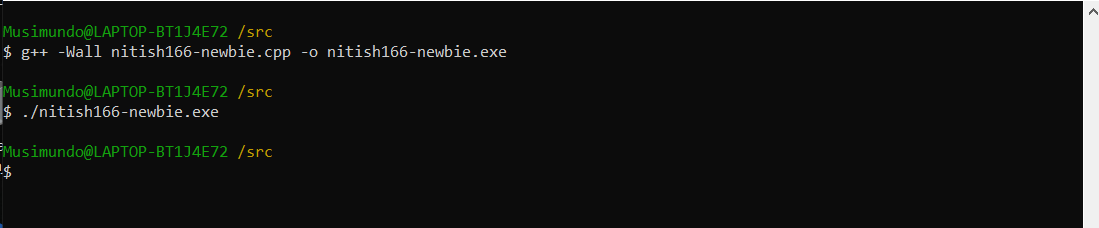
Let us know if you need further assistance.
 sfhacker
on 29 Aug 2020
sfhacker
on 29 Aug 2020
Hi @sfhacker you're totally correct visual studio code is just an editor. I'm attaching the screen-shot please have a look.

FYI - I have installed c/c++ extension in visual studio code for executing the code as mentioned in the snipped.
nitish166
on 29 Aug 2020
There must be some path issues in/with your environment!
Can you try compiling via the command line first? If that works, then do the same from within VS Code.


sfhacker
on 29 Aug 2020
@nitish166 - even though you have install Visual Studio Code, you still need a C/C++ compiler. Have you installed a compiler and developer kit for your system?
For Windows:
- vcpkg needs Visual Studio 2015.3 or later, Windows SDK 8.1 or later and the English Language Pack to compile/link programs all within Visual Studio (the community edition is free https://visualstudio.microsoft.com/downloads/)
- VS Code needs a compiler/linker and development tools (See here for requirements: https://code.visualstudio.com/docs/languages/cpp)
See https://github.com/microsoft/vcpkg Table of Contents for Quick Starts for Windows, Unix (Linux and MacOS).
 StarGate-One
on 29 Aug 2020
StarGate-One
on 29 Aug 2020
Thank you all for your effort!
nitish166
on 30 Aug 2020
Related issues
 PhilLab
·
3Comments
PhilLab
·
3Comments
 angelmixu
·
3Comments
angelmixu
·
3Comments
 ThinkalVB
·
3Comments
ThinkalVB
·
3Comments
 jack17529
·
3Comments
jack17529
·
3Comments
 tzbo
·
3Comments
tzbo
·
3Comments