Vcpkg: [protobuf:x64-windows] build failure
Host Environment
- OS: Win10
- Compiler: revision
To Reproduce
Steps to reproduce the behavior:
vcpkg install protobuf:x64-windows
Failure logs
Computing installation plan...
The following packages will be built and installed:
protobuf[core]:x64-windows
Detecting compiler hash for triplet x64-windows...
Starting package 1/1: protobuf:x64-windows
Building package protobuf[core]:x64-windows...
Could not locate cached archive: C:\Users\Lollipop\AppData\Local\vcpkg\archives\83\83131633f57199177b05c9f2dec4699f08908e02.zip
-- Using cached D:/C/vcpkg/downloads/protocolbuffers-protobuf-31ebe2ac71400344a5db91ffc13c4ddfb7589f92.tar.gz
-- Extracting source D:/C/vcpkg/downloads/protocolbuffers-protobuf-31ebe2ac71400344a5db91ffc13c4ddfb7589f92.tar.gz
-- Applying patch fix-uwp.patch
-- Applying patch fix-android-log.patch
-- Applying patch fix-static-build.patch
-- Using source at D:/C/vcpkg/buildtrees/protobuf/src/dfb7589f92-61fbc4fa5f.clean
-- Configuring x64-windows
-- Building x64-windows-dbg
-- Building x64-windows-rel
CMake Error at scripts/cmake/vcpkg_execute_required_process.cmake:72 (message):
Command failed: D:/C/vcpkg/downloads/tools/powershell-core-6.2.1-windows/powershell.exe -noprofile -executionpolicy Bypass -nologo -file D:/C/vcpkg/scripts/buildsystems/msbuild/applocal.ps1 -targetBinary D:/C/vcpkg/packages/protobuf_x64-windows/tools/protobuf/protoc.exe -installedDir D:/C/vcpkg/packages/protobuf_x64-windows/bin
Working Directory: D:/C/vcpkg
Error code: -2146232797
See logs for more information:
D:\C\vcpkg\buildtrees\protobuf\copy-tool-dependencies-err.log
Call Stack (most recent call first):
scripts/cmake/vcpkg_copy_tool_dependencies.cmake:27 (vcpkg_execute_required_process)
scripts/cmake/vcpkg_copy_tool_dependencies.cmake:37 (search_for_dependencies)
scripts/cmake/vcpkg_copy_tools.cmake:55 (vcpkg_copy_tool_dependencies)
ports/protobuf/portfile.cmake:93 (vcpkg_copy_tools)
scripts/ports.cmake:79 (include)
Error: Building package protobuf:x64-windows failed with: BUILD_FAILED
Please ensure you're using the latest portfiles with .\vcpkg update, then
submit an issue at https://github.com/Microsoft/vcpkg/issues including:
Package: protobuf:x64-windows
Vcpkg version: 2020.06.15-nohash
Additionally, attach any relevant sections from the log files above.
Additional context
D:/C/vcpkg/packages/protobuf_x64-windows/tools/protobuf/protoc.exe
libprotobuf.dll and libprotoc.dll do not exist in D:/C/vcpkg/packages/protobuf_x64-windows/tools/protobuf
 yuxiaoyang88
All 70 comments
@yuxiaoyang88 I think this issue was fixed by my PR #12776, please update vcpkg and retry again.
Thanks.
 JackBoosY
on 11 Aug 2020
JackBoosY
on 11 Aug 2020
----- 原始邮件 -----
发件人:Jack·Boos·Yu notifications@github.com
收件人:microsoft/vcpkg vcpkg@noreply.github.com
抄送人:于潇洋 yuxiaoyang88@sina.com, Mention mention@noreply.github.com
主题:Re: [microsoft/vcpkg] [protobuf:x64-windows] build failure (#12849)
日期:2020年08月11日 11点00分
@yuxiaoyang88 I think this issue was fixed by my PR #12776, please update vcpkg and retry again.
Thanks.
—
You are receiving this because you were mentioned.
Reply to this email directly, view it on GitHub, or unsubscribe.
I already update and rebuild vcpkg and still find the same problem......
yuxiaoyang88
on 11 Aug 2020
@yuxiaoyang88 Could you provide log _D:\C\vcpkg\buildtrees\protobuf\copy-tool-dependencies-err.log_ ?
JackBoosY
on 11 Aug 2020
----- 原始邮件 -----
发件人:Jack·Boos·Yu notifications@github.com
收件人:microsoft/vcpkg vcpkg@noreply.github.com
抄送人:于潇洋 yuxiaoyang88@sina.com, Mention mention@noreply.github.com
主题:Re: [microsoft/vcpkg] [protobuf:x64-windows] build failure (#12849)
日期:2020年08月11日 13点41分
@yuxiaoyang88 Could you provide log D:\C\vcpkg\buildtrees\protobuf\copy-tool-dependencies-err.log ?
—
You are receiving this because you were mentioned.
Reply to this email directly, view it on GitHub, or unsubscribe.
I am sorry to have delayed writing back to you....I just wake up from a nap.....This is the log
yuxiaoyang88
on 11 Aug 2020
@yuxiaoyang88 Seems you didn't attch log in your comment?
JackBoosY
on 11 Aug 2020
----- 原始邮件 -----
发件人:Jack·Boos·Yu notifications@github.com
收件人:microsoft/vcpkg vcpkg@noreply.github.com
抄送人:于潇洋 yuxiaoyang88@sina.com, Mention mention@noreply.github.com
主题:Re: [microsoft/vcpkg] [protobuf:x64-windows] build failure (#12849)
日期:2020年08月11日 16点14分
@yuxiaoyang88 Seems you didn't attch log in your comment?
—
You are receiving this because you were mentioned.
Reply to this email directly, view it on GitHub, or unsubscribe.
FailFast:Infinite recursion during resource lookup within System.Private.CoreLib.  This may be a bug in System.Private.CoreLib, or potentially in certain extensibility points such as assembly resolve events or CultureInfo names.  Resource name: Arg_AccessViolationException
   at System.Environment.FailFast(System.String)
  at System.SR.InternalGetResourceString(System.String)
  at System.SR.GetResourceString(System.String, System.String)
  at System.AccessViolationException..ctor()
  at System.SpanHelpers.IndexOf(Char ByRef, Char, Int32)
  at System.Globalization.CultureData.InitCultureData()
  at System.Globalization.CultureData.CreateCultureData(System.String, Boolean)
  at System.Globalization.CultureData.GetCultureData(System.String, Boolean)
  at System.Globalization.CultureInfo.InitializeFromName(System.String, Boolean)
  at System.Globalization.CultureInfo..ctor(System.String, Boolean)
  at System.Globalization.CultureInfo.GetCultureInfoHelper(Int32, System.String, System.String)
  at System.Globalization.CultureInfo.GetCultureInfo(System.String)
  at System.Resources.ManifestBasedResourceGroveler.GetNeutralResourcesLanguage(System.Reflection.Assembly, System.Resources.UltimateResourceFallbackLocation ByRef)
  at System.Resources.ResourceManager.CommonAssemblyInit()
  at System.Resources.ResourceManager..ctor(System.Type)
  at System.SR.InternalGetResourceString(System.String)
  at System.SR.GetResourceString(System.String, System.String)
  at System.AccessViolationException..ctor()
  at System.SpanHelpers.SequenceEqual(Byte ByRef, Byte ByRef, UInt32)
  at System.String.Equals(System.String, System.String)
  at System.AppDomain.Setup(System.Object)
yuxiaoyang88
on 11 Aug 2020
FailFast:Infinite recursion during resource lookup within System.Private.CoreLib. This may be a bug in System.Private.CoreLib, or potentially in certain extensibility points such as assembly resolve events or CultureInfo names. Resource name: Arg_AccessViolationException
at System.Environment.FailFast(System.String)
at System.SR.InternalGetResourceString(System.String)
at System.SR.GetResourceString(System.String, System.String)
at System.AccessViolationException..ctor()
at System.SpanHelpers.IndexOf(Char ByRef, Char, Int32)
at System.Globalization.CultureData.InitCultureData()
at System.Globalization.CultureData.CreateCultureData(System.String, Boolean)
at System.Globalization.CultureData.GetCultureData(System.String, Boolean)
at System.Globalization.CultureInfo.InitializeFromName(System.String, Boolean)
at System.Globalization.CultureInfo..ctor(System.String, Boolean)
at System.Globalization.CultureInfo.GetCultureInfoHelper(Int32, System.String, System.String)
at System.Globalization.CultureInfo.GetCultureInfo(System.String)
at System.Resources.ManifestBasedResourceGroveler.GetNeutralResourcesLanguage(System.Reflection.Assembly, System.Resources.UltimateResourceFallbackLocation ByRef)
at System.Resources.ResourceManager.CommonAssemblyInit()
at System.Resources.ResourceManager..ctor(System.Type)
at System.SR.InternalGetResourceString(System.String)
at System.SR.GetResourceString(System.String, System.String)
at System.AccessViolationException..ctor()
at System.SpanHelpers.SequenceEqual(Byte ByRef, Byte ByRef, UInt32)
at System.String.Equals(System.String, System.String)
at System.AppDomain.Setup(System.Object)
@strega-nil @ras0219-msft can you please take a look? Our applocal.ps1 seems have bugs,
JackBoosY
on 11 Aug 2020
----- 原始邮件 -----
发件人:Jack·Boos·Yu notifications@github.com
收件人:microsoft/vcpkg vcpkg@noreply.github.com
抄送人:于潇洋 yuxiaoyang88@sina.com, Mention mention@noreply.github.com
主题:Re: [microsoft/vcpkg] [protobuf:x64-windows] build failure (#12849)
日期:2020年08月11日 16点21分
FailFast:Infinite recursion during resource lookup within System.Private.CoreLib. This may be a bug in System.Private.CoreLib, or potentially in certain extensibility points such as assembly resolve events or CultureInfo names. Resource name: Arg_AccessViolationException
at System.Environment.FailFast(System.String) at System.SR.InternalGetResourceString(System.String) at System.SR.GetResourceString(System.String, System.String) at System.AccessViolationException..ctor() at System.SpanHelpers.IndexOf(Char ByRef, Char, Int32) at System.Globalization.CultureData.InitCultureData() at System.Globalization.CultureData.CreateCultureData(System.String, Boolean) at System.Globalization.CultureData.GetCultureData(System.String, Boolean) at System.Globalization.CultureInfo.InitializeFromName(System.String, Boolean) at System.Globalization.CultureInfo..ctor(System.String, Boolean) at System.Globalization.CultureInfo.GetCultureInfoHelper(Int32, System.String, System.String) at System.Globalization.CultureInfo.GetCultureInfo(System.String) at System.Resources.ManifestBasedResourceGroveler.GetNeutralResourcesLanguage(System.Reflection.Assembly, System.Resources.UltimateResourceFallbackLocation ByRef) at System.Resources.ResourceManager.CommonAssemblyInit() at System.Resources.ResourceManager..ctor(System.Type) at System.SR.InternalGetResourceString(System.String) at System.SR.GetResourceString(System.String, System.String) at System.AccessViolationException..ctor() at System.SpanHelpers.SequenceEqual(Byte ByRef, Byte ByRef, UInt32) at System.String.Equals(System.String, System.String) at System.AppDomain.Setup(System.Object)
@strega-nil @ras0219-msft can you please take a look? Our applocal.ps1 seems have bugs,
—
You are receiving this because you were mentioned.
Reply to this email directly, view it on GitHub, or unsubscribe.
D:\C\vcpkg\scripts\buildsystems\msbuildalso add in attachment
[cmdletbinding()]param([string]$targetBinary, [string]$installedDir, [string]$tlogFile, [string]$copiedFilesLog)
$g_searched = @{}# Note: installedDir is actually the bin\ directory.$g_install_root = Split-Path $installedDir -parent$g_is_debug = $g_install_root -match '(.*\)?debug(\)?$'
Ensure we create the copied files log, even if we don't end up copying any filesif ($copiedFilesLog){ Set-Content -Path $copiedFilesLog -Value "" -Encoding UTF8}
Note: this function signature is depended upon by the qtdeploy.ps1 script introduced in 5.7.1-7function deployBinary([string]$targetBinaryDir, [string]$SourceDir, [string]$targetBinaryName) { if (Test-Path "$targetBinaryDir\$targetBinaryName") { $sourceModTime = (Get-Item $SourceDir\$targetBinaryName).LastWriteTime $destModTime = (Get-Item $targetBinaryDir\$targetBinaryName).LastWriteTime if ($destModTime -lt $sourceModTime) { Write-Verbose " ${targetBinaryName}: Updating $SourceDir\$targetBinaryName" Copy-Item "$SourceDir\$targetBinaryName" $targetBinaryDir } else { Write-Verbose " ${targetBinaryName}: already present" } } else { Write-Verbose " ${targetBinaryName}: Copying $SourceDir\$targetBinaryName" Copy-Item "$SourceDir\$targetBinaryName" $targetBinaryDir } if ($copiedFilesLog) { Add-Content $copiedFilesLog "$targetBinaryDir\$targetBinaryName" -Encoding UTF8 } if ($tlogFile) { Add-Content $tlogFile "$targetBinaryDir\$targetBinaryName" -Encoding Unicode }}
Write-Verbose "Resolving base path $targetBinary..."try{ $baseBinaryPath = Resolve-Path $targetBinary -erroraction stop $baseTargetBinaryDir = Split-Path $baseBinaryPath -parent}catch [System.Management.Automation.ItemNotFoundException]{ return}
Note: this function signature is depended upon by the qtdeploy.ps1 scriptfunction resolve([string]$targetBinary) { Write-Verbose "Resolving $targetBinary..." try { $targetBinaryPath = Resolve-Path $targetBinary -erroraction stop } catch [System.Management.Automation.ItemNotFoundException] { return } $targetBinaryDir = Split-Path $targetBinaryPath -parent
$a = $(dumpbin /DEPENDENTS $targetBinary | ? { $_ -match "^ [^ ].*\.dll" } | % { $_ -replace "^ ","" }) $a | % { if ([string]::IsNullOrEmpty($_)) { return } if ($g_searched.ContainsKey($_)) { Write-Verbose " ${_}: previously searched - Skip" return } $g_searched.Set_Item($_, $true) if (Test-Path "$installedDir\$_") { deployBinary $baseTargetBinaryDir $installedDir "$_" if (Test-Path function:\deployPluginsIfQt) { deployPluginsIfQt $baseTargetBinaryDir "$g_install_root\plugins" "$_" } if (Test-Path function:\deployOpenNI2) { deployOpenNI2 $targetBinaryDir "$g_install_root" "$_" } if (Test-Path function:\deployPluginsIfMagnum) { if ($g_is_debug) { deployPluginsIfMagnum $targetBinaryDir "$g_install_root\bin\magnum-d" "$_" } else { deployPluginsIfMagnum $targetBinaryDir "$g_install_root\bin\magnum" "$_" } } if (Test-Path function:\deployAzureKinectSensorSDK) { deployAzureKinectSensorSDK $targetBinaryDir "$g_install_root" "$_" } resolve "$baseTargetBinaryDir\$_" } elseif (Test-Path "$targetBinaryDir\$_") { Write-Verbose " ${_}: $_ not found in vcpkg; locally deployed" resolve "$targetBinaryDir\$_" } else { Write-Verbose " ${_}: $installedDir\$_ not found" } } Write-Verbose "Done Resolving $targetBinary."}
Note: This is a hack to make Qt5 work.# Introduced with Qt package version 5.7.1-7if (Test-Path "$g_install_root\plugins\qtdeploy.ps1") { . "$g_install_root\plugins\qtdeploy.ps1"}
Note: This is a hack to make OpenNI2 work.if (Test-Path "$g_install_root\bin\OpenNI2\openni2deploy.ps1") { . "$g_install_root\bin\OpenNI2\openni2deploy.ps1"}
Note: This is a hack to make Magnum work.if (Test-Path "$g_install_root\bin\magnum\magnumdeploy.ps1") { . "$g_install_root\bin\magnum\magnumdeploy.ps1"} elseif (Test-Path "$g_install_root\bin\magnum-d\magnumdeploy.ps1") { . "$g_install_root\bin\magnum-d\magnumdeploy.ps1"}
Note: This is a hack to make Azure Kinect Sensor SDK work.if (Test-Path "$g_install_root\tools\azure-kinect-sensor-sdk\k4adeploy.ps1") { . "$g_install_root\tools\azure-kinect-sensor-sdk\k4adeploy.ps1"}
resolve($targetBinary)Write-Verbose $($g_searched | out-string)
yuxiaoyang88
on 11 Aug 2020
Any news/update on this issue?
We have just downloaded master branch and built it from source under MinGW on Windows 10 x64.
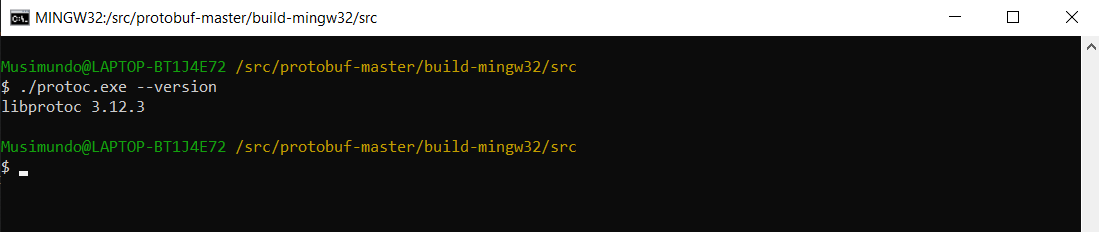
 sfhacker
on 12 Aug 2020
sfhacker
on 12 Aug 2020
@sfhacker Please use this workaround: copy libprotoc.dll and libprotobuf.dll from _VCPKG_ROOT/installed/x64-windows/bin_ to _VCPKG_ROOT/installed/x64-windows/tools/protobuf_ manually, and try again.
JackBoosY
on 13 Aug 2020
Any news/update on this issue?
We have just downloaded master branch and built it from source under MinGW on Windows 10 x64.
Please use powershell instead.
JackBoosY
on 13 Aug 2020
@JackBoos Are you new to this project (i.e. vcpkg)? We are improving our troubleshooting skills, aren't we?
We build large projects from source (including protobuf) using MinGW and we haven't had any issues so far.
@yuxiaoyang88 Any news/update on this open issue?
sfhacker
on 13 Aug 2020
----- 原始邮件 -----
发件人:John Sheppard notifications@github.com
收件人:microsoft/vcpkg vcpkg@noreply.github.com
抄送人:于潇洋 yuxiaoyang88@sina.com, Mention mention@noreply.github.com
主题:Re: [microsoft/vcpkg] [protobuf:x64-windows] build failure (#12849)
日期:2020年08月13日 18点59分
@JackBoos Are you new to this project (i.e. vcpkg)? We are improving our troubleshooting skills, aren't we?
We build large projects from source (including protobuf) using MinGW and we haven't had any issues so far.
@yuxiaoyang88 Any news/update on this open issue?
—
You are receiving this because you were mentioned.
Reply to this email directly, view it on GitHub, or unsubscribe.
The first time I open issue #12756It used to haveD:\C\vcpkg\installed\x64-windows\tools\protobufprotoc.exenot haveD:\C\vcpkg\installed\x64-windows\tools\protobuflibprotobuf.dllD:\C\vcpkg\installed\x64-windows\tools\protobuflibprotoc.dllIf I copy libprotobuf.dll and libprotoc.dll fromD:\C\vcpkg\installed\x64-windows\bintoD:\C\vcpkg\installed\x64-windows\tools\protobuf\I can build successfully with vcpkg install protobuf:x64-windows
now protoc.exe move to new pathD:\C\vcpkg\packages\protobuf_x64-windows\tools\protobufprotoc.exenot exit like beforeD:\C\vcpkg\installed\x64-windows\tools\protobufprotoc.exebut after #12756D:\C\vcpkg\installed\x64-windows\tools\protobuflibprotobuf.dllD:\C\vcpkg\installed\x64-windows\tools\protobuflibprotoc.dllexistsD:\C\vcpkg\installed\x64-windows\tools\protobufprotoc.exedoesn't exist
yuxiaoyang88
on 13 Aug 2020
@yuxiaoyang88 Have a look at this screenshot.
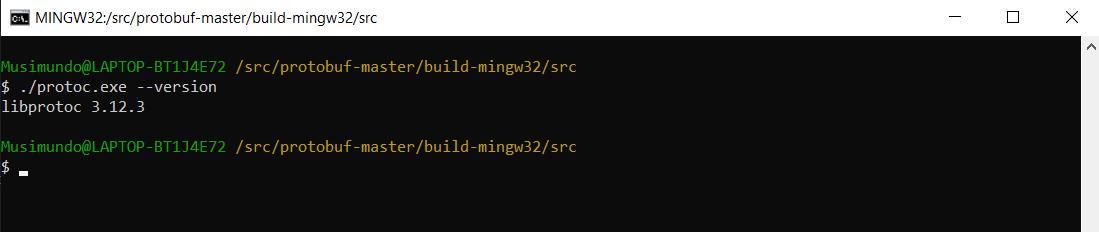
How familiar are you with building projects from source on Windows? Have you tried some other alternatives?
Have fun!
sfhacker
on 13 Aug 2020
Is that call stack being emitted by powershell?
 BillyONeal
on 18 Aug 2020
BillyONeal
on 18 Aug 2020
Is that call stack being emitted by powershell?
I think call stack is related with powershell.
If I run
D:/C/vcpkg/downloads/tools/powershell-core-6.2.1-windows/powershell.exe -noprofile -executionpolicy Bypass -nologo -file D:/C/vcpkg/scripts/buildsystems/msbuild/applocal.ps1 -targetBinary D:/C/vcpkg/packages/protobuf_x64-windows/tools/protobuf/protoc.exe -installedDir D:/C/vcpkg/packages/protobuf_x64-windows/bin
which is produced by vcpkg
PowerShell 7.0.3 return the same issue as D:\C\vcpkg\buildtrees\protobuf\copy-tool-dependencies-err.log
FailFast:
Infinite recursion during resource lookup within System.Private.CoreLib. This may be a bug in System.Private.CoreLib, or potentially in certain extensibility points such as assembly resolve events or CultureInfo names. Resource name: Arg_AccessViolationException
at System.Environment.FailFast(System.String)
at System.SR.InternalGetResourceString(System.String)
at System.SR.GetResourceString(System.String, System.String)
at System.AccessViolationException..ctor()
at System.SpanHelpers.IndexOf(Char ByRef, Char, Int32)
at System.Globalization.CultureData.InitCultureData()
at System.Globalization.CultureData.CreateCultureData(System.String, Boolean)
at System.Globalization.CultureData.GetCultureData(System.String, Boolean)
at System.Globalization.CultureInfo.InitializeFromName(System.String, Boolean)
at System.Globalization.CultureInfo..ctor(System.String, Boolean)
at System.Globalization.CultureInfo.GetCultureInfoHelper(Int32, System.String, System.String)
at System.Globalization.CultureInfo.GetCultureInfo(System.String)
at System.Resources.ManifestBasedResourceGroveler.GetNeutralResourcesLanguage(System.Reflection.Assembly, System.Resources.UltimateResourceFallbackLocation ByRef)
at System.Resources.ResourceManager.CommonAssemblyInit()
at System.Resources.ResourceManager..ctor(System.Type)
at System.SR.InternalGetResourceString(System.String)
at System.SR.GetResourceString(System.String, System.String)
at System.AccessViolationException..ctor()
at System.SpanHelpers.SequenceEqual(Byte ByRef, Byte ByRef, UInt32)
at System.String.Equals(System.String, System.String)
at System.AppDomain.Setup(System.Object)
but PowerShell 6.2.1 in D:/C/vcpkg/downloads/tools/powershell-core-6.2.1-windows/powershell.exe
only return this which is also odd
dumpbin : The term 'dumpbin' is not recognized as the name of a cmdlet, function, script file, or operable program.
Check the spelling of the name, or if a path was included, verify that the path is correct and try again.
At D:\C\vcpkg\scripts\buildsystems\msbuildapplocal.ps1:60 char:12
- $a = $(dumpbin /DEPENDENTS $targetBinary | ? { $_ -match "^ [^ ...
~~~- CategoryInfo : ObjectNotFound: (dumpbin:String) [], CommandNotFoundException
- FullyQualifiedErrorId : CommandNotFoundException
yuxiaoyang88
on 18 Aug 2020
My computer is latest Win10 2004 + PowerShell 7.0.3 + Terminal with no other setting
yuxiaoyang88
on 18 Aug 2020
@yuxiaoyang88 Could you provide the dumpbin.exe 's full path?
JackBoosY
on 18 Aug 2020
@yuxiaoyang88 Could you provide the dumpbin.exe 's full path?
I get four,not sure which one.
"E:\Program\Microsoft Visual Studio\2019\Community\VC\Tools\MSVC\14.27.29110\bin\Hostx64\x86\dumpbin.exe"
"E:\Program\Microsoft Visual Studio\2019\Community\VC\Tools\MSVC\14.27.29110\bin\Hostx64\x64\dumpbin.exe"
"E:\Program\Microsoft Visual Studio\2019\Community\VC\Tools\MSVC\14.27.29110\bin\Hostx86\x64\dumpbin.exe"
"E:\Program\Microsoft Visual Studio\2019\Community\VC\Tools\MSVC\14.27.29110\bin\Hostx86\x86\dumpbin.exe"
yuxiaoyang88
on 18 Aug 2020
Hi,my visual studio upgrade to
Microsoft Visual Studio Community 2019
版本 16.7.2
My issue has been solved.
PS C:\Users\Lollipop> vcpkg install protobuf:x64-windows
Computing installation plan...
The following packages will be built and installed:
protobuf[core]:x64-windows
Detecting compiler hash for triplet x64-windows...
Starting package 1/1: protobuf:x64-windows
Building package protobuf[core]:x64-windows...
Could not locate cached archive: C:\Users\Lollipop\AppData\Local\vcpkg/archives\b3\b303779a009c15518b21fdd946d4ab739e977575.zip
-- Using cached D:/C/vcpkg/downloads/protocolbuffers-protobuf-fde7cf7358ec7cd69e8db9be4f1fa6a5c431386a.tar.gz
-- Cleaning sources at D:/C/vcpkg/buildtrees/protobuf/src/a5c431386a-c9deea9e31.clean. Use --editable to skip cleaning for the packages you specify.
-- Extracting source D:/C/vcpkg/downloads/protocolbuffers-protobuf-fde7cf7358ec7cd69e8db9be4f1fa6a5c431386a.tar.gz
-- Applying patch fix-uwp.patch
-- Applying patch fix-android-log.patch
-- Applying patch fix-static-build.patch
-- Using source at D:/C/vcpkg/buildtrees/protobuf/src/a5c431386a-c9deea9e31.clean
-- Configuring x64-windows
-- Building x64-windows-dbg
-- Building x64-windows-rel
-- Installing: D:/C/vcpkg/packages/protobuf_x64-windows/share/protobuf/copyright
-- Fixing pkgconfig file: D:/C/vcpkg/packages/protobuf_x64-windows/lib/pkgconfig/protobuf-lite.pc
-- Fixing pkgconfig file: D:/C/vcpkg/packages/protobuf_x64-windows/lib/pkgconfig/protobuf.pc
-- Fixing pkgconfig file: D:/C/vcpkg/packages/protobuf_x64-windows/debug/lib/pkgconfig/protobuf-lite.pc
-- Fixing pkgconfig file: D:/C/vcpkg/packages/protobuf_x64-windows/debug/lib/pkgconfig/protobuf.pc
-- Performing post-build validation
-- Performing post-build validation done
Stored binary cache: C:\Users\Lollipop\AppData\Local\vcpkg/archives\b3\b303779a009c15518b21fdd946d4ab739e977575.zip
Building package protobuf[core]:x64-windows... done
Installing package protobuf[core]:x64-windows...
File D:\C\vcpkg\installed\x64-windows\tools/protobuf/libprotobuf.dll was already present and will be overwritten
File D:\C\vcpkg\installed\x64-windows\tools/protobuf/libprotoc.dll was already present and will be overwritten
Installing package protobuf[core]:x64-windows... done
Elapsed time for package protobuf:x64-windows: 2.927 min
Total elapsed time: 3.014 min
The package protobuf:x64-windows provides CMake targets:
find_package(protobuf CONFIG REQUIRED)
 target_link_libraries(main PRIVATE protobuf::libprotoc protobuf::libprotobuf protobuf::libprotobuf-lite)
Many thanks
yuxiaoyang88
on 23 Aug 2020
Since @yuxiaoyang88 said solved, let's close issue.
 linquize
on 23 Aug 2020
linquize
on 23 Aug 2020
I think this is just a solution and we need to do more research on it.
JackBoosY
on 24 Aug 2020
I think this is just a solution and we need to do more research on it.
hello, how resolve it finally? I am confused...
 whidbey
on 31 Aug 2020
whidbey
on 31 Aug 2020
@whidbey We are trying to reproduce this issue now.
JackBoosY
on 31 Aug 2020
@whidbey We are trying to reproduce this issue now.
ok,thanks. i will temply use vckpg of 202006 's version
whidbey
on 31 Aug 2020
hello, how resolve it finally? I am confused...
@whidbey We are also confused! Can you post here the issues you are facing at the moment so we can assist you?
sfhacker
on 31 Aug 2020
hello, how resolve it finally? I am confused...
@whidbey We are also confused! Can you post here the issues you are facing at the moment so we can assist you?
on my win10, vcpkg install protobuf or protobuf:x64-windows-static ok
vcpkg install protobuf:x86-windows-static failed
on my win7, vcpkg install any triplet failed;
Make Error at scripts/cmake/vcpkg_execute_required_process.cmake:83 (message):
Command failed: C:/vcpkg/downloads/tools/powershell-core-6.2.1-windows/powershell.exe -noprofile -executionpolicy Bypass -nologo -file C:/vcpkg/scripts/buildsystems/msbuild/applocal.ps1 -targetBinary C:/vcpkg/packages/protobuf_x86-windows-static/tools/protobuf/protoc.exe -installedDir C:/vcpkg/packages/protobuf_x86-windows-static/bin
Working Directory: C:/vcpkg
Error code: -2146232797
See logs for more information:
C:\vcpkg\buildtrees\protobuf\copy-tool-dependencies-err.log
Call Stack (most recent call first):
scripts/cmake/vcpkg_copy_tool_dependencies.cmake:27 (vcpkg_execute_required_process)
scripts/cmake/vcpkg_copy_tool_dependencies.cmake:37 (search_for_dependencies)
scripts/cmake/vcpkg_copy_tools.cmake:55 (vcpkg_copy_tool_dependencies)
ports/protobuf/portfile.cmake:93 (vcpkg_copy_tools)
scripts/ports.cmake:79 (include)
FailFast:
Infinite recursion during resource lookup within System.Private.CoreLib. This may be a bug in System.Private.CoreLib, or potentially in certain extensibility points such as assembly resolve events or CultureInfo names. Resource name: Arg_AccessViolationException
at System.Environment.FailFast(System.String)
at System.SR.InternalGetResourceString(System.String)
at System.SR.GetResourceString(System.String, System.String)
at System.AccessViolationException..ctor()
at System.SpanHelpers.IndexOf(Char ByRef, Char, Int32)
at System.Globalization.CultureData.InitCultureData()
at System.Globalization.CultureData.CreateCultureData(System.String, Boolean)
at System.Globalization.CultureData.GetCultureData(System.String, Boolean)
at System.Globalization.CultureInfo.InitializeFromName(System.String, Boolean)
at System.Globalization.CultureInfo..ctor(System.String, Boolean)
at System.Globalization.CultureInfo.GetCultureInfoHelper(Int32, System.String, System.String)
at System.Globalization.CultureInfo.GetCultureInfo(System.String)
at System.Resources.ManifestBasedResourceGroveler.GetNeutralResourcesLanguage(System.Reflection.Assembly, System.Resources.UltimateResourceFallbackLocation ByRef)
at System.Resources.ResourceManager.CommonAssemblyInit()
at System.Resources.ResourceManager..ctor(System.Type)
at System.SR.InternalGetResourceString(System.String)
at System.SR.GetResourceString(System.String, System.String)
at System.AccessViolationException..ctor()
at System.SpanHelpers.SequenceEqual(Byte ByRef, Byte ByRef, UInt32)
at System.String.Equals(System.String, System.String)
at System.AppDomain.Setup(System.Object)
I han't no other logs.
would you help with that? what info would you need?
tks.
whidbey
on 31 Aug 2020
@whidbey Revert to the older version doesn't fix this issue, it will just ignore this error.
JackBoosY
on 1 Sep 2020
Hi @whidbey @sfhacker Can you run the command mentioned in the error message and provide me with output?
Such as:
Command failed: C:/vcpkg/downloads/tools/powershell-core-6.2.1-windows/powershell.exe -noprofile -executionpolicy Bypass -nologo -file C:/vcpkg/scripts/buildsystems/msbuild/applocal.ps1 -targetBinary C:/vcpkg/packages/protobuf_x86-windows-static/tools/protobuf/protoc.exe -installedDir C:/vcpkg/packages/protobuf_x86-windows-static/bin
Hi @whidbey @sfhacker Can you run the command mentioned in the error message and provide me with output?
Such as:Command failed: C:/vcpkg/downloads/tools/powershell-core-6.2.1-windows/powershell.exe -noprofile -executionpolicy Bypass -nologo -file C:/vcpkg/scripts/buildsystems/msbuild/applocal.ps1 -targetBinary C:/vcpkg/packages/protobuf_x86-windows-static/tools/protobuf/protoc.exe -installedDir C:/vcpkg/packages/protobuf_x86-windows-static/bin
C:/vcpkg/downloads/tools/powershell-core-6.2.1-windows/powershell.exe -noprofile -executionpolicy Bypass -nologo -file C:/vcpkg/scripts/buildsystems/msbuild/applocal.ps1 -targetBinary C:/vcpkg/packages/protobuf_x86-windows-static/tools/protobuf/protoc.exe -installedDir C:/vcpkg/packages/protobuf_x86-windows-static/bin
runs ok ,and no logs.
before that, I copyed my c:/vcpkg-202006/installed/...........(everything about protobuf ) to c:/vcpkg to solved this problem..
I will use my home pc to try this tonight.
whidbey
on 1 Sep 2020
I rename package to protobuf_x64-windows-static to protobuf_x64-windows-static______________
and remove protobuf from c:/vcpkg.
and run again
C:\Users\Administrator>C:/vcpkg/downloads/tools/powershell-core-6.2.1-windows/po
wershell.exe -noprofile -executionpolicy Bypass -nologo -file C:/vcpkg/scripts/b
uildsystems/msbuild/applocal.ps1 -targetBinary C:/vcpkg/packages/protobuf_x86-wi
ndows-static/tools/protobuf/protoc.exe -installedDir C:/vcpkg/packages/protobuf_
x86-windows-static/bin
nothing happens
whidbey
on 1 Sep 2020
then I run vcpkg install protobuf again:
thows crazy erros :
CMake Error at scripts/cmake/vcpkg_execute_required_process.cmake:83 (message):
Command failed: C:/vcpkg/downloads/tools/powershell-core-6.2.1-windows/power
shell.exe -noprofile -executionpolicy Bypass -nologo -file C:/vcpkg/scripts/buil
dsystems/msbuild/applocal.ps1 -targetBinary C:/vcpkg/packages/protobuf_x86-windo
ws/tools/protobuf/protoc.exe -installedDir C:/vcpkg/packages/protobuf_x86-window
s/bin
Working Directory: C:/vcpkg
Error code: -2146232797
See logs for more information:
C:\vcpkg\buildtrees\protobuf\copy-tool-dependencies-err.log
whidbey
on 1 Sep 2020
Hi guys, can you test #13267 ?
Thanks.
JackBoosY
on 1 Sep 2020
Hi guys, can you test #13267 ?
Thanks.
trying clone your forks.. will show the result later
whidbey
on 1 Sep 2020
Hi guys, can you test #13267 ?
Thanks.
c:\vcpkg_jackboosy\vcpkg>.\vcpkg install protobuf
Computing installation plan...
A suitable version of cmake was not found (required v3.17.2). Downloading portab
le cmake v3.17.2...
Extracting cmake...
A suitable version of 7zip was not found (required v18.1.0). Downloading portabl
e 7zip v18.1.0...
Extracting 7zip...
A suitable version of nuget was not found (required v5.5.1). Downloading portabl
e nuget v5.5.1...
Downloading nuget...
https://dist.nuget.org/win-x86-commandline/v5.5.1/nuget.exe -> C:\vcpkg_jackboosy\vcpkg\downloads\22ea847d-nuget.exe
File does not have the expected hash:
url : [ https://dist.nuget.org/win-x86-commandline/v5.5.1/nuget.exe
]
File path : [ C:\vcpkg_jackboosy\vcpkg\downloads\22ea847d-nuget.exe.part ]
Expected hash : [ 22ea847d8017cd977664d0b13c889cfb13c89143212899a511be217345a
4e243d4d8d4099700114a11d26a087e83eb1a3e2b03bdb5e0db48f10403184cd26619 ]
Actual hash : [ 7858fb210e8682ea6dad4329d46b5daef5e3c3fd0f07f2d5f50c728919e
ac423c771cb33d95b9cec30c1bc6c91a543577cd276133564a30ec6c3da32783feb02 ]
whidbey
on 1 Sep 2020
@whidbey can you try again? It seems that the nuget download is incomplete.
JackBoosY
on 1 Sep 2020
-- Using source at C:/vcpkg_jackboosy/vcpkg/buildtrees/protobuf/src/a5c431386a-c
9deea9e31.clean
-- Configuring x86-windows
-- Building x86-windows-dbg
-- Building x86-windows-rel
CMake Error at scripts/cmake/vcpkg_execute_required_process.cmake:83 (message):
Command failed: C:/vcpkg_jackboosy/vcpkg/downloads/tools/powershell-core-7.0
.3-windows/powershell.exe -noprofile -executionpolicy Bypass -nologo -file C:/vc
pkg_jackboosy/vcpkg/scripts/buildsystems/msbuild/applocal.ps1 -targetBinary C:/v
cpkg_jackboosy/vcpkg/packages/protobuf_x86-windows/tools/protobuf/protoc.exe -in
stalledDir C:/vcpkg_jackboosy/vcpkg/packages/protobuf_x86-windows/bin
Working Directory: C:/vcpkg_jackboosy/vcpkg
Error code: -2146232797
See logs for more information:
C:\vcpkg_jackboosy\vcpkg\buildtrees\protobuf\copy-tool-dependencies-err.lo
g
whidbey
on 1 Sep 2020
@whidbey can you try again? It seems that the nuget download is incomplete.
it's slow and after a long run.. thows error as above
whidbey
on 1 Sep 2020
run alone the command as poweshell 6 shows:
c:\vcpkg_jackboosy\vcpkg>C:/vcpkg_jackboosy/vcpkg/downloads/tools/powershell-cor
e-7.0.3-windows/powershell.exe -noprofile -executionpolicy Bypass -nologo -file
C:/vcpkg_jackboosy/vcpkg/scripts/buildsystems/msbuild/applocal.ps1 -targetBinary
C:/vcpkg_jackboosy/vcpkg/packages/protobuf_x86-windows/tools/protobuf/protoc.ex
e -installedDir C:/vcpkg_jackboos/vcpkg/packages/protobuf_x86-windows/bin
dumpbin: C:\vcpkg_jackboosy\vcpkg\scripts\buildsystems\msbuildapplocal.ps1:60
Line |
The Win32 internal error "连到系统上的设备没有å‘挥作用。" 0x1F oc
curred while writing to the console output buffer at the current cursor position
. Contact Microsoft Customer Support Services.
"
whidbey
on 1 Sep 2020
@whidbey
Please provide failure log _C:\vcpkg_jackboosy\vcpkg\buildtrees\protobuf\copy-tool-dependencies-err.log_.
JackBoosY
on 1 Sep 2020
Process terminated. Infinite recursion during resource lookup within System.Private.CoreLib. This may be a bug in System.Private.CoreLib, or potentially in certain extensibility points such as assembly resolve events or CultureInfo names. Resource name: Arg_AccessViolationException
at System.Environment.FailFast(System.String)
at System.SR.InternalGetResourceString(System.String)
at System.SR.GetResourceString(System.String, System.String)
at System.AccessViolationException..ctor()
at System.SpanHelpers.IndexOf(Char ByRef, Char, Int32)
at System.Globalization.CultureData.InitCultureData()
at System.Globalization.CultureData.CreateCultureData(System.String, Boolean)
at System.Globalization.CultureData.GetCultureData(System.String, Boolean)
at System.Globalization.CultureInfo..ctor(System.String, Boolean)
at System.Globalization.CultureInfo.GetCultureByName(System.String)
at System.Globalization.CultureInfo.GetUserDefaultUICulture()
at System.Globalization.CultureInfo.InitializeUserDefaultUICulture()
at System.Globalization.CultureInfo.get_UserDefaultUICulture()
at System.Globalization.CultureInfo.get_CurrentUICulture()
at System.Resources.ResourceManager.GetString(System.String, System.Globalization.CultureInfo)
at System.SR.InternalGetResourceString(System.String)
at System.SR.GetResourceString(System.String, System.String)
at System.AccessViolationException..ctor()
at System.SpanHelpers.IndexOf(Char ByRef, Char, Int32)
at System.String.Ctor(Char*)
at System.AppContext.Setup(Char, Char, Int32)
whidbey
on 1 Sep 2020
all the log is like this...
whidbey
on 1 Sep 2020
It seems that updating the Powershell version cannot solve this problem, @ras0219-msft @ras0219 is there any other solution?
JackBoosY
on 1 Sep 2020
@whidbey the workaround is update Visual Studio to the latest.
JackBoosY
on 1 Sep 2020
@whidbey the workaround is update Visual Studio to the latest.
but i am using the newsest
packa ge of vs
whidbey
on 1 Sep 2020
@whidbey Are you still having issues building this small project (protobuf)?
Have you taken a look at this screenshot, posted about 20 days ago?
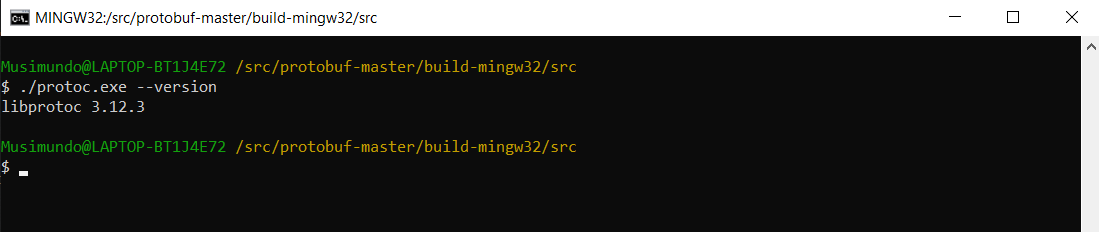
Have you tried other alternatives? It should not take more than 2 mins to build protobuf. It is pretty straight forward.
sfhacker
on 1 Sep 2020
@whidbey Are you still having issues building this small project (protobuf)?
Have you taken a look at this screenshot, posted about 20 days ago?
Have you tried other alternatives? It should not take more than 2 mins to build protobuf. It is pretty straight forward.
yes still Problem ,eachbuild take me 20minutes... and high
cpu. I try anothrr computer win10 and only vs
2019 with lastest update. the same result?. cant figure out why now..
whidbey
on 1 Sep 2020
@whidbey 20 mins plus is a lot! I didn't know vcpkg was so slow! You should try some other alternative.
@JackBoosY This issue seems quite hard to troubleshoot! How can we assist this user? Perhaps the user environment is broken somehow?
sfhacker
on 1 Sep 2020
@whidbey 20 mins plus is a lot! I didn't know vcpkg was so slow! You should try some other alternative.
@JackBoosY This issue seems quite hard to troubleshoot! How can we assist this user? Perhaps the user environment is broken somehow?
yes,i dont have a choice... currently just complile with c:/vcpkg-202006 version and copy to my c:/vcpkg
whidbey
on 1 Sep 2020
@whidbey 20 mins plus is a lot! I didn't know vcpkg was so slow! You should try some other alternative.
@JackBoosY This issue seems quite hard to troubleshoot! How can we assist this user? Perhaps the user environment is broken somehow?
plus , there is seems not only google protobuf,but others .. depends on lucky or not...
would you suggest install a clean windows 10 and visual studio ? I am sure there is something wrong as I have 3 computer....
the pc on my home works ok on x64 when vs 2019 upgrade to newest package... but no lucky for x86. and no lucky for the two other computer...
whidbey
on 1 Sep 2020
reset the vs dont help
c:\vcpkg>vcpkg upgrade
All installed packages are up-to-date with the local portfiles.

c:\vcpkg>vcpkg install protobuf:x86-windows-static
Computing installation plan...
The following packages will be built and installed:
    protobuf[core]:x86-windows-static
Detecting compiler hash for triplet x86-windows-static...
Starting package 1/1: protobuf:x86-windows-static
Building package protobuf[core]:x86-windows-static...
Could not locate cached archive: C:\Users\WIN\AppData\Local\vcpkg/archives\ec\ec0710042569bbddbad46f1b9d254eea71ff5d67.zip
-- Using community triplet x86-windows-static. This triplet configuration is not guaranteed to succeed.
-- [COMMUNITY] Loading triplet configuration from: C:\vcpkg\triplets\community\x86-windows-static.cmake
-- Using cached C:/vcpkg/downloads/protocolbuffers-protobuf-fde7cf7358ec7cd69e8db9be4f1fa6a5c431386a.tar.gz
-- Cleaning sources at C:/vcpkg/buildtrees/protobuf/src/a5c431386a-c9deea9e31.clean. Use --editable to skip cleaning for the packages you specify.
-- Extracting source C:/vcpkg/downloads/protocolbuffers-protobuf-fde7cf7358ec7cd69e8db9be4f1fa6a5c431386a.tar.gz
-- Applying patch fix-uwp.patch
-- Applying patch fix-android-log.patch
-- Applying patch fix-static-build.patch
-- Using source at C:/vcpkg/buildtrees/protobuf/src/a5c431386a-c9deea9e31.clean
-- Configuring x86-windows-static
-- Building x86-windows-static-dbg
-- Building x86-windows-static-rel
CMake Error at scripts/cmake/vcpkg_execute_required_process.cmake:83 (message):
    Command failed: C:/vcpkg/downloads/tools/powershell-core-6.2.1-windows/powershell.exe -noprofile -executionpolicy Bypass -nologo -file C:/vcpkg/scripts/buildsystems/msbuild/applocal.ps1 -targetBinary C:/vcpkg/packages/protobuf_x86-windows-static/tools/protobuf/protoc.exe -installedDir C:/vcpkg/packages/protobuf_x86-windows-static/bin
    Working Directory: C:/vcpkg
    Error code: -2146232797
    See logs for more information:
      C:\vcpkg\buildtrees\protobuf\copy-tool-dependencies-err.log

Call Stack (most recent call first):
  scripts/cmake/vcpkg_copy_tool_dependencies.cmake:27 (vcpkg_execute_required_process)
  scripts/cmake/vcpkg_copy_tool_dependencies.cmake:37 (search_for_dependencies)
  scripts/cmake/vcpkg_copy_tools.cmake:55 (vcpkg_copy_tool_dependencies)
  ports/protobuf/portfile.cmake:93 (vcpkg_copy_tools)
  scripts/ports.cmake:79 (include)


Error: Building package protobuf:x86-windows-static failed with: BUILD_FAILED
Please ensure you're using the latest portfiles with `.\vcpkg update`, then
submit an issue at https://github.com/Microsoft/vcpkg/issues including:
  Package: protobuf:x86-windows-static
  Vcpkg version: 2020.06.15-nohash

Additionally, attach any relevant sections from the log files above.

c:\vcpkg>vcpkg install protobuf:x64-windows-static
Computing installation plan...
The following packages are already installed:
    protobuf[core]:x64-windows-static
Package protobuf:x64-windows-static is already installed

Total elapsed time: 2.084 ms

The package protobuf:x64-windows-static provides CMake targets:

    find_package(protobuf CONFIG REQUIRED)
     target_link_libraries(main PRIVATE protobuf::libprotoc protobuf::libprotobuf protobuf::libprotobuf-lite)
My Powershell version is 5.1
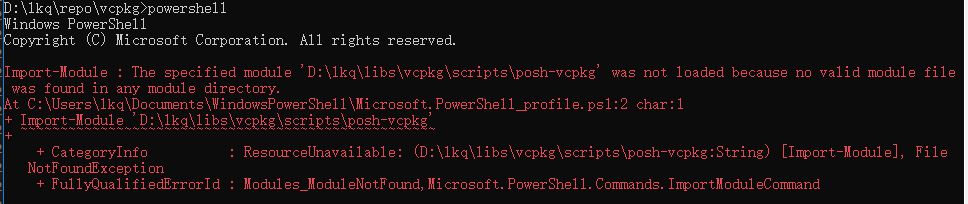
When I run powershell, it show the error log.
Is it relate to the error?
 blackknifes
on 2 Sep 2020
blackknifes
on 2 Sep 2020
@whidbey @blackknifes Can you use the command dumpbin /DEPENDENTS PROTOC_EXE_PATH in Visual Studio Native Tools Command Prompt? PROTOC_EXE_PATH should be the full path of protoc.exe in _VCPKG_ROOT/packages/protobuf-TRIPLET/tools/protobuf_.
The output should like this:
C:\Program Files (x86)\Microsoft Visual Studio\2017\Enterprise>dumpbin /DEPENDENTS f:\vcpkg\packages\protobuf_x64-windows\tools\protobuf\protoc.exe
Microsoft (R) COFF/PE Dumper Version 14.16.27043.0
Copyright (C) Microsoft Corporation.  All rights reserved.


Dump of file f:\vcpkg\packages\protobuf_x64-windows\tools\protobuf\protoc.exe

File Type: EXECUTABLE IMAGE

  Image has the following dependencies:

    libprotoc.dll
    MSVCP140.dll
    VCRUNTIME140.dll
    api-ms-win-crt-runtime-l1-1-0.dll
    api-ms-win-crt-heap-l1-1-0.dll
    api-ms-win-crt-math-l1-1-0.dll
    api-ms-win-crt-stdio-l1-1-0.dll
    api-ms-win-crt-locale-l1-1-0.dll
    KERNEL32.dll

  Summary

        1000 .data
        1000 .pdata
        2000 .rdata
        1000 .reloc
        1000 .rsrc
        3000 .text

C:\Program Files (x86)\Microsoft Visual Studio\2017\Enterprise>
@JackBoosY How can we assist these users here? It is over 20 days and they are unable to succeed!
Perhaps their environment is broken somehow?
sfhacker
on 2 Sep 2020
@whidbey @blackknifes Can you use the command
dumpbin /DEPENDENTS PROTOC_EXE_PATHinVisual Studio Native Tools Command Prompt?PROTOC_EXE_PATHshould be the full path ofprotoc.exein _VCPKG_ROOT/packages/protobuf-TRIPLET/tools/protobuf_.The output should like this:
C:\Program Files (x86)\Microsoft Visual Studio\2017\Enterprise>dumpbin /DEPENDENTS f:\vcpkg\packages\protobuf_x64-windows\tools\protobuf\protoc.exe
Microsoft (R) COFF/PE Dumper Version 14.16.27043.0
Copyright (C) Microsoft Corporation.  All rights reserved.


Dump of file f:\vcpkg\packages\protobuf_x64-windows\tools\protobuf\protoc.exe

File Type: EXECUTABLE IMAGE

  Image has the following dependencies:

    libprotoc.dll
    MSVCP140.dll
    VCRUNTIME140.dll
    api-ms-win-crt-runtime-l1-1-0.dll
    api-ms-win-crt-heap-l1-1-0.dll
    api-ms-win-crt-math-l1-1-0.dll
    api-ms-win-crt-stdio-l1-1-0.dll
    api-ms-win-crt-locale-l1-1-0.dll
    KERNEL32.dll

  Summary

        1000 .data
        1000 .pdata
        2000 .rdata
        1000 .reloc
        1000 .rsrc
        3000 .text

C:\Program Files (x86)\Microsoft Visual Studio\2017\Enterprise>
Dump of file C:\vcpkg\installed\x86-windows\tools\protobufprotoc.exe
File Type: EXECUTABLE IMAGE
Image has the following dependencies:
libprotoc.dll
MSVCP140.dll
VCRUNTIME140.dll
api-ms-win-crt-runtime-l1-1-0.dll
api-ms-win-crt-heap-l1-1-0.dll
api-ms-win-crt-math-l1-1-0.dll
api-ms-win-crt-stdio-l1-1-0.dll
api-ms-win-crt-locale-l1-1-0.dll
KERNEL32.dll
Summary
    1000 .data
    2000 .rdata
    1000 .reloc
    1000 .rsrc
    2000 .text
here is my succed of vs2019 and x86-windows triplet result...
but as you know.. I failed to compile x86-windows-static thus there no protoc.exe generated I thiink...
whidbey
on 2 Sep 2020
C:\vcpkg\packages\protobuf_x86-windows-static\tools\protobuf
here it go for the x86-windows-static tools
C:\Program Files (x86)\Microsoft Visual Studio\2019\Community>dumpbin /dependents C:\vcpkg\packages\protobuf_x86-windows-static\tools\protobufprotoc.exe
Microsoft (R) COFF/PE Dumper Version 14.27.29111.0
Copyright (C) Microsoft Corporation. All rights reserved.
Dump of file C:\vcpkg\packages\protobuf_x86-windows-static\tools\protobufprotoc.exe
File Type: EXECUTABLE IMAGE
Image has the following dependencies:
KERNEL32.dll
Summary
    9000 .data
   91000 .rdata
   17000 .reloc
    1000 .rsrc
  204000 .text
C:\Program Files (x86)\Microsoft Visual Studio\2019\Community>dumpbin /dependents C:\vcpkg\packages\protobuf_x64-windows-static\tools\protobufprotoc.exe
Microsoft (R) COFF/PE Dumper Version 14.27.29111.0
Copyright (C) Microsoft Corporation. All rights reserved.
Dump of file C:\vcpkg\packages\protobuf_x64-windows-static\tools\protobufprotoc.exe
File Type: EXECUTABLE IMAGE
Image has the following dependencies:
KERNEL32.dll
Summary
    B000 .data
   14000 .pdata
   AF000 .rdata
    4000 .reloc
    1000 .rsrc
  258000 .text
    1000 _RDATA
Maybe the dlls needed by powershell cannot be found in system32 which caused this issue, but we still cannot reproduce it.
For workaround. please unzip and replace this file to _VCPKG_ROOT/scripts/cmake_, rebuild protobuf and copy all the files from _VCPKG_ROOT/packages/protobuf_TRIPLET/bin_ to _VCPKG_ROOT/installed/TRIPLET/tools/protobuf_.
JackBoosY
on 3 Sep 2020
Maybe the dlls needed by powershell cannot be found in system32 which caused this issue, but we still cannot reproduce it.
For workaround. please unzip and replace this file to _VCPKG_ROOT/scripts/cmake_, rebuild protobuf and copy all the files from _VCPKG_ROOT/packages/protobuf_TRIPLET/bin_ to _VCPKG_ROOT/installed/TRIPLET/tools/protobuf_.
this works ,it generates lib in
C:\vcpkg\installed\x86-windows-static\lib
I dont need the bin/exe infact,as I could use the x86-windows triplet version I think..
-- Using community triplet x86-windows-static. This triplet configuration is not guaranteed to succeed.
-- [COMMUNITY] Loading triplet configuration from: C:\vcpkg\triplets\community\x86-windows-static.cmake
-- Using cached C:/vcpkg/downloads/protocolbuffers-protobuf-fde7cf7358ec7cd69e8db9be4f1fa6a5c431386a.tar.gz
-- Cleaning sources at C:/vcpkg/buildtrees/protobuf/src/a5c431386a-c9deea9e31.clean. Use --editable to skip cleaning for the packages you specify.
-- Extracting source C:/vcpkg/downloads/protocolbuffers-protobuf-fde7cf7358ec7cd69e8db9be4f1fa6a5c431386a.tar.gz
-- Applying patch fix-uwp.patch
-- Applying patch fix-android-log.patch
-- Applying patch fix-static-build.patch
-- Using source at C:/vcpkg/buildtrees/protobuf/src/a5c431386a-c9deea9e31.clean
-- Configuring x86-windows-static
-- Building x86-windows-static-dbg
-- Building x86-windows-static-rel
FailFast:
Infinite recursion during resource lookup within System.Private.CoreLib. This may be a bug in System.Private.CoreLib, or potentially in certain extensibility points such as assembly resolve events or CultureInfo names. Resource name: Arg_AccessViolationException
at System.Environment.FailFast(System.String)
at System.SR.InternalGetResourceString(System.String)
at System.SR.GetResourceString(System.String, System.String)
at System.AccessViolationException..ctor()
at System.SpanHelpers.IndexOf(Char ByRef, Char, Int32)
at System.Globalization.CultureData.InitCultureData()
at System.Globalization.CultureData.CreateCultureData(System.String, Boolean)
at System.Globalization.CultureData.GetCultureData(System.String, Boolean)
at System.Globalization.CultureInfo.InitializeFromName(System.String, Boolean)
at System.Globalization.CultureInfo..ctor(System.String, Boolean)
at System.Globalization.CultureInfo.GetCultureInfoHelper(Int32, System.String, System.String)
at System.Globalization.CultureInfo.GetCultureInfo(System.String)
at System.Resources.ManifestBasedResourceGroveler.GetNeutralResourcesLanguage(System.Reflection.Assembly, System.Resources.UltimateResourceFallbackLocation ByRef)
at System.Resources.ResourceManager.CommonAssemblyInit()
at System.Resources.ResourceManager..ctor(System.Type)
at System.SR.InternalGetResourceString(System.String)
at System.SR.GetResourceString(System.String, System.String)
at System.AccessViolationException..ctor()
at System.SpanHelpers.SequenceEqual(Byte ByRef, Byte ByRef, UInt32)
at System.String.Equals(System.String, System.String)
at System.AppDomain.Setup(System.Object)
FailFast:
Infinite recursion during resource lookup within System.Private.CoreLib. This may be a bug in System.Private.CoreLib, or potentially in certain extensibility points such as assembly resolve events or CultureInfo names. Resource name: Arg_AccessViolationException
at System.Environment.FailFast(System.String)
at System.SR.InternalGetResourceString(System.String)
at System.SR.GetResourceString(System.String, System.String)
at System.AccessViolationException..ctor()
at System.SpanHelpers.IndexOf(Char ByRef, Char, Int32)
at System.Globalization.CultureData.InitCultureData()
at System.Globalization.CultureData.CreateCultureData(System.String, Boolean)
at System.Globalization.CultureData.GetCultureData(System.String, Boolean)
at System.Globalization.CultureInfo.InitializeFromName(System.String, Boolean)
at System.Globalization.CultureInfo..ctor(System.String, Boolean)
at System.Globalization.CultureInfo.GetCultureInfoHelper(Int32, System.String, System.String)
at System.Globalization.CultureInfo.GetCultureInfo(System.String)
at System.Resources.ManifestBasedResourceGroveler.GetNeutralResourcesLanguage(System.Reflection.Assembly, System.Resources.UltimateResourceFallbackLocation ByRef)
at System.Resources.ResourceManager.CommonAssemblyInit()
at System.Resources.ResourceManager..ctor(System.Type)
at System.SR.InternalGetResourceString(System.String)
at System.SR.GetResourceString(System.String, System.String)
at System.AccessViolationException..ctor()
at System.SpanHelpers.SequenceEqual(Byte ByRef, Byte ByRef, UInt32)
at System.String.Equals(System.String, System.String)
at System.AppDomain.Setup(System.Object)
-- Installing: C:/vcpkg/packages/protobuf_x86-windows-static/share/protobuf/copyright
-- Fixing pkgconfig file: C:/vcpkg/packages/protobuf_x86-windows-static/lib/pkgconfig/protobuf-lite.pc
-- Fixing pkgconfig file: C:/vcpkg/packages/protobuf_x86-windows-static/lib/pkgconfig/protobuf.pc
-- Fixing pkgconfig file: C:/vcpkg/packages/protobuf_x86-windows-static/debug/lib/pkgconfig/protobuf-lite.pc
-- Fixing pkgconfig file: C:/vcpkg/packages/protobuf_x86-windows-static/debug/lib/pkgconfig/protobuf.pc
-- Performing post-build validation
-- Performing post-build validation done
Stored binary cache: C:\Users\WIN\AppData\Local\vcpkg/archives\ec\ec0710042569bbddbad46f1b9d254eea71ff5d67.zip
Building package protobuf[core]:x86-windows-static... done
Installing package protobuf[core]:x86-windows-static...
Installing package protobuf[core]:x86-windows-static... done
Elapsed time for package protobuf:x86-windows-static: 5.17 min
Total elapsed time: 5.43 min
The package protobuf:x86-windows-static provides CMake targets:
find_package(protobuf CONFIG REQUIRED)
 target_link_libraries(main PRIVATE protobuf::libprotoc protobuf::libprotobuf protobuf::libprotobuf-lite)
c:\vcpkg>
c:\vcpkg>
whidbey
on 5 Sep 2020
and I see C:\vcpkg\installed\x86-windows-static\tools\protobufprotoc.exe generates without copy from package folder.
whidbey
on 5 Sep 2020
@whidbey Yes, that's why it's called workaround, you need to copy the dependencies manually.
JackBoosY
on 7 Sep 2020
@whidbey Yes, that's why it's called
workaround, you need to copy the dependencies manually.
ok,thanks ,i templty resolve it by your patch...
whidbey
on 7 Sep 2020
Has the bug been fixed? Will it merge to master?
blackknifes
on 11 Sep 2020
No... it's not resolved.
JackBoosY
on 11 Sep 2020
vcpkg's powershell has been updated to version 7, but the bug is still exists.
blackknifes
on 18 Sep 2020
@virtualMx What have you 'met'?
sfhacker
on 16 Oct 2020
@virtualMx We have had no issues building OpenSSL or protobuf from source on Windows at all!
This issue is two months old!
On another note, which (language) translator are you using? I'd like to try it out!
sfhacker
on 16 Oct 2020
For workaround. please unzip and replace this file to _VCPKG_ROOT/scripts/cmake_, rebuild protobuf and copy all the files from _VCPKG_ROOT/packages/protobuf_TRIPLET/bin_ to _VCPKG_ROOT/installed/TRIPLET/tools/protobuf_.
Maybe the dlls needed by powershell cannot be found in system32 which caused this issue, but we still cannot reproduce it.
For workaround. please unzip and replace this file to _VCPKG_ROOT/scripts/cmake_, rebuild protobuf and copy all the files from _VCPKG_ROOT/packages/protobuf_TRIPLET/bin_ to _VCPKG_ROOT/installed/TRIPLET/tools/protobuf_.
this works ,it generates lib in
C:\vcpkg\installed\x86-windows-static\lib
I dont need the bin/exe infact,as I could use the x86-windows triplet version I think..-- Using community triplet x86-windows-static. This triplet configuration is not guaranteed to succeed.
-- [COMMUNITY] Loading triplet configuration from: C:\vcpkg\triplets\community\x86-windows-static.cmake
-- Using cached C:/vcpkg/downloads/protocolbuffers-protobuf-fde7cf7358ec7cd69e8db9be4f1fa6a5c431386a.tar.gz
-- Cleaning sources at C:/vcpkg/buildtrees/protobuf/src/a5c431386a-c9deea9e31.clean. Use --editable to skip cleaning for the packages you specify.
-- Extracting source C:/vcpkg/downloads/protocolbuffers-protobuf-fde7cf7358ec7cd69e8db9be4f1fa6a5c431386a.tar.gz
-- Applying patch fix-uwp.patch
-- Applying patch fix-android-log.patch
-- Applying patch fix-static-build.patch
-- Using source at C:/vcpkg/buildtrees/protobuf/src/a5c431386a-c9deea9e31.clean
-- Configuring x86-windows-static
-- Building x86-windows-static-dbg
-- Building x86-windows-static-rel
FailFast:
Infinite recursion during resource lookup within System.Private.CoreLib. This may be a bug in System.Private.CoreLib, or potentially in certain extensibility points such as assembly resolve events or CultureInfo names. Resource name: Arg_AccessViolationExceptionat System.Environment.FailFast(System.String)
at System.SR.InternalGetResourceString(System.String)
at System.SR.GetResourceString(System.String, System.String)
at System.AccessViolationException..ctor()
at System.SpanHelpers.IndexOf(Char ByRef, Char, Int32)
at System.Globalization.CultureData.InitCultureData()
at System.Globalization.CultureData.CreateCultureData(System.String, Boolean)
at System.Globalization.CultureData.GetCultureData(System.String, Boolean)
at System.Globalization.CultureInfo.InitializeFromName(System.String, Boolean)
at System.Globalization.CultureInfo..ctor(System.String, Boolean)
at System.Globalization.CultureInfo.GetCultureInfoHelper(Int32, System.String, System.String)
at System.Globalization.CultureInfo.GetCultureInfo(System.String)
at System.Resources.ManifestBasedResourceGroveler.GetNeutralResourcesLanguage(System.Reflection.Assembly, System.Resources.UltimateResourceFallbackLocation ByRef)
at System.Resources.ResourceManager.CommonAssemblyInit()
at System.Resources.ResourceManager..ctor(System.Type)
at System.SR.InternalGetResourceString(System.String)
at System.SR.GetResourceString(System.String, System.String)
at System.AccessViolationException..ctor()
at System.SpanHelpers.SequenceEqual(Byte ByRef, Byte ByRef, UInt32)
at System.String.Equals(System.String, System.String)
at System.AppDomain.Setup(System.Object)
FailFast:
Infinite recursion during resource lookup within System.Private.CoreLib. This may be a bug in System.Private.CoreLib, or potentially in certain extensibility points such as assembly resolve events or CultureInfo names. Resource name: Arg_AccessViolationExceptionat System.Environment.FailFast(System.String)
at System.SR.InternalGetResourceString(System.String)
at System.SR.GetResourceString(System.String, System.String)
at System.AccessViolationException..ctor()
at System.SpanHelpers.IndexOf(Char ByRef, Char, Int32)
at System.Globalization.CultureData.InitCultureData()
at System.Globalization.CultureData.CreateCultureData(System.String, Boolean)
at System.Globalization.CultureData.GetCultureData(System.String, Boolean)
at System.Globalization.CultureInfo.InitializeFromName(System.String, Boolean)
at System.Globalization.CultureInfo..ctor(System.String, Boolean)
at System.Globalization.CultureInfo.GetCultureInfoHelper(Int32, System.String, System.String)
at System.Globalization.CultureInfo.GetCultureInfo(System.String)
at System.Resources.ManifestBasedResourceGroveler.GetNeutralResourcesLanguage(System.Reflection.Assembly, System.Resources.UltimateResourceFallbackLocation ByRef)
at System.Resources.ResourceManager.CommonAssemblyInit()
at System.Resources.ResourceManager..ctor(System.Type)
at System.SR.InternalGetResourceString(System.String)
at System.SR.GetResourceString(System.String, System.String)
at System.AccessViolationException..ctor()
at System.SpanHelpers.SequenceEqual(Byte ByRef, Byte ByRef, UInt32)
at System.String.Equals(System.String, System.String)
at System.AppDomain.Setup(System.Object)
-- Installing: C:/vcpkg/packages/protobuf_x86-windows-static/share/protobuf/copyright
-- Fixing pkgconfig file: C:/vcpkg/packages/protobuf_x86-windows-static/lib/pkgconfig/protobuf-lite.pc
-- Fixing pkgconfig file: C:/vcpkg/packages/protobuf_x86-windows-static/lib/pkgconfig/protobuf.pc
-- Fixing pkgconfig file: C:/vcpkg/packages/protobuf_x86-windows-static/debug/lib/pkgconfig/protobuf-lite.pc
-- Fixing pkgconfig file: C:/vcpkg/packages/protobuf_x86-windows-static/debug/lib/pkgconfig/protobuf.pc
-- Performing post-build validation
-- Performing post-build validation done
Stored binary cache: C:\Users\WIN\AppData\Local\vcpkg/archives\ec\ec0710042569bbddbad46f1b9d254eea71ff5d67.zip
Building package protobuf[core]:x86-windows-static... done
Installing package protobuf[core]:x86-windows-static...
Installing package protobuf[core]:x86-windows-static... done
Elapsed time for package protobuf:x86-windows-static: 5.17 minTotal elapsed time: 5.43 min
The package protobuf:x86-windows-static provides CMake targets:
find_package(protobuf CONFIG REQUIRED)
 target_link_libraries(main PRIVATE protobuf::libprotoc protobuf::libprotobuf protobuf::libprotobuf-lite)
c:\vcpkg>
c:\vcpkg>
It works, so this problem is solved? However, after this, installing many package(mathgl for example) will throw these messages:
at System.Environment.FailFast(System.String)
at System.SR.InternalGetResourceString(System.String)
at System.SR.GetResourceString(System.String, System.String)
at System.AccessViolationException..ctor()
at System.SpanHelpers.IndexOf(Char ByRef, Char, Int32)
at System.Globalization.CultureData.InitCultureData()
at System.Globalization.CultureData.CreateCultureData(System.String, Boolean)
at System.Globalization.CultureData.GetCultureData(System.String, Boolean)
at System.Globalization.CultureInfo.InitializeFromName(System.String, Boolean)
at System.Globalization.CultureInfo..ctor(System.String, Boolean)
at System.Globalization.CultureInfo.GetCultureInfoHelper(Int32, System.String, System.String)
at System.Globalization.CultureInfo.GetCultureInfo(System.String)
at System.Resources.ManifestBasedResourceGroveler.GetNeutralResourcesLanguage(System.Reflection.Assembly, System.Resources.UltimateResourceFallbackLocation ByRef)
at System.Resources.ResourceManager.CommonAssemblyInit()
at System.Resources.ResourceManager..ctor(System.Type)
at System.SR.InternalGetResourceString(System.String)
at System.SR.GetResourceString(System.String, System.String)
at System.AccessViolationException..ctor()
at System.SpanHelpers.SequenceEqual(Byte ByRef, Byte ByRef, UInt32)
at System.String.Equals(System.String, System.String)
at System.AppDomain.Setup(System.Object)
-- Installing: C:/vcpkg/packages/protobuf_x86-windows-static/share/protobuf/copyright
-- Fixing pkgconfig file: C:/vcpkg/packages/protobuf_x86-windows-static/lib/pkgconfig/protobuf-lite.pc
-- Fixing pkgconfig file: C:/vcpkg/packages/protobuf_x86-windows-static/lib/pkgconfig/protobuf.pc
-- Fixing pkgconfig file: C:/vcpkg/packages/protobuf_x86-windows-static/debug/lib/pkgconfig/protobuf-lite.pc
-- Fixing pkgconfig file: C:/vcpkg/packages/protobuf_x86-windows-static/debug/lib/pkgconfig/protobuf.pc
-- Performing post-build validation
-- Performing post-build validation done
Stored binary cache: C:\Users\WIN\AppData\Local\vcpkg/archives\ec\ec0710042569bbddbad46f1b9d254eea71ff5d67.zip
Building package protobuf[core]:x86-windows-static... done
Installing package protobuf[core]:x86-windows-static...
Installing package protobuf[core]:x86-windows-static... done
Elapsed time for package protobuf:x86-windows-static: 5.17 min.
Can we have other approaches for this problem?
 nil-is-lin
on 23 Oct 2020
nil-is-lin
on 23 Oct 2020
@nil-is-lin We are trying to replace the ps1 script with executable to completely solve this issue.
JackBoosY
on 23 Oct 2020
at System.AppDomain.Setup(System.Object)
The API presents only .Net Framework so the callstack comes from Windows PowerShell.
 iSazonov
on 26 Oct 2020
iSazonov
on 26 Oct 2020
Related issues
 angelmixu
·
3Comments
angelmixu
·
3Comments
 husseinalihazime
·
3Comments
husseinalihazime
·
3Comments
 pkeir
·
3Comments
pkeir
·
3Comments
 PhilLab
·
3Comments
PhilLab
·
3Comments
 tzbo
·
3Comments
tzbo
·
3Comments