Vcpkg: NuGet package doesn't add proper include and library paths
Describe the bug
I just recently pulled the newest set of ports in order to update all the dependencies in my project. NuGet export needed to update NuGet from 4.6.2 to 4.8.1. I created a package and installed it in my project using the Package Manager Console as I did multiple times before. This time though my project doesn't seem to have proper include and library paths set.
For example if I want to #include <fmt/format.h> I will get an error saying cannot open source file "fmt/format.h". It's clear to me that include path is not set. What's curious though is that if I write #include <../x64-windows/include/fmt/format.h> it works! I'm not sure what the include path might be though since it's neither installed/x64-windows nor installed/vcpkg.
If I manually add packages\MyPackage.1.0.2\installed\x64-windows\include to the project include paths it works fine, but since I shouldn't be doing this when using NuGet, I don't want to.
Even If I do though the same applies to library path since compiling the project reports a big set of unresolved external errors.
Before that the last time I updated the package was yesterday. That was before pulling from the vcpkg repository, so it seems that updating vcpkg (or NuGet) is a probable cause of the problem.
Environment
- OS: Windows 10
- Compiler: Visual Studio 2019 Community 16.5.4, Toolchain v142
To Reproduce
Steps to reproduce the behavior:
- ./vcpkg install fmt:x64-windows
- ./vcpkg export fmt:x64-windows --nuget
- Install the package in a project
#include <fmt/format.h>reports an error sayingcannot open source file "fmt/format.h"
Expected behavior
I expect installing a NuGet package to setup proper include and library paths as it did before.
Additional context
- It happens on my project and on a clean one
- It happens if I export all the dependencies and when I only export one of them
- I don't use vcpkg integration and always export NuGet packages
- I set my projects to the appropriate architecture when testing
- I'm currently on vcpkg master@28ab0b1
 Vennor
All 7 comments
I tried one more thing. I compared all the files of my previous package and the new one.
One thing that caught my attention was that build/native/MyPackage.targets has one extra entry now. I've pasted it below.
  <PropertyGroup>
    <VcpkgRoot>$([MSBuild]::GetDirectoryNameOfFileAbove($(MSBuildThisFileDirectory), .vcpkg-root))\installed\$(VcpkgTriplet)\</VcpkgRoot>
  </PropertyGroup>
Removing it fixes the problem. Is it something that vcpkg adds?
Vennor
on 25 Apr 2020
This issue is caused by PR: https://github.com/microsoft/vcpkg/pull/6214.
@shihaonan369 Could you please help have a look this issue?
 Cheney-W
on 29 Apr 2020
Cheney-W
on 29 Apr 2020
This issue is caused by PR: #6214.
@shihaonan369 Could you please help have a look this issue?
Yeah, i will take a look. @Cheney-W @Vennor
 shihaonan369
on 30 Apr 2020
shihaonan369
on 30 Apr 2020
@Vennor I fix this bug #11093 , please check if it works for you. The reason is $(VcpkgTriplet) has not defined before import vcpkg.target.
For #6214, set $(VcpkgRoot) to empty can also achieve the same result.
shihaonan369
on 30 Apr 2020
Thanks, @shihaonan369. I tested it by cloning your fork on master@eb39023. The problem's still there but it changed a bit.
#include <fmt/format.h> still doesn't work. This time to make it work I have to include the file like this: #include "packages/MyPackage/installed/x64-windows/include/fmt/format.h" which is simply a path relative to my test project's root. Also, removing the whole PropertyGroup from the targets file doesn't fix the problem anymore for some reason.
Vennor
on 30 Apr 2020
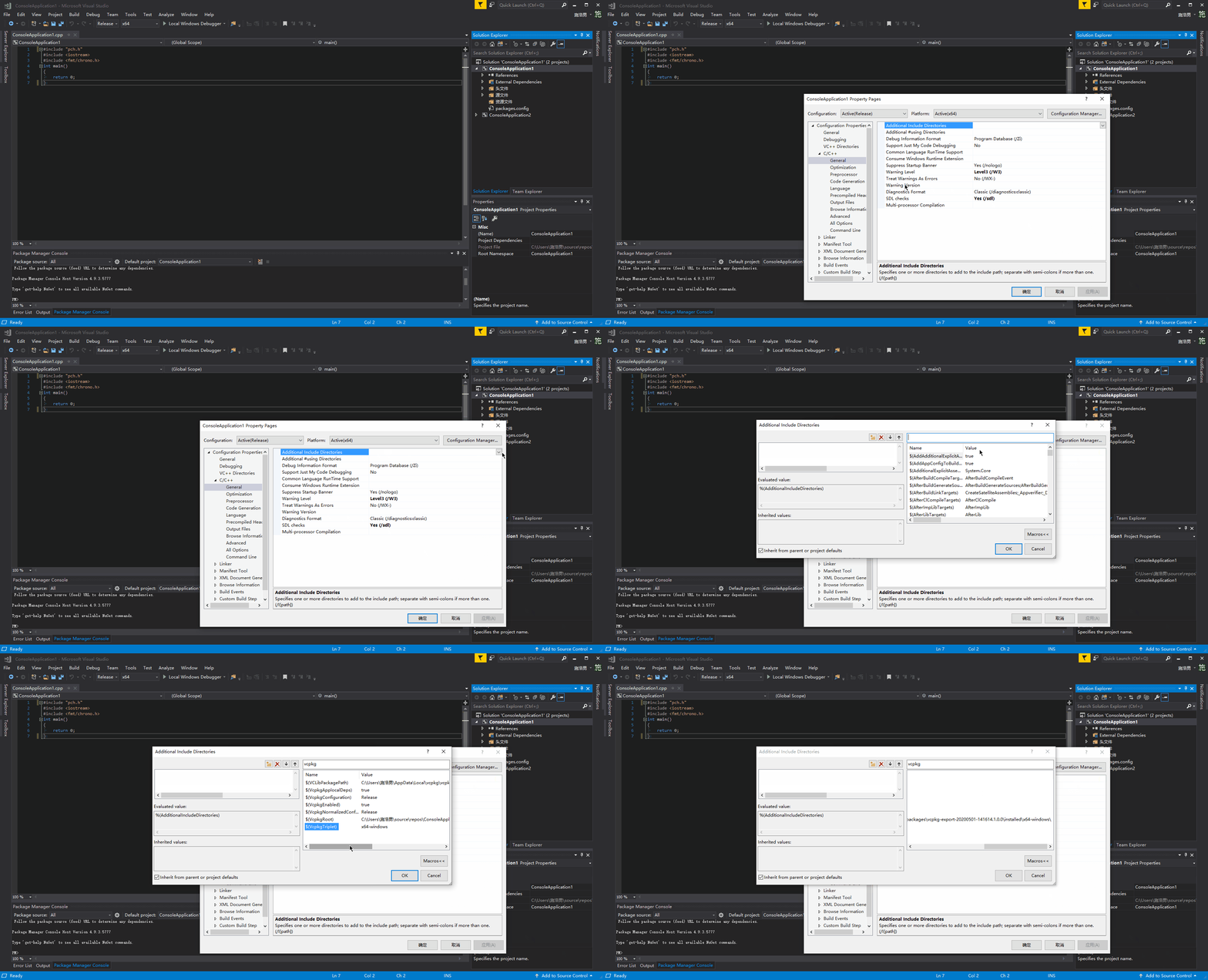
@Vennor Could you please tell me what's the value of $(VcpkgRoot) and $(VcpkgTriplet)? You can find them as shown.
shihaonan369
on 1 May 2020
$(VcpkgTriplet) is x86-windows and $(VcpkgRoot) is C:\Code\NugetTest2\packages\MyPackage\installed\x86-windows.
So, for some reason, the triplet is wrong. It should be x64-windows since that's what I exported and that's what is in the actual path.
Actually, it just came to me that I had the test project set to x86. After switching to x64 it works fine. Sorry for missing that earlier and thanks for the fix!
Vennor
on 1 May 2020
Related issues
 ghost
·
3Comments
ghost
·
3Comments
 spindensity
·
3Comments
spindensity
·
3Comments
 jack17529
·
3Comments
jack17529
·
3Comments
 aspioupiou
·
3Comments
aspioupiou
·
3Comments
 pakdel
·
3Comments
pakdel
·
3Comments
Most helpful comment
@Vennor Could you please tell me what's the value of $(VcpkgRoot) and $(VcpkgTriplet)? You can find them as shown.
