Vcpkg: Vcpkg terminated with message 'Could not locate a complete toolset'
The Machine Setup
- Windows 10 1709
- Visual Studio 2017 (15.4.5)
- CMake version is 3.10
- Locale: zh-cn (Simplified Chinese)
Steps to Reproduce
Just run command .\vcpkg.exe install boost and it terminated with following message:
PS C:\Users\MyUserName\Developer\GitHub\vcpkg> .\vcpkg.exe install boost
The following packages will be built and installed:
    boost:x86-windows
  * bzip2:x86-windows
  * zlib:x86-windows
Additional packages (*) will be installed to complete this operation.
Starting package 1/3: zlib:x86-windows
Building package zlib:x86-windows...
Warning: The following VS instances are exluded because the English language pack is unavailable.
    C:\Program Files (x86)\Microsoft Visual Studio\2017\Community
Please install the English language pack.
Could not locate a complete toolset.
The following paths were examined:
    C:\Program Files (x86)\Microsoft Visual Studio\2017\Community\VC\Auxiliary\Build\vcvarsall.bat
    C:\Program Files (x86)\Microsoft Visual Studio\2017\Community\VC\Tools\MSVC\14.11.25503\bin\HostX86\x86\dumpbin.exe
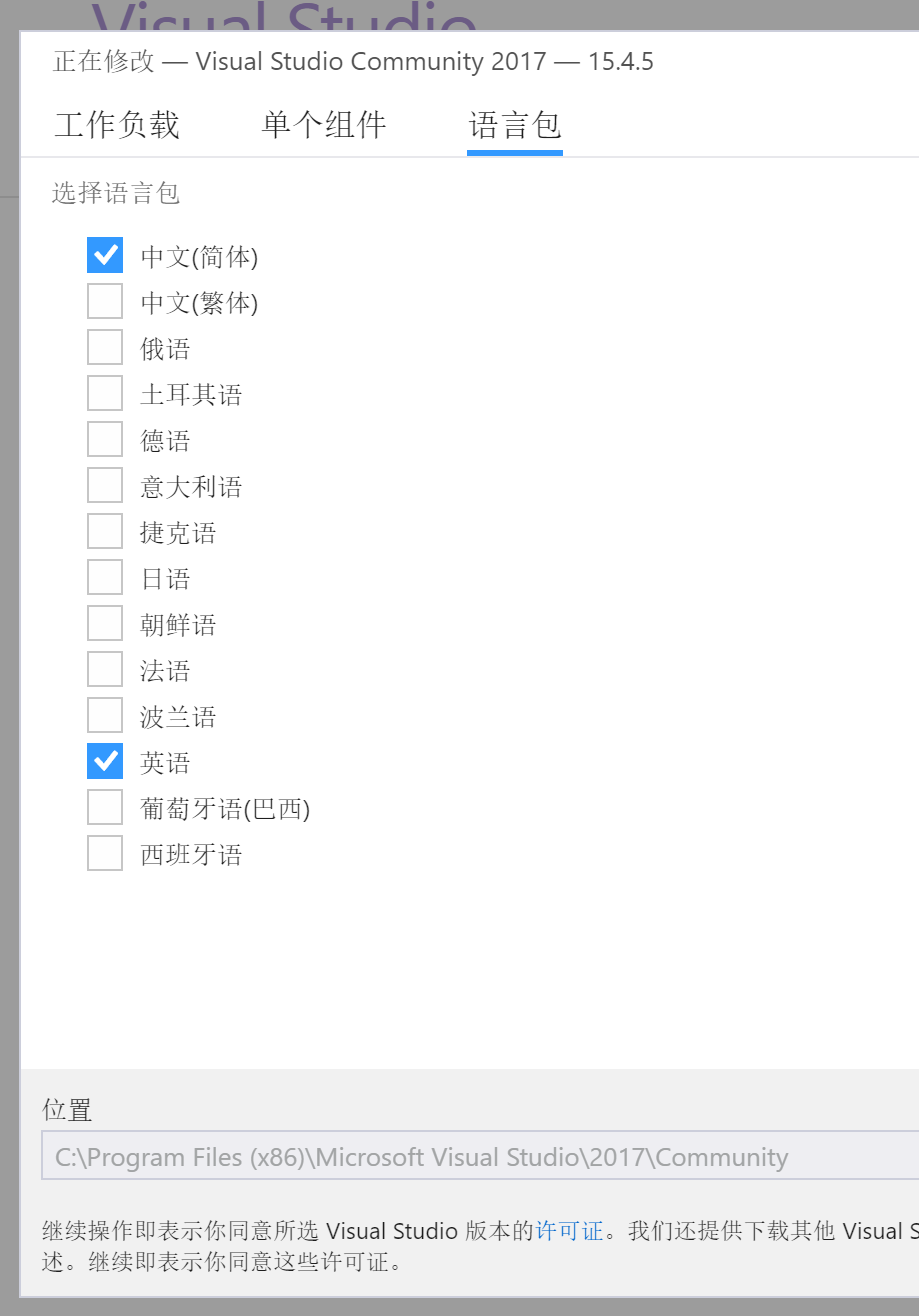
It seems that English language pack of my Visual Studio 2017 is missing. However, the Visual Studio Installer told me that it was installed. When I tried to do the same with administrator privilege, it still doesn't work.
Screenshot: The first check box indicates Simplified Chinese and the second check box indicates English.
 chengluyu
All 6 comments
I believe English is not actually installed. Try clicking "Modify" on the screen above to apply the changes. I think it will then properly install English.
 alexkaratarakis
on 4 Dec 2017
alexkaratarakis
on 4 Dec 2017
@alexkaratarakis It works! Thanks for your help. By the way, why installation requires English language pack?
chengluyu
on 4 Dec 2017
@chengluyu
This is pretty unfortunate, but many build systems are failing with non-English. To bypass these issues, we are setting the build environment to always use English. So, for example, you will see all compiler output in English. In order for this environment switch to work, we need the English language pack to be installed, hence the check that was recently added.
alexkaratarakis
on 4 Dec 2017
@alexkaratarakis Thanks. This issues can be marked as solved now.
chengluyu
on 6 Dec 2017
mark!
 jingxa
on 21 Mar 2018
jingxa
on 21 Mar 2018
This is awkward. I fail to see why compiling would depend on compiler language, which AFAIK only affects user-facing messages, but command names, parameters, exit codes, generated code, etc. is always the same. Can't this be solved?
 aslze
on 24 May 2020
aslze
on 24 May 2020
Related issues
 spindensity
·
3Comments
spindensity
·
3Comments
 cskrisz
·
3Comments
cskrisz
·
3Comments
 jack17529
·
3Comments
jack17529
·
3Comments
 pakdel
·
3Comments
pakdel
·
3Comments
 ThinkalVB
·
3Comments
ThinkalVB
·
3Comments
Most helpful comment
@alexkaratarakis It works! Thanks for your help. By the way, why installation requires English language pack?