Vault: HAproxy as Load Balancing Using External Load Balancer
https://www.vaultproject.io/guides/operations/reference-architecture.html#load-balancing
include Example Consul Template for the above HAProxy block that is not working.
my HAProxy(101.233.170.42) configuration:
user vcap
group vcap
maxconn 64000
stats socket /var/vcap/sys/run/haproxy/stats.sock
defaults
log global
retries 3
option redispatch
maxconn 4096
timeout connect 5000
timeout client 10000
timeout server 10000

listen vault
bind 101.233.170.42:8200
balance roundrobin
option httpchk GET /v1/sys/health
server node0 101.233.168.55:8200 check
server node1 101.233.168.56:8200 check
server node2 101.233.168.57:8200 check
also https tested,
listen vault
bind 101.233.170.42:8200 ssl cert /path
balance roundrobin
option httpchk GET /v1/sys/health
server node0 101.233.168.55:8200 check
server node1 101.233.168.56:8200 check
server node2 101.233.168.57:8200 check
and recive:
[root@sol-usgp2bosh01-d ~]# curl https://101.233.170.42:8200/v1/sys/health -k
curl: (35) Encountered end of file
[root@sol-usgp2bosh01-d ~]# vault status
Error checking seal status: Get https://101.233.170.42:8200/v1/sys/seal-status: EOF
 Alexvianet
All 7 comments
What do your vault server logs say? Also, is the service showing up as healthy from HAProxy?
 chrishoffman
on 26 Jun 2018
chrishoffman
on 26 Jun 2018
vault server logs: do not say anything:
==> Vault server configuration:
Api Address: http://101.233.168.56:8200
Cgo: disabled
Cluster Address: https://101.233.168.56:8201
Listener 1: tcp (addr: "0.0.0.0:8200", cluster address: "0.0.0.0:8201", tls: "enabled")
Log Level: debug
Mlock: supported: true, enabled: true
Storage: consul (HA available)
Version: Vault v0.10.3
Version Sha: c69ae68faf2bf7fc1d78e3ec62655696a07454c7
==> Vault server started! Log data will stream in below:
haproxy/0f7650c2-4843-4d88-9e7c-f3da383604f1:~$ curl https://101.233.168.55:8200/v1/sys/health -k
{"initialized":true,"sealed":false,"standby":false,"replication_performance_mode":"disabled","replication_dr_mode":"disabled","server_time_utc":1530008634,"version":"0.10.3","cluster_name":"vault-cluster-8968d00b","cluster_id":"bdfbb338-03e1-113c-626c-9774458179b1"}
haproxy/0f7650c2-4843-4d88-9e7c-f3da383604f1:~$ curl http://0.0.0.0:8200/v1/sys/health
curl: (52) Empty reply from server
haproxy/0f7650c2-4843-4d88-9e7c-f3da383604f1:~$ curl https://101.233.168.56:8200/v1/sys/health -k
{"initialized":true,"sealed":true,"standby":true,"replication_performance_mode":"unknown","replication_dr_mode":"unknown","server_time_utc":1530008679,"version":"0.10.3"}
curl https://101.233.168.57:8200/v1/sys/health -k
{"initialized":true,"sealed":false,"standby":false,"replication_performance_mode":"disabled","replication_dr_mode":"disabled","server_time_utc":1530006468,"version":"0.10.3","cluster_name":"vault-cluster-8968d00b","cluster_id":"bdfbb338-03e1-113c-626c-9774458179b1"}
Alexvianet
on 26 Jun 2018
@chrishoffman if U have working haproxy configuration please provide it, for example, I have made the only mod tcp working, but I need option httpchk GET /v1/sys/health
Alexvianet
on 26 Jun 2018
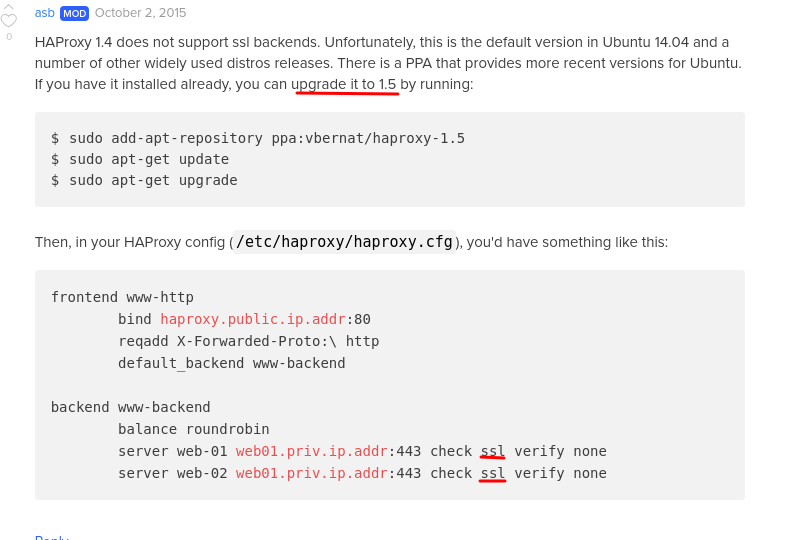
my fault I have found a solution please add it to documentation that, to make it work needs to add ssl to each backend:
listen vault
bind 101.233.170.42:8200 ssl cert /path
balance roundrobin
option httpchk GET /v1/sys/health
server node0 101.233.168.55:8200 check ssl verify
server node1 101.233.168.56:8200 check ssl verify
server node2 101.233.168.57:8200 check ssl verify
Alexvianet
on 27 Jun 2018
Just adding to this comment as I wanted to have haproxy load balance vault while also having vault terminate its own tls for obvious security reasons:
    # Vault has a http health endpoint on /v1/sys/health that returns different http codes
    # depending on the status of the running vault instance.
    #
    # See: https://www.vaultproject.io/api/system/health.html#read-health-information
    #
    #    * 200 if initialized, unsealed, and active
    #    * 429 if unsealed and standby
    #    * 472 if data recovery mode replication secondary and active
    #    * 473 if performance standby
    #    * 501 if not initialized
    #    * 503 if sealed

    # Redirect http --> https
    frontend vault_http
      mode http
      # bind to the ip you give clients
      bind 1.2.3.6:80
      redirect scheme https code 301 if !{ ssl_fc }

    # Primary https listener
    frontend vault_https
      mode tcp
      log global
      timeout client 30000
      # bind to the ip you give to clients
      bind 1.2.3.6:443
      description Vault over https
      default_backend vault_https
      option tcplog

    backend vault_https
      mode tcp
      timeout check 5000
      timeout server 30000
      timeout connect 5000
      option httpchk GET /v1/sys/health
      server vault-server1 1.2.3.4:8200 check check-ssl verify none inter 5000
      server vault-server2 1.2.3.5:8200 check check-ssl verify none inter 5000
      server vault-server3 1.2.3.6:8200 check check-ssl verify none inter 5000
It will likely help the next person who is googling and finds this.
 SEJeff
on 2 Nov 2018
SEJeff
on 2 Nov 2018
@SEJeff with this config are you able to see the client's IP in the audit log?
 robert-gomes
on 22 Jul 2019
robert-gomes
on 22 Jul 2019
Hello,
Based on @SEJeff haproxy config i am using this extra line bellow on the backend section :
http-check expect rstatus (200|429)
With this line you will have all the nodes on healthy status based on this status code :
The default status codes are:
200 if initialized, unsealed, and active
429 if unsealed and standby
472 if disaster recovery mode replication secondary and active
473 if performance standby
501 if not initialized
503 if sealed
More info here : https://www.vaultproject.io/api-docs/system/health
 Slapper
on 29 Jul 2020
Slapper
on 29 Jul 2020
Related issues
 lexsys27
·
3Comments
lexsys27
·
3Comments
 Wonder007
·
3Comments
Wonder007
·
3Comments
 maxsivanov
·
3Comments
maxsivanov
·
3Comments
 dwdraju
·
3Comments
dwdraju
·
3Comments
 weisinc
·
3Comments
weisinc
·
3Comments
Most helpful comment
Just adding to this comment as I wanted to have haproxy load balance vault while also having vault terminate its own tls for obvious security reasons:
It will likely help the next person who is googling and finds this.