TLDR; I'm curious if someone tried to run a macOS Cocoa app with Vapor on it.
Hi everyone,
This is a similar question to https://github.com/vapor/vapor/issues/108 but centered in macOS instead of iOS.
I've been able to create a Framework with my backend logic with Swift Package Framework and then importing it on my existing macOS app by adding it as a sub-project.
I had a couple of link errors at first but after a while I was able to run it. The bad news is that I have this error from vapor/console
"⚠️ [CommandError.excessInput: Too many arguments or unsupported options were supplied: [\"-NSDocumetRevisiosDebugMode\", \"YES\"]]"
I'm not specifically asking about how to resolve this issue, I'm actually more interested in knowing if making this more _"Cocoa friendly"_ is in the roadmap or if there's some blog post about making this work.
 betzerra
All 3 comments
I have personally never seen anyone try to add Vapor to a macOS project. I think a couple people have asked before, but never went anywhere with it when they heard that it isn't officially supported.
We would love to actually support iOS and macOS at some point, and we are getting closer. Vapor 4 will remove a most if not all of the dependencies on APIs that aren't supported on those platforms. But even with that, I don't think much work will be actively done in the area until a third-party (like you 😉) decides to add support or SPM is officially integrated into Xcode.
Something like the swift-xcode tool might help.
And about that Console error. If you updated your Console version to 3.1.1 to apply PR 93, that might get you sorted out. Otherwise, instead of using Environment.detect(), use one of the default environment instances based on your app's build.
 calebkleveter
on 2 Apr 2019
calebkleveter
on 2 Apr 2019
Yup @calebkleveter is right, Environment.detect() sounds like the problem there. If there are any other issues you run into, we're happy to fix them. :)
 tanner0101
on 3 Apr 2019
tanner0101
on 3 Apr 2019
Hello @betzerra
I have vapor running in a macOS app
Your error it's cause by the Documents Versions debugger
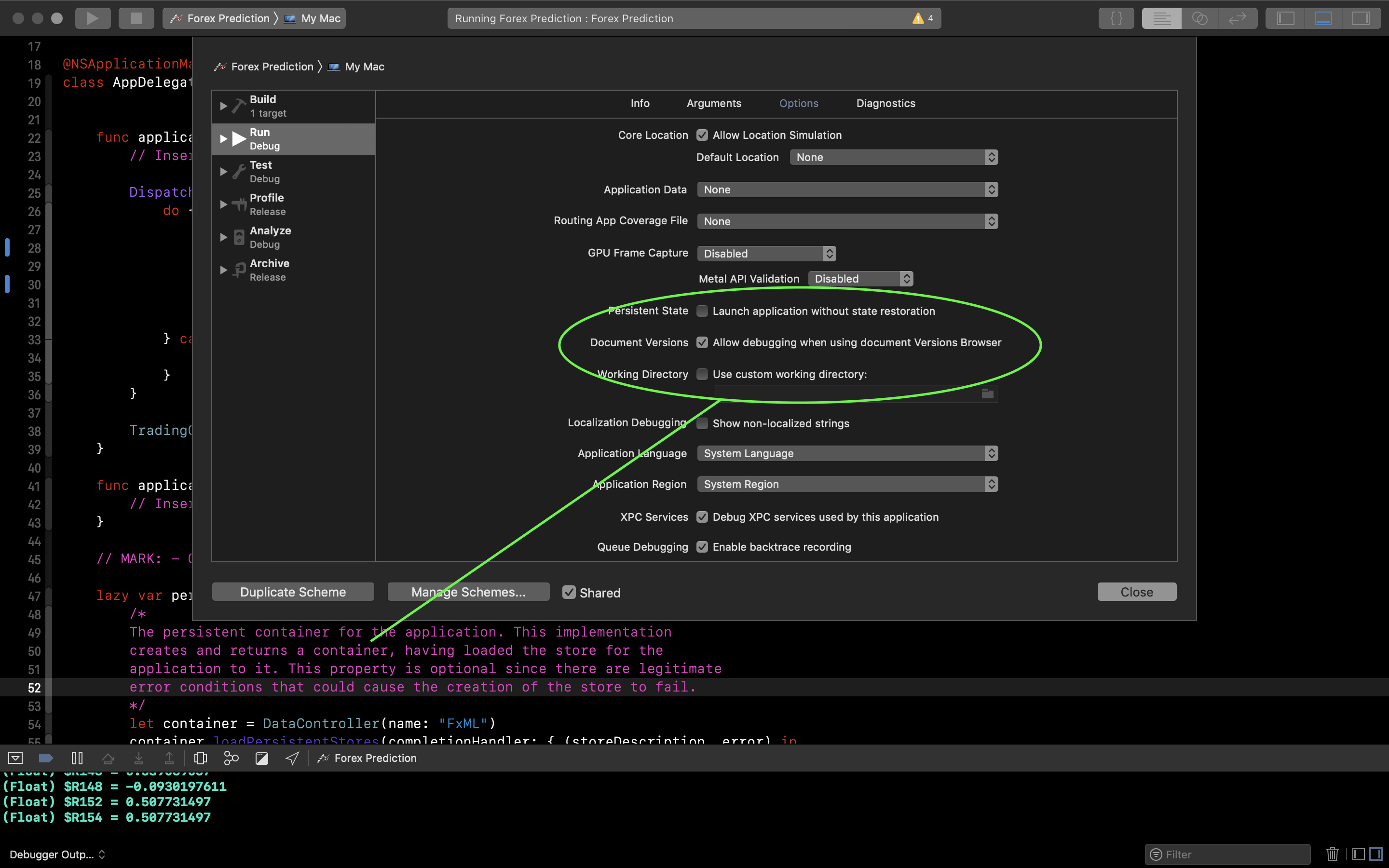
You can remove it in the panel showed in the previous picture
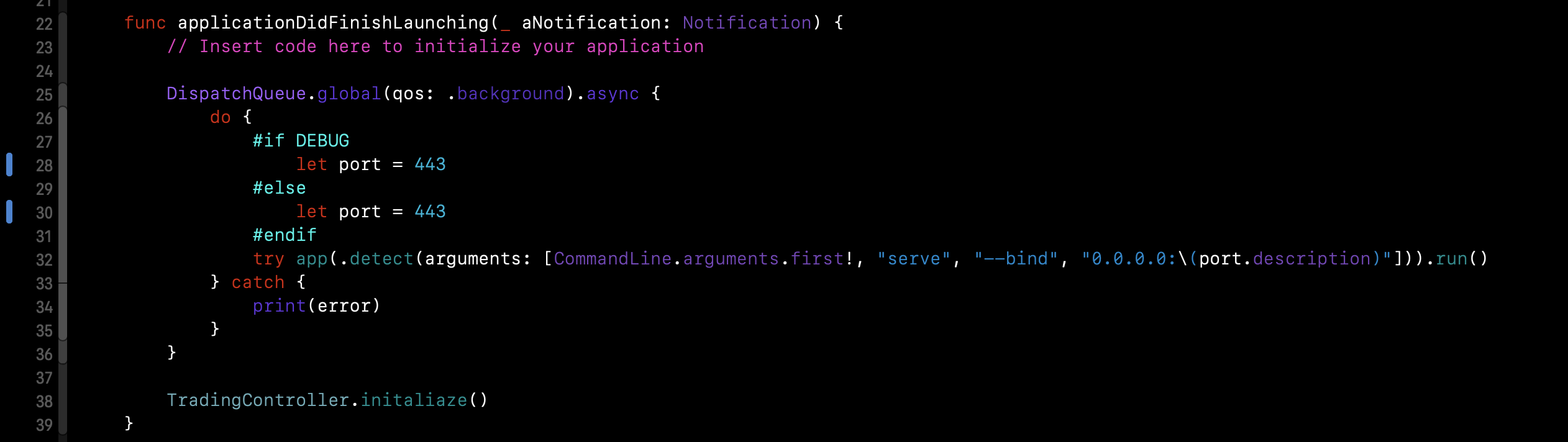
Or simply use Vapor like this
 Sombre-Osmoze
on 20 Apr 2019
Sombre-Osmoze
on 20 Apr 2019
Related issues
 Joannis
·
4Comments
Joannis
·
4Comments
 bearier
·
3Comments
bearier
·
3Comments
 mandrusiaks
·
4Comments
mandrusiaks
·
4Comments
 kdawgwilk
·
4Comments
kdawgwilk
·
4Comments
 wildfiremedia
·
4Comments
wildfiremedia
·
4Comments
Most helpful comment
Hello @betzerra

I have vapor running in a macOS app
Your error it's cause by the Documents Versions debugger
You can remove it in the panel showed in the previous picture
Or simply use Vapor like this
