Just thinking out loud… maybe it would be cool to replace the current ADF dialog
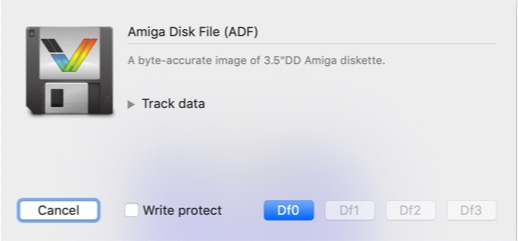
by a new one that allows to drag in a cover image:
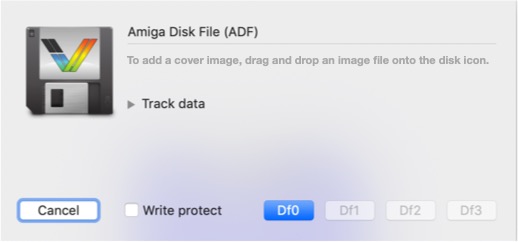
When a cover image is dragged in, vAmiga would save it together with the checksum of the ADF. When the ADF is inserted a second time, it would automatically come up like this:
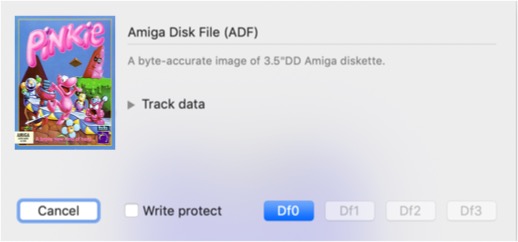
I know that FSUAE is doing something much cooler. It is able to scan the database on openretro.org and updates the images automatically. However, the API is not documented and the user needs to create an openretro account to make the feature work.
 dirkwhoffmann
All 22 comments
Nice idea to remember the checksum of the ADF. When the user loads the same disk some days later again you could do something for him. Maybe it could also be used to present some user permanently saved snapshots for that particular ADF automatically in a "show last snapshots browser" in that disk dialog.
In v0.6 I can save temporarily user snapshots and it has a nice GUI too.👍🏼
BTW: When I completely shutdown vAmiga then a dialog pops up and asks me whether I want to save the session in a file. I did so, but on reloading, all user taken snapshots where deleted (not loaded). Is that intentional ?
 mithrendal
on 20 Feb 2020
mithrendal
on 20 Feb 2020
but on reloading, all user taken snapshots where deleted (not loaded). Is that intentional ?
Yes, that's intended behaviour. The internal snapshots are volatile. If you want to preserve a snapshot, you must save it explicitly (snapshot are mostly intended for cheating, to make games easier).
dirkwhoffmann
on 20 Feb 2020
you must save it explicitly (snapshot are mostly intended for cheating, to make games easier).
How to do that? I can not figure out how... 🐶
mithrendal
on 22 Feb 2020
How to do that? I can not figure out how...
Oh, I think I know what you are trying to do. You want to save a snapshot from the snapshot storage to disk. This is not possible yet 🤓. You need to restore the snapshot (by double clicking it or dragging and dropping it into the emulator window). After that, you can save it via the "Save As..." item in the files menu. BTW, it would be a bad idea to build up a large snapshot collection. The snapshot format usually changes with every new release.
Did you know that drag and drop also works across emulator windows .... oops 🙈.... would work across emulator windows when the latest version of the emulator wouldn't crash when opening another emulator instance? Anyway. It's a good day for the emulator, because I found that huge Blitter DMA bug. Test cases are in the works... after completion, I'll work on a fix...
One more thing... in the next release, the mouse will have virtual pull-up resistors. Killer feature 😎.
🐶
Hmmm, this guy looks a little bit like @Alessandro1970's retrobrighted cat. No? 🤔
dirkwhoffmann
on 22 Feb 2020
Hi, yes !

 Alessandro1970
on 22 Feb 2020
Alessandro1970
on 22 Feb 2020
You want to save a snapshot from the snapshot storage to disk. This is not possible yet 🤓
After that, you can save it via the "Save As..." item in the files menu.
When I do a save in the file menu then it does save something .... but what does it save excactly ? When I restart emulator and load the saved thing, only workbench hand fires up. So apparently it does not include the state of the last VM session.
.... I love virtual pull-up resistors !! Are the mouse port signals giving you floating values ?
Yes 🐶🐶🐶 looks a bit like @Alessandro1970 nice cat.
mithrendal
on 23 Feb 2020
but what does it save excactly ?
vAmiga complies to what is called a "document based app" in Apple terms. Think of vAmiga as a text editor whose documents are emulator instances. The only semantic difference is that vAmiga's documents are able to change themselves (when the emulator instance runs). By selecting "Save" or "Save As", the current emulator state is saved. If you save at the point where the hand & disk logo is shown, it'll save that state to disk. When the emulator continuous to run, the changed state is not saved automatically. Hence, if you reload the snapshot from the disk, the hand & disk logo is showing up again.
Complying with the Apple guidelines, a changed (unsaved) document is marked by a black dot in the upper left red icon:
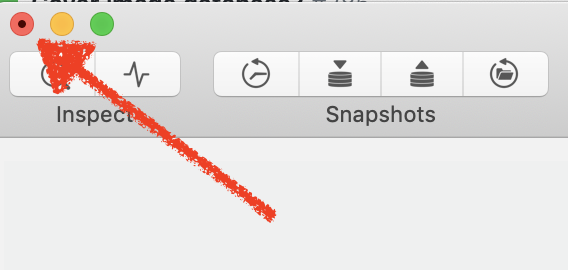
When the emulator is in pause mode and a document is saved, the black dot vanishes. If the emulator continues to run, the black dot reappears.
Can't take my eyes off that cat. Sooooooo cute 🥰.
dirkwhoffmann
on 23 Feb 2020
In virtualC64 when I save in the middle of an c64-app, it creates an "blabla.VC64" in Macs filesystem. When I close all VC64 instances and doubleclick that "blabla.VC64" file then it beams me right where I was before I saved.
This is what I would expect from a end user point of view.
🙋🏿Given the fact that vAmiga is kind of a descendent in terms of the GUI, why can't it behave like VC64?
mithrendal
on 23 Feb 2020
why can't it behave like VC64?
🤔 It is supposed to behave exactly the same way.
dirkwhoffmann
on 23 Feb 2020
.... I love virtual pull-up resistors !! Are the mouse port signals giving you floating values ?
Yeah, hot stuff 😎, but no floating point values. It's just that releasing the mouse button pulls up the port signal back to 1. Without pull-up resistors, the Amiga has to pull the signal up, otherwise it would remain in the 0 state.
When I restart emulator and load the saved thing, only workbench hand fires up.
I usually use drag and drop. Maybe there is an error if the snapshot is loaded via the menu or if it gets double clicked. I'll look into that...
dirkwhoffmann
on 23 Feb 2020
I usually use drag and drop. Maybe there is an error if the snapshot is loaded via the menu or if it gets double clicked.
I tried drag and drop. It works as one would expect ... You found it ! So its maybe only a missing method call in the file menu or double-click logic...
mithrendal
on 23 Feb 2020
So its maybe only a missing method call in the file menu or double-click logic...
OK, got it:
The error is due to code ported over from VirtualC64. There, the startup sequence is like this:
- The GUI loads Roms into the C64, one after another.
- The C64 responds with a READY_TO_POWER_UP message once all Roms are good.
- The GUI responds by loading in a pending snapshot and starting the emulator.
In vAmiga, the start sequence had been changed. Long story short: The READY_TO_POWER_UP message is never sent. Hence, pending snapshots are not processed and the emulator always starts from scratch (with the hand & disk logo).
I'll postpone the fix a little, because I want to change the start-up sequence anyway. My plan is to revert to the Rom usage model that is used in VirtualC64. That is:
- The emulator checks if all Roms are installed.
- If not, it sends a ROM_MISSING message to the GUI.
- The GUI responds by opening the Rom preferences.
- When the user adds a Rom, the GUI installs that Rom.
- When all Roms are good, the READY_TO_POWER_UP message is sent.
For vAmiga this means that the Aros Roms are not loaded as a fallback any more. If the user wants to use them, he has to add them manually. The main reason for this is that I came to the conclusion that Aros is not a suitable fallback for casual users, but vAmiga is made exactly for this audience. I think most casual users (including me) just want to have the original kickstart and workbench (the ones they remember from back in the day). When such a user launches vAmiga for the first time, he might even be confused when Aros comes up. Therefore, I think it's better to show them the Rom preferences and tell them that something needs to be added before they can, e.g., rescue a princess or whatever they want to do.
dirkwhoffmann
on 23 Feb 2020
Thanks for the finding the problem. 🤗 And pointing me to the current workaround (with drag and drop).
And sorry for hijacking this issue. I should have better opened a new issue for this load thing problem ...
mithrendal
on 23 Feb 2020
And sorry for hijacking this issue. I should have better opened a new issue for this load thing ...
Back to the original topic then: Cover art. Why not ask @FrodeSolheim, the maker of FSUAE, if he could give us some hints.
Hi Frode,
last year in January, I started working on an Amiga emulator called vAmiga (actually it’s my second emulator, the first one was VirtualC64). The vAmiga project has come to a point where emulation accuracy is beginning to stabilise and a growing amount of games and demos is already working. While thinking about ways to improve UX, I was thrilled to see what FSUAE can do w.r.t. to displaying cover art and screenshots. I really like the idea of a media data base and I think it would be great to have some kind of database support in vAmiga, too.
I understand that FSUAE gets the cover images and screenshots directly from the OpenRetro Game Database. As far as I know, there is no official API documentation about how to access the OpenRetro archive. Is this still true? In case the code is the documentation, could you perhaps point us to some file or subfolder of the FSUAE repo that we could look at? This would be a great starting point for us to understand how the OpenRetro database could be accessed. Thank you very much in advance and keep up the excellent work!
dirkwhoffmann
on 23 Feb 2020
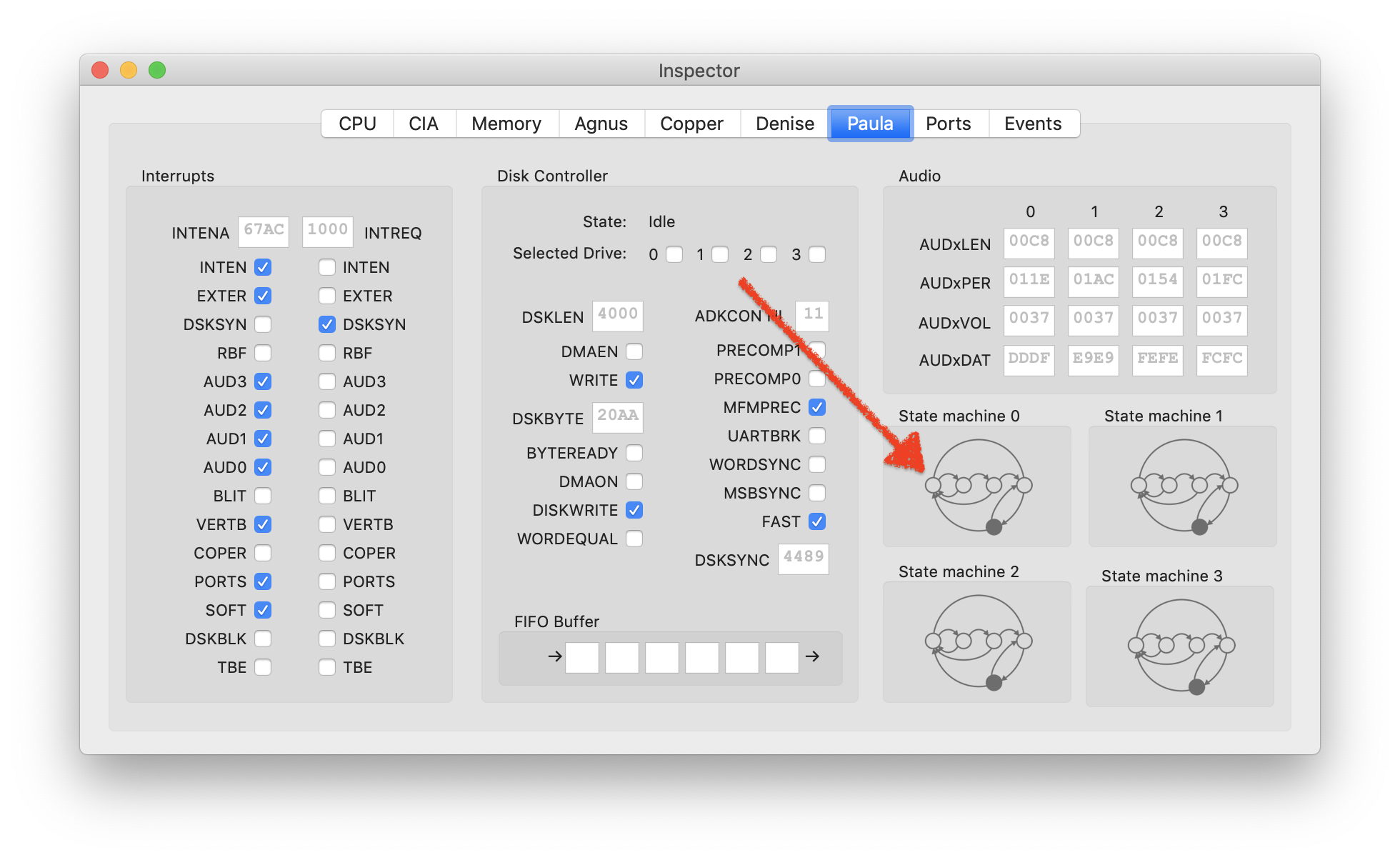
Although a little bit off topic: Paula can visualise the audio state machines now. I thought that's kind of cool 😎.
dirkwhoffmann
on 25 Feb 2020
@dirkwhoffmann I think it would be great if vAmiga could use the OpenRetro database as well :)
The registration requirement can be dropped (I'm not sure the API itself requires it any longer). Initially, I thought it was a good idea to require registration to lower the bar for submissions/fixes since you already got an account, but I don't feel this is needed anymore, so I was planning to remove the registration requirement anyway.
The API isn't actually documented, but it's quite simple, and documenting it for you isn't any problem.
Currently, the clients (Launcher) downloads the entire database, and then downloads incremental updates to the database whenever it wants to. This means the Launcher only syncs down information from OpenRetro, and does not fetch database entries on demand (except images, which is downloaded on demand). The API is currently tailored to this usage. Will this approach suit your emulator as well?
(I'm also open to discussing other API mechanisms)
 FrodeSolheim
on 25 Feb 2020
FrodeSolheim
on 25 Feb 2020
I think it would be great if vAmiga could use the OpenRetro database as well
Hi Frode. That’s awesome to hear 👍.
This means the Launcher only syncs down information from OpenRetro, and does not fetch database entries on demand (except images, which is downloaded on demand).
I must say in advance that I have never programmed a serious web application before. Therefore I would like to start with a very simple integration of OpenRetro into vAmiga. The simplest usage model I could imagine is to use OpenRetro like a simple web service that delivers cover images. In my imagination, the integration could work as follows:
- The user drags and drops an ADF file into vAmiga.
- vAmiga computes a fingerprint of the ADF (MDM checksum, CRC checksum, whatever OpenRetro needs) and sends it to OpenRetro.
- OpenRetro sends back an image if the ADF fingerprint is recognised.
- vAmiga presents the image to the user in the ADF dialog window.
To reduce the number of web accesses, vAmiga would cache already downloaded images locally.
Would it be possible to integrate OpenRetro in this way with the current API?
dirkwhoffmann
on 25 Feb 2020
Hi dirk I just tested the new Paula audio states panel. Don't know what is going on there but it looks cool 🤤 when it plays music it switches back an forth and it is doing this in the rythm of the music tunes. Very nice. Now I have to study the paulas audio state logic ...
@FrodeSolheim so nice that you are supporting vAmiga with making it open to it. I still remember the cool sessions on EAB with you when we did discussed the way to make the mouse joystick switching automatic.
mithrendal
on 26 Feb 2020
It is not possible at this moment via the API, no. But it is certainly feasible to implement. I'll just need to add some more information (internally) in the database to be able to do these look-ups efficiently :)
The database already uses a lot of SHA-1 checksums, so it makes sense to go with that. I guess you have also considered the issue of modified ADF images? Will your emulator keep the original ADF unmodified and store changes in a different file? Maybe an API call should accept both SHA-1 and filename, so it can also try to match with game using known names (i.e. TOSEC) or worst case fuzzy-matching, if checksum does not match.
FrodeSolheim
on 3 Mar 2020
It is not possible at this moment via the API, no. But it is certainly feasible to implement.
That’s great news! 😃
The database already uses a lot of SHA-1 checksums, so it makes sense to go with that.
Agreed. SHA-1 is easy to implement.
I guess you have also considered the issue of modified ADF images? Will your emulator keep the original ADF unmodified and store changes in a different file?
To be honest, I hadn't considered this yet. Luckily, vAmiga does not modify the original ADF. When the user opens an ADF, the MFM encoder converts it into a virtual disk and from that moment on, only the virtual disk is modified. The user has to explicitly export the disk to an ADF if he wants to keep the changes.
Maybe an API call should accept both SHA-1 and filename, so it can also try to match with game using known names (i.e. TOSEC) or worst case fuzzy-matching, if checksum does not match.
Sound like a good idea to me. If the checksums do not match, the server could compare file names. This would solve the problem if the user saves, e.g., a Highscore list to disk.
A typical scenario would be like this:
- User „finds“ some ADF on the internet
- User drags in ADF into the emulator
- vAmiga sends the SHA-1 checksum to the server
- The server recognises the checksum and sends back a cover image
- The user saves a Highscore list and exports the ADF
The next time, he drags in the ADF, the following would happen:
- vAmiga sends the SHA-1 checksum to the server
- The server does not recognise the checksum, but the file name
- The server sends back the same image as before
If both checksum and file name are different, the disk wouldn't be recognised any more, but I think that's OK. Fuzzy matching file names also sounds like a cool idea, but there might be a risk of having too many false positives. I guess a typical fuzzy matcher would map "Turrican II" to "Turrican" (if it only knows about part I) and would return a wrong image in this case.
dirkwhoffmann
on 3 Mar 2020
Yes, with fuzzy, I was thinking abot a more conservative approach, perhaps normalization would be a better word (ignore case, whitespace, perhaps consider ii and 2 the same, etc).
(You might also want to consider caching the checksums and/or images by path or something like that, so for the "next time" scenario, you already know the original checksum / have the image, and the less accurate algorithm only kicks in if the file was modified and moved).
FrodeSolheim
on 3 Mar 2020
Just added a method const char *sha1()to class ADFFile.
I've used the code from
https://github.com/CTrabant/teeny-sha1/blob/master/teeny-sha1.c
which seems to work pretty well. @CTrabant, thanks for writing that code!
Yes, with fuzzy, I was thinking abot a more conservative approach, perhaps normalization would be a better word (ignore case, whitespace, perhaps consider ii and 2 the same, etc).
Oh yes, I see. Normalizing definitely makes sense, i.e., upper case / lower case conversion.
You might also want to consider caching the checksums
Yes. I could store something like a "hash alias". When the user modifies a disk, the emulator would save an alias to the locally stored image of the original disk.
dirkwhoffmann
on 4 Mar 2020
Related issues
dirkwhoffmann
·
4Comments
dirkwhoffmann
·
4Comments
dirkwhoffmann
·
3Comments
dirkwhoffmann
·
3Comments
dirkwhoffmann
·
3Comments
Most helpful comment
@dirkwhoffmann I think it would be great if vAmiga could use the OpenRetro database as well :)
The registration requirement can be dropped (I'm not sure the API itself requires it any longer). Initially, I thought it was a good idea to require registration to lower the bar for submissions/fixes since you already got an account, but I don't feel this is needed anymore, so I was planning to remove the registration requirement anyway.
The API isn't actually documented, but it's quite simple, and documenting it for you isn't any problem.
Currently, the clients (Launcher) downloads the entire database, and then downloads incremental updates to the database whenever it wants to. This means the Launcher only syncs down information from OpenRetro, and does not fetch database entries on demand (except images, which is downloaded on demand). The API is currently tailored to this usage. Will this approach suit your emulator as well?
(I'm also open to discussing other API mechanisms)