Hi guys,
As i always do i wanted to share the application I am making to a customer so i did a "valet share" but got some errors.
Here are the logs : https://pastebin.com/3GjCaZAD
Do you have any idea ?
Already updated composer and tried to uninstall / re install valet.
Thanks for the help.
 ghost
ghost
All 47 comments
ERROR: Tunnel 'command_line' specifies invalid address 'newlinedisplay.test:80': address newlinedisplay.test:80: unexpected '[' in address
- For diagnostic purposes, make the following edit to find out the command that's actually being run.
Temporarily edit~/.composer/vendor/laravel/valet/valet, line 55 to changesudo -uto justecho:
-  sudo -u "$(logname)" "$DIR/bin/ngrok" http "$HOST.$TLD:$PORT" -host-header=rewrite ${*:2}
+  echo "$(logname)" "$DIR/bin/ngrok" http "$HOST.$TLD:$PORT" -host-header=rewrite ${*:2}
Then run valet share again (from your newlinedisplay dir of course). It will output the info it resolves for that line, and it will also output a Connection Refused message, which you can ignore and press CTRL+C to get control back.
What's the output you get?
It should be something like this:
username /Users/username/.composer/vendor/laravel/valet/bin/ngrok http projectname.test:80 -host-header=rewrite
The error message you posted mentions
unexpected '[' in address. Where's the[coming from?Have you let Valet manage all your nginx configs? Or have you edited those files yourself? (
~/.config/valet/Nginx/newlinedisplay.test)
 drbyte
on 26 Jun 2019
drbyte
on 26 Jun 2019
Hi @drbyte as always you rock the issues 👍
1 / Here is the result :

2/ I have no idea ...
3/ I didn't edit anything by myself. I also uninstalled and re installed completely homebrew and valet (and let nginx / dnsmasq etc ... being installed by valet)
ghost
on 26 Jun 2019
Hmmm...
Well, let's undo that edit at least.
I'm puzzled about where ngrok is getting the [ from.
I'd try securing it since that creates a new nginx config:
cd newlinedisplay
valet secure
valet share
Does that work?
If not, then test unsecuring and just linking
valet unsecure
valet unlink
valet link
valet share
In essence these just set/clean some standard expectations upon which the ngrok implementation depends.
Do the error messages change between attempts?
What's the output of: pwd
and of echo "$SHELL"
What happens if you run bash as a command to start a new bash shell, and then run valet share?
I wonder if possibly your command-prompt is customized to insert [ and that's getting picked up in the pbcopy that the share command relies on?
drbyte
on 26 Jun 2019
Hi Doctor, one again thanks for replying and helping.
Here is the result of :
First try with secure =>

Second try with unlink / link =>
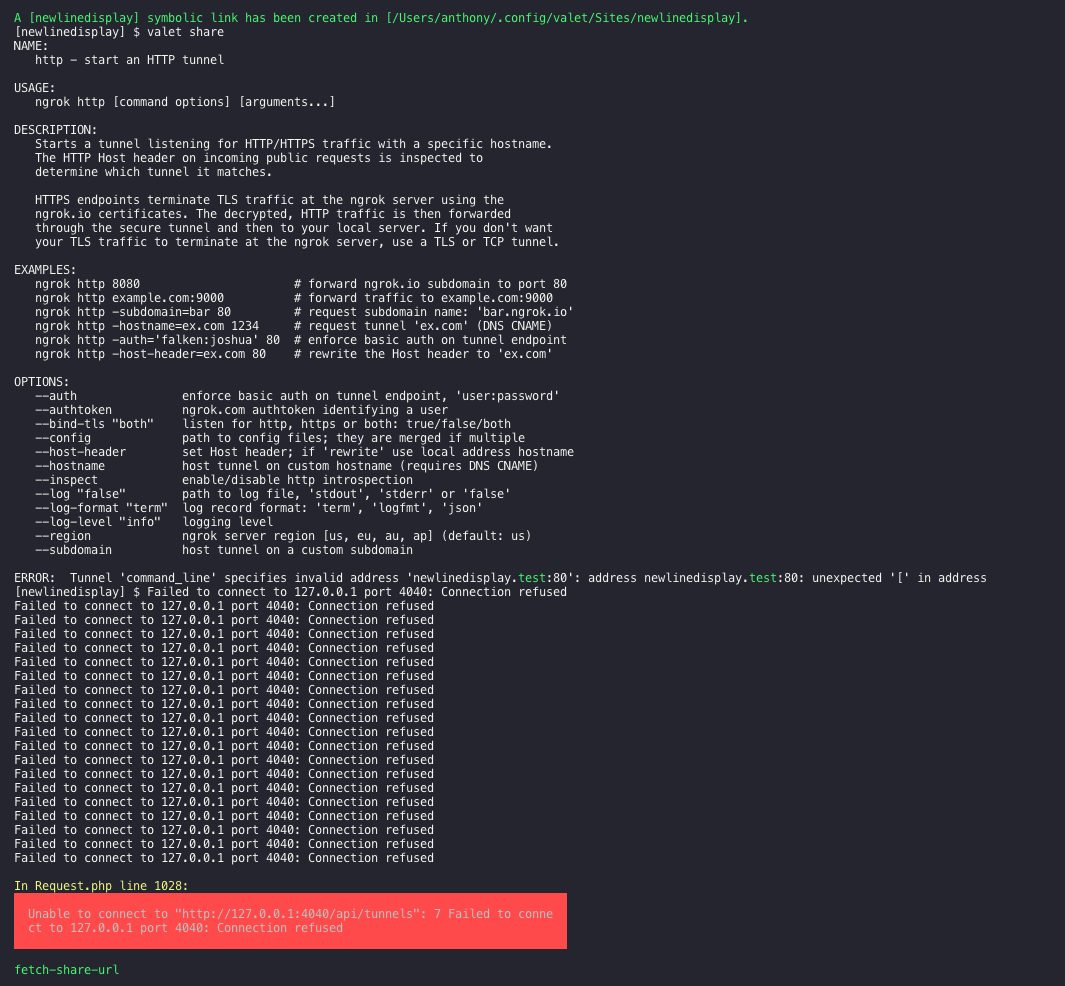
As you can see, there are both the same i think.
And here is the result of the two commands you asked for :
[newlinedisplay] $ pwd
/Users/anthony/Sites/newlinedisplay
[newlinedisplay] $ echo "$SHELL"
/bin/bash
ghost
on 27 Jun 2019
Just noticed on my screens that the first error with ngrok disappeared right ?
ghost
on 27 Jun 2019
What's the output of: echo $PS1
What happens if you do this:
export PS1="\W> "
valet share
These are just exploring whether the [ in your bash prompt is interfering when valet does some clipboard copying trickery. But I think yours is pretty much a default, so may not be related.
drbyte
on 27 Jun 2019
Do you have a custom ngrok config file?
ls -al ~/.ngrok2
(ie: a yaml file in that dir)
If yes, what's in the file? (if you have an authtoken, don't post its value here, obfuscate it)
drbyte
on 27 Jun 2019
What happens if you do this:
export PS1="\W> "
valet share
Same ... :(
And ...
[~] $ ls -al ~/.ngrok2
ls: /Users/anthony/.ngrok2: No such file or directory
ghost
on 27 Jun 2019
Just checked if i did something wrong in my .bash_profile too but, i don't think anything is wrong here

ghost
on 27 Jun 2019
Still exploring diagnostics...
I think the "command_line" part of the error message is referring to the ngrok tunnel api that valet is inspecting, hence being curious about any custom ngrok config you might have. Having no custom config is fine.
Try this in your project directory:
~/.composer/vendor/laravel/valet/bin/ngrok http 80
(copy/paste the output or screenshot of what you get when you do that)
Then in your browser, go to: http://127.0.0.1:4040/api/tunnels and post here what you see there.
Then you can go back and CTRL+C in your ngrok/terminal window.
For comparison, I get this in Safari (if I refresh I sometimes get http instead of https, don't fret about that):
This XML file does not appear to have any style information associated with it. The document tree is shown below.
<tunnelListResource>
<Tunnels>
<Name>command_line</Name>
<URI>/api/tunnels/command_line</URI>
<PublicURL>https://fa55ab0f.ngrok.io</PublicURL>
<Proto>https</Proto>
<Config>
<Addr>http://localhost:80</Addr>
<Inspect>true</Inspect>
</Config>
<Metrics>
<Conns>
<Count>0</Count>
<Gauge>0</Gauge>
<Rate1>0</Rate1>
<Rate5>0</Rate5>
<Rate15>0</Rate15>
<P50>0</P50>
<P90>0</P90>
<P95>0</P95>
<P99>0</P99>
</Conns>
<HTTP>
<Count>0</Count>
<Rate1>0</Rate1>
<Rate5>0</Rate5>
<Rate15>0</Rate15>
<P50>0</P50>
<P90>0</P90>
<P95>0</P95>
<P99>0</P99>
</HTTP>
</Metrics>
</Tunnels>
<Tunnels>
<Name>command_line (http)</Name>
<URI>/api/tunnels/command_line%20%28http%29</URI>
<PublicURL>http://fa55ab0f.ngrok.io</PublicURL>
<Proto>http</Proto>
<Config>
<Addr>http://localhost:80</Addr>
<Inspect>true</Inspect>
</Config>
<Metrics>
<Conns>
<Count>0</Count>
<Gauge>0</Gauge>
<Rate1>0</Rate1>
<Rate5>0</Rate5>
<Rate15>0</Rate15>
<P50>0</P50>
<P90>0</P90>
<P95>0</P95>
<P99>0</P99>
</Conns>
<HTTP>
<Count>0</Count>
<Rate1>0</Rate1>
<Rate5>0</Rate5>
<Rate15>0</Rate15>
<P50>0</P50>
<P90>0</P90>
<P95>0</P95>
<P99>0</P99>
</HTTP>
</Metrics>
</Tunnels>
<URI>/api/tunnels</URI>
</tunnelListResource>
Also, just to be sure, what version of ngrok are you using?
~/.composer/vendor/laravel/valet/bin/ngrok version
ngrok version 2.3.30
drbyte
on 27 Jun 2019
Here is the result of the first composer command :
<TunnelListResource>
<Tunnels>
<Name>command_line</Name>
<URI>/api/tunnels/command_line</URI>
<PublicURL>https://8ee0ebc0.ngrok.io</PublicURL>
<Proto>https</Proto>
<Config>
<Addr>localhost:80</Addr>
<Inspect>true</Inspect>
<AppProto>http</AppProto>
</Config>
<Metrics>
<Conns>
<Count>0</Count>
<Gauge>0</Gauge>
<Rate1>0</Rate1>
<Rate5>0</Rate5>
<Rate15>0</Rate15>
<P50>0</P50>
<P90>0</P90>
<P95>0</P95>
<P99>0</P99>
</Conns>
<HTTP>
<Count>0</Count>
<Rate1>0</Rate1>
<Rate5>0</Rate5>
<Rate15>0</Rate15>
<P50>0</P50>
<P90>0</P90>
<P95>0</P95>
<P99>0</P99>
</HTTP>
</Metrics>
</Tunnels>
<Tunnels>
<Name>command_line (http)</Name>
<URI>/api/tunnels/command_line+%28http%29</URI>
<PublicURL>http://8ee0ebc0.ngrok.io</PublicURL>
<Proto>http</Proto>
<Config>
<Addr>localhost:80</Addr>
<Inspect>true</Inspect>
<AppProto>http</AppProto>
</Config>
<Metrics>
<Conns>
<Count>0</Count>
<Gauge>0</Gauge>
<Rate1>0</Rate1>
<Rate5>0</Rate5>
<Rate15>0</Rate15>
<P50>0</P50>
<P90>0</P90>
<P95>0</P95>
<P99>0</P99>
</Conns>
<HTTP>
<Count>0</Count>
<Rate1>0</Rate1>
<Rate5>0</Rate5>
<Rate15>0</Rate15>
<P50>0</P50>
<P90>0</P90>
<P95>0</P95>
<P99>0</P99>
</HTTP>
</Metrics>
</Tunnels>
<URI>/api/tunnels</URI>
</TunnelListResource>
And i have :
ngrok version 2.2.8
ghost
on 27 Jun 2019
While that version of ngrok shouldn't be having any issues with this, try:
~/.composer/vendor/laravel/valet/bin/ngrok http 80
and while it's on the screen press CTRL+U to upgrade it (I think it shows that keystroke on screen too)
Then end ngrok and try valet share again.
drbyte
on 27 Jun 2019
What's in your ~/.composer/composer.json ?
drbyte
on 27 Jun 2019
Did the update process and restarted all services. Here is the result ... :D

I don't see the error with the "[" right ?
This is what i have in my composer.json
{
    "require": {
        "laravel/valet": "^2.3"
    }
}
Also hade this error when launched valet (maybe there is something with DNSMasq?) :
Warning: Taking root:admin ownership of some dnsmasq paths:
  /usr/local/Cellar/dnsmasq/2.80/sbin
  /usr/local/Cellar/dnsmasq/2.80/sbin/dnsmasq
  /usr/local/opt/dnsmasq
  /usr/local/opt/dnsmasq/sbin
  /usr/local/var/homebrew/linked/dnsmasq
This will require manual removal of these paths using sudo rm on
brew upgrade/reinstall/uninstall.
ghost
on 27 Jun 2019
Warning: Taking root:admin ownership of some dnsmasq paths:
Those are normal messages with dnsmasq installed by homebrew. Nothing to worry about.
I don't see the error with the "[" right ?
Ya, the error has changed since your ngrok upgrade.
Maybe it's something in your project?
What happens if you make a new directory, foo in your Sites dir, and run valet share from that?
cd ~/Sites
mkdir foo
cd foo
valet share
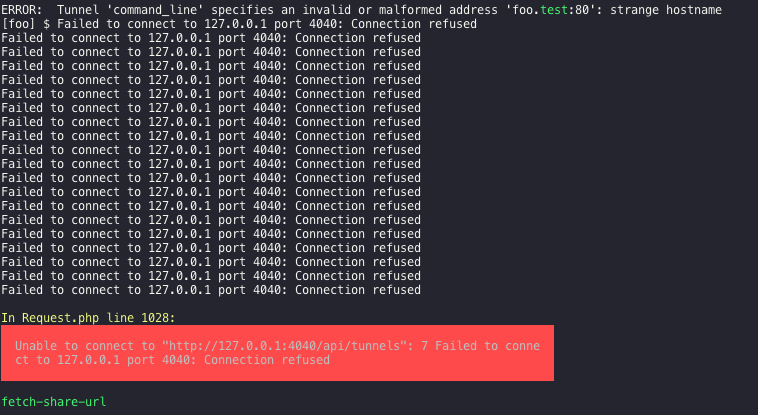
Same error than before ... :(
ghost
on 27 Jun 2019
Puzzling.
I'm wondering why your call to api/tunnels (where 'command_line' is coming from) doesn't show the http:// prefix on the domain.
Screenshot: yours on the left, mine on the right.
(Granted, yours was from the older version, so maybe that's all the difference is.)

drbyte
on 28 Jun 2019
Didn't get it here. What should i do ? Replace some stuff ?
Getting sick of this errors :(
ghost
on 28 Jun 2019
I'm pretty sure this is not a Valet issue at all.
It's something not playing well with ngrok, thus preventing ngrok from doing its usual thing.
Proof of concept:
Valet is just preparing the command line for you, which resolves to the following, which you could use to manually start ngrok yourself:
~/.composer/vendor/laravel/valet/bin/ngrok http ${PWD##*/}.test:80 -host-header=rewrite
or, more directly for the domain you've been using:
~/.composer/vendor/laravel/valet/bin/ngrok http newlinedisplay.test:80 -host-header=rewrite
When you copy/paste that into your terminal, what happens?
If it keeps giving you one of those command_line errors, then I'm guessing some other process is already running on ports ngrok wants, or otherwise interrupting what ngrok is trying to do.
But here's another troubleshooting step you can try: tell ngrok to output logs to stdout:
~/.composer/vendor/laravel/valet/bin/ngrok http ${PWD##*/}.test:80 -host-header=rewrite --log "stdout"
I get the following with that logging enabled, when running it from my foo directory:
INFO[06-28|13:33:28] no configuration paths supplied
INFO[06-28|13:33:28] ignoring default config path, could not stat it path=/Users/chris/.ngrok2/ngrok.yml err="stat /Users/chris/.ngrok2/ngrok.yml: no such file or directory"
t=2019-06-28T13:33:28-0400 lvl=info msg="starting web service" obj=web addr=127.0.0.1:4040
t=2019-06-28T13:33:29-0400 lvl=info msg="tunnel session started" obj=tunnels.session
t=2019-06-28T13:33:29-0400 lvl=info msg="client session established" obj=csess id=2681f5ac604b
t=2019-06-28T13:33:29-0400 lvl=info msg="started tunnel" obj=tunnels name="command_line (http)" addr=http://foo.test:80 url=http://59e750a8.ngrok.io
t=2019-06-28T13:33:29-0400 lvl=info msg="started tunnel" obj=tunnels name=command_line addr=http://foo.test:80 url=https://59e750a8.ngrok.io
You can use the following to see what services are running on which ports: lsof -Pn -i4 in case that helps you respond to whatever the logging reveals to you.
drbyte
on 28 Jun 2019
Hi there,
It works when i do a
~/.composer/vendor/laravel/valet/bin/ngrok http newlinedisplay.test:80 -host-header=rewrite
I am wondering where this shitty bug is coming from.
ghost
on 29 Jun 2019
When it’s running that way, what happens in two cases:
- use browser to visit the port 4040 URL it shows in ngrok terminal
- run valet fetch-share-url
drbyte
on 29 Jun 2019
Was the log output any different from mine?
drbyte
on 29 Jun 2019
Got this when accessing to 4040 port url :

Works with the shared URL but cannot see some images.
Here is the output of the log :
[~] $ ~/.composer/vendor/laravel/valet/bin/ngrok http newlinedisplay.test:80 -host-header=rewrite --log "stdout"
INFO[06-29|15:31:55] no configuration paths supplied
INFO[06-29|15:31:55] ignoring default config path, could not stat it path=/Users/anthony/.ngrok2/ngrok.yml err="stat /Users/anthony/.ngrok2/ngrok.yml: no such file or directory"
t=2019-06-29T15:31:55+0200 lvl=info msg="starting web service" obj=web addr=127.0.0.1:4040
t=2019-06-29T15:31:56+0200 lvl=info msg="tunnel session started" obj=tunnels.session
t=2019-06-29T15:31:56+0200 lvl=info msg="client session established" obj=csess id=d2620117e28f
t=2019-06-29T15:31:56+0200 lvl=info msg="started tunnel" obj=tunnels name="command_line (http)" addr=http://newlinedisplay.test:80 url=http://c57522ca.ngrok.io
t=2019-06-29T15:31:56+0200 lvl=info msg="started tunnel" obj=tunnels name=command_line addr=http://newlinedisplay.test:80 url=https://c57522ca.ngrok.io
t=2019-06-29T15:31:57+0200 lvl=info msg=start pg=/grpc/rpx.ClientWeb/State id=dfabb7d29094b44b
I'm having the same issue. Stray [ reference and all. Followed along with this thread with the same results.
 scottzirkel
on 10 Jul 2019
scottzirkel
on 10 Jul 2019
Glad to not be the only one. I feel understanded.
Hope we get a fix asap.
ghost
on 13 Jul 2019
Given that I can't replicate it on my day-to-day Mojave Mac, I tried installing a fresh new Mojave on a loaner Mac. Installed Valet, and valet share works without error.
What's the history of your Mac? How can I make mine do what yours is doing? :)
drbyte
on 13 Jul 2019
It was a clean install for me too when i installed it too. I really have no idea on how to reproduce this error.
ghost
on 14 Jul 2019
Cool.
On top of installation of a new Mac and fresh install of Valet, you've no doubt installed other applications, and probably other development environment tools, maybe even mobile device simulators, SDKs, compilers, API tools like Postman, and others. Maybe one of those is causing it.
Can both of you post a list of whatever you've installed, and whatever you've changed in your Mac?
Then we can explore what we find in common as possible root cause.
drbyte
on 14 Jul 2019
Hello, just have some homebrew packages : dnsmasq, mariadb, nginx, php.
Also have installed npm & node.
Made my own .bash_profile for shortcuts.
I don't see anything else.
ghost
on 24 Jul 2019
I have exactly the same issue, you are using Hyper no?
I tried valet share on a raw Terminal.app and it worked
 clmntgr
on 6 Aug 2019
clmntgr
on 6 Aug 2019
I have exactly the same issue, you are using Hyper no?
I triedvalet shareon a raw Terminal.app and it worked
Same here! Thanks for this solution.
 kms-rscholz
on 8 Aug 2019
kms-rscholz
on 8 Aug 2019
Commenting for visibility: I also had the same problem (although for some reason it's forwarding to port 60 instead of 80: mydomain.test:60). I also use Hyper for my terminal app.
Switching to Terminal.app (or even iTerm.app) works fine. So the problem is coming from something Hyper does.
 mikemand
on 18 Aug 2019
mikemand
on 18 Aug 2019
Ya, I'm normally using iTerm, not Hyper.
Looks like I'm gonna stick with iTerm ! 👍
drbyte
on 18 Aug 2019
@AnthonyWebDev Were you using Hyper? Sounds like this might be just that. Going to close it unless you respond and say you weren't.
Short story: If anyone comes across this issue, Valet share and Hyper don't place together nicely. :) Likely more Hyper and ngrok but not 100% sure.
Thanks as always to the wonderful @drbyte for digging through this. <3
 mattstauffer
on 18 Aug 2019
mattstauffer
on 18 Aug 2019
@mattstauffer I have this issue on the regular mac terminal app and iTerm. I am on Laravel Valet 2.9.0.
Here is the output I get
Session Status                online    n     rt1     rt5     p50     p90
Account                       Abishek R Srikaanth (Plan: Pro) 0.00    0.00
V rsion                       2.3.35
R gio                         United States (us)
Web Interface                 http://127.0.0.1:4040
F rward ng                    h tp://92c4274c.ngrok.io -> http://laravel.test:60
Forwarding                    https://92c4274c.ngrok.io -> http://laravel.test:60

Connections                   ttl     opn     rt1     rt5     p50     p90     Failed to connect to 127.0.0.1 port 4041: Connection refused
                              0       0       0.00    0.00    0.00    0.00    Failed to connect to 127.0.0.1 port 4041: Connection refused
Failed to connect to 127.0.0.1 port 4041: Connection refused
Failed to connect to 127.0.0.1 port 4041: Connection refused
Failed to connect to 127.0.0.1 port 4041: Connection refused
Failed to connect to 127.0.0.1 port 4041: Connection refused
Failed to connect to 127.0.0.1 port 4041: Connection refused
Failed to connect to 127.0.0.1 port 4041: Connection refused
Failed to connect to 127.0.0.1 port 4041: Connection refused
Failed to connect to 127.0.0.1 port 4041: Connection refused
Failed to connect to 127.0.0.1 port 4041: Connection refused
Failed to connect to 127.0.0.1 port 4041: Connection refused
Failed to connect to 127.0.0.1 port 4041: Connection refused
Failed to connect to 127.0.0.1 port 4041: Connection refused
Failed to connect to 127.0.0.1 port 4041: Connection refused
Failed to connect to 127.0.0.1 port 4041: Connection refused

In Request.php line 1060:

  Unable to connect to "http://127.0.0.1:4041/api/tunnels": 7 Failed to conne                                                                                                                                                                 ct to 127.0.0.1 port 4041: Connection refused

Failed to connect to 127.0.0.1 port 4041: Connection refused
fetch-share-url [<domain>].0.1 port 4041: Connectio
 abishekrsrikaanth
on 19 Mar 2020
abishekrsrikaanth
on 19 Mar 2020
Interestingly, what's different about your case vs the original one is that this is specifically complaining about port 4041, and not 4040 where your ngrok instance is actually running.
Valet does 2 things here. Only 1 is truly crucial, the other might be where the problem is, and it's not so crucial.
1 - it calls ngrok to open the tunnel -- obviously this is crucial
2 - it also attempts to fetch the generated URL to stuff it into the clipboard so you can immediately paste it into your browser or emulator or slack or share with colleagues, etc. This is not important, as you could do that yourself.
It appears the first step, actual ngrok, is working fine.
It's the fetch-share-url step that's having troubles in your case.
I'm not sure if your Pro Plan is a contributor to any confusion: it shouldn't be, but only Pro plans and higher can even open multiple tunnels, and ngrok only uses port 4041 with multiple tunnels (it starts with 4040 for the first tunnel).
The fetch-share-url step loops through both 4040 and 4041 attempting to determine whether the connection is open, in order to use it to read the URL to copy into the clipboard.
For some reason in your case it didn't find it on port 4040 so it moved on to 4041, which isn't started, so is (appropriately) reporting refused.
So the key is figuring out why it didn't use the data from 4040 ...
What's in your ~/.ngrok2/ngrok.yml file? (don't post your authtoken though!)
drbyte
on 19 Mar 2020
@drbyte, The .yml file just has the authtoken, nothing else. But the below does work properly (I assume this is what valet uses
~/.composer/vendor/laravel/valet/bin/ngrok http laravel.test:443 -host-header=rewrite
Interesting. Does the generated ngrok forwarding URL get copied to your clipboard? ie: in the case you posted above, it would normally have had http://92c4274c.ngrok.io copied to clipboard after running valet share.
And yes, I expect calling ngrok manually will work fine. AND running valet share as you did ALSO is working fine ... it's just the copy-to-clipboard part that's showing those connection-failure messages (up to 20 of them because it tests up to 20 times), but ngrok is working fine in the background.
drbyte
on 19 Mar 2020
Well, another interesting thing that I noticed is if I have an existing tunnel open by calling ngrok manually using the above code I posted and then if I run valet share, then it works fine but doesn't copy the URL to the clipboard. But if I close the first tunnel and run valet share to open the first tunnel, then it fails to connect.
abishekrsrikaanth
on 19 Mar 2020
I don't know if anybody still has problems with this. I was getting the same error as @abishekrsrikaanth (Failed to connect to 127.0.0.1 port 4041: Connection refused)
As soon as I got back to the office it was working again. At home I'm using 'Plume' routers. They were interfering. When I got home again and connected to the internet through plume I got the errors. When I used the lan cable no issues. They filter & block malicious traffic. So its worth to look into if your routers are filtering "malicious" traffic.
 GioChocolateBro
on 4 Jun 2020
GioChocolateBro
on 4 Jun 2020
I have this issue on iTerm and Terminal app. Any ideas?
 Unable to connect to "http://127.0.0.1:4041/api/tunnels": 7 Failed to conne
  ct to 127.0.0.1 port 4041: Connection refused
 guidoferreyra
on 20 Oct 2020
guidoferreyra
on 20 Oct 2020
The understanding of this issue seems to have a bit evolved today. See comments:
- https://github.com/vercel/hyper/issues/3796#issuecomment-765126204
- https://github.com/vercel/hyper/issues/3796#issuecomment-765501242
Second one is pointing to how valet-linux solved it.
 meduzen
on 22 Jan 2021
meduzen
on 22 Jan 2021
@meduzen Can you test making this change in your ~/.composer/vendor/laravel/valet/cli/valet.php file:
    $app->command('tld [tld]', function ($tld = null) {
        if ($tld === null) {
-            return info(Configuration::read()['tld']);
+            return output(Configuration::read()['tld']);
        }
eg: changing the info() function to output() in
https://github.com/laravel/valet/blob/8c74df2b34899a15d17060810ab0a18efa8f7409/cli/valet.php#L80
drbyte
on 22 Jan 2021
@drbyte I tried out the above change and it fixes the issue for me
I'm still getting the port 4041 error though, but that's present in the default terminal also
 LabhanshAgrawal
on 22 Jan 2021
LabhanshAgrawal
on 22 Jan 2021
@drbyte Working fine for me, too, on Valet 2.13.18.
meduzen
on 22 Jan 2021
Fix PR'ed by the amazing @drbyte in #1029 and tagged in https://github.com/laravel/valet/releases/tag/v2.13.19
mattstauffer
on 23 Jan 2021
Related issues
 webartistse
·
4Comments
webartistse
·
4Comments
 sadhakbj
·
3Comments
sadhakbj
·
3Comments
 tomirons
·
4Comments
tomirons
·
4Comments
 TimOgilvy
·
3Comments
TimOgilvy
·
3Comments
 papakay
·
3Comments
papakay
·
3Comments
Most helpful comment
I have exactly the same issue, you are using Hyper no?
I tried
valet shareon a raw Terminal.app and it worked