Valet: The ping test after installation doesn't work
Hi everyone,
I just installed for the first time Valet on my Mac. So i did all the process for the installation.
1 / Installed HomeBrew
2 / Installed PHP 7.3 with a homebrew install [email protected] & composer in global mode
3 / Did the composer global require laravel/valet
I had no problems during the installation. But now, when i am trying to test a .dev domain with a ping this is what i am getting :
MBP:~ anthony$ ping hhh.dev
ping: cannot resolve hhh.dev: Unknown host
Does anyone have the answer for this issue ? Thanks guys !
 ghost
ghost
All 18 comments
Sorry, just saw an other issue. And the default domain seems to be now .test !
And it seems to work as i have a 127.0.0.1 response when i ping a random domain :) !
ghost
on 20 Mar 2019
 brandonsueur
on 20 Mar 2019
brandonsueur
on 20 Mar 2019
@AnthonyRubioDev if you saw .dev documented somewhere, that documentation is out of date.
If it was in Laravel's docs, can you please post that here so we can get it fixed?
If it was on someone else's blog/etc, well, there's not much can be done about that unless you want to reach out to them to get them to update their post/article/etc.
Given that Valet is now working for you, do you mind closing this issue? Just use the Close button below the comment-box here on github.
 drbyte
on 20 Mar 2019
drbyte
on 20 Mar 2019
Hi @drbyte in fact it was on this page but it's now updated : https://laravel.com/docs/5.8/valet
Actually i am getting two other problems.
1 / I went to my Sites/ folder and did a valet park ! Then i wanted to create a domain for my folder /mybetcms/ so i went into this folder and did a valet link mybetcms. Now, when i go to my domain mybetcms i am at the Index of / page. The same page i am getting when i do a localhost for example.
You can see here that everything seems good 👍
mybetcms | | http://mybetcms.test | /Users/anthony/Sites/mybetcms |
Here is an example of what i got in a web browser
Capture d’écran 2019-03-20 à 18 19 44
Any idea for this one ?
2 / My second problem, when i try to do a lavarel new projectname he don't found the laravel command.
Thanks for the help guys :) !
ghost
on 20 Mar 2019
- I think you linked the wrong thing.
Since you've alreadyparked yourSitesdirectory, you can just create new subdirectories in it, and they will automatically be available asdirectoryname.test.
ie:Sites/foois automatically available ashttp://foo.test
So, for your mybetcms dir, do this:
cd ~/Sites
valet unlink mybetcms
mkdir mybetcms
cd mybetcms
echo "Hello World" > index.html
valet open
- If
laravel newisn't working, then you need tocomposer global require laravel/installer
Then you can:
cd ~/Sites
laravel new myproject
cd myproject
valet open
Note: valet open isn't required. It just conveniently opens your (default) browser to the current directory's directoryname.test
drbyte
on 20 Mar 2019
Thanks for answering. I am trying to resolve the first issue first then i will switch to second one.
So i did this as you asked :
MBP:~ anthony$ cd Sites/
MBP:Sites anthony$ valet unlink mybetcms
Password:
The [mybetcms] symbolic link has been removed.
MBP:Sites anthony$ mkdir mybetcms
MBP:Sites anthony$ cd mybetcms/
MBP:mybetcms anthony$ echo "Hello World" > index.html
MBP:mybetcms anthony$ valet open
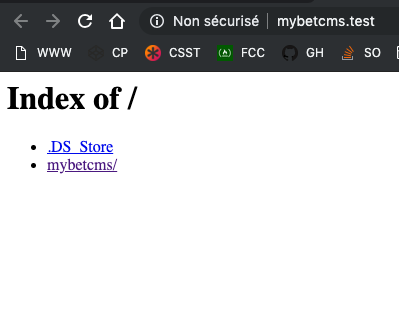
The last command open me this window, so as you can see i have the same problem
ghost
on 20 Mar 2019
Hmmm ....
What happens when you click the mybetcms/ link in that webpage (ie your screenshot)?
Does it show the Hello World?
drbyte
on 20 Mar 2019
What's in your valet config file? See it with this:
cat ~/.config/valet/config.json
Yes it's show the Hello World when I click on the folder name.
Here is the content of the config.json file !

ghost
on 20 Mar 2019
I think your browser has cached the old results.
Opening the URL in a new browser or new incognito tab will probably show the correct results.
Did you install the laravel installer? What happens when you create a new laravel project in a new directory, and then visit that directory's .test domain in your browser? You should see the Laravel default new application page.
drbyte
on 20 Mar 2019
I think your browser has cached the old results.
Opening the URL in a new browser or new incognito tab will probably show the correct results.
I don't think so ... I just tried with Safari / Chrome & FireFox. All with empty cache ...
Did you install the laravel installer? What happens when you create a new laravel project in a new directory, and then visit that directory's .test domain in your browser? You should see the Laravel default new application page.
Yes, installed it.
Here is the result on pastebin : https://pastebin.com/qc6g68Jt
As you can see, now i can launch a new laravel project but it got this when it's about visit the address

...
ghost
on 20 Mar 2019
Hmmm ... it's serving up the parent directory instead of individual projects.
It makes me wonder if you've also added any custom valet drivers. I know you didn't mention it, and didn't mention editing any of the core valet files if trying to troubleshoot, but in case you did, undoing that would be helpful.
drbyte
on 20 Mar 2019
No i didn't do anything ... The only thing i did was doing a valet park in my /Sites/ folder.
That's the only thing I did before trying to get a domain working ...
ghost
on 20 Mar 2019
Ok just did a random computer reboot (after already tried rebooting valet) and now it works.
Last question, how can i avoid typing my password at each valet command ?
Btw, thanks for helping me dude, appreciate it !
After that, i will close my issue 👍
ghost
on 20 Mar 2019
Woot!
The reboot is always magical. Solves a million mysteries!
If you're confident that nobody else could misuse your machine, you can run valet trust to have it add yourself to the sudoers list, which will skip the need for your password.
drbyte
on 20 Mar 2019
True. Even my step dad who is a aircraf pilot sometime reboot the planes 😅
Thanks for the help, time to close this one.
ghost
on 20 Mar 2019
Glad you got it sorted.
(I can't close this discussion. But you can, since you created it.)
drbyte
on 20 Mar 2019
Done :) !
ghost
on 20 Mar 2019
Related issues
 eberkund
·
4Comments
eberkund
·
4Comments
 pmochine
·
5Comments
pmochine
·
5Comments
 webartistse
·
4Comments
webartistse
·
4Comments
 dustinleblanc
·
4Comments
dustinleblanc
·
4Comments
 AlexVipond
·
4Comments
AlexVipond
·
4Comments
Most helpful comment
True. Even my step dad who is a aircraf pilot sometime reboot the planes 😅
Thanks for the help, time to close this one.