Valet: Valet not working as expected, browser not loading any of my projects
So, I make clear installation of valet. When I list brew services list I get:
Name    Status  User Plist
php71   started root /Library/LaunchDaemons/homebrew.mxcl.php71.plist
nginx   started root /Library/LaunchDaemons/homebrew.mxcl.nginx.plist
dnsmasq started root /Library/LaunchDaemons/homebrew.mxcl.dnsmasq.plist
So I supposed that everything will work correctly but it`s not. Mac Os High Sierra 10.13.2. Valet domain is app, valet config.json is:
{
    "domain": "app",
    "paths": [
        "/Users/macbook/.valet/Sites",
        "/Users/macbook/laravel"
    ]
}
In my laravel folder all my local projects. I will provide any additional information if needed. Any ideas what is wrong with this?
 machulskyiDmitryi
All 27 comments
What happens when you try to visit a project? There’s several different
errors that it could be which indicate different problems.
On Fri, Dec 15, 2017 at 6:09 AM Spade notifications@github.com wrote:
So, I make clear installation of valet. When I list brew services list I
get:Name Status User Plist
php71 started root /Library/LaunchDaemons/homebrew.mxcl.php71.plist
nginx started root /Library/LaunchDaemons/homebrew.mxcl.nginx.plist
dnsmasq started root /Library/LaunchDaemons/homebrew.mxcl.dnsmasq.plistSo I supposed that everything is work correctly. Mac Os High Sierra
10.13.2. Valet domain is app, valet config.json is:{
"domain": "app",
"paths": [
"/Users/macbook/.valet/Sites",
"/Users/macbook/laravel"
]
}In my laravel folder all my local projects. I will provide any additional
information if needed. Any ideas what is wrong with this?—
You are receiving this because you are subscribed to this thread.
Reply to this email directly, view it on GitHub
https://github.com/laravel/valet/issues/488, or mute the thread
https://github.com/notifications/unsubscribe-auth/AEH3bCZ-kBM3Ddhgjg4Axjsj4SLWhKgoks5tAlNrgaJpZM4RDVl9
.
 adamwathan
on 15 Dec 2017
adamwathan
on 15 Dec 2017
@adamwathan All I see is ––
ERR_CONNECTION_REFUSED
machulskyiDmitryi
on 15 Dec 2017
And here is some new information that I find in /usr/local/var/log/nginx:
2017/12/15 10:31:27 [emerg] 14238#0: open() "/Users/macbook/.valet/Log/nginx-error.log" failed (2: No such file or directory)
2017/12/15 10:43:46 [emerg] 19313#0: open() "/Users/macbook/.valet/Log/nginx-error.log" failed (2: No such file or directory)
machulskyiDmitryi
on 15 Dec 2017
Can you create that file and try to visit a site again and see if that log updates with more errors? It shouldn't need to be created but maybe the entire Log folder is missing.
More questions:
- What are the contents of
~/.valet? - I see the user is
macbook, do you have multiple user accounts on your machine? Valet has a lot of issues in those situations that we haven't had time to explore. If this is your problem, it's likely that some username references are incorrect in some generated files. Start with/usr/local/etc/nginx/nginx.confand see if any of the username references are for the wrong user. - Is
php-fpmrunning? (Don't trust what Homebrew says.) Runps aux | grep phpand paste the output here. - Is
dnsmasqrunning? (Don't trust what Homebrew says.) Runps aux | grep dnsmasqand paste the output here. - Is
nginxrunning? (Don't trust what Homebrew says.) Runps aux | grep nginxand paste the output here.
adamwathan
on 15 Dec 2017
- What are the contents of
~/.valet?

macbook is the only acc.
```
macbook 48296 0.0 0.0 4315076 468 ?? S 2:24PM 0:00.00 /usr/local/opt/php71/sbin/php-fpm --nodaemonize --fpm-config /usr/local/etc/php/7.1/php-fpm.conf
macbook 48295 0.0 0.0 4315076 468 ?? S 2:24PM 0:00.00 /usr/local/opt/php71/sbin/php-fpm --nodaemonize --fpm-config /usr/local/etc/php/7.1/php-fpm.conf
root 48272 0.0 0.1 4315076 6020 ?? Ss 2:24PM 0:00.20 /usr/local/opt/php71/sbin/php-fpm --nodaemonize --fpm-config /usr/local/etc/php/7.1/php-fpm.conf
macbook 49349 0.0 0.0 4276968 880 s000 S+ 2:58PM 0:00.01 grep php
4. ```
nobody 47328 0.0 0.0 4295896 656 ?? Ss 2:21PM 0:00.01 /usr/local/opt/dnsmasq/sbin/dnsmasq --keep-in-foreground -C /usr/local/etc/dnsmasq.conf
macbook 49356 0.0 0.0 4276968 884 s000 S+ 2:59PM 0:00.00 grep dnsmasq
macbook 49360 0.0 0.0 4285160 888 s000 S+ 2:59PM 0:00.01 grep nginx
Here is all info.
machulskyiDmitryi
on 15 Dec 2017
Ok looks like nginx isn't running.
Can you try running:
sudo /usr/local/opt/nginx/bin/nginx -t
and seeing if it shows any errors?
If not, run:
sudo /usr/local/opt/nginx/bin/nginx -g daemon off;
...to try and start nginx manually and seeing if it complains.
adamwathan
on 15 Dec 2017
Also I think something strange in certificate folder:
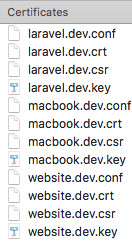
sudo /usr/local/opt/nginx/bin/nginx -g daemon off;
nginx: invalid option: "off"
When I go to my main folder called
laravel
and in this folder is all my projects, than I use valet park no issues, but in chrome I always get unsecure connection, even if I run valet secure in this main folder named laravel
machulskyiDmitryi
on 15 Dec 2017
Sorry need quotes there, my mistake:
sudo /usr/local/opt/nginx/bin/nginx -g 'daemon off;'
You need to secure each project, not the parked directory. Super annoying, so unless you have a really good reason for using HTTPS locally, I would just switch to a different TLD, like .test which is our new default.
To clean things up I would run:
cd ~/laravel && valet unsecure
valet domain test
Then if you've now got nginx working, try visit one of your projects at my-project.test/.
adamwathan
on 15 Dec 2017
nginx: [emerg] bind() to 0.0.0.0:80 failed (48: Address already in use)
nginx: [emerg] bind() to 0.0.0.0:443 failed (48: Address already in use)
nginx: [emerg] bind() to 0.0.0.0:80 failed (48: Address already in use)
nginx: [emerg] bind() to 0.0.0.0:443 failed (48: Address already in use)
nginx: [emerg] bind() to 0.0.0.0:80 failed (48: Address already in use)
nginx: [emerg] bind() to 0.0.0.0:443 failed (48: Address already in use)
nginx: [emerg] bind() to 0.0.0.0:80 failed (48: Address already in use)
nginx: [emerg] bind() to 0.0.0.0:443 failed (48: Address already in use)
nginx: [emerg] bind() to 0.0.0.0:80 failed (48: Address already in use)
nginx: [emerg] bind() to 0.0.0.0:443 failed (48: Address already in use)
nginx: [emerg] still could not bind()
Answer for –– sudo /usr/local/opt/nginx/bin/nginx -g 'daemon off;'
Ok, I get it, make valet domain testand cd ~/laravel && valet unsecure as well.
machulskyiDmitryi
on 15 Dec 2017
Use this command to try and find out what is already running on those ports:
sudo lsof -i tcp:80
sudo lsof -i tcp:443
IDK how, but after I change valet domain to test everything start to work ok, thanks a lot for the answers!!!!!
machulskyiDmitryi
on 15 Dec 2017
I have the same issues after open my macbook today.
Worked with the valet domain test for me too
 SimonJ
on 15 Dec 2017
SimonJ
on 15 Dec 2017
@machulskyiDmitryi - if this is resolved, please close the issue.
 drbyte
on 17 Dec 2017
drbyte
on 17 Dec 2017
Thank @adamwathan so much .Your answer help me lot.
 helojianxin
on 26 Apr 2018
helojianxin
on 26 Apr 2018
We just encountered and resolved a similar issue.
We changed the domain to a temporary one then back again which seemed to fix the DNS problems by recreating the resolver and the dnsmasq.conf files.
EG:
#Original domain is .test
valet domain foo
valet domain test
 ben-rogerson
on 3 May 2018
ben-rogerson
on 3 May 2018
Original domain is .test
valet domain foo
valet domain test
This just worked for me too, phew! 😌
 jkudish
on 28 May 2018
jkudish
on 28 May 2018
tq Adamwathan you are really helping to the core.
(i just trying stop the services since my macbook got heat, then my vallet app not working)
you are my hero.
 jerza90
on 30 Jul 2018
jerza90
on 30 Jul 2018
Just solved a similar problem. Used Adams advice to test the config
nginx: the configuration file /usr/local/etc/nginx/nginx.conf syntax is ok
nginx: [emerg] open() "/Users/USER/.valet/Log/nginx-error.log" failed (2: No such file or directory)
nginx: configuration file /usr/local/etc/nginx/nginx.conf test failed
seems like during upgrade valet did not update the new path for valet config (mentioned here: https://www.bram.us/2018/10/16/missing-valet-folder/ )
I looked inside the .conf file and found that caching.conf inside servers folder was still listing the old path of nginx error log.
Updated that.
valet domain test
then checked if nginx is running with ps aux | grep nginx
hope this helps someone
 bystrovo
on 11 Feb 2019
bystrovo
on 11 Feb 2019
IDK how, but after I change
valet domaintotesteverything start to work ok, thanks a lot for the answers!!!!!
+1 to this mate! solved my issue
 manugentoo
on 4 Mar 2019
manugentoo
on 4 Mar 2019
IDK how, but after I change
valet domaintotesteverything start to work ok, thanks a lot for the answers!!!!!
Working for me too
 israelguido
on 6 Mar 2019
israelguido
on 6 Mar 2019
for me was a issue:
sudo /usr/local/opt/nginx/bin/nginx -t
nginx: [emerg] open() "/usr/local/etc/nginx/valet/elasticsearch.conf" failed (2: No such file or directory) in /usr/local/etc/nginx/nginx.conf:44
nginx: configuration file /usr/local/etc/nginx/nginx.conf test failed
( elastic was installed ), i created file manualy and works
 devhero-tech
on 25 Aug 2019
devhero-tech
on 25 Aug 2019
valet domain test
valet domain test
worked in my case.
thanks
 ilearnbydoing
on 4 Oct 2019
ilearnbydoing
on 4 Oct 2019
Also had similar struggling after updating valet (to 2.4.2).
Running sudo /usr/local/opt/nginx/bin/nginx -t revealed the real problem
Old version of nginx and missing http2_push_preload. Update nginx and all now everything is working as expected
 powergrip
on 4 Oct 2019
powergrip
on 4 Oct 2019
This is not an issue, it happens only due to "https" whether you use ".test" or ".dev".
Google chrome automatically surf ".dev" with "https" even you forcefully type "http://domain.dev" but yet chrome redirects to "https://domain.dev"
Try opening in safari as http://domain.dev
Cheers!
 imranbts
on 26 Jan 2020
imranbts
on 26 Jan 2020
for me was a issue:
sudo /usr/local/opt/nginx/bin/nginx -t nginx: [emerg] open() "/usr/local/etc/nginx/valet/elasticsearch.conf" failed (2: No such file or directory) in /usr/local/etc/nginx/nginx.conf:44 nginx: configuration file /usr/local/etc/nginx/nginx.conf test failed
( elastic was installed ), i created file manualy and works
Any plans to create this file during install? Would save much time debugging.
 faisalmirza
on 23 Feb 2020
faisalmirza
on 23 Feb 2020
@faisalmirza wrote:
for me was a issue:
`sudo /usr/local/opt/nginx/bin/nginx -t nginx: [emerg] open() "/usr/local/etc/nginx/valet/elasticsearch.conf" failed (2: No such file or directory) in /usr/local/etc/nginx/nginx.conf:44 nginx: configuration file /usr/local/etc/nginx/nginx.conf test failed
( elastic was installed ), i created file manualy and works
Any plans to create this file during install? Would save much time debugging.
Which file?
Are you saying you want Valet to force an elasticsearch.conf file on everyone who installs Valet?
drbyte
on 24 Feb 2020
@faisalmirza wrote:
Which file?
You can find the stub here: https://github.com/weprovide/valet-plus/blob/master/cli/stubs/elasticsearch.conf
So, create a new file within /usr/local/etc/nginx/valet/elasticsearch.conf with the content of the elasticsearch.conf stub:
Replace VALET_DOMAIN with your domain e.g .test.
server {
    listen 80;
    server_name elasticsearch.VALET_DOMAIN www.elasticsearch.VALET_DOMAIN;
    charset utf-8;
    client_max_body_size 128M;

    location / {
        chunked_transfer_encoding on;
        proxy_set_header X-NginX-Proxy true;
        proxy_set_header Upgrade $http_upgrade;
        proxy_set_header Connection "upgrade";
        proxy_http_version 1.1;
        proxy_redirect off;
        proxy_buffering off;
        proxy_pass http://localhost:9200;
    }
}
This should do the trick. After running sudo /usr/local/opt/nginx/bin/nginx -t again, your configuration test should be successful.
 ChristopherDosin
on 28 Mar 2020
ChristopherDosin
on 28 Mar 2020
Related issues
 pmochine
·
5Comments
pmochine
·
5Comments
 sadhakbj
·
3Comments
sadhakbj
·
3Comments
 LucidNinja
·
4Comments
LucidNinja
·
4Comments
 papakay
·
3Comments
papakay
·
3Comments
 dannygsmith
·
5Comments
dannygsmith
·
5Comments
Most helpful comment
We just encountered and resolved a similar issue.
We changed the domain to a temporary one then back again which seemed to fix the DNS problems by recreating the resolver and the dnsmasq.conf files.
EG: