Valet: Accessing Valet from within a VirtualBox
Hi!
I'm in a situation that requires me to test our website on Internet Explorer / Edge intensively. I'm on Mac which of course makes it a bit difficult to debug IE/Edge.
The solution I have found so far was to install WIndows 10 in a VirtualBox and debug from there. I can access the host localhost by the IP 10.0.2.2 which gives me the Valet 404 - Not Found. This is equal to navigating to localhost directly on the host.
The question is: How do I access my sites within the VirtualBox. I tried mapping 10.0.2.2 example.app but it didn't work.
Do you have any suggestions?
Thanks!
 rasmuswoelk
All 15 comments
Not sure if that's possible i must say :P
But you would have to edit the hosts file within the guest (windows) machine :P
 morloderex
on 28 Sep 2016
morloderex
on 28 Sep 2016
Hey @rasmuswoelk, if you use the master branch, I've just merged a feature that will let you use xip.io for this.
You would just need to visit example.10.0.2.2.xip.io and that should allow you to view the site.
 adamwathan
on 28 Sep 2016
adamwathan
on 28 Sep 2016
Hi @adamwathan
I updated valet to the latest version and tried accessing the way you described but it still just returns the valet 404 page.
Am I missing some important piece of setup to make it work?
Any suggestions?
rasmuswoelk
on 30 Sep 2016
Are you on dev-master or the latest tagged release (1.1.22)?
adamwathan
on 30 Sep 2016
I'm on dev-master now 👍 I will try it out again!
rasmuswoelk
on 3 Oct 2016
@adamwathan It works! You guys rock.
One more question though: Will this work with subdomains? Our project is mostly structured to use subdomains such as my.example.app. Is that possible?
rasmuswoelk
on 3 Oct 2016
@rasmuswoelk I don't have time to set it up and test this morning but you can test yourself and let us know if it's good, just try hitting a URL like my.example.10.0.2.2.xip.io.
adamwathan
on 3 Oct 2016
I know this is really old, but my searching brought me here, so figured others may benefit from how I got this working (with a little help from StackOverflow).
- Copy the network IP from your
Vagrantfile. Should look something like this:
rb config.vm.network :private_network, ip: "192.168.0.0" - Paste it in your Vagrant's hosts file, replacing the final octet with a
1, e.g.192.168.0.1.
(Note: if your IP looks like192.168.0.101, it still becomes192.168.0.1).
sh
vagrant ssh
sudo vi /etc/hosts
# add the following line (without the `#`) to hosts and save
# 192.168.0.1 my-valet-domain.test
 curtisblackwell
on 17 Jun 2019
curtisblackwell
on 17 Jun 2019
@curtisblackwell Just noting (for others that land here looking for the Valet solution) that Vagrant is a different setup than Valet.
Not 100% sure but I think Valet uses a regular webserver on the host. So, in theory if you add something to the /etc/host file within the virtual machine, something like:
192.168.0.1 mysite.test
Then it should bind correctly to the hosts nginx bindings. Well, that's the theory. I haven't fully tested yet because I don't yet know how to edit the hosts file on windows 10 VM ;)
Will report back...
Ah, yes, this is correct. The trick is to find out what the correct IP address is to use. To do that run ifconfig in the command prompt of the host. You're looking for something like:
en0 inet 192.168.1.94
 jv2222
on 2 Jul 2019
jv2222
on 2 Jul 2019
@jv2222 Hi, thanks for your updated post. I'm in need of a solution too. I tried doing your approach, but so far it doesn't seem to work.
- I found my local
en0 inetIP on my mac, and it turned out to be192.168.39.143 - I went inside the hosts file on my windows 10 machine, and added:
192.168.39.143 mydomain.test - I tried accessing the website on internet explorer. It says "waiting for mydomain.test" then fails after some seconds.

What am I doing wrong? I am trying to access with HTTPS.
 simplenotezy
on 21 Sep 2019
simplenotezy
on 21 Sep 2019
What happens if you do ping mydomain.test?
On Sat, 21 Sep 2019 at 07:21, Mattias Fjellvang notifications@github.com
wrote:
@jv2222 https://github.com/jv2222 Hi, thanks for your updated post. I'm
in need of a solution too. I tried doing your approach, but so far it
doesn't seem to work.
- I found my local en0 inet IP on my mac, and it turned out to be
192.168.39.143- I went inside the hosts file on my windows 10 machine, and added: 192.168.39.143
mydomain.test- I tried accessing the website on internet explorer. It says
"waiting for mydomain.test" then fails after some seconds.[image: image]
https://user-images.githubusercontent.com/3786627/65374581-d7c3a980-dc8b-11e9-8cee-832525b9a339.pngWhat am I doing wrong? I am trying to access with HTTPS.
—
You are receiving this because you were mentioned.
Reply to this email directly, view it on GitHub
https://github.com/laravel/valet/issues/175?email_source=notifications&email_token=AACTRMGOGTJQPH4X5W7Y4XDQKYUWZA5CNFSM4CRE32UKYY3PNVWWK3TUL52HS4DFVREXG43VMVBW63LNMVXHJKTDN5WW2ZLOORPWSZGOD7ISVXY#issuecomment-533801695,
or mute the thread
https://github.com/notifications/unsubscribe-auth/AACTRMAPPMHXVUT5AVQKQ2DQKYUWZANCNFSM4CRE32UA
.
jv2222
on 21 Sep 2019
@jv2222 then it's actually responding. Still Explorer says it can't display the page:
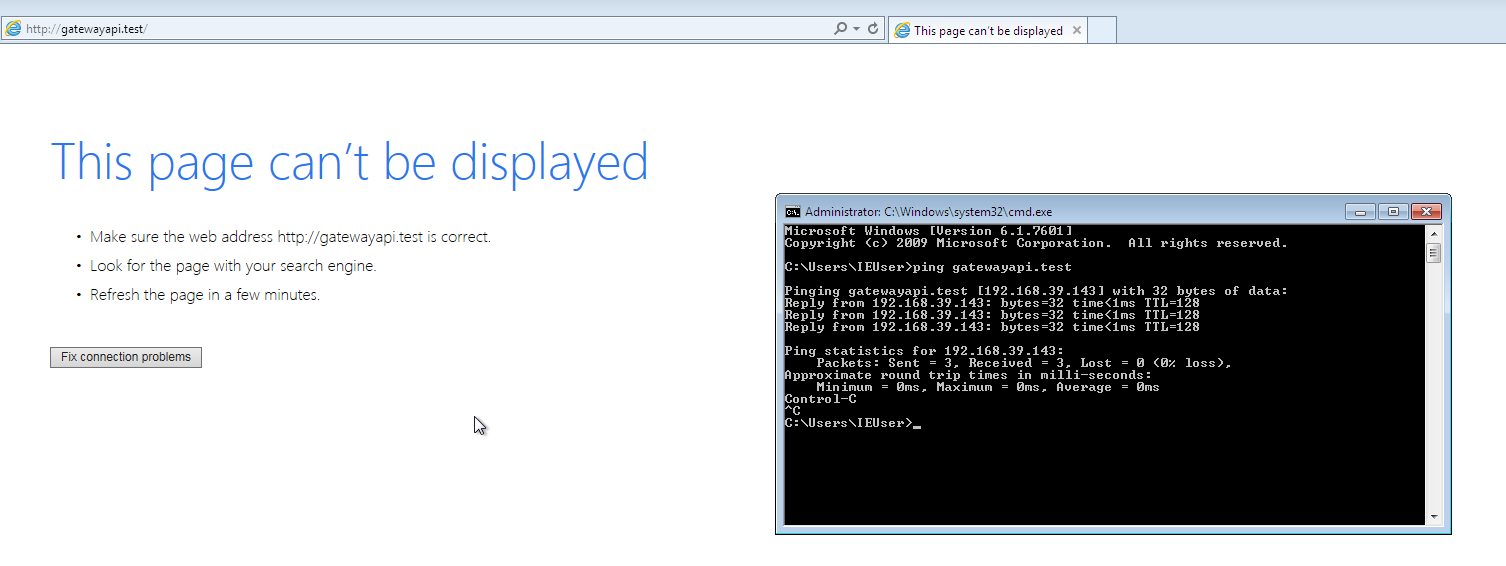
simplenotezy
on 22 Sep 2019
And it works correctly inside the virtual box?
On Sun, 22 Sep 2019 at 06:04, Mattias Fjellvang notifications@github.com
wrote:
@jv2222 https://github.com/jv2222 then it's actually responding. Still
Explorer says it can't display the page:[image: image]
https://user-images.githubusercontent.com/3786627/65387722-3f402e80-dd4a-11e9-9648-0b1d37a159bb.png—
You are receiving this because you were mentioned.
Reply to this email directly, view it on GitHub
https://github.com/laravel/valet/issues/175?email_source=notifications&email_token=AACTRMHARI2BKZ5J7NPVC7TQK5UNPA5CNFSM4CRE32UKYY3PNVWWK3TUL52HS4DFVREXG43VMVBW63LNMVXHJKTDN5WW2ZLOORPWSZGOD7JF4AA#issuecomment-533880320,
or mute the thread
https://github.com/notifications/unsubscribe-auth/AACTRMGZOJXFRM4ETVQEDVTQK5UNPANCNFSM4CRE32UA
.
jv2222
on 22 Sep 2019
It seems to be the nginx configuration. It is configured to listen to 127.0.0.1 (port 80, etc)
I solved it (temporaly) by changing ~/.config/valet/Nginx/on.test.
replaced instances of 127.0.0.1 by *
 erlendtermaat
on 17 Dec 2019
erlendtermaat
on 17 Dec 2019
Just to chime in on this - I was facing this exact same issue with Valet+ on macOS and can confirm that @jv2222's comment above (https://github.com/laravel/valet/issues/175#issuecomment-507476220) fixed the issue.
 alexryans
on 11 Nov 2020
alexryans
on 11 Nov 2020
Related issues
 tomirons
·
4Comments
tomirons
·
4Comments
 TimOgilvy
·
3Comments
TimOgilvy
·
3Comments
 marianvlad
·
5Comments
marianvlad
·
5Comments
 idmahbub
·
3Comments
idmahbub
·
3Comments
 eberkund
·
4Comments
eberkund
·
4Comments
Most helpful comment
Hey @rasmuswoelk, if you use the
masterbranch, I've just merged a feature that will let you usexip.iofor this.You would just need to visit
example.10.0.2.2.xip.ioand that should allow you to view the site.