Valet-plus: Will Not Use Linked PHP Version
Hello, I seem to be unable to use the version of PHP that Valet Plus claims it is using again.
If I do valet use 7.2 and php -v, I get:
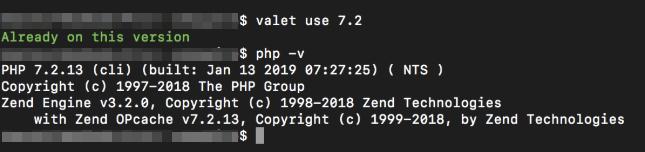
However phpinfo() shows different:

Why isn't the version that I have linked and said to use isn't being used? I have tried restarting Valet Plus, Terminal, and my MacBook. Thanks for your help.
Valet+ 1.0.26
MacOS Mojave 10.14.3 (18D109)
 amcguireweb
All 10 comments
I was able to finally get the server to use PHP 7.2.13, but I'm not sure how. I believe that I followed these steps:
brew unlink [email protected]
brew link [email protected] --force
Received warning that 7.2 was already linked, and to run the following to unlink and force relink (and did so):
brew unlink [email protected] && brew link --force [email protected]
valet use 7.2
valet restart
phpinfo(); still showed PHP Version 7.1.25.
So then I closed out Terminal, shut down my MacBook and then powered it back on.
phpinfo(); then showed PHP Version 7.2.13.
Is this expected behavior? Should valet restart switch the PHP version and be ready for use at that time or is a Terminal and/or Machine restart required?
Thank you for any clarification you may be able to provide.
amcguireweb
on 1 Mar 2019
I have seen this before. Especially when switching between PHP versions. Nginx seems to want to hold on to versions. Removing ~/.valet/valet.sock and trying again worked for me.
 rosstafarian
on 2 Mar 2019
rosstafarian
on 2 Mar 2019
This morning when I started my Mac the PHP version is randomly on 5.6 (with output from phpinfo();), when I last shut it down it was running php 7.2.
Now I can't get it to switch at all.
amcguireweb
on 4 Mar 2019
Make sure you run brew doctor when running into problems like these. In my case, homebrew could not link my php version to /usr/local/sbin, because the directory did not exist.
 rvdbogerd
on 14 Mar 2019
rvdbogerd
on 14 Mar 2019
In my case, I stop all services of php and start a specific version
 MaxSouza
on 19 Mar 2019
MaxSouza
on 19 Mar 2019
It doesn't matter what I do. I just can't switch back and forth. Instead, I spend an hour or two trying everything and then suddenly it switches for me. Currently in the middle of that process, once again.
amcguireweb
on 1 Apr 2019
Hi all,
When u are suffering with this problem, just do:
- valet stop
- rm ~/.valet/valet.sock
- valet start
And everything will work again (thanks @rosstafarian)
 theozzz
on 8 Apr 2019
theozzz
on 8 Apr 2019
Could be you've added exports to .zshrc or .bashrc files to point to specific versions of php.
 complexthings
on 29 Apr 2019
complexthings
on 29 Apr 2019
@amcguireweb are you still having problems? You could join the Valet+ Slack channel (see the bottom of the readme of this project) so we can more easily debug what's going on.
In general if your terminal shows a different version than phpinfo() it's because there is something causing trouble in your $PATH variable. You can check this with echo $PATH in your terminal. /usr/local/bin should be somewhere at the start. If there is a specific php version in your $PATH, look for export lines in ~/.bash_profile or ~/.bashrc files and remove them.
 SanderAtom
on 7 Jun 2019
SanderAtom
on 7 Jun 2019
Dear Contributor,
With the release of Valet+ 2.0.0 the Valet+ development team and contributors have implemented the contribution guidelines. The contribution guidelines aim to improve the support and workflow of Valet+. For further information why this was implemented please check https://github.com/weprovide/valet-plus/issues/393.
We're closing this ticket because it does not follow the correct format. If you feel your ticket is still relevant we encourage you to re-open your ticket using the correct format.
Kind regards,
The Valet+ team
 Neodork
on 7 Feb 2020
Neodork
on 7 Feb 2020
Related issues
 SnowCommerceBrand
·
4Comments
SnowCommerceBrand
·
4Comments
 NurdinDev
·
4Comments
NurdinDev
·
4Comments
 rafaelstz
·
5Comments
rafaelstz
·
5Comments
 Serializator
·
4Comments
Serializator
·
4Comments
 aronwp
·
4Comments
aronwp
·
4Comments
Most helpful comment
Could be you've added exports to
.zshrcor.bashrcfiles to point to specific versions of php.