Valet-plus: Setting password for root user failed.
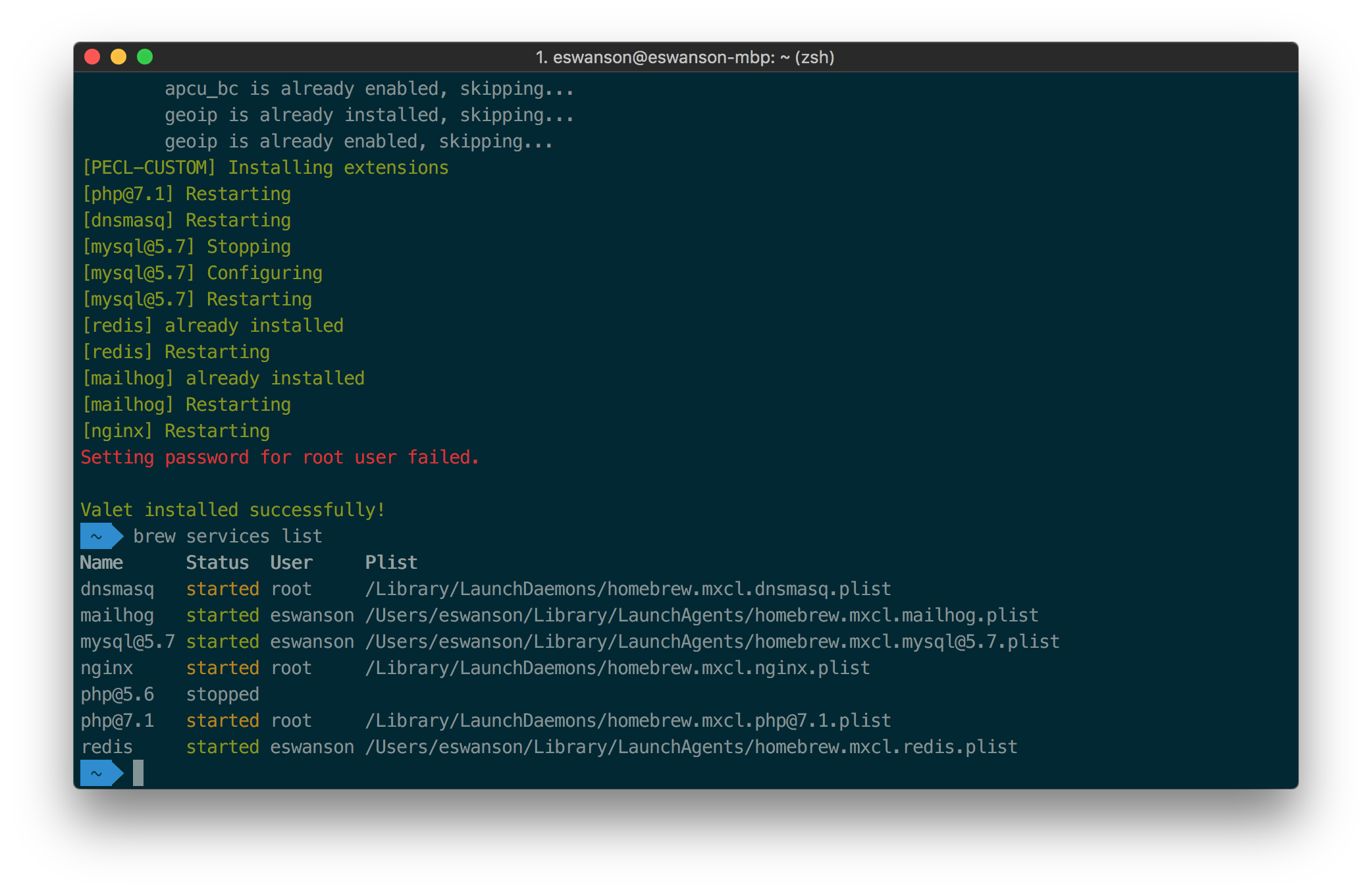
Every time I run Valet Install i get the following error: Setting password for root user failed. Here is my brew services list:
 ericswansonfc
All 10 comments
I have the same issue even I run valet with sudo
I have the lastest version of valet+
 cuongtran-6618
on 13 Sep 2018
cuongtran-6618
on 13 Sep 2018
Can you connect to MySQL? Did you have any MySQL installed before installing Valet+?
 SanderAtom
on 13 Sep 2018
SanderAtom
on 13 Sep 2018
Try running which mysql.
If this returns empty as mine did, the following fix may work.
brew uninstall --force mysql
brew prune
brew install mysql
valet install
 toptomatotwo
on 15 Sep 2018
toptomatotwo
on 15 Sep 2018
It looks like valet install installs [email protected], whereas brew install mysql installs mysql@8.
Not sure though because the installation output looks like this:
[[email protected]] Stopping
[[email protected]] Configuring
[[email protected]] Restarting
But /usr/local/Cellar/mysql/ just contains 8.0.12.
 MikeiLL
on 9 Oct 2018
MikeiLL
on 9 Oct 2018
@toptomatotwo's solution worked for me!
 sirugh
on 19 Mar 2019
sirugh
on 19 Mar 2019
I'm getting the same error on OSX 10.14 Is this a permission issue?
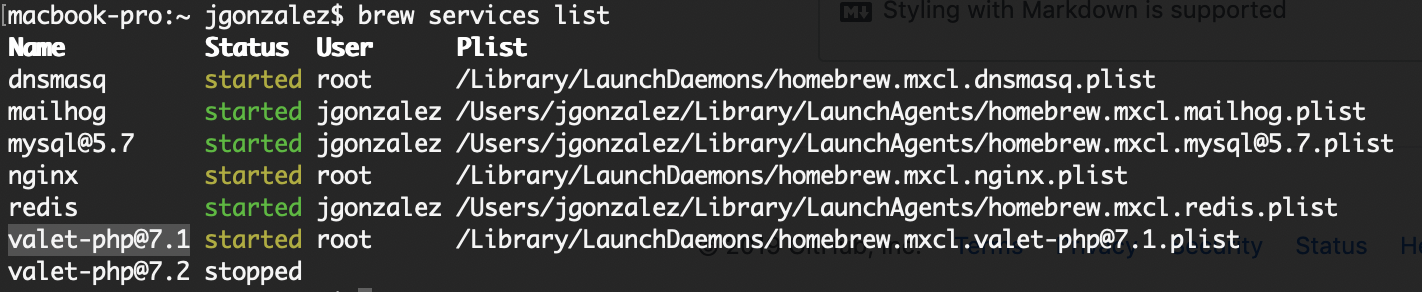
Contents of /usr/local/etc/my.cnf
[client]
user=root
password=root
host=localhost
[mysqld]
sql_mode="NO_ENGINE_SUBSTITUTION"
innodb_file_per_table=OFF
show_compatibility_56=ON
open_files_limit=999999
log-error=/Users/jgonzalez/.valet/Log/mysql.log
local_infile=ON
secure_file_priv=""
max_allowed_packet=1073741824
max_connections=100000
key_buffer_size=1024M
innodb_buffer_pool_size=1024M
query_cache_size=67108864
query_cache_type=1
query_cache_limit=4194304
table_open_cache=4096
innodb_buffer_pool_instances=24
myisam_sort_buffer_size=1024M
innodb_sort_buffer_size=1024M
sort_buffer_size=1024M
innodb_flush_log_at_trx_commit=0
innodb_log_file_size=25M
interactive_timeout=3600
max_connect_errors=1000000
thread_cache_size=1024
[mysqld_safe]
open_files_limit=999999
macbook-pro:etc jgonzalez$ ls -la
total 408
drwxrwxr-x 20 jgonzalez admin 640 Mar 27 20:10 .
drwxr-xr-x 16 root wheel 512 Mar 26 14:32 ..
drwxr-xr-x 4 jgonzalez admin 128 Mar 25 19:46 bash_completion.d
-rw-r--r-- 1 jgonzalez admin 27483 Mar 25 20:03 dnsmasq.conf
-rw-r--r-- 1 jgonzalez admin 27435 Mar 26 11:44 dnsmasq.conf.default
-rwxr-xr-x 1 jgonzalez admin 1281 Mar 26 11:40 freetds.conf
-rwxr-xr-x 1 jgonzalez admin 370 Mar 26 11:40 locales.conf
-rw-r--r-- 1 jgonzalez admin 735 Mar 27 11:40 my.cnf
drwxr-xr-x 18 jgonzalez admin 576 Mar 26 16:32 nginx
-rw-r--r-- 1 jgonzalez admin 0 Mar 26 11:40 odbc.ini
-rw-r--r-- 1 jgonzalez admin 0 Mar 26 11:40 odbcinst.ini
drwxr-xr-x 9 jgonzalez admin 288 Mar 25 16:53 openldap
drwxr-xr-x 5 jgonzalez admin 160 Mar 26 16:32 openssl
drwxr-xr-x 3 jgonzalez admin 96 Mar 25 19:55 php
-rwxr-xr-x 1 jgonzalez admin 219 Mar 26 11:40 pool.conf
-rw-r--r-- 1 jgonzalez admin 9710 Mar 26 11:45 redis-sentinel.conf
-rw-r--r-- 1 jgonzalez admin 46731 Mar 27 11:40 redis.conf
-rw-r--r-- 1 jgonzalez admin 62201 Mar 26 11:45 redis.conf.default
drwxr-xr-x 4 jgonzalez admin 128 Mar 25 19:44 valet-php
-rw-r--r-- 1 jgonzalez admin 4945 Feb 22 2018 wgetrc
macbook-pro:etc jgonzalez$ mysql -uroot -proot
mysql: [Warning] Using a password on the command line interface can be insecure.
ERROR 1045 (28000): Access denied for user 'root'@'localhost' (using password: YES)
macbook-pro:etc jgonzalez$ sudo mysql -uroot -proot
mysql: [Warning] Using a password on the command line interface can be insecure.
ERROR 1045 (28000): Access denied for user 'root'@'localhost' (using password: YES)
macbook-pro:etc jgonzalez$ which mysql
/usr/local/opt/[email protected]/bin/mysql
macbook-pro:etc jgonzalez$ which php
/usr/local/opt/[email protected]/bin/php
macbook-pro:etc jgonzalez$ valet db list
Password:
PHP Warning: mysqli::__construct(): (HY000/1045): Access denied for user 'root'@'localhost' (using password: YES) in /Users/jgonzalez/.composer/vendor/weprovide/valet-plus/cli/Valet/Mysql.php on line 284
Warning: mysqli::__construct(): (HY000/1045): Access denied for user 'root'@'localhost' (using password: YES) in /Users/jgonzalez/.composer/vendor/weprovide/valet-plus/cli/Valet/Mysql.php on line 284
Failed to connect to database
PHP Warning: mysqli_real_escape_string(): Couldn't fetch mysqli in /Users/jgonzalez/.composer/vendor/weprovide/valet-plus/cli/Valet/Mysql.php on line 305
Warning: mysqli_real_escape_string(): Couldn't fetch mysqli in /Users/jgonzalez/.composer/vendor/weprovide/valet-plus/cli/Valet/Mysql.php on line 305
PHP Fatal error: Uncaught Error: Call to a member function query() on boolean in /Users/jgonzalez/.composer/vendor/weprovide/valet-plus/cli/Valet/Mysql.php:264
Stack trace:
0 /Users/jgonzalez/.composer/vendor/weprovide/valet-plus/cli/Valet/Mysql.php(237): Valet\Mysql->query(NULL)
1 /Users/jgonzalez/.composer/vendor/weprovide/valet-plus/cli/Valet/Mysql.php(227): Valet\Mysql->getDatabases()
2 /Users/jgonzalez/.composer/vendor/weprovide/valet-plus/cli/includes/facades.php(28): Valet\Mysql->listDatabases()
3 /Users/jgonzalez/.composer/vendor/weprovide/valet-plus/cli/valet.php(515): Facade::__callStatic('listDatabases', Array)
4 [internal function]: Silly\Application->{closure}(Object(Symfony\Component\Console\Input\ArgvInput), Object(Symfony\Component\Console\Output\ConsoleOutput), 'list', NULL, NULL)
5 /Users/jgonzalez/.composer/vendor/php-di/invoker/src/Invoker.php(82): call_user_func_array(Object(Closure), Array)
6 /Users/jgonzalez/.composer/vendor/mnapoli/silly/src/Application.php(85): Invoker\Invoker->call(Object(Clos in /Users/jgonzalez/.composer/vendor/weprovide/valet-plus/cli/Valet/Mysql.php on line 264
Fatal error: Uncaught Error: Call to a member function query() on boolean in /Users/jgonzalez/.composer/vendor/weprovide/valet-plus/cli/Valet/Mysql.php:264
Stack trace:
0 /Users/jgonzalez/.composer/vendor/weprovide/valet-plus/cli/Valet/Mysql.php(237): Valet\Mysql->query(NULL)
1 /Users/jgonzalez/.composer/vendor/weprovide/valet-plus/cli/Valet/Mysql.php(227): Valet\Mysql->getDatabases()
2 /Users/jgonzalez/.composer/vendor/weprovide/valet-plus/cli/includes/facades.php(28): Valet\Mysql->listDatabases()
3 /Users/jgonzalez/.composer/vendor/weprovide/valet-plus/cli/valet.php(515): Facade::__callStatic('listDatabases', Array)
4 [internal function]: Silly\Application->{closure}(Object(Symfony\Component\Console\Input\ArgvInput), Object(Symfony\Component\Console\Output\ConsoleOutput), 'list', NULL, NULL)
5 /Users/jgonzalez/.composer/vendor/php-di/invoker/src/Invoker.php(82): call_user_func_array(Object(Closure), Array)
6 /Users/jgonzalez/.composer/vendor/mnapoli/silly/src/Application.php(85): Invoker\Invoker->call(Object(Clos in /Users/jgonzalez/.composer/vendor/weprovide/valet-plus/cli/Valet/Mysql.php on line 264
vim /etc/hosts
127.0.0.1 localhost
255.255.255.255 broadcasthost
::1 localhost
macbook-pro:etc jgonzalez$ sudo mysql_secure_installation
Securing the MySQL server deployment.
Error: Access denied for user 'root'@'localhost' (using password: YES)
macbook-pro:etc jgonzalez$ sudo mysqld stop
2019-03-28T03:40:04.460107Z 0 [Warning] Could not increase number of max_open_files to more than 262144 (request: 999999)
2019-03-28T03:40:04.656844Z 0 [Warning] TIMESTAMP with implicit DEFAULT value is deprecated. Please use --explicit_defaults_for_timestamp server option (see documentation for more details).
2019-03-28T03:40:04.656869Z 0 [Warning] 'NO_AUTO_CREATE_USER' sql mode was not set.
2019-03-28T03:40:04.656945Z 0 [Warning] Insecure configuration for --secure-file-priv: Current value does not restrict location of generated files. Consider setting it to a valid, non-empty path.
2019-03-28T03:40:04.657005Z 0 [Note] mysqld (mysqld 5.7.25) starting as process 49431 ...
2019-03-28T03:40:04.660663Z 0 [Warning] Setting lower_case_table_names=2 because file system for /usr/local/var/mysql/ is case insensitive
2019-03-28T03:40:04.660733Z 0 [ERROR] Fatal error: Please read "Security" section of the manual to find out how to run mysqld as root!
2019-03-28T03:40:04.660761Z 0 [ERROR] Aborting
2019-03-28T03:40:04.660778Z 0 [Note] Binlog end
2019-03-28T03:40:04.660947Z 0 [Note] mysqld: Shutdown complete
 TheRealJAG
on 28 Mar 2019
TheRealJAG
on 28 Mar 2019
@TheRealJAG Did you confirm which version of MySQL you are using? See the above entries about that in terms of the Homebrew-installed MySQL version.
MikeiLL
on 28 Mar 2019
@MikeiLL Here is what I found.
MacBook-Pro:~ jgonzalez$ brew info mysql
mysql: stable 8.0.15 (bottled)
Open source relational database management system
https://dev.mysql.com/doc/refman/8.0/en/
Conflicts with:
mariadb (because mysql, mariadb, and percona install the same binaries.)
mariadb-connector-c (because both install plugins)
mysql-cluster (because mysql, mariadb, and percona install the same binaries.)
mysql-connector-c (because both install MySQL client libraries)
percona-server (because mysql, mariadb, and percona install the same binaries.)
Not installed
From: https://github.com/Homebrew/homebrew-core/blob/master/Formula/mysql.rb
==> Dependencies
Build: cmake ✘
Required: openssl ✔
==> Requirements
Required: macOS >= 10.10 ✔
==> Caveats
We've installed your MySQL database without a root password. To secure it run:
mysql_secure_installation
MySQL is configured to only allow connections from localhost by default
To connect run:
mysql -uroot
To have launchd start mysql now and restart at login:
brew services start mysql
Or, if you don't want/need a background service you can just run:
mysql.server start
==> Analytics
install: 67,118 (30 days), 215,596 (90 days), 887,578 (365 days)
install_on_request: 62,690 (30 days), 196,880 (90 days), 804,737 (365 days)
build_error: 0 (30 days)
brew uninstall mysql
Error: No such keg: /usr/local/Cellar/mysql
MacBook-Pro:~ jgonzalez$ brew link [email protected] --force
Warning: Already linked: /usr/local/Cellar/[email protected]/5.7.25
To relink: brew unlink [email protected] && brew link --force [email protected]
MacBook-Pro:~ jgonzalez$ brew unlink mysql
Error: No such keg: /usr/local/Cellar/mysql
MacBook-Pro:~ jgonzalez$ brew switch mysql 5.7
Error: mysql not found in the Cellar.
MacBook-Pro:~ jgonzalez$ brew reinstall [email protected]
==> Reinstalling [email protected]
==> Downloading https://homebrew.bintray.com/bottles/[email protected]
Already downloaded: /Users/jgonzalez/Library/Caches/Homebrew/downloads/9bea6ff9f2b392ad4d37e94a64969cc32fa3d373f0798c6400eb42e167bd2d4c--mysql@5.7-5.7.25.mojave.bottle.tar.gz
==> Pouring [email protected]
==> Caveats
We've installed your MySQL database without a root password. To secure it run:
mysql_secure_installation
MySQL is configured to only allow connections from localhost by default
To connect run:
mysql -uroot
[email protected] is keg-only, which means it was not symlinked into /usr/local,
because this is an alternate version of another formula.
If you need to have [email protected] first in your PATH run:
echo 'export PATH="/usr/local/opt/[email protected]/bin:$PATH"' >> ~/.bash_profile
For compilers to find [email protected] you may need to set:
export LDFLAGS="-L/usr/local/opt/[email protected]/lib"
export CPPFLAGS="-I/usr/local/opt/[email protected]/include"
To have launchd start [email protected] now and restart at login:
brew services start [email protected]
Or, if you don't want/need a background service you can just run:
/usr/local/opt/[email protected]/bin/mysql.server start
==> Summary
🍺 /usr/local/Cellar/[email protected]/5.7.25: 319 files, 234MB
mysql -V
mysql Ver 14.14 Distrib 5.7.25, for osx10.14 (x86_64) using EditLine wrapper
MacBook-Pro:~ jgonzalez$ brew services restart mysql
Stopping mysql... (might take a while)
==> Successfully stopped mysql (label: homebrew.mxcl.mysql)
Error: Formula mysql is not installed.
TheRealJAG
on 28 Mar 2019
For reference, I had to forcefully remove all traces of MySQL and reinstall with Valet Plus to get it working again. I documented the issue and processes here:
 brendanfalkowski
on 30 May 2019
brendanfalkowski
on 30 May 2019
I had this issue and saw another mysqld instance running. You can either remove that instance or just shutdown in settings preference > mac instead of removing all traces.
 sdouma
on 8 Nov 2019
sdouma
on 8 Nov 2019
Related issues
 Igloczek
·
4Comments
Igloczek
·
4Comments
 rdorck
·
3Comments
rdorck
·
3Comments
 kupoback
·
4Comments
kupoback
·
4Comments
 dustbuster
·
5Comments
dustbuster
·
5Comments
 zcuric
·
4Comments
zcuric
·
4Comments
Most helpful comment
Try running
which mysql.If this returns empty as mine did, the following fix may work.