Valet-plus: Call to undefined function apcu_fetch() Pecl
Hi I have just installed the latest version and I am getting this
Fatal error: Uncaught Error: Call to undefined function apcu_fetch() in /Users/username/.composer/vendor/weprovide/valet-plus/server.php:37 Stack trace: #0 {main} thrown in /Users/username/.composer/vendor/weprovide/valet-plus/server.php on line 37
List of commands run
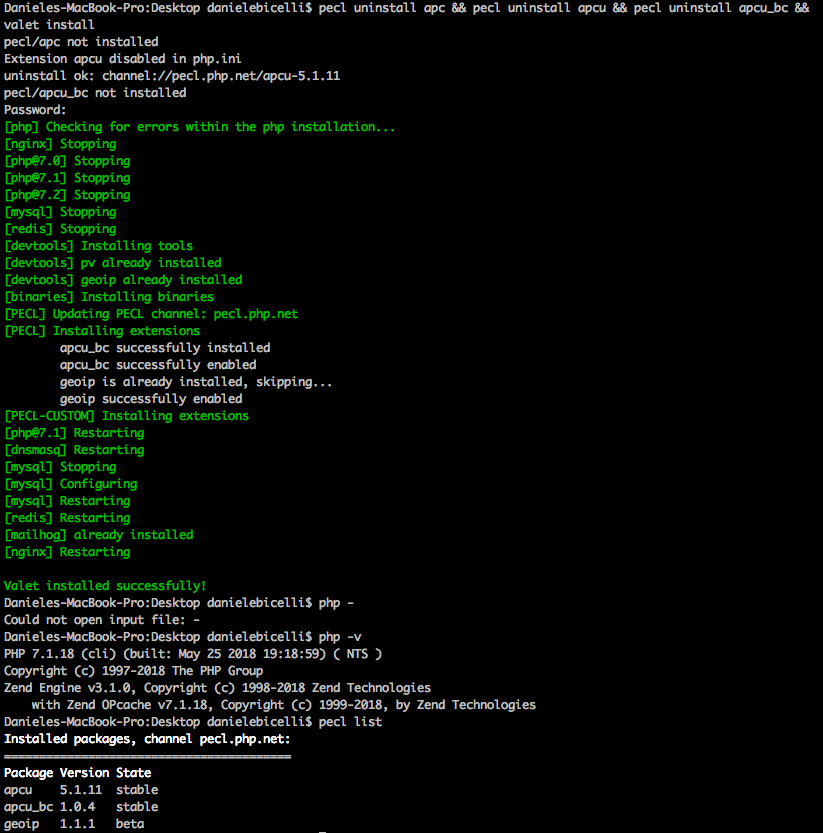
Thanks already
 falko189
All 9 comments
@falko189 This is related to the PHP-FPM service not switching to your current php version. Please show us your current PHP-FPM services with: ps -efw | grep php-fpm
 Neodork
on 11 Jun 2018
Neodork
on 11 Jun 2018
thanks for reply here the print
ps -efw | grep php-fpm
501 1288 1 0 4Jun18 ?? 0:02.83 /usr/local/opt/[email protected]/sbin/php-fpm --nodaemonize
501 1305 1 0 4Jun18 ?? 0:02.78 /usr/local/opt/php/sbin/php-fpm --nodaemonize
501 1456 1305 0 4Jun18 ?? 0:00.07 /usr/local/opt/php/sbin/php-fpm --nodaemonize
501 1458 1305 0 4Jun18 ?? 0:00.06 /usr/local/opt/php/sbin/php-fpm --nodaemonize
501 1581 1288 0 4Jun18 ?? 0:00.00 /usr/local/opt/[email protected]/sbin/php-fpm --nodaemonize
501 1583 1288 0 4Jun18 ?? 0:00.00 /usr/local/opt/[email protected]/sbin/php-fpm --nodaemonize
501 13053 19275 0 11:51am ttys004 0:00.00 grep php-fpm
falko189
on 11 Jun 2018
The /usr/local/opt/php/sbin/php-fpm services are overriding your /usr/local/opt/[email protected]/sbin/php-fpm services. Your webserver is currently running on PHP 7.2 instead of PHP 7.1. There could be a number of reasons why that happens one I've identified is*:
- Your path variable links /usr/local/opt/php or a similar path before the brew paths are loaded. Paths are usually build within the .rc file of your shell.
Make sure this:
0:02.83 /usr/local/opt/[email protected]/sbin/php-fpm --nodaemonize 501 1305 1 0 4Jun18 ??
0:02.78 /usr/local/opt/php/sbin/php-fpm --nodaemonize 501 1456 1305 0 4Jun18 ??
0:00.07 /usr/local/opt/php/sbin/php-fpm --nodaemonize 501 1458 1305 0 4Jun18 ??
0:00.06 /usr/local/opt/php/sbin/php-fpm --nodaemonize 501 1581 1288 0 4Jun18 ??
0:00.00 /usr/local/opt/[email protected]/sbin/php-fpm --nodaemonize 501 1583 1288 0 4Jun18 ??
0:00.00 /usr/local/opt/[email protected]/sbin/php-fpm --nodaemonize 501 13053 19275 0 11:51am
only shows fpm-services which are related to the current linked PHP version:
0:02.83 /usr/local/opt/[email protected]/sbin/php-fpm --nodaemonize 501 1305 1 0 4Jun18 ??
0:00.00 /usr/local/opt/[email protected]/sbin/php-fpm --nodaemonize 501 1583 1288 0 4Jun18 ??
0:00.00 /usr/local/opt/[email protected]/sbin/php-fpm --nodaemonize 501 13053 19275 0 11:51am
You can workaround this bug by killing php-fpm services with their PID by doing kill <pid>. For your current running services that would be: kill 1456 && kill 1458 && kill 1581. Once killed run ps -efw | grep php-fpm to ensure that the services are dead.
*Will update found causes when I've reproduced more.
Neodork
on 11 Jun 2018
WOW killing the service seems to have fixed the issue. Thanks.
Although I have a question I did run valet use 7.2 and my php -v shows php 7.2 however the ps -efw | grep php-fpm still shows [email protected] is this correct?
Thanks very much
falko189
on 11 Jun 2018
That would be the same issue. I would suggest checking your PATH variable if any PHP binary paths are loaded before the brew paths.
When switching to PHP 7.2 the services should be:
0 23887 1 0 1:04PM ?? 0:00.05 /usr/local/opt/php/sbin/php-fpm --nodaemonize
501 23896 23887 0 1:04PM ?? 0:00.00 /usr/local/opt/php/sbin/php-fpm --nodaemonize
501 23897 23887 0 1:04PM ?? 0:00.00 /usr/local/opt/php/sbin/php-fpm --nodaemonize
Note that there is no php@{version} within these php-fpm services because PHP 7.2 is currently the brew default version.
Neodork
on 11 Jun 2018
Hi @Neodork I think we can close this off thanks.
I managed to get rid of the 7.1 installation and exported export PATH="$(brew --prefix homebrew/php/php72)/bin:$PATH" after killing the processes I have this so it should be all good
501 55926     1   0 12:43pm ??         0:00.09 /usr/local/opt/php/sbin/php-fpm --nodaemonize
  501 55927 55926   0 12:43pm ??         0:00.12 /usr/local/opt/php/sbin/php-fpm --nodaemonize
  501 55928 55926   0 12:43pm ??         0:00.66 /usr/local/opt/php/sbin/php-fpm --nodaemonize
Daniele
falko189
on 11 Jun 2018
@falko189 We consider this ticket as completed but will leave it open for a few more days so other users can read up on the php-fpm related issues. Thanks for bringing this error to our attention within the 1.0.17 release.
Neodork
on 11 Jun 2018
If kill <pid> don't work, you can stop php version with brew services stop [email protected]
 MaxSouza
on 16 Jun 2018
MaxSouza
on 16 Jun 2018
Closing ticket.
 samgranger
on 21 Jun 2018
samgranger
on 21 Jun 2018
Related issues
 NurdinDev
·
4Comments
NurdinDev
·
4Comments
 SnowCommerceBrand
·
4Comments
SnowCommerceBrand
·
4Comments
 Serializator
·
4Comments
Serializator
·
4Comments
 rdorck
·
3Comments
rdorck
·
3Comments
 kupoback
·
4Comments
kupoback
·
4Comments
Most helpful comment
Hi @Neodork I think we can close this off thanks.
I managed to get rid of the 7.1 installation and exported
export PATH="$(brew --prefix homebrew/php/php72)/bin:$PATH"after killing the processes I have this so it should be all goodDaniele