Valet-plus: Fatal error: Call to undefined function apcu_fetch()
Hello everyone,
Valet works for me on php 7.1, but when i will change php(7.1 to 5.6) - (valet use 5.6)

when i ran app, return:

Fatal error: Call to undefined function apcu_fetch() in /Users/maxalexandre/.composer/vendor/weprovide/valet-plus/server.php on line 37
 MaxSouza
All 46 comments
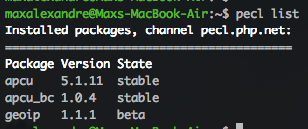
pecl list
MaxSouza
on 11 Apr 2018
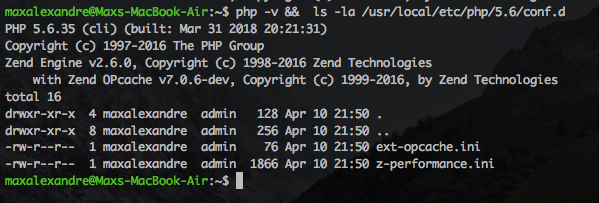
@MaxSouza Please show me the output of cat /usr/local/etc/php/{YOUR_VERSION}/conf.d/z-performance.ini, php -v and ls -la /usr/local/etc/php/{YOUR_VERSION}/conf.d.
 Neodork
on 11 Apr 2018
Neodork
on 11 Apr 2018
z-performance.ini
; Add America/Sao_Paulo string for replacing with machine timezone
date.timezone = "America/Sao_Paulo"
; Max execution time per request
max_execution_time = 300
; Max memory per instance
memory_limit = 128M
;The maximum size of an uploaded file.
upload_max_filesize = 128M
;Sets max size of post data allowed. This setting also affects file upload. To upload large files, this value must be larger than upload_max_filesize
post_max_size = 128M
session.auto_start = off
session.gc_probability = 0
suhosin.session.cryptua = off
memory_limit=2G
; Disable garbage collector
zend.enable_gc = off
; Use mailhog for sending emails
sendmail_path = /usr/local/bin/MailHog sendmail test@test
[opcache]
opcache.enable = 1
opcache.enable_cli = 1
opcache.memory_consumption = 2048
opcache.interned_strings_buffer = 20
opcache.file_cache=1
opcache.max_accelerated_files = 80000
opcache.max_wasted_percentage = 5
opcache.use_cwd = 1
opcache.validate_timestamps = 1
opcache.revalidate_freq = 0
opcache.file_update_protection = 2
opcache.revalidate_path = 0
opcache.save_comments = 1
opcache.load_comments = 1
opcache.fast_shutdown = 1
opcache.enable_file_override = 0
opcache.optimization_level = 0xffffffff
opcache.inherited_hack = 1
opcache.blacklist_filename = ""
opcache.max_file_size = 0
opcache.consistency_checks = 0
opcache.force_restart_timeout = 180
opcache.error_log = ""
opcache.log_verbosity_level = 1
opcache.preferred_memory_model = ""
opcache.protect_memory = 0
apc.cache_by_default = false
[apcu]
; apcu and php-fpm cause valet to hang, so we turn off apcu for now.
; See https://github.com/weprovide/valet-plus/issues/49
apc.enabled=0
apc.shm_size=512M
apc.ttl=7200
apc.mmap_file_mask=/tmp/apc.XXXXXX
apc.enable_cli=1
[xdebug]
xdebug.remote_enable=1
xdebug.remote_host=localhost
xdebug.remote_port=9000
xdebug.remote_autostart=1
xdebug.idekey=PHPSTORM
MaxSouza
on 11 Apr 2018
MaxSouza
on 11 Apr 2018
Please run pecl uninstall apc, pecl uninstall apcu and pecl uninstall apcu_bc then run: valet install and check your page.
Leave the input of valet install here for me please. If that didn't fix it for you.
Neodork
on 11 Apr 2018
@Neodork I have the same problem (it seems)
Fatal error: Uncaught Error: Call to undefined function apcu_fetch() in /Users/ws-concepts/.composer/vendor/weprovide/valet-plus/server.php:37 Stack trace: #0 {main} thrown in /Users/allrude/.composer/vendor/weprovide/valet-plus/server.php on line 37
So i tried
pecl uninstall apc
pecl/apc not installed
pecl uninstall apcu
Extension apcu disabled in php.ini
uninstall ok: channel://pecl.php.net/apcu-5.1.11
pecl uninstall apcu_bc
Extension apc disabled in php.ini
uninstall ok: channel://pecl.php.net/apcu_bc-1.0.4
valet install
Password:
[php] Checking for errors within the php installation...
[nginx] Stopping
[[email protected]] Stopping
[[email protected]] Stopping
[mysql] Stopping
[redis] Stopping
[devtools] Installing
[devtools] wp-cli already installed
[devtools] pv already installed
[binaries] Installing binaries
[PECL] Updating PECL channel: pecl.php.net
[PECL] Installing extensions
apcu_bc successfully installed
[[email protected]] Restarting
[dnsmasq] Restarting
[mysql] Stopping
[mysql] Configuring
[mysql] Restarting
[redis] Restarting
[mailhog] already installed
[nginx] Restarting

Valet installed successfully!
But the problem remains, Call to undefined function apcu_fetch()
 allrude
on 11 Apr 2018
allrude
on 11 Apr 2018
@Neodork for me, worked
MaxSouza
on 11 Apr 2018
@allrude Are you sure your webserver PHP is 7.1? I've seen machines that kept 5.6 linked. A restart of your computer might do the trick, so other PHP services can die.
Neodork
on 11 Apr 2018
@Neodork , Do I have to do this everytime when change version?
Thanks for all
MaxSouza
on 11 Apr 2018
@Neodork , it took two restarts and then it worked, feeling relieved and grateful thanks all you guys for getting Valet+ up and running again
allrude
on 11 Apr 2018
@MaxSouza Restart should only be required for initial setup. After the restart switching should be on the fly. Edit: Is your PHP 5.6 malfunctioning every time you switch? That should not be the case. I've however had a somewhat similar report.
@allrude I am happy you got it all working. Happy Valet+-ing!
Edit: comment for MaxSouza
Neodork
on 11 Apr 2018
Hello everyone,
Yesterday, i changed php version with valet use, but same error again Call to undefined function apcu_fetch
valet version: 1.0.14
I reinstalled valet and php, but when switch [email protected] for [email protected]


MaxSouza
on 4 May 2018
I removed pecl modules and reinstall valet in php version 7.0 and worked
MaxSouza
on 4 May 2018
I've tried removing the pecl modules advised above then running valet install, but now I'm getting the following when trying to use [email protected] to run valet:
PHP Warning:  PHP Startup: Unable to load dynamic library '/usr/local/Cellar/[email protected]/7.0.30/lib/php/20151012/php_intl.dll' - dlopen(/usr/local/Cellar/[email protected]/7.0.30/lib/php/20151012/php_intl.dll, 9): image
not found in Unknown on line 0
PHP Warning:  PHP Startup: Unable to load dynamic library '/usr/local/opt/php70-apcu/apcu.so' - dlopen(/usr/local/opt/php70-apcu/apcu.so, 9): image not found in Unknown on line 0
PHP Warning:  PHP Startup: Unable to load dynamic library '/usr/local/opt/php70-geoip/geoip.so' - dlopen(/usr/local/opt/php70-geoip/geoip.so, 9): image not found in Unknown on line 0
PHP Warning:  PHP Startup: Unable to load dynamic library '/usr/local/Cellar/[email protected]/7.0.30/lib/php/20151012/php_intl.dll' - dlopen(/usr/local/Cellar/[email protected]/7.0.30/lib/php/20151012/php_intl.dll, 9): image
not found in Unknown on line 0
PHP Warning:  PHP Startup: Unable to load dynamic library '/usr/local/opt/php70-apcu/apcu.so' - dlopen(/usr/local/opt/php70-apcu/apcu.so, 9): image not found in Unknown on line 0
PHP Warning:  PHP Startup: Unable to load dynamic library '/usr/local/opt/php70-geoip/geoip.so' - dlopen(/usr/local/opt/php70-geoip/geoip.so, 9): image not found in Unknown on line 0
PHP Parse error:  syntax error, unexpected '@', expecting ',' or ')' in Command line code on line 2
PHP Warning:  PHP Startup: Unable to load dynamic library '/usr/local/Cellar/[email protected]/7.0.30/lib/php/20151012/php_intl.dll' - dlopen(/usr/local/Cellar/[email protected]/7.0.30/lib/php/20151012/php_intl.dll, 9): image
not found in Unknown on line 0

Warning: PHP Startup: Unable to load dynamic library '/usr/local/Cellar/[email protected]/7.0.30/lib/php/20151012/php_intl.dll' - dlopen(/usr/local/Cellar/[email protected]/7.0.30/lib/php/20151012/php_intl.dll, 9): image not f
ound in Unknown on line 0
PHP Warning:  PHP Startup: Unable to load dynamic library '/usr/local/opt/php70-apcu/apcu.so' - dlopen(/usr/local/opt/php70-apcu/apcu.so, 9): image not found in Unknown on line 0

Warning: PHP Startup: Unable to load dynamic library '/usr/local/opt/php70-apcu/apcu.so' - dlopen(/usr/local/opt/php70-apcu/apcu.so, 9): image not found in Unknown on line 0
PHP Warning:  PHP Startup: Unable to load dynamic library '/usr/local/opt/php70-geoip/geoip.so' - dlopen(/usr/local/opt/php70-geoip/geoip.so, 9): image not found in Unknown on line 0

Warning: PHP Startup: Unable to load dynamic library '/usr/local/opt/php70-geoip/geoip.so' - dlopen(/usr/local/opt/php70-geoip/geoip.so, 9): image not found in Unknown on line 0
Could not open input file:
Warning: PHP Startup: Unable to load dynamic library '/usr/local/Cellar/[email protected]/7.0.30/lib/php/20151012/php_intl.dll' - dlopen(/usr/local/Cellar/[email protected]/7.0.30/lib/php/20151012/php_intl.dll, 9): image not f
ound in Unknown on line 0

Warning: PHP Startup: Unable to load dynamic library '/usr/local/opt/php70-apcu/apcu.so' - dlopen(/usr/local/opt/php70-apcu/apcu.so, 9): image not found in Unknown on line 0

Warning: PHP Startup: Unable to load dynamic library '/usr/local/opt/php70-geoip/geoip.so' - dlopen(/usr/local/opt/php70-geoip/geoip.so, 9): image not found in Unknown on line 0

Parse error: syntax error, unexpected '@', expecting ',' or ')' in Command line code on line 2/cli/valet.php
 jonlambert
on 4 May 2018
jonlambert
on 4 May 2018
I'm getting this same error on a completely fresh install.
Also had the error with the PECL extensions being added to php.ini with no line breaks.
Definitely some kinks to work out here. Reverting to vanilla Valet for now. 🤷♂️
 clifgriffin
on 7 May 2018
clifgriffin
on 7 May 2018
@clifgriffin Remove all extensions of pecl.
pecl uninstall apcu_bc, apcu and geoip, after this, try valet install
MaxSouza
on 9 May 2018
Yeah, I tried that after reading this comment:
https://github.com/weprovide/valet-plus/issues/133#issuecomment-380430233
Not sure if I did geoip at the time or not. 🤷♂️
I tried tearing the whole thing completely down, following roughly this guide:
https://tommcfarlin.com/when-valet-stops-working/
But I always ended up back in the same place.
clifgriffin
on 9 May 2018
I had same problem, but https://github.com/weprovide/valet-plus/issues/133#issuecomment-380430233 help.
Small note:
$ pecl uninstall apc
pecl/apc not installed
 Igloczek
on 23 May 2018
Igloczek
on 23 May 2018
@Igloczek
Try pecl uninstall apcu or apcu_bc,
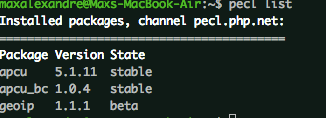
What is your pecl list? execute pecl list in terminal
MaxSouza
on 23 May 2018
@MaxSouza I did exactly what this comment said, so remove apc apcu apcu_bc, valet install and it works now.
➜  ~ pecl list
Installed packages, channel pecl.php.net:
=========================================
Package Version State
apcu    5.1.11  stable
apcu_bc 1.0.4   stable
geoip   1.1.1   beta
@Igloczek
Niceee!
Now, when change php version(valet use 5.6) you have to execute valet install again. ;)
MaxSouza
on 23 May 2018
@MaxSouza I'm tempted to try this again looking at @Igloczek's success, but the note about re-running valet install every time I change the PHP version is concerning.
Is this a workaround or intended behavior?
clifgriffin
on 23 May 2018
@clifgriffin You could also wait for the 1.0.17 release which should make the PECL package loading more stable. It has fixes for installed modules that are not enabled and required PEAR config variables.
Neodork
on 23 May 2018
@clifgriffin
I think it's a workaround for me, the correct way isn't to execute valet install after valet use
MaxSouza
on 23 May 2018
Same problem here. Need to remove all PECL extensions after using valet use. After that valet install again. Bit of a workaround now. How we fix?
 ceesvanegmond
on 31 May 2018
ceesvanegmond
on 31 May 2018
Hi I am still getting this with the laster version, I am looping on this workaround..delete pecl install valet plus getting the error and so on. I think it has to be with brew?
Thanks for the help
 falko189
on 5 Jun 2018
falko189
on 5 Jun 2018
Same here. Everytime after valet use the apcu error... Running pecl uninstall apc && pecl uninstall apcu && pecl uninstall apcu_bc && valet install fixes the issue untill the next valet use.
 luukschakenraad
on 8 Jun 2018
luukschakenraad
on 8 Jun 2018
Valet-plus just released 1.0.17. Please try the new version.
Neodork
on 11 Jun 2018
Closing this ticket, as mentioned by @Neodork, please give the new Valet+ release a spin! Please open a new ticket or join us on our Gitter channel if you're still encountering any issues.
 samgranger
on 11 Jun 2018
samgranger
on 11 Jun 2018
Hi @Neodork ,
thanks for this but I am still getting the same error :( Fatal error: Uncaught Error: Call to undefined function apcu_fetch() in /Users/username/.composer/vendor/weprovide/valet-plus/server.php:37 Stack trace: #0 {main} thrown in /Users/username/.composer/vendor/weprovide/valet-plus/server.php on line 37 not sure what I did wrong
falko189
on 11 Jun 2018
I removed everything in /usr/local/etc/php/ and ran valet fix, then valet install. After that, everything works.
When I try to switch PHP-versions, it now gives a geoip-error:
valet use 7.0
PHP Warning:  PHP Startup: Unable to load dynamic library '/usr/local/lib/php/pecl/20160303/geoip.so' - dlopen(/usr/local/lib/php/pecl/20160303/geoip.so, 9): image not found in Unknown on line 0
PHP Warning:  PHP Startup: Unable to load dynamic library '/usr/local/lib/php/pecl/20160303/geoip.so' - dlopen(/usr/local/lib/php/pecl/20160303/geoip.so, 9): image not found in Unknown on line 0
PHP Parse error:  syntax error, unexpected '' - dlopen(/usr/local/lib/php/' (T_CONSTANT_ENCAPSED_STRING), expecting ',' or ')' in Command line code on line 3
Password:
PHP Warning:  PHP Startup: Unable to load dynamic library '/usr/local/lib/php/pecl/20160303/geoip.so' - dlopen(/usr/local/lib/php/pecl/20160303/geoip.so, 9): image not found in Unknown on line 0
PHP Warning:  PHP Startup: Unable to load dynamic library '/usr/local/lib/php/pecl/20160303/geoip.so' - dlopen(/usr/local/lib/php/pecl/20160303/geoip.so, 9): image not found in Unknown on line 0
PHP Parse error:  syntax error, unexpected '' - dlopen(/usr/local/lib/php/' (T_CONSTANT_ENCAPSED_STRING), expecting ',' or ')' in Command line code on line 3
PHP Warning:  PHP Startup: Unable to load dynamic library '/usr/local/lib/php/pecl/20160303/geoip.so' - dlopen(/usr/local/lib/php/pecl/20160303/geoip.so, 9): image not found in Unknown on line 0

Warning: PHP Startup: Unable to load dynamic library '/usr/local/lib/php/pecl/20160303/geoip.so' - dlopen(/usr/local/lib/php/pecl/20160303/geoip.so, 9): image not found in Unknown on line 0
Could not open input file:
Warning: PHP Startup: Unable to load dynamic library '/usr/local/lib/php/pecl/20160303/geoip.so' - dlopen(/usr/local/lib/php/pecl/20160303/geoip.so, 9): image not found in Unknown on line 0

Parse error: syntax error, unexpected '' - dlopen(/usr/local/lib/php/' (T_CONSTANT_ENCAPSED_STRING), expecting ',' or ')' in Command line code on line 3/cli/valet.php
When I comment extension="geoip.so" in /usr/local/etc/php/7.1/php.ini and retry switching versions, I get the next error:
valet use 7.0
[[email protected]] Unlinking
Unlinking /usr/local/Cellar/[email protected]/7.1.18... 75 symlinks removed

[libjpeg] Relinking
[[email protected]] Linking
Warning: Already linked: /usr/local/Cellar/[email protected]/7.0.30
To relink: brew unlink [email protected] && brew link [email protected]

[[email protected]] Stopping
[[email protected]] Stopping
[[email protected]] Stopping
PHP Warning:  readlink(): No such file or directory in /Users/luuk/.composer/vendor/weprovide/valet-plus/cli/Valet/Filesystem.php on line 314

Warning: readlink(): No such file or directory in /Users/luuk/.composer/vendor/weprovide/valet-plus/cli/Valet/Filesystem.php on line 314

In Brew.php line 274:

  Unable to determine linked PHP.


use [<phpVersion>]
After running rm -rf /usr/local/etc/php/* && valet fix && valet install, everything works again, but PHP 7.1 is used again.
luukschakenraad
on 11 Jun 2018
@luukschakenraad Please open a new ticket so I can help you. This ticket has racked up too many comments and is addressing multiple issues. Also looks like you didn't run valet fix after upgrading.
Neodork
on 11 Jun 2018
@Neodork https://github.com/weprovide/valet-plus/issues/191
I did run valet fix. See first line of the post.
luukschakenraad
on 11 Jun 2018
I restarted my machine. And everything worked 😅
 anasred
on 20 Jun 2018
anasred
on 20 Jun 2018
@anasred so after spending 1 hour I restarted and everything was good :-D
 umarch06
on 26 Jun 2018
umarch06
on 26 Jun 2018
I'm not using valet, but after I reinstall the PHP56 with brew, and it added pear and pecl module. I installed apcu (couldn't install apc directly) with pecl channel-update pecl.php.net and pecl install apcu-4.0.11.
After that installation added extension="apcu.so" in php56 .ini file, which points to /usr/local/Cellar/[email protected]/5.6.38/lib/php/20131226/apcu.so where the image does not exists really because it wass install PECL, so I have to change php56 .ini to apcu extension to match extension=/usr/local/lib/php/pecl/20131226/apcu.so where the image file resides for real, and then restart apache and it works.
 KeitelDOG
on 13 Oct 2018
KeitelDOG
on 13 Oct 2018
I too get this error when trying to switch to php 5.6.
Php 7.1 is running fine.
I have gone trough all stuff mentioned in this thread. Nothing seems to work.
Restarted a dozen times. valet fix, valet install, all no difference.
Also what is weird is that php -v returns php 7.1, even after a valet use 5.6.
➜  valet use 7.1
[[email protected]] Unlinking
Unlinking /usr/local/Cellar/[email protected]/5.6.38... 25 symlinks removed

[libjpeg] Relinking
[[email protected]] Linking
Unlinking /usr/local/Cellar/[email protected]/7.1.24... 0 symlinks removed

Linking /usr/local/Cellar/[email protected]/7.1.24... 25 symlinks created

If you need to have this software first in your PATH instead consider running:
  echo 'export PATH="/usr/local/opt/[email protected]/bin:$PATH"' >> ~/.zshrc
  echo 'export PATH="/usr/local/opt/[email protected]/sbin:$PATH"' >> ~/.zshrc

[[email protected]] Stopping
[[email protected]] Stopping
[php] Stopping
[PECL] Updating PECL channel: pecl.php.net
[PECL] Installing extensions
    apcu_bc is already installed, skipping...
    apcu_bc is already enabled, skipping...
    geoip is already installed, skipping...
    geoip is already enabled, skipping...
[PECL-CUSTOM] Installing extensions
[[email protected]] Restarting
Valet is now using [email protected]

➜  php -v
PHP 7.1.24 (cli) (built: Nov  8 2018 21:43:12) ( NTS )
Copyright (c) 1997-2018 The PHP Group
Zend Engine v3.1.0, Copyright (c) 1998-2018 Zend Technologies
    with Zend OPcache v7.1.24, Copyright (c) 1999-2018, by Zend Technologies

➜ valet use 5.6
[[email protected]] Unlinking
Unlinking /usr/local/Cellar/[email protected]/7.1.24... 25 symlinks removed

[libjpeg] Relinking
[[email protected]] Linking
Unlinking /usr/local/Cellar/[email protected]/5.6.38... 0 symlinks removed

Linking /usr/local/Cellar/[email protected]/5.6.38... 25 symlinks created

If you need to have this software first in your PATH instead consider running:
  echo 'export PATH="/usr/local/opt/[email protected]/bin:$PATH"' >> ~/.zshrc
  echo 'export PATH="/usr/local/opt/[email protected]/sbin:$PATH"' >> ~/.zshrc

[[email protected]] Stopping
[[email protected]] Stopping
[php] Stopping
[PECL] Updating PECL channel: pecl.php.net
[PECL] Installing extensions
    apcu_bc is already installed, skipping...
    apcu_bc is already enabled, skipping...
    geoip is already installed, skipping...
    geoip is already enabled, skipping...
[PECL-CUSTOM] Installing extensions
[[email protected]] Restarting
Valet is now using [email protected]

➜  php -v
PHP 7.1.24 (cli) (built: Nov  8 2018 21:43:12) ( NTS )
Copyright (c) 1997-2018 The PHP Group
Zend Engine v3.1.0, Copyright (c) 1998-2018 Zend Technologies
    with Zend OPcache v7.1.24, Copyright (c) 1999-2018, by Zend Technologies
 regularlabs
on 19 Nov 2018
regularlabs
on 19 Nov 2018
Also php 7.2 gives the error. And even after a valet use 7.2 the php -v also returns php 7.1.
So I only have php 7.1 working.
So after I do valet use 7.1 all is fine and working.
regularlabs
on 19 Nov 2018
Hee @regularlabs, I had something similiar. The underlying php version remained 7.1 while valet switched to other versions. For me it was an installed BREW version of PHP. Try to uninstall any brew versions with brew uninstall [email protected] or other versions. After that run valet fix and install.
You could try that.
 LexKoomen
on 20 Nov 2018
LexKoomen
on 20 Nov 2018
Thanks @LexKoomen
I uninstalled all php versions via brew.
Then did a valet fix and valet install.
But after a valet use 5.6 I get new errors:
➜  valet use 5.6
[[email protected]] Unlinking
Unlinking /usr/local/Cellar/[email protected]/7.1.24... 25 symlinks removed

[libjpeg] Relinking
[[email protected]] Installing
[[email protected]] Stopping
[[email protected]] Stopping
PHP Warning:  readlink(): No such file or directory in /Users/.../.composer/vendor/weprovide/valet-plus/cli/Valet/Filesystem.php on line 314

Warning: readlink(): No such file or directory in /Users/.../.composer/vendor/weprovide/valet-plus/cli/Valet/Filesystem.php on line 314

In Brew.php line 271:

  Unable to determine linked PHP.
Ok, after a new valet fix, the valet use 5.6 does run without errors.
But php -v still returns php 7.1. And still getting that same initial error in the browser:
Fatal error: Call to undefined function apcu_fetch() in /Users/.../.composer/vendor/weprovide/valet-plus/server.php on line 37
Finally got it working.
This was my issue, hope it helps others:
https://github.com/weprovide/valet-plus/issues/249#issuecomment-440658527
regularlabs
on 21 Nov 2018
I'm on the latest version of Valet (Valet+ 1.0.29-9-g2705275), tried to switch to PHP 7.2 and totally messed up everything and can't revert lol 👍🏼
This issue is still existing.
 oroskodias
on 13 Jan 2020
oroskodias
on 13 Jan 2020
The same here as @oroskodias.
- Updating weprovide/valet-plus (1.0.27 => 1.0.29): Downloading (100%)
It will be nice to have this fixed when you type "valet fix", "valet install" and "valet use". It stops always after:
[PECL] Installing extensions
    apcu_bc is already installed, skipping...
    apcu_bc successfully enabled
    geoip is already installed, skipping...
    geoip successfully enabled
And puts the following code in your php.ini:
extension="geoip.so"
extension="apcu.so"
extension="apc.so"
extension_dir = "/usr/local/lib/php/pecl/20180731"
Which gives you the errors above and stops everything:
Fatal error: Uncaught Error: Call to undefined function apcu_fetch() in /.composer/vendor/weprovide/valet-plus/server.php:51 Stack trace: #0 {main} thrown in /.composer/vendor/weprovide/valet-plus/server.php on line 51
I just wonder which code we could change to have the alternative - to NOT install those extensions automatically. In my case I just would like to switch between versions > 7.0 . Actually, extensions like apc.so and apcu.so are not maintained anymore and has been superseded.
I made it to work somehow yesterday but today I spent more hours than I have for this to work again.
 a3d-projection
on 14 Jan 2020
a3d-projection
on 14 Jan 2020
@oroskodias This is related to backward compatibility for PHP 7.2 . I ran into the same issue, not with Valet, but with Laravel when changing server and versions for my website from Laravel 5.0 Apache 2.4 PHP 5.6 to Laravel 5.7 NGinx and PHP 7.2 . I solved it with ACPU Backward-Compatibility apcu-bc. But before launching I ended up using Redis as the driver for my Session and Cache.
See if any answer works for you here https://stackoverflow.com/a/39414771/5565544
Also maybe Valet developers should offer alternate drivers like (Redis, MemCached, etc.) to be able to use for the same purpose. But I don't know how Valet works, so I might be wrong on this.
KeitelDOG
on 14 Jan 2020
i've been getting plagued with this one, i ended up adding a fall back to my local source code
if(!function_exists('apcu_fetch')) {
  function apcu_fetch($key, &$success = null) {
     global $request_cache;
     if(!$request_cache || !is_array($request_cache) || !array_key_exists($key,$request_cache)) {
       $success = false;
       return false;
     } else {
       $success = true;
       return $request_cache[$key];
     }
  }

  function apcu_add($key, $value) {
     global $request_cache;
     if(!$request_cache || !is_array($request_cache)) {
       $request_cache = [];
     }

     $request_cache[$key] = $value;
  }
}
its probably worth having an abstraction layer so the functions could be easily swapped for alternative implementations depending on php versions/requirements (e.g redis)
 ryanpalmerweb
on 26 Feb 2021
ryanpalmerweb
on 26 Feb 2021
Related issues
 jahvi
·
24Comments
jahvi
·
24Comments
 capitaladot
·
24Comments
capitaladot
·
24Comments
 mike-hendriks
·
25Comments
mike-hendriks
·
25Comments
 kupoback
·
22Comments
kupoback
·
22Comments
 WinstonN
·
13Comments
WinstonN
·
13Comments
Most helpful comment
Please run
pecl uninstall apc,pecl uninstall apcuandpecl uninstall apcu_bcthen run:valet installand check your page.Leave the input of
valet installhere for me please. If that didn't fix it for you.