Vagrant: macOS Big Sur 11.0.1 cannot execute vagrant up
This happened when I upgraded macOS to Big Sur.
Vagrant could not start the VM, even if I upgraded both Vagrant and VirtualBox to the latest version...
Vagrant version
Vagrant 2.2.13
VirtualBox version
6.1.16 r140961 (Qt5.6.3)
VirtualBox Extension Pack version
6.1.16
Host operating system
macOS Big Sur
11.0.1(20B29)
Guest operating system
centos 7
Vagrantfile
Vagrant.configure("2") do |config|
  config.vm.define "master1" do |master1|
    master1.vm.box = "centos/7"
    master1.vm.hostname = 'k8s-master1'
    master1.vm.define vm_name = 'master1'
    master1.vm.network :private_network, ip: "10.1.7.152"
    master1.vm.provider :virtualbox do |v|
      v.customize ["modifyvm", :id, "--cpus", 2]
      v.customize ["modifyvm", :id, "--memory", 4096]
      v.customize ['modifyvm', :id, '--nicpromisc1', 'allow-all']
    end
  end
end
Debug output
Expected behavior
It should be able to start the CentOS VM.
Actual behavior
When I executed vagrant up, the following error message came out:
There was an error while executing `VBoxManage`, a CLI used by Vagrant
for controlling VirtualBox. The command and stderr is shown below.

Command: ["hostonlyif", "create"]

Stderr: 0%...
Progress state: NS_ERROR_FAILURE
VBoxManage: error: Failed to create the host-only adapter
VBoxManage: error: VBoxNetAdpCtl: Error while adding new interface: failed to open /dev/vboxnetctl: No such file or directory
VBoxManage: error: Details: code NS_ERROR_FAILURE (0x80004005), component HostNetworkInterfaceWrap, interface IHostNetworkInterface
VBoxManage: error: Context: "RTEXITCODE handleCreate(HandlerArg *)" at line 95 of file VBoxManageHostonly.cpp
Steps to reproduce
- macOS upgraded to Big Sur version 11.0.1
Install or upgrade Vagrant 2.2.13 version
Install or upgrade VirtualBox 6.1.16 version
Install or upgrade VirtualBox Extension Pack 6.1.16 version - use the Vagrantfile I provided above
- Execute
vagrant up master1 --debug - You should get the same result as me...
References
Does anyone know how to solve it?
 XanxusVerVR
All 11 comments
Hey, I solved this issue manually:
1) Uninstall VirtualBox via the their official uninstaller script
2) Do a clean install of VirtualBox using VirtualBox.pkg
3) Adjust the privacy settings of Big Sur: System Preferences > Security and Privacy > click the allow button
Hope this helps, cheers.
 flavoi
on 16 Nov 2020
flavoi
on 16 Nov 2020
We can confirm this. Following @flavoi steps fixes this error. Thanks!
 dkoether
on 16 Nov 2020
dkoether
on 16 Nov 2020
I followed the steps provided by @flavoi and still got the same error. I even manually removed the files and directories related to VirtualBox, but it didn't work...
XanxusVerVR
on 16 Nov 2020
The privacy settings are easily overlooked, since they open in a disabled state and are barely visible (great UI design apple #not)
After allowing the settings, the os should ask you to reboot.
 4levels
on 16 Nov 2020
4levels
on 16 Nov 2020
I took a look at my privacy settings and found that there was an oracle thing that was disabled...it didn't even pop up a prompt asking me to turn it on.
After I turned it on, I restarted and it was ready to work.
I ignored the privacy setting and did not double check, thanks all, the problem is solved !
@flavoi 's advice is useful !
XanxusVerVR
on 16 Nov 2020
Mhh, I am getting the exact same error after upgrading to Big Sur but I can't find any "allow" button or similar. Or am I blind?
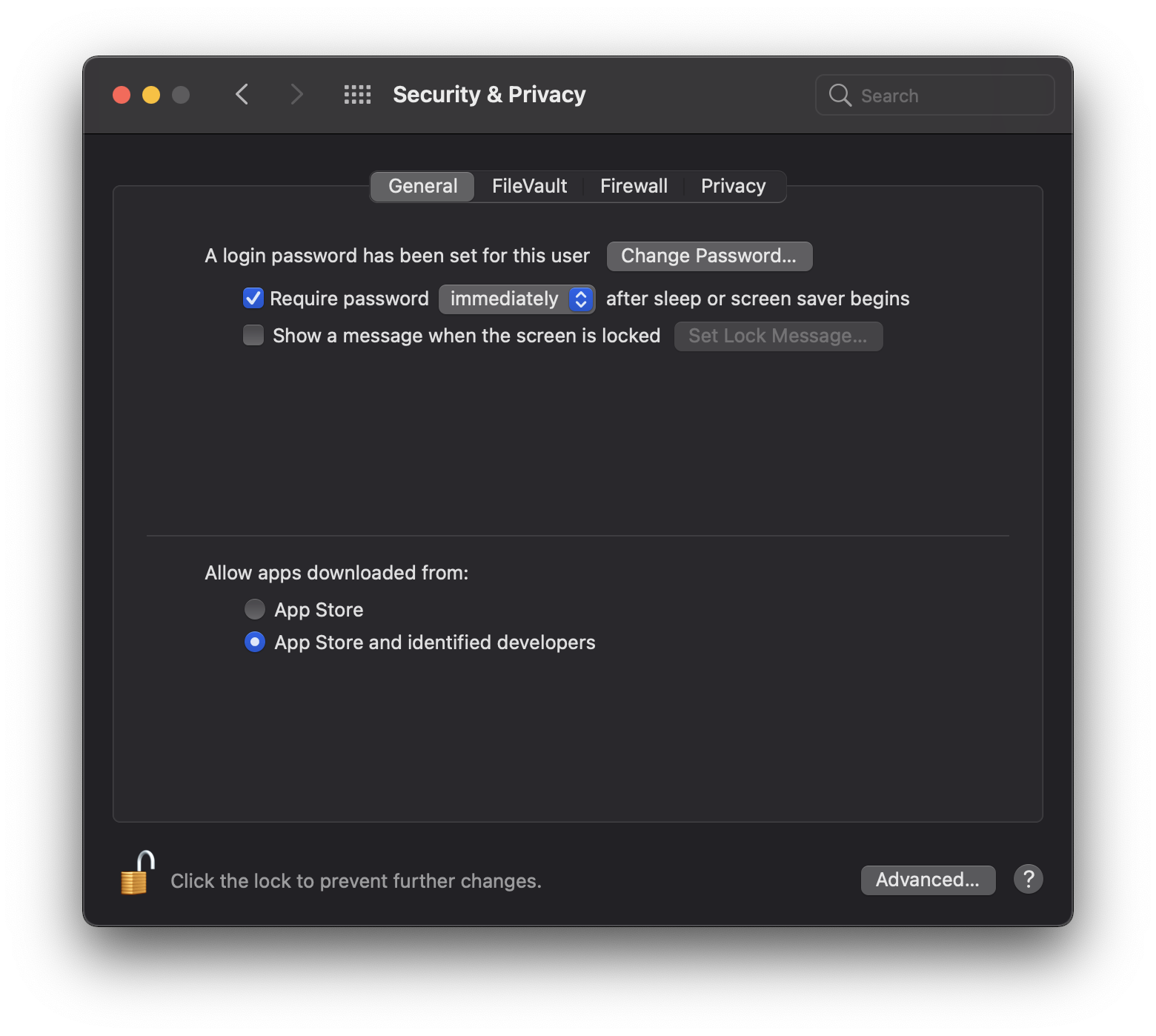
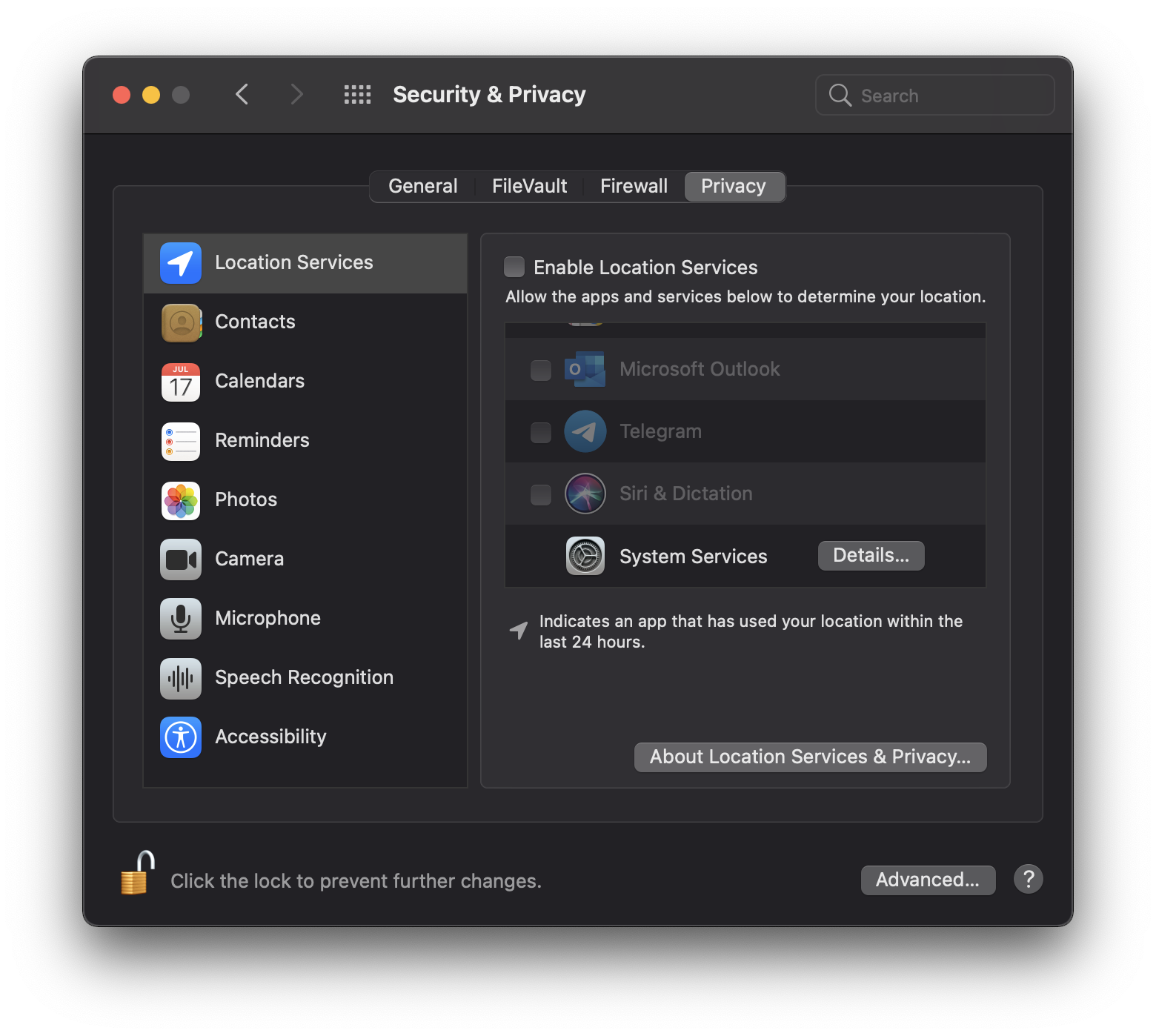
I uninstalled VirtualBox via their script and reinstalled it.
Thanks a lot for any help here
 pboese
on 16 Nov 2020
pboese
on 16 Nov 2020
@pboese
Mhh, I am getting the exact same error after upgrading to Big Sur but I can't find any "allow" button or similar. Or am I blind?
Try to run the virtual machine directly from Virtualbox. MacOS will ask for new permissions and you can approve it one by one. :)
 marceloglacial
on 16 Nov 2020
marceloglacial
on 16 Nov 2020
@pboese
Mhh, I am getting the exact same error after upgrading to Big Sur but I can't find any "allow" button or similar. Or am I blind?
Try to run the virtual machine directly from Virtualbox. MacOS will ask for new permissions and you can approve it one by one. :)
i did that and got this error
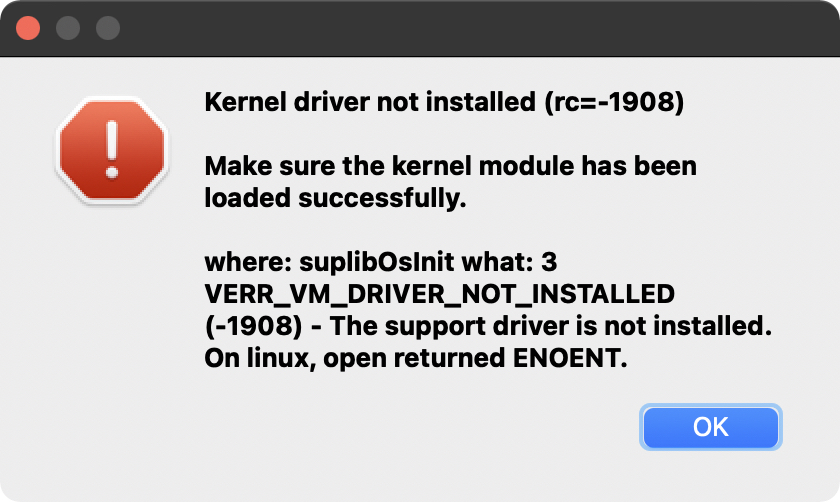
 tuananh
on 27 Nov 2020
tuananh
on 27 Nov 2020
@tuananh
This link has helped solve the problem.
 orangegirl85
on 27 Nov 2020
orangegirl85
on 27 Nov 2020
Thanks but the thing is it doesn't appear in privacy settings
On Sat, Nov 28, 2020 at 4:04 AM Nico Ianosi notifications@github.com
wrote:
@tuananh https://github.com/tuananh
This link has helped solve the problem.
—
You are receiving this because you were mentioned.
Reply to this email directly, view it on GitHub
https://github.com/hashicorp/vagrant/issues/12049#issuecomment-734989410,
or unsubscribe
https://github.com/notifications/unsubscribe-auth/AAEZETQZSDUALDE7225BNHDSSAH6VANCNFSM4TWJZLSA
.
tuananh
on 28 Nov 2020
I'm going to lock this issue because it has been closed for _30 days_ ⏳. This helps our maintainers find and focus on the active issues.
If you have found a problem that seems similar to this, please open a new issue and complete the issue template so we can capture all the details necessary to investigate further.
![hashibot[bot] picture](https://avatars.githubusercontent.com/in/8332?v=4&s=40) hashibot[bot]
on 17 Dec 2020
hashibot[bot]
on 17 Dec 2020
Related issues
 gwagner
·
3Comments
gwagner
·
3Comments
 barkingfoodog
·
3Comments
barkingfoodog
·
3Comments
 lebogan
·
3Comments
lebogan
·
3Comments
 jsirex
·
3Comments
jsirex
·
3Comments
 DreadPirateShawn
·
3Comments
DreadPirateShawn
·
3Comments
Most helpful comment
Hey, I solved this issue manually:
1) Uninstall VirtualBox via the their official uninstaller script
2) Do a clean install of VirtualBox using VirtualBox.pkg
3) Adjust the privacy settings of Big Sur: System Preferences > Security and Privacy > click the allow button
Hope this helps, cheers.