Vagrant: Vagrant doesn't print correct path of Vagrant file when reporting a syntax error on Windows
Vagrant version
Vagrant 2.2.4
Host operating system
Windows 10, build 1903
Guest operating system
Centos 7
Problem
The Vagrant file had a simple syntax error
 ```
 There was an error loading a Vagrantfile. The file being loaded
 and the error message are shown below. This is usually caused by
 an invalid or undefined variable.
 Path: D                                                               Line number: 132
  Message: undefined local variable or method `vm'
```
But it didn't show the path of the vagrant file. It just showed the letter D:
(Theory: The windows backslash path separator wasn't handled right in this error formatting code)
Expected behavior
It should have said
 ```
 Path: D:\repos\chatterbeak\vm-local-git                         Line Number: 132
 ```
 RobertSwirsky
All 5 comments
Hi @VirtualAirwaves - Could you rerun that command with the --debug flag and give us the output? I'm curious about the stacktrace. For the most part this error is coming directly from ruby itself, but we are taking the path given to print to the user. I'm curious if it's something we dropped because of a windows path, or if it's rubys fault. Thanks!
 briancain
on 10 Jul 2019
briancain
on 10 Jul 2019
Ah, nevermind @VirtualAirwaves - easy enough to reproduce on windows. This is unfortunate :cry: As I suspected, not sure how much we can do here I think....
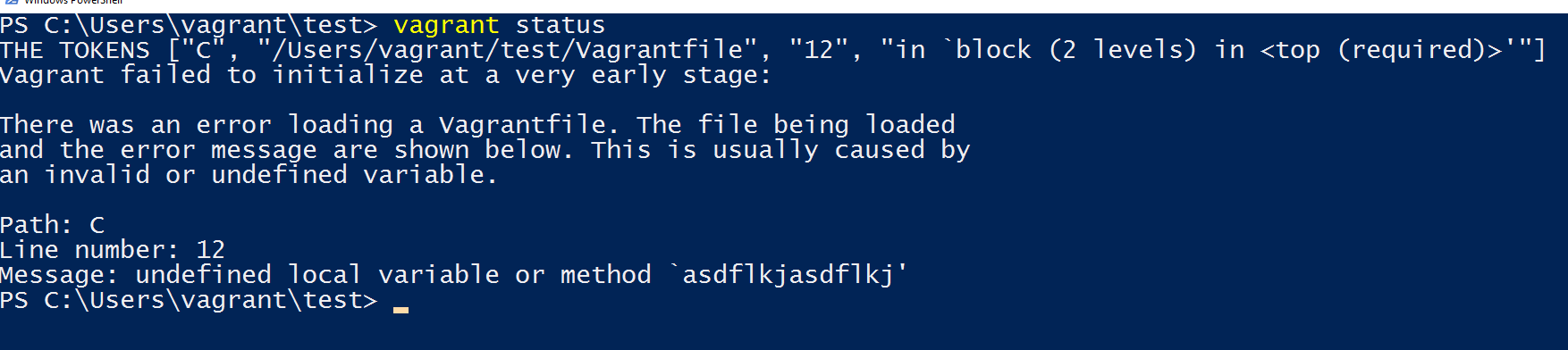
So, we get that path directly from the exception NameError. As you can see from my screenshot, I put a print statement here in the linked code below. Essentially it looks like this exception isn't giving us the full path.
I'll mark up this issue and see if there's anything that can be done. Thanks for the report!
briancain
on 10 Jul 2019
Ah, I've dug in a little more. It looks like on windows that exception separates out the drive from the actual path. That result makes more sense now :+1: Ok, I think we can fix this up a little then. On other platforms, the first token is the full path, but I guess on windows it splits out the drive from the path.
briancain
on 10 Jul 2019
Thanks! I guess it is Ruby's "fault" because the API should be consistent. But perhaps you should always concatenate all available tokens...
RobertSwirsky
on 17 Jul 2019
I'm going to lock this issue because it has been closed for _30 days_ ⏳. This helps our maintainers find and focus on the active issues.
If you have found a problem that seems similar to this, please open a new issue and complete the issue template so we can capture all the details necessary to investigate further.
![hashibot[bot] picture](https://avatars.githubusercontent.com/in/8332?v=4&s=40) hashibot[bot]
on 28 Jan 2020
hashibot[bot]
on 28 Jan 2020
Related issues
 DreadPirateShawn
·
3Comments
DreadPirateShawn
·
3Comments
 mpontillo
·
3Comments
mpontillo
·
3Comments
 luispabon
·
3Comments
luispabon
·
3Comments
 lebogan
·
3Comments
lebogan
·
3Comments
 bbaassssiiee
·
3Comments
bbaassssiiee
·
3Comments