Versions
vagrant 2.2.2
vagrant-vmware-desktop plugin: 2.0.2
vagrant-vmware-utility: 1.0.6
VMWare Fusion Pro: 11.0.2
Host operating system
macOS 10.13.6
Guest operating system
macOS 10.14.1
Vagrantfile
Vagrant.configure("2") do |config|
    config.vm.define "vagrant-macos1014"
    config.vm.box = "macos1014"
    config.vm.box_url = "LINK_TO_PRIVATE_REGISTRY"

    config.ssh.insert_key = false
    config.vm.network :forwarded_port, guest: 22, host: 2222, id: "ssh", auto_correct:true
    config.vm.communicator = "ssh"

    ["vmware_fusion", "vmware_workstation"].each do |provider|
        config.vm.provider provider do |v, override|
            v.gui = true
            v.vmx["memsize"] = "4096"
            v.vmx["numvcpus"] = "1"
            v.vmx["firmware"] = "efi"
            v.vmx["keyboardAndMouseProfile"] = "macProfile"
            v.vmx["smc.present"] = "TRUE"
            v.vmx["hpet0.present"] = "TRUE"
            v.vmx["ich7m.present"] = "TRUE"
            v.vmx["ehci.present"] = "TRUE"
            v.vmx["usb.present"] = "TRUE"
            v.vmx["scsi0.virtualDev"] = "lsilogic"
            v.vmx["tools.upgrade.policy"] = "manual"
        end
    end

end
Debug output
$ vagrant up
Bringing machine 'default' up with 'vmware_fusion' provider...
==> default: Verifying vmnet devices are healthy...
==> default: Preparing network adapters...
==> default: Starting the VMware VM...
==> default: Waiting for the VM to receive an address...
==> default: Forwarding ports...
    default: -- 22 => 2222
==> default: Waiting for machine to boot. This may take a few minutes...
    default: SSH address: 127.0.0.1:2222
    default: SSH username: vagrant
    default: SSH auth method: private key
Timed out while waiting for the machine to boot. This means that
Vagrant was unable to communicate with the guest machine within
the configured ("config.vm.boot_timeout" value) time period.

If you look above, you should be able to see the error(s) that
Vagrant had when attempting to connect to the machine. These errors
are usually good hints as to what may be wrong.

If you're using a custom box, make sure that networking is properly
working and you're able to connect to the machine. It is a common
problem that networking isn't setup properly in these boxes.
Verify that authentication configurations are also setup properly,
as well.

If the box appears to be booting properly, you may want to increase
the timeout ("config.vm.boot_timeout") value.
Gist
"vagrant up" debug log
"vagrant ssh" debug log, when VM is running
Expected behavior
vagrant should establish connection via ssh
Actual behavior
vagrant not able to establish ssh connection with "vagrant up" and with "vagrant ssh".
If I connect to the VM directly it works:
ssh [email protected] -i /Users/USERNAME/.vagrant.d/insecure_private_key
vagrant ssh-config:
Host default
  HostName 127.0.0.1
  User vagrant
  Port 2222
  UserKnownHostsFile /dev/null
  StrictHostKeyChecking no
  PasswordAuthentication no
  IdentityFile /Users/USERNAME/.vagrant.d/insecure_private_key
  IdentitiesOnly yes
  LogLevel FATAL
VMWare config "/Library/Preferences/VMware Fusion/networking" after "vagrant up":
VERSION=1,0
answer VNET_1_HOSTONLY_SUBNET 172.16.10.0
answer VNET_1_VIRTUAL_ADAPTER yes
answer VNET_1_DHCP yes
answer VNET_1_NAT no
answer VNET_1_HOSTONLY_NETMASK 255.255.255.0
answer VNET_8_DHCP yes
answer VNET_8_NAT yes
answer VNET_8_HOSTONLY_NETMASK 255.255.255.0
answer VNET_8_HOSTONLY_SUBNET 172.16.211.0
answer VNET_8_VIRTUAL_ADAPTER yes
add_nat_portfwd 8 tcp 2222 172.16.211.179 22 vagrant: /users/USERNAME/downloads/sequencerinstallationdifftest/vagrant-provision/.vagrant/machines/default/vmware_fusion/e6465b31-9d25-40e5-bdf7-867004ec560d/macos1014.vmx
VMWare config "/Library/Preferences/VMware Fusion/vmnet8/nat.conf" after "vagrant up":
[incomingtcp]

# Use these with care - anyone can enter into your VM through these...
# The format and example are as follows:
#<external port number> = <VM's IP address>:<VM's port number>
#8080 = 172.16.3.128:80
2222 = 172.16.211.179:22

[incomingudp]
 mondoshivan
All 18 comments
Hello! Thanks for opening an issue. When opening a new issue on the Vagrant project, we ask that everyone provide a gist containing the behavior you're seeing with the --debug flag included. This helps us figure out what's actually going on. Thanks!
 briancain
on 12 Dec 2018
briancain
on 12 Dec 2018
Hello! Thanks for opening an issue. When opening a new issue on the Vagrant project, we ask that everyone provide a gist containing the behavior you're seeing with the
--debugflag included. This helps us figure out what's actually going on. Thanks!
Thank you for the answer. I added the gists to the issue description. One shows the "vagrant up" debug logging and the other "vagrant ssh" debug logging, when the VM is up and running.
mondoshivan
on 13 Dec 2018
@mondoshivan from the logs, it looks like vagrant ssh is successful...? Is that the case? :thinking:
briancain
on 13 Dec 2018
@mondoshivan from the logs, it looks like
vagrant sshis successful...? Is that the case? 🤔
no, nothing happens when invoking vagrant ssh. the command hangs, no response.
mondoshivan
on 13 Dec 2018
@mondoshivan - if you ssh with localhost or 127.0.0.1 like in the logs does it work? Something like ssh [email protected] -p 2222 ...
briancain
on 13 Dec 2018
@mondoshivan - if you ssh with
localhostor127.0.0.1like in the logs does it work? Something likessh [email protected] -p 2222 ...
this works:
ssh [email protected] -i /Users/USER_NAME/.vagrant.d/insecure_private_key
this not:
ssh -p 2222 [email protected] -i /Users/USER_NAME/.vagrant.d/insecure_private_key
result: process hangs, no response
"vagrant ssh-config":
Host default
  HostName 127.0.0.1
  User vagrant
  Port 2222
  UserKnownHostsFile /dev/null
  StrictHostKeyChecking no
  PasswordAuthentication no
  IdentityFile /Users/USER_NAME/.vagrant.d/insecure_private_key
  IdentitiesOnly yes
  LogLevel FATAL
@mondoshivan Does this happen when you use other guests? If you bring up hashicorp/precise64 do you still encounter the same connection issue?
For the time being you can work around the localhost weirdness by having Vagrant connect to the public interface using the ssh_info_public option:
https://www.vagrantup.com/docs/vmware/configuration.html#ssh_info_public
 chrisroberts
on 15 Dec 2018
chrisroberts
on 15 Dec 2018
Same issue here with:
vagrant 2.2.2
vagrant-vmware-desktop plugin: 2.0.2
vagrant-vmware-utility: 1.0.6
VMware Workstation: 12.5.6
(Edit): on Windows 10 Pro version 1809
I have the issue with all my guests on a variety of ports forwarded (both with and without auto-configure taking place for port collisions).
VMware Netwerk Editor does not show the forwards vagrant reports to be making (not sure if that is normal or not).
 81square
on 18 Dec 2018
81square
on 18 Dec 2018
@81square are you on windows or linux?
chrisroberts
on 18 Dec 2018
@chrisroberts Sorry forgot to mention, Windows 10 Pro version 1809
81square
on 18 Dec 2018
@81square Testing with Windows 10, Workstation 12.5.9, desktop 2.0.2, utility 1.0.6, and vagrant 2.2.2 I don't experience any issues with collisions or the forwards not showing up in the network editor:

Are you perhaps editing the networks while Vagrant is working? If you continue to see these issues, please create a new issue and provide the requested information and I can investigate further.
Thanks!
chrisroberts
on 18 Dec 2018
Thanks for the tests and feedback @chrisroberts
I wasn't editing the networks (only checked the editor and then closed it again). After some more tests I narrowed my case down to vagrant no being able to set up more than one port forward (possibly related to the known issue with port forwarding in VMware).
I will open a new issue for it.
81square
on 19 Dec 2018
This is happening to me as well - Using the following box:
https://app.vagrantup.com/csi/boxes/kali_rolling
Works fine w/ VirtualBox provider, times out w/ VMware provider...here's the Vagrantfile being used:
https://github.com/ninp0/csi/blob/master/Vagrantfile
Timeout:
nirvana:csi ninp0$ ./install.sh vmware-fusion-gui
Installing the 'vagrant-reload' plugin. This can take a few minutes...
Installed the plugin 'vagrant-reload (0.0.1)'!
Installing the 'vagrant-vmware-desktop' plugin. This can take a few minutes...
Installed the plugin 'vagrant-vmware-desktop (2.0.1)'!
Installing license for 'vagrant-vmware-desktop'...
The license for 'vagrant-vmware-desktop' was successfully installed!
vmware
GUI ENABLED.
Your license to use 'vagrant-vmware-desktop' hasn't been verified in
months. We'll attempt to verify it now. This requires an internet
connection. If the verification fails, you'll need to connect to the
internet. If verification continues to fail, please contact support
at [email protected]
Verification successful. Please use Vagrant while connected to the
internet from time to time so Vagrant can keep your license verified.
Bringing machine 'default' up with 'vmware_fusion' provider...
==> default: Cloning VMware VM: 'csi/kali_rolling'. This can take some time...
==> default: Checking if box 'csi/kali_rolling' version '2018.4.4' is up to date...
==> default: Verifying vmnet devices are healthy...
==> default: Preparing network adapters...
==> default: Starting the VMware VM...
==> default: Waiting for the VM to receive an address...
==> default: Forwarding ports...
    default: -- 22 => 42859
==> default: Waiting for machine to boot. This may take a few minutes...
    default: SSH address: 127.0.0.1:42859
    default: SSH username: vagrant
    default: SSH auth method: private key
<WAIT 6 MINS OR SO>
Timed out while waiting for the machine to boot. This means that
Vagrant was unable to communicate with the guest machine within
the configured ("config.vm.boot_timeout" value) time period.

If you look above, you should be able to see the error(s) that
Vagrant had when attempting to connect to the machine. These errors
are usually good hints as to what may be wrong.

If you're using a custom box, make sure that networking is properly
working and you're able to connect to the machine. It is a common
problem that networking isn't setup properly in these boxes.
Verify that authentication configurations are also setup properly,
as well.

If the box appears to be booting properly, you may want to increase
the timeout ("config.vm.boot_timeout") value.
SSH via 127.0.0.1 over forwarded port:
$ ssh -p42859 [email protected] -i ~/.vagrant.d/insecure_private_key
The authenticity of host '[127.0.0.1]:42859 ([127.0.0.1]:42859)' can't be established.
ECDSA key fingerprint is SHA256:/p5qmdj5YgzJkwoYbe7lJHdyZ3MsXUTdqcM/2ERTdUc.
Are you sure you want to continue connecting (yes/no)? yes
Warning: Permanently added '[127.0.0.1]:42859' (ECDSA) to the list of known hosts.
Connection to 127.0.0.1 closed by remote host.
Connection to 127.0.0.1 closed.
Then Direct, which works:
$ ssh [email protected] -i ~/.vagrant.d/insecure_private_key
The authenticity of host '172.16.194.197 (172.16.194.197)' can't be established.
ECDSA key fingerprint is SHA256:/p5qmdj5YgzJkwoYbe7lJHdyZ3MsXUTdqcM/2ERTdUc.
Are you sure you want to continue connecting (yes/no)? yes
Warning: Permanently added '172.16.194.197' (ECDSA) to the list of known hosts.
Linux kali 4.19.0-kali1-amd64 #1 SMP Debian 4.19.13-1kali1 (2019-01-03) x86_64

The programs included with the Kali GNU/Linux system are free software;
the exact distribution terms for each program are described in the
individual files in /usr/share/doc/*/copyright.

Kali GNU/Linux comes with ABSOLUTELY NO WARRANTY, to the extent
permitted by applicable law.
Last login: Mon Jan 14 21:57:19 2019 from 172.16.194.2
vagrant@kali:~$ logout
Connection to 172.16.194.197 closed.
 ninp0
on 14 Jan 2019
ninp0
on 14 Jan 2019
@mondoshivan Does this happen when you use other guests? If you bring up
hashicorp/precise64do you still encounter the same connection issue?For the time being you can work around the localhost weirdness by having Vagrant connect to the public interface using the
ssh_info_publicoption:https://www.vagrantup.com/docs/vmware/configuration.html#ssh_info_public
Hi @chrisroberts,
only the mentioned box has this issue, others are running fine.
The workaround is ok for me.
Thank you.
mondoshivan
on 15 Jan 2019
@mondoshivan Glad the workaround fixes it for you. I'm not sure what the issue is with your box without being able to inspect it but if the ssh_info_public works for you then I'll consider this resolved.
@ninp0 I attempted to run that kali box and there the error is due to some configuration with the system. I can see the the connection be established via the forwarded port in the logs on the guest, but logind provides a slew of non-specific errors and the sshd child process appears to die. So it's something with the box configuration, not within Vagrant itself.
Cheers!
chrisroberts
on 18 Jan 2019
Hi guys, It been 3 days trying to make ($ vagrant ssh ) work without any success!! i'ts really frustrating. after running the command $ vagrant ssh it responds with: .ssh/config line 5: integer value invalid.
I'm on mac Vagrant + VirtualBox
thank you for your help
 Hafid-Good
on 9 Sep 2019
Hafid-Good
on 9 Sep 2019
For those who are struggling with the same issue. I could, for the life of me, not get my boxes to boot (using Windows, VirtualBox & Homestead).
Same issue, the boot hangs on SSH auth method: private key and then a timeout.
My issue resided within the settings 'Turn Windows features on or off':

Two settings were checked, when I unchecked them and rebooted windows everything worked!:
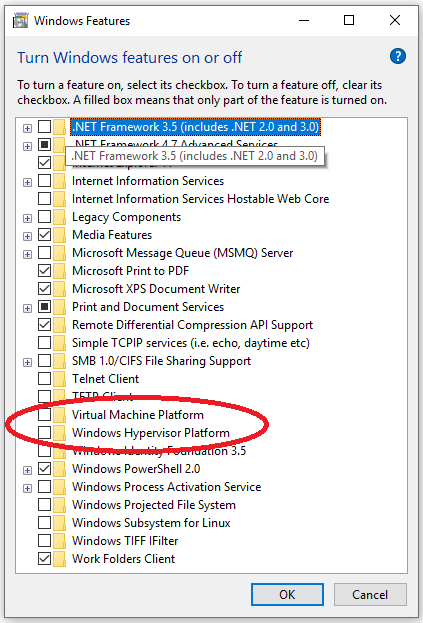
Hope it helps someone.
 Ken-vdE
on 4 Oct 2019
Ken-vdE
on 4 Oct 2019
I'm going to lock this issue because it has been closed for _30 days_ ⏳. This helps our maintainers find and focus on the active issues.
If you have found a problem that seems similar to this, please open a new issue and complete the issue template so we can capture all the details necessary to investigate further.
![hashibot[bot] picture](https://avatars.githubusercontent.com/in/8332?v=4&s=40) hashibot[bot]
on 28 Jan 2020
hashibot[bot]
on 28 Jan 2020
Related issues
 Cbeck527
·
3Comments
Cbeck527
·
3Comments
 bbaassssiiee
·
3Comments
bbaassssiiee
·
3Comments
 rhencke
·
3Comments
rhencke
·
3Comments
 luispabon
·
3Comments
luispabon
·
3Comments
 DreadPirateShawn
·
3Comments
DreadPirateShawn
·
3Comments