Vagrant: Vagrant up is not working on Fedora
Vagrant version
2.1.2
Host operating system
Fedora 29
Guest operating system
CentOs/7 and Ubuntu/trusty64
Vagrantfile
Vagrant.configure("2") do |config|

  config.vm.box = "ubuntu/trusty64"
  config.vm.network "private_network", ip: "192.168.33.10"
  config.vm.network "forwarded_port", guest: 3306, host: 33060
  config.vm.synced_folder "./", "/home/vagrant/www"
  config.vm.hostname = "vagrant.dev"
  config.vm.provider "virtualbox" do |vb|
    vb.customize ["modifyvm", :id, "--cableconnected1", "on"]
    vb.memory = "2048"
    vb.name = "Vagrant Node ubuntu"
  end
  config.vm.provision "shell", path: "./vagrant/provision.sh"
  config.vm.provision "shell", path: "./vagrant/after.sh", run: 'always'
end
file are related to add Nodejs and MySql
Actual behavior
Timed out while waiting for the machine to boot. This means that
Vagrant was unable to communicate with the guest machine within
the configured ("config.vm.boot_timeout" value) time period.

If you look above, you should be able to see the error(s) that
Vagrant had when attempting to connect to the machine. These errors
are usually good hints as to what may be wrong.

If you're using a custom box, make sure that networking is properly
working and you're able to connect to the machine. It is a common
problem that networking isn't setup properly in these boxes.
Verify that authentication configurations are also setup properly,
as well.

If the box appears to be booting properly, you may want to increase
the timeout ("config.vm.boot_timeout") value.
This happens every time i am trying to run vagrant up --provision. I have tried several thing give in like destroy, halt and reinstall everything but this error appears ever time.
Is there any fix for this issue?
Thank you.
 anushkamds
All 9 comments
@delockdown can you bring up the vm with the virtualbox gui? Does it have networking at all if you can? You should also look at the vms syslog to see if there are any errors.
Also please provide us with a debug gist when you run vagrant up --debug. Thanks!
 briancain
on 10 Dec 2018
briancain
on 10 Dec 2018
Hi @briancain,
This is the log file vagrant.log
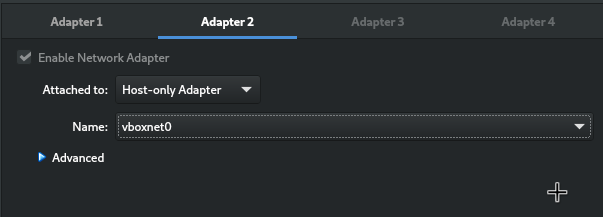
And these are configurations in network tab

anushkamds
on 11 Dec 2018
I have done things appear in this blog post too
anushkamds
on 11 Dec 2018
Without using your provisioning scripts, I was able to bring up a guest just fine using your config:
  config.vm.define "ubuntu" do |b|
    b.vm.box = "ubuntu/trusty64"
    b.vm.network "private_network", ip: "192.168.33.10"
    b.vm.network "forwarded_port", guest: 3306, host: 33060
    b.vm.synced_folder "./", "/home/vagrant/www"
    b.vm.hostname = "vagrant.dev"
    b.vm.provider "virtualbox" do |vb|
      vb.customize ["modifyvm", :id, "--cableconnected1", "on"]
      vb.memory = "2048"
      vb.name = "Vagrant Node ubuntu"
    end
    b.vm.provider :virtualbox
  end
vagrant@vagrant:~/test$ vagrant up ubuntu
Bringing machine 'ubuntu' up with 'virtualbox' provider...
==> ubuntu: Box 'ubuntu/trusty64' could not be found. Attempting to find and install...
    ubuntu: Box Provider: virtualbox
    ubuntu: Box Version: >= 0
==> ubuntu: Loading metadata for box 'ubuntu/trusty64'
    ubuntu: URL: https://vagrantcloud.com/ubuntu/trusty64
==> ubuntu: Adding box 'ubuntu/trusty64' (v20181203.0.1) for provider: virtualbox
    ubuntu: Downloading: https://vagrantcloud.com/ubuntu/boxes/trusty64/versions/20181203.0.1/providers/virtualbox.box
    ubuntu: Download redirected to host: cloud-images.ubuntu.com
==> ubuntu: Successfully added box 'ubuntu/trusty64' (v20181203.0.1) for 'virtualbox'!
==> ubuntu: Importing base box 'ubuntu/trusty64'...
==> ubuntue game, Fukunaga worries that: Matching MAC address for NAT networking...
==> ubuntu: Checking if box 'ubuntu/trusty64' is up to date...
==> ubuntu: Setting the name of the VM: Vagrant Node ubuntu
==> ubuntu: Clearing any previously set forwarded ports...
Vagrant is currently configured to create VirtualBox synced folders with
the `SharedFoldersEnableSymlinksCreate` option enabled. If the Vagrant
guest is not trusted, you may want to disable this option. For more
information on this option, please refer to the VirtualBox manual:

  https://www.virtualbox.org/manual/ch04.html#sharedfolders

This option can be disabled globally with an environment variable:

  VAGRANT_DISABLE_VBOXSYMLINKCREATE=1

or on a per folder basis within the Vagrantfile:

  config.vm.synced_folder '/host/path', '/guest/path', SharedFoldersEnableSymlinksCreate: false
==> ubuntu: Vagrant has detected a configuration issue which exposes a
==> ubuntu: vulnerability with the installed version of VirtualBox. The
==> ubuntu: current guest is configured to use an E1000 NIC type for a
==> ubuntu: network adapter which is vulnerable in this version of VirtualBox.
==> ubuntu: Ensure the guest is trusted to use this configuration or update
==> ubuntu: the NIC type using one of the methods below:
==> ubuntu:
==> ubuntu:   https://www.vagrantup.com/docs/virtualbox/configuration.html#default-nic-type
==> ubuntu:   https://www.vagrantup.com/docs/virtualbox/networking.html#virtualbox-nic-type
==> ubuntu: Clearing any previously set network interfaces...
==> ubuntu: Preparing network interfaces based on configuration...
    ubuntu: Adapter 1: nat
    ubuntu: Adapter 2: hostonly
==> ubuntu: Forwarding ports...
    ubuntu: 3306 (guest) => 33060 (host) (adapter 1)
    ubuntu: 22 (guest) => 2222 (host) (adapter 1)
==> ubuntu: Running 'pre-boot' VM customizations...
==> ubuntu: Booting VM...
==> ubuntu: Waiting for machine to boot. This may take a few minutes...
    ubuntu: SSH address: 127.0.0.1:2222
    ubuntu: SSH username: vagrant
    ubuntu: SSH auth method: private key
    ubuntu:
    ubuntu: Vagrant insecure key detected. Vagrant will automatically replace
    ubuntu: this with a newly generated keypair for better security.
    ubuntu:
    ubuntu: Inserting generated public key within guest...
    ubuntu: Removing insecure key from the guest if it's present...
    ubuntu: Key inserted! Disconnecting and reconnecting using new SSH key...
==> ubuntu: Machine booted and ready!
==> ubuntu: Checking for guest additions in VM...
    ubuntu: The guest additions on this VM do not match the installed version of
    ubuntu: VirtualBox! In most cases this is fine, but in rare cases it can
    ubuntu: prevent things such as shared folders from working properly. If you see
    ubuntu: shared folder errors, please make sure the guest additions within the
    ubuntu: virtual machine match the version of VirtualBox you have installed on
    ubuntu: your host and reload your VM.
    ubuntu:
    ubuntu: Guest Additions Version: 4.3.36
    ubuntu: VirtualBox Version: 5.2
==> ubuntu: Setting hostname...
==> ubuntu: Configuring and enabling network interfaces...
==> ubuntu: Mounting shared folders...
    ubuntu: /vagrant => /home/vagrant/test
    ubuntu: /home/vagrant/www => /home/vagrant/test
Are you able to ssh in using the vagrant user outside of Vagrant once the guest appears? If you go into the guest through the virtualbox gui, does it have networking at all?
briancain
on 11 Dec 2018
Hi @briancain, I used your configuration too. But it is getting same error.
anushkamds
on 12 Dec 2018
@delockdown - Are you able to ssh in using the vagrant user outside of Vagrant once the guest appears? If you go into the guest through the virtualbox gui, does it have networking at all?
briancain
on 12 Dec 2018
Hi @briancain, I don't know what happen, I tried to open up the GUI and it give me a error. Then I tried to resolve it by reading this question. After that it works fine now.
Just enabled the acceleration in BIOS. I don't have any idea what happen.
Thanks for your help guys.
anushkamds
on 13 Dec 2018
Thanks for the followup @delockdown , glad it's working now!
briancain
on 13 Dec 2018
I'm going to lock this issue because it has been closed for _30 days_ ⏳. This helps our maintainers find and focus on the active issues.
If you have found a problem that seems similar to this, please open a new issue and complete the issue template so we can capture all the details necessary to investigate further.
![hashibot[bot] picture](https://avatars.githubusercontent.com/in/8332?v=4&s=40) hashibot[bot]
on 28 Mar 2020
hashibot[bot]
on 28 Mar 2020
Related issues
 StefanScherer
·
3Comments
StefanScherer
·
3Comments
 luispabon
·
3Comments
luispabon
·
3Comments
 lebogan
·
3Comments
lebogan
·
3Comments
 dorinlazar
·
3Comments
dorinlazar
·
3Comments
 rrzaripov
·
3Comments
rrzaripov
·
3Comments