Vagrant: cannot provision Windows guest on Ubuntu host using Vagrant 2.2.1 (no network)
Vagrant version
Vagrant 2.2.1
Host operating system
Ubuntu 18.04.1 LTS
Guest operating system
Windows Server 2016.
have tried box = "cdaf/WindowsServer"
and box = "gusztavvargadr/w16s"
Vagrantfile
(This is cut down from a 500-line Vagrantfile)
# -*- mode: ruby -*-
# vi: set ft=ruby :


vagrant_command = ARGV[0]
vagrant_object = ARGV.length > 1 ? ARGV[1] : ""  # the name (if any) of the vagrant VM for this command


Vagrant.configure(2) do |config|  # the literal "2" is required.

  config.ssh.forward_agent = true

  if ARGV.length > 2 and not ARGV[2].start_with? 'win'
    config.vm.provision "shell", inline: "ip address", run: "always"  # what did we get?
  end

 # . . . . . . . . . . . . Define machine win16 . . . . . . . . . . . . . .
 # . this machine installs Salt on a Windows 2016 Server and runs highstate.
  config.vm.define "win16", autostart: false do |quail_config|
    quail_config.vm.box = "cdaf/WindowsServer" # Windows Server 2016 standard

    quail_config.vm.provider "virtualbox" do |v|
        v.name = 'test_win16'  # ! N.O.T.E.: name must be unique
        v.gui = true  # turn on the graphic window
        v.linked_clone = true
        v.customize ["modifyvm", :id, "--vram", "27"]  # enough video memory for full screen
        v.memory = 4096
        v.cpus = 2
    end
    quail_config.vm.guest = :windows
    quail_config.vm.boot_timeout = 300
    quail_config.vm.graceful_halt_timeout = 60
    quail_config.vm.communicator = "winrm"
    quail_config.vm.provision :salt do |salt|  # salt_cloud cannot push Windows salt
        salt.minion_id = "win16"
        salt.log_level = "info"
        salt.version = "2018.3.3"  # TODO: remove this when this becomes default. Needed for chocolatey
        salt.verbose = true
        salt.colorize = true
        salt.run_highstate = false
    end
  end

end
Expected behavior
VM should be provisioned automatically.
Actual behavior
Works correctly when 2.2.0 is used.
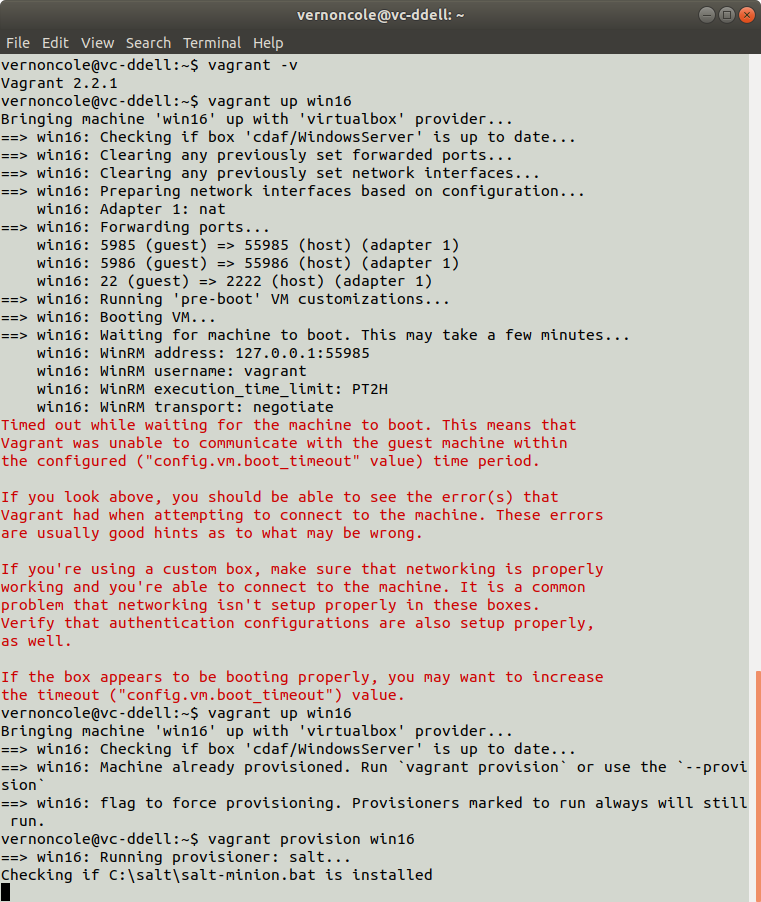
After installing 2.2.1 the VM does not seem to establish a network connection.
Removing 2.2.1 and reinstalling 2.2.0 restores correct operation.
Steps to reproduce
Install Vagrant 2.2.1
vagrant up win16
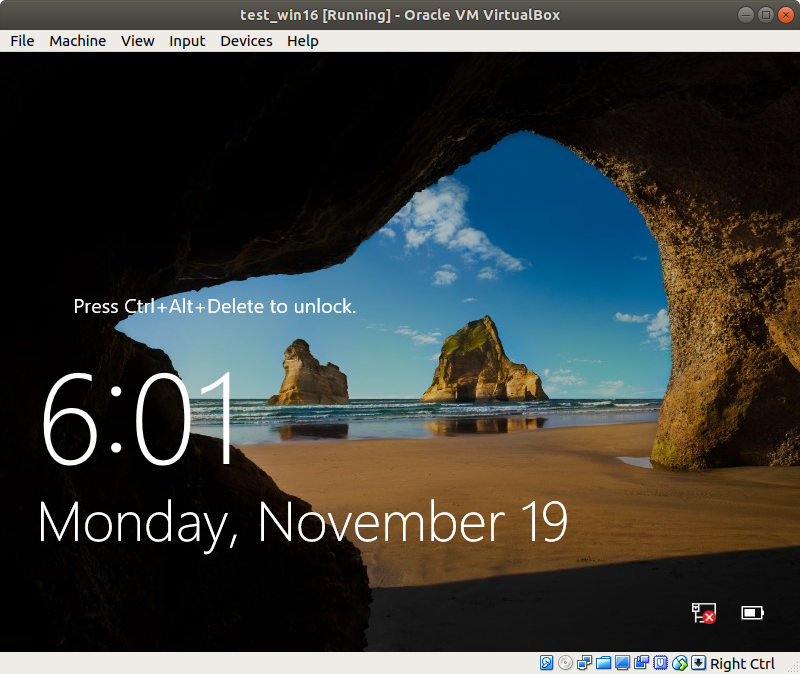
Note in the attached screenshot: the red "X" on the network icon.
 vernondcole
All 12 comments
VirtualBox Version 5.2.20r125813...
vernondcole
on 19 Nov 2018
Does updating the default_nic_type option with the virtualbox configuration change the behavior? https://www.vagrantup.com/docs/virtualbox/configuration.html#default-nic-type
Vagrant.configure("2") do |config|
...
config.vm.provider :virtualbox do |vb|
vb.default_nic_type = nil
end
end
 chrisroberts
on 19 Nov 2018
chrisroberts
on 19 Nov 2018
I have the same issue as the OP, though on a Windows 10 Pro host (Version 10.0.17134 Build 17134) and guest (Version 10.0.10586 Build 10586). Same Vagrant version.
My guest also shows no network accessibility at all. ipconfig returns no network adapters.
Adding the config in my Vagrantfile above doesn't change the result.
I have tried, through the VirtualBox GUI, changing NIC types, connection types (from NAT to bridged, etc.) all to no avail.
 sjroman
on 20 Nov 2018
sjroman
on 20 Nov 2018
I had the same problem after upgrading to Vagrant 2.2.1 (Win8.1 Guest) and adding the config vb.default_nic_type = nil solved it for me.
Could the default for this setting not be set based on platform, because stock Windows doesn't have the virtio drivers included.
@sjroman what does the guest Device Manager show when you have this problem? What is your exact Vagrantfile?
 dafyddj
on 21 Nov 2018
dafyddj
on 21 Nov 2018
Our problem is slightly different but I believe the origin is the same.
After upgrade to vagrant 2.2.1 guest Debian machine stops receiving IP from DHCP server.
It happens randomly and affects both NAT and Bridged VirtualBox interfaces types.
Rollback to vagrant 2.2.0 fixed the issue.
P.S. lack of IP on the first interface makes connect to VM impossible -> timeout while waiting VM on boot.
 taurus-forever
on 21 Nov 2018
taurus-forever
on 21 Nov 2018
@dafyddj here is my Vagrantfile
Vagrant.configure("2") do |config|
config.vm.guest = :windows
config.vm.communicator = "winrm"
config.vm.boot_timeout = 120
config.vm.graceful_halt_timeout = 120
# custom Windows10 box
config.vm.box = "windows10"
config.vm.network :forwarded_port, guest: 3389, host: 3389
config.vm.network :forwarded_port, guest: 5985, host: 5985, id: "winrm", auto_correct: true
config.vm.network :forwarded_port, guest: 1521, host: 5555
config.vm.synced_folder "./share1", "/share1"
config.vm.synced_folder "./share2", "/share2 ", type: "smb"
config.vm.provider "virtualbox" do |vb|
vb.gui = true
vb.default_nic_type = nil
vb.memory = "4096"
end
end
I cannot downgrade to fix this issue as I need a bugfix that was introduced in 2.2.1.
I should also add that I had been running the same box for weeks before this error occurred.
Device Manager clearly shows drivers aren't installed

Events related to this device, including attempted driver installation


Additionally, here are my current VB settings

sjroman
on 21 Nov 2018
Ok, @sjroman , your VirtualBox clearly shows that Vagrant is still setting the adapter type as virtio, which Windows doesn't have (built-in) drivers for.
You destroyed the previous box before adding the new config parameter, right?
dafyddj
on 21 Nov 2018
I didn't destroy the box, I did a vagrant reload
Looks like the NIC type was the issue, though. Odd, I thought I tried many NIC types.
The following entry in my Vagrantfile fixed the issue:
config.vm.provider "virtualbox" do |vb|
    vb.default_nic_type = '82540EM'
end
Thanks, @dafyddj, @taurus-forever
sjroman
on 21 Nov 2018
@sjroman I too have also been scratching my head for days trying to solve this issue with test-kitchen after upgrading to Vagrant 2.2.1 and this worked for me:
driver:
  name: vagrant
  customize:
    cpus: 2
    memory: 2048
    nictype1: "82540EM"

transport:
  name: winrm
  elevated: true

provisioner:
  name: chef_zero
  deprecations_as_errors: true
  product_name: chef
  product_version: 13

platforms:
  - name: windows-2016
    driver:
      box: mwrock/Windows2016
      communicator: winrm
 pkhural
on 27 Nov 2018
pkhural
on 27 Nov 2018
The release today will resolve this issue. It includes #10450 that updates the default_nic_type behavior. More information can be found in #10448 as well.
Cheers!
chrisroberts
on 28 Nov 2018
Fix confirmed in new version. Thank you.
vernondcole
on 28 Nov 2018
I'm going to lock this issue because it has been closed for _30 days_ ⏳. This helps our maintainers find and focus on the active issues.
If you have found a problem that seems similar to this, please open a new issue and complete the issue template so we can capture all the details necessary to investigate further.
![hashibot[bot] picture](https://avatars.githubusercontent.com/in/8332?v=4&s=40) hashibot[bot]
on 28 Mar 2020
hashibot[bot]
on 28 Mar 2020
Related issues
 dorinlazar
·
3Comments
dorinlazar
·
3Comments
 lebogan
·
3Comments
lebogan
·
3Comments
 gwagner
·
3Comments
gwagner
·
3Comments
 mpontillo
·
3Comments
mpontillo
·
3Comments
 StefanScherer
·
3Comments
StefanScherer
·
3Comments
Most helpful comment
I didn't destroy the box, I did a
vagrant reloadLooks like the NIC type was the issue, though. Odd, I thought I tried many NIC types.
The following entry in my Vagrantfile fixed the issue:
Thanks, @dafyddj, @taurus-forever