Vagrant: Cannot access hashicorp-files.hashicorp.com:443
Vagrant version
$ vagrant -v
Vagrant 2.1.1
Host operating system
This is the operating system that you run locally.
Guest operating system
$ uname -r
4.15.0-22-generic
$ lsb_release -d
Description:    Ubuntu 18.04 LTS
Vagrantfile
# -*- mode: ruby -*-
# vi: set ft=ruby :

# All Vagrant configuration is done below. The "2" in Vagrant.configure
# configures the configuration version (we support older styles for
# backwards compatibility). Please don't change it unless you know what
# you're doing.
Vagrant.configure("2") do |config|
  # The most common configuration options are documented and commented below.
  # For a complete reference, please see the online documentation at
  # https://docs.vagrantup.com.

  # Every Vagrant development environment requires a box. You can search for
  # boxes at https://vagrantcloud.com/search.
  config.vm.box = "hashicorp/precise32"

  config.vm.box_download_insecure = true

  # Disable automatic box update checking. If you disable this, then
  # boxes will only be checked for updates when the user runs
  # `vagrant box outdated`. This is not recommended.
  # config.vm.box_check_update = false

  # Create a forwarded port mapping which allows access to a specific port
  # within the machine from a port on the host machine. In the example below,
  # accessing "localhost:8080" will access port 80 on the guest machine.
  # NOTE: This will enable public access to the opened port
  # config.vm.network "forwarded_port", guest: 80, host: 8080

  # Create a forwarded port mapping which allows access to a specific port
  # within the machine from a port on the host machine and only allow access
  # via 127.0.0.1 to disable public access
  # config.vm.network "forwarded_port", guest: 80, host: 8080, host_ip: "127.0.0.1"

  # Create a private network, which allows host-only access to the machine
  # using a specific IP.
  # config.vm.network "private_network", ip: "192.168.33.10"

  # Create a public network, which generally matched to bridged network.
  # Bridged networks make the machine appear as another physical device on
  # your network.
  # config.vm.network "public_network"

  # Share an additional folder to the guest VM. The first argument is
  # the path on the host to the actual folder. The second argument is
  # the path on the guest to mount the folder. And the optional third
  # argument is a set of non-required options.
  # config.vm.synced_folder "../data", "/vagrant_data"

  # Provider-specific configuration so you can fine-tune various
  # backing providers for Vagrant. These expose provider-specific options.
  # Example for VirtualBox:
  #
  # config.vm.provider "virtualbox" do |vb|
  #   # Display the VirtualBox GUI when booting the machine
  #   vb.gui = true
  #
  #   # Customize the amount of memory on the VM:
  #   vb.memory = "1024"
  # end
  #
  # View the documentation for the provider you are using for more
  # information on available options.

  # Enable provisioning with a shell script. Additional provisioners such as
  # Puppet, Chef, Ansible, Salt, and Docker are also available. Please see the
  # documentation for more information about their specific syntax and use.
  # config.vm.provision "shell", inline: <<-SHELL
  #   apt-get update
  #   apt-get install -y apache2
  # SHELL
end
Please note, if you are using Homestead or a different Vagrantfile format, we
may be unable to assist with your issue. Try to reproduce the issue using a
vanilla Vagrantfile first.
Debug output
https://gist.github.com/wheelerlaw/66466d1a9e128d75043ce43140aed03d
Expected behavior
Vagrant should have downloaded the box and startup
Actual behavior
Ran into some sort of networking error while trying to pull the box from https://hashicorp-files.hashicorp.com/precise32.box
Steps to reproduce
vagrant up --debug
Other Information
Initially, I thought this was an issue with our proxy servers. However, if I manually run curl from an internet-facing VPS, it isn't able to reach the server:
# uname -r
4.13.0-43-generic
# lsb_release -d
Description:    Ubuntu 16.04.3 LTS

# curl -vvv "https://hashicorp-files.hashicorp.com/precise32.box"
*   Trying 208.68.38.78...
# fping -t5000 hashicorp-files.hashicorp.com
hashicorp-files.hashicorp.com is unreachable
So looks like vagrant up is failing locally because our proxy servers are unable to reach an unreachable server.
 wheelerlaw
All 21 comments
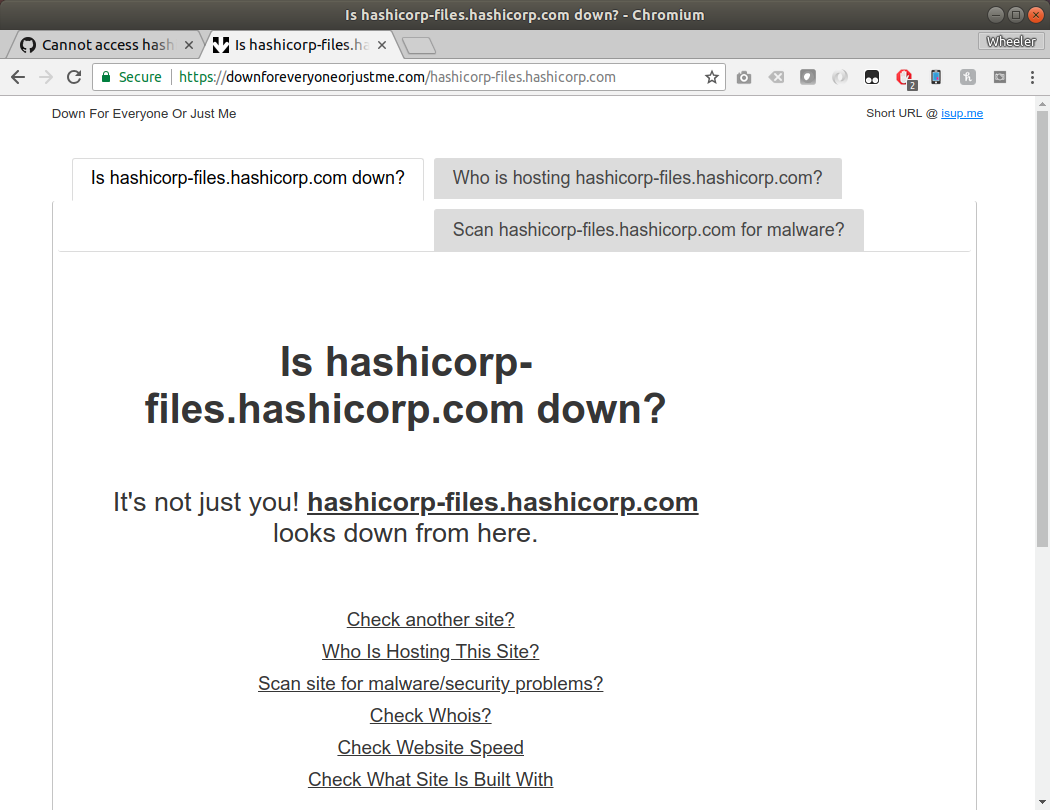
downforeveryoneorjustme.com also agrees that hashicorp-files.hashicorp.com is down:
wheelerlaw
on 4 Jun 2018
Hi there @wheelerlaw ! Recently we migrated that box over to Vagrant Cloud off of some old infrastructure. The easiest way to fix this on your end is delete the box and redownload it with the proper server URL. You should be able to remove the box with vagrant box remove and redownload it from Vagrant Cloud. Apologies for this! I'm going to go ahead and close this, but let us know if you have any further issues. Thanks!
 briancain
on 4 Jun 2018
briancain
on 4 Jun 2018
The box was never downloaded in the first place:
$ vagrant box remove hashicorp/precise32
The box you requested to be removed could not be found. No
boxes named 'hashicorp/precise32' could be found.
@briancain
Just tried on a completely fresh VPS outside of our network using the vagrant file from above:
# vagrant up
Bringing machine 'default' up with 'virtualbox' provider...
==> default: Box 'hashicorp/precise32' could not be found. Attempting to find and install...
    default: Box Provider: virtualbox
    default: Box Version: >= 0
==> default: Loading metadata for box 'hashicorp/precise32'
    default: URL: https://vagrantcloud.com/hashicorp/precise32
==> default: Adding box 'hashicorp/precise32' (v1.0.0) for provider: virtualbox
    default: Downloading: https://vagrantcloud.com/hashicorp/boxes/precise32/versions/1.0.0/providers/virtualbox.box
    default: Download redirected to host: hashicorp-files.hashicorp.com
An error occurred while downloading the remote file. The error
message, if any, is reproduced below. Please fix this error and try
again.

Failed to connect to hashicorp-files.hashicorp.com port 443: Connection timed out
Hey @wheelerlaw - I didn't notice the 32! precise64 was uploaded and migrated (which is what I tested), but there looks to be a problem with the precise32 box. We'll try to get that fixed ASAP. Thanks!
briancain
on 4 Jun 2018
@briancain Awesome, thanks!
wheelerlaw
on 4 Jun 2018
I'm getting the same problem with the precise64 box
 CallumBrankin
on 5 Jun 2018
CallumBrankin
on 5 Jun 2018
@CallumBrankin Follow these steps and let me know if you still have a problem https://github.com/hashicorp/vagrant/issues/9897#issuecomment-394453394 Thanks!
briancain
on 5 Jun 2018
@briancain I am getting the same issue with the precise64 box. Following the steps on this issue of removing the box returns the same error that wheelerlaw received.
 fangherk
on 6 Jun 2018
fangherk
on 6 Jun 2018
I was able to fix the issue by switching from
config.vm.box = 'precise64' to
config.vm.box = 'hashicorp/precise64'
and commenting out the line:
config.vm.box_url = 'http://files.vagrantup.com/precise64.box'
The old config.vm.box_url causes the problem that wheelerlaw received from the migration to Vagrant Cloud.
fangherk
on 6 Jun 2018
@briancain This is from a fresh vagrant up, so i cannot run $ vagrant box remove hashicorp/precise64 because the box was never added.
CallumBrankin
on 6 Jun 2018
Try this url instead of the files.vagrantup one:
https://vagrantcloud.com/hashicorp/boxes/precise64/versions/1.1.0/providers/virtualbox.box
 tdvance
on 6 Jun 2018
tdvance
on 6 Jun 2018
precise32 box has been restored into Vagrant Cloud. Cheers!
 chrisroberts
on 9 Jun 2018
chrisroberts
on 9 Jun 2018
I have the same error with percise64
Failed to connect to hashicorp-file, also I tried to remove but I got the same error message that everyone recieved.
@fangherk solution worked for me, thanks
 MaiHassanM
on 12 Jun 2018
MaiHassanM
on 12 Jun 2018
@fangherk solution worked for me too, Thanks!
 amarathota
on 13 Jun 2018
amarathota
on 13 Jun 2018
Same issue and solution not working from Mac OS X
Made it work by following the default vagrant workflow
vagrant init hashicorp/precise64
vagrant up
 mime29
on 21 Aug 2018
mime29
on 21 Aug 2018
@tdvance thank you
 AhmadPirzargar
on 6 Sep 2018
AhmadPirzargar
on 6 Sep 2018
I met the same problem, when download ubuntu lucid32 image
Failed to connect to hashicorp-files.hashicorp.com port 443: Operation timed out。
just to modify the Vagrantfile,
Vagrant.configure("2") do |config|
     config.vm.box = "mrgcastle/ubuntu-lucid32"
     config.vm.box_version = "1.0.0.0"
 end
hope helps!
 songxin1990
on 21 Sep 2018
songxin1990
on 21 Sep 2018
Also they still link to the old url on the getting started page here
Commenting out the box_url method worked like what @fangherk said
 Lee1984
on 28 Sep 2018
Lee1984
on 28 Sep 2018
Thanks for pointing that out @Lee1984 - I've fixed that and the website should be up to date now with a proper URL that works: https://www.vagrantup.com/intro/getting-started/boxes.html#using-a-box
briancain
on 28 Sep 2018
I'm going to lock this issue because it has been closed for _30 days_ ⏳. This helps our maintainers find and focus on the active issues.
If you have found a problem that seems similar to this, please open a new issue and complete the issue template so we can capture all the details necessary to investigate further.
![hashibot[bot] picture](https://avatars.githubusercontent.com/in/8332?v=4&s=40) hashibot[bot]
on 29 Mar 2020
hashibot[bot]
on 29 Mar 2020
Related issues
 bbaassssiiee
·
3Comments
bbaassssiiee
·
3Comments
 DreadPirateShawn
·
3Comments
DreadPirateShawn
·
3Comments
 janw-me
·
3Comments
janw-me
·
3Comments
 barkingfoodog
·
3Comments
barkingfoodog
·
3Comments
 RobertSwirsky
·
3Comments
RobertSwirsky
·
3Comments
Most helpful comment
I was able to fix the issue by switching from
config.vm.box = 'precise64'toconfig.vm.box = 'hashicorp/precise64'and commenting out the line:
config.vm.box_url = 'http://files.vagrantup.com/precise64.box'The old config.vm.box_url causes the problem that wheelerlaw received from the migration to Vagrant Cloud.