Vagrant: Windows Vagrant version: unknown
Vagrant version
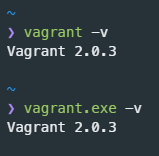
Windows Vagrant version: 2.0.3
Windows Subsystem for Linux Vagrant version: 2.0.3
Host operating system
Windows 10
Guest operating system
laravel/homestead -> Ubuntu
Vagrantfile
https://github.com/laravel/homestead/blob/master/Vagrantfile
Debug output
https://gist.github.com/Walkoss/cfd098138fed518d9f9364b1ad4875c5
Expected behavior
Vagrant should start the virtual machine
Actual behavior
As Vagrant on WSL doesn't recognize Vagrant Windows version, it raised an exception.
 Walkoss
All 8 comments
VAGRANT_WSL_ENABLE_WINDOWS_ACCESS env variable is set
PATH env variable contains /mnt/c/Program Files/Oracle/VirtualBox
Walkoss
on 29 Mar 2018
This morning, vagrant worked perfectly on WSL but without any update, it fails now. I tried to reinstall on windows and WSL.
Walkoss
on 29 Mar 2018
@Walkoss What is the output of this command from within WSL:
$ /mnt/c/HashiCorp/Vagrant/bin/vagrant.exe version
 chrisroberts
on 29 Mar 2018
chrisroberts
on 29 Mar 2018
@chrisroberts here is the output
Installed Version: 2.0.3
Latest Version: 2.0.3

You're running an up-to-date version of Vagrant!
Can you provide a gist of the output with the full debug:
$ vagrant up --debug
Thanks!
chrisroberts
on 29 Mar 2018
Walkoss
on 29 Mar 2018
@Walkoss It looks like the version check error is suppressing the actual error which is a problem parsing the Vagrantfile. You can see it here: https://gist.github.com/Walkoss/dc817f50ca8e659e896e817d675e3174#file-gistfile1-txt-L242
I'll create a new issue to track this problem and get it fixed in a future release. Cheers!
chrisroberts
on 29 Mar 2018
I'm going to lock this issue because it has been closed for _30 days_ ⏳. This helps our maintainers find and focus on the active issues.
If you have found a problem that seems similar to this, please open a new issue and complete the issue template so we can capture all the details necessary to investigate further.
![hashibot[bot] picture](https://avatars.githubusercontent.com/in/8332?v=4&s=40) hashibot[bot]
on 30 Mar 2020
hashibot[bot]
on 30 Mar 2020
Related issues
 DreadPirateShawn
·
3Comments
DreadPirateShawn
·
3Comments
 janw-me
·
3Comments
janw-me
·
3Comments
 rhencke
·
3Comments
rhencke
·
3Comments
 jsirex
·
3Comments
jsirex
·
3Comments
 gwagner
·
3Comments
gwagner
·
3Comments
Most helpful comment
@Walkoss It looks like the version check error is suppressing the actual error which is a problem parsing the Vagrantfile. You can see it here: https://gist.github.com/Walkoss/dc817f50ca8e659e896e817d675e3174#file-gistfile1-txt-L242
I'll create a new issue to track this problem and get it fixed in a future release. Cheers!