Vagrant: Vagrant up not working on Google Cloud instance Debian 9
Vagrant version
Vagrant 2.0.3
Host operating system
Debian GNU/Linux 9 AMD64 ( Google Cloud instance )
Guest operating system
ubuntu/trusty64
Vagrantfile
# -*- mode: ruby -*-
# vi: set ft=ruby :

Vagrant.configure("2") do |config|

  config.vm.box = "ubuntu/trusty64"

  config.vm.provision :shell, path: "install.sh"

  config.vm.provider "virtualbox" do |vb|
    vb.memory = "1024"
  end

end
Expected behavior
It's supposed to run the vagrant up command with no issues just like it does in my local environment which has the same architecture and OS as the google cloud instance ( Debian 9 )
Actual behavior
Bringing machine 'default' up with 'virtualbox' provider...
==> default: Importing base box 'ubuntu/trusty64'...
==> default: Matching MAC address for NAT networking...
==> default: Checking if box 'ubuntu/trusty64' is up to date...
==> default: Setting the name of the VM: bots_default_1521745305028_28624
==> default: Clearing any previously set forwarded ports...
==> default: Clearing any previously set network interfaces...
==> default: Preparing network interfaces based on configuration...
    default: Adapter 1: nat
==> default: Forwarding ports...
    default: 22 (guest) => 2222 (host) (adapter 1)
==> default: Running 'pre-boot' VM customizations...
==> default: Booting VM...
==> default: Waiting for machine to boot. This may take a few minutes...
    default: SSH address: 127.0.0.1:2222
    default: SSH username: vagrant
    default: SSH auth method: private key
Timed out while waiting for the machine to boot. This means that
Vagrant was unable to communicate with the guest machine within
the configured ("config.vm.boot_timeout" value) time period.

If you look above, you should be able to see the error(s) that
Vagrant had when attempting to connect to the machine. These errors
are usually good hints as to what may be wrong.

If you're using a custom box, make sure that networking is properly
working and you're able to connect to the machine. It is a common
problem that networking isn't setup properly in these boxes.
Verify that authentication configurations are also setup properly,
as well.

If the box appears to be booting properly, you may want to increase
the timeout ("config.vm.boot_timeout") value.
This is what i get, the command stops at default: SSH auth method: private key for a couple of minutes and the vagrant up command gets interrupted by the timeout. I tried to edit my firewall rules to port tcp:2200-2300 both for ingress and egress. I'm not so sure what to do and it would be great if somebody could help me. I also installed the vagrant-google plugin but nothing changed...
Steps to reproduce
wget https://download.virtualbox.org/virtualbox/5.2.8/virtualbox-5.2_5.2.8-121009~Debian~stretch_amd64.deb
sudo dpkg -i virtualbox-5.2_5.2.8-121009~Debian~stretch_amd64.deb
sudo apt-get install -f -y
sudo apt-get install linux-headers-amd64
sudo /sbin/vboxconfig
wget https://releases.hashicorp.com/vagrant/2.0.2/vagrant_2.0.2_x86_64.deb
sudo dpkg -i vagrant_2.0.2_x86_64.deb

vagrant up
Thanks
I really can't figure out what i'm doing wrong so i'd like some help :+1:
 Splinter0
All 6 comments
In general, most cloud providers do not allow for nested virtualization which is why virtualbox can't bring up your vm. However it seems like there might be a way to allow it on Google cloud? Check this out here: https://cloud.google.com/compute/docs/instances/enable-nested-virtualization-vm-instances
If you have any more questions I recommend mailing the vagrant up mailing list, thanks!
 briancain
on 23 Mar 2018
briancain
on 23 Mar 2018
Thank you so much @briancain for the help! That resource helped me a lot, right now it's still not clear if virtualbox is supported, but i'm sure i'll find a solution.
Thanks :+1:
Splinter0
on 25 Mar 2018
@Splinter0, nested virtualisation does work per the link shared by @briancain
I've had success with this config. I could vagrant up and vagrant ssh without any problem
Vagrant 2.0.3
Vboxmanage  5.1.34r121010

host VM: debian-9 (GCP; VT-x enabled)
guest VM: hashicorp/precise64 (virtualbox, 1.1.0)
 ```

But I'm having trouble when guest OS is
ubuntu/xenial32 (virtualbox, 20180410.0.0)
or
ubuntu/xenial64 (virtualbox, 20180410.0.0)
``
vagrant upfreezes at default: SSH auth method: private key` similar to yours.
Similar threads (None of the suggestions seem to work for me)
8157
https://github.com/chef/bento/issues/682
https://github.com/chef/bento/issues/688
@Splinter0 , Pls let me know if you have found any fix.
Thanks
 navndn
on 12 Apr 2018
navndn
on 12 Apr 2018
@navndn The solution proposed by @briancain worked fine the first time but when i had to reboot my host machine, once it was back up the ssh freezed again just like last time. The configuration that i'm using is still the same. I found an alternative so this is why i haven't tested new solutions to this problem. But i'd like to know if anybody has a solution.
Thanks :wink:
Splinter0
on 2 May 2018
Just want to add that in my case, this is due to kernel panic during boot (with bento/debian-9 image).
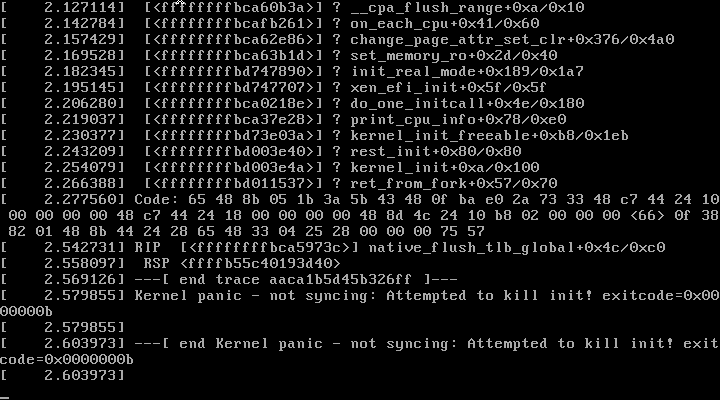
Unfortunately, I have not managed to find out why the kernel panic happened. My guess would be GCP exposed very limited sets of VT-x features for KVM to function, but not anything else. :\
 sirn
on 21 Jul 2018
sirn
on 21 Jul 2018
I'm going to lock this issue because it has been closed for _30 days_ ⏳. This helps our maintainers find and focus on the active issues.
If you have found a problem that seems similar to this, please open a new issue and complete the issue template so we can capture all the details necessary to investigate further.
![hashibot[bot] picture](https://avatars.githubusercontent.com/in/8332?v=4&s=40) hashibot[bot]
on 1 Apr 2020
hashibot[bot]
on 1 Apr 2020
Related issues
 cbednarski
·
3Comments
cbednarski
·
3Comments
 lebogan
·
3Comments
lebogan
·
3Comments
 bbaassssiiee
·
3Comments
bbaassssiiee
·
3Comments
 mpontillo
·
3Comments
mpontillo
·
3Comments
 StefanScherer
·
3Comments
StefanScherer
·
3Comments
Most helpful comment
Just want to add that in my case, this is due to kernel panic during boot (with
bento/debian-9image).Unfortunately, I have not managed to find out why the kernel panic happened. My guess would be GCP exposed very limited sets of VT-x features for KVM to function, but not anything else. :\