Vagrant: Network Config randomness, ssh auth fails
Vagrant version
Vagrant 2.0.2
Host operating system
my-user@my-host:~$ cat /etc/*release
DISTRIB_ID=Ubuntu
DISTRIB_RELEASE=17.10
DISTRIB_CODENAME=artful
DISTRIB_DESCRIPTION="Ubuntu 17.10"
NAME="Ubuntu"
VERSION="17.10 (Artful Aardvark)"
ID=ubuntu
ID_LIKE=debian
PRETTY_NAME="Ubuntu 17.10"
VERSION_ID="17.10"
HOME_URL="https://www.ubuntu.com/"
SUPPORT_URL="https://help.ubuntu.com/"
BUG_REPORT_URL="https://bugs.launchpad.net/ubuntu/"
PRIVACY_POLICY_URL="https://www.ubuntu.com/legal/terms-and-policies/privacy-policy"
VERSION_CODENAME=artful
UBUNTU_CODENAME=artful
Guest operating system
config.vm.box = "archlinux/archlinux"
Vagrantfile
Vagrant.configure("2") do |config|
  config.vm.box = "archlinux/archlinux"
  config.vm.network "public_network", bridge: "wlp2s0"
  config.vm.synced_folder "./vagrant_data_host", "/vagrant_data_guest"
  config.vm.provider "virtualbox" do |vb|
    vb.name = "my_arch_3"
    vb.memory = 512
    vb.cpus = 1
    vb.customize ["modifyvm", :id, "--cpuexecutioncap", "100"]
  end
end
Debug output
Here is the output of vagrant up --debug &> vagrant.log:
https://gist.github.com/keltik85/dd7bc933ce04a0808093ff5a2f35023c
Expected behavior
vagrant up completes successfully every single time, not randomly, namely deterministically and more specifically while "upping" the machine it passes the point of doing default: SSH auth method: private key without throwing the error pasted into the next section for the sake of the issue template.
Actual behavior
In 90 percent of the attempts initializing the VM with vagrant up the creation process hangs when:
...
default: SSH auth method: private key
Timed out while waiting for the machine to boot. This means that
Vagrant was unable to communicate with the guest machine within
the configured ("config.vm.boot_timeout" value) time period.

If you look above, you should be able to see the error(s) that
Vagrant had when attempting to connect to the machine. These errors
are usually good hints as to what may be wrong.

If you're using a custom box, make sure that networking is properly
working and you're able to connect to the machine. It is a common
problem that networking isn't setup properly in these boxes.
Verify that authentication configurations are also setup properly,
as well.

If the box appears to be booting properly, you may want to increase
the timeout ("config.vm.boot_timeout") value.
Steps to reproduce
my-user@my-host:~$ mkdir vagrant_arch_3
my-user@my-host:~$ cd vagrant_arch_3/
my-user@my-host:~/vagrant_arch_3$ mkdir vagrant_data_host
my-user@my-host:~/vagrant_arch_3$ vim Vagrantfile
... paste the aforementioned Vagrantfile, see section 3 of the issue...
my-user@my-host:~/vagrant_arch_3$ vagrant init
my-user@my-host:~/vagrant_arch_3$ vagrant up --debug &> vagrant.log
...
Stuff that I have investigated and done to fix it
Since sometimes vagrant manages to boot the machine like it is supposed to. I copied the network-settings of another machine, that I successfully "upped" with Vagrant -speciffically that didnt stop at default: SSH auth method: private key-, only exchanging the IPs.
I open a Machine Console session with the VirtualBox Gui -into the machine that I cant ssh into- and check the Network Settings (since i can't copy&paste from the Vbox-Console, will be using screenshots):
- Login user:
vagrant, pw:vagrant, and view network settings withip addr:
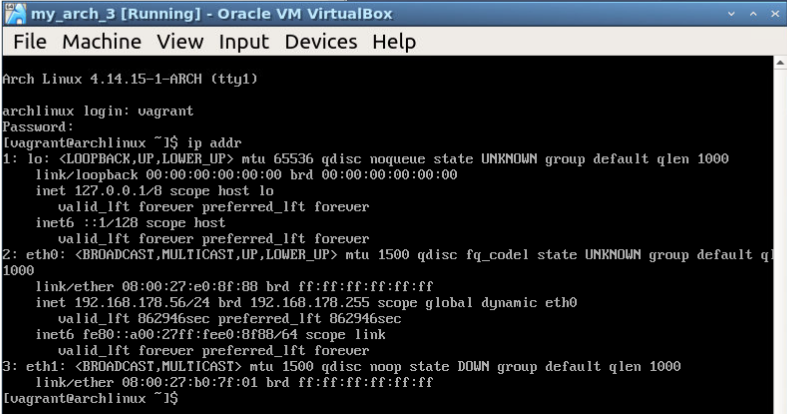
- Try pinging google.com --->
ping 8.8.8.8---> works! (No screenshot for brevity...)
_Interpretation: Vagrant could start the first NIC namedeth0, which connects the VM to the Public Network, but was unable to connect the second NIC to the VM internal private network._ - Manually configure the NIC
eth1(first I "up" the NIC, then I give it a static ip):
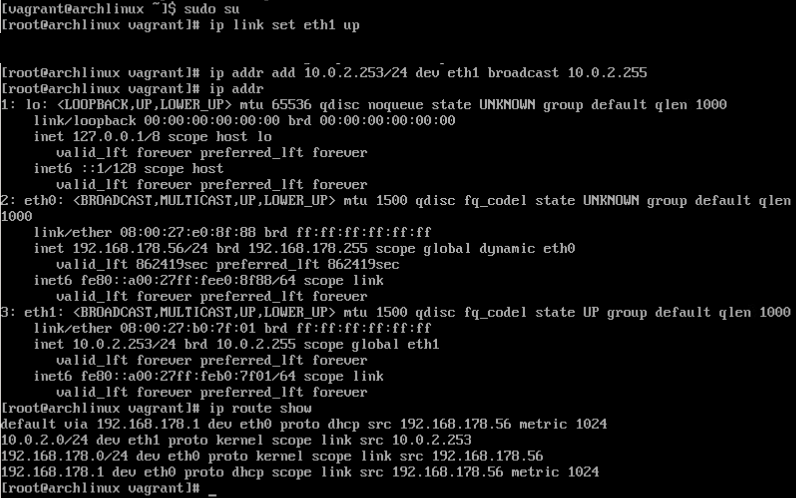
- Manually check the network routes and give the second NIC
eth1a default gateway:

- I try my luck with the vagrant ssh connection:
my-user@my-host:~/vagrant_arch_3$ vagrant ssh 799b639
ssh_exchange_identification: read: Connection reset by peer
- Now, still can't ssh into the machine using
vagrant ssh 799b639and therefore I again compare its network settings against the working machine (working means, I can ssh into it withvagrant ssh):
Working machine:
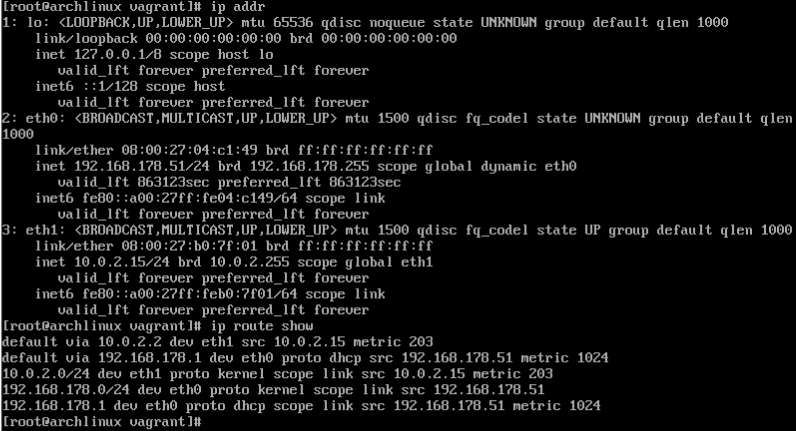
Machine that is not working:

I cant find any difference besides the IP, which is something I did deliberately.
I thought maybe it is something wrong with the Guest-Image config.vm.box = "archlinux/archlinux", because using this Guest OS config.vm.box = "ubuntu/xenial64" it boots deterministically and does not stop at default: SSH auth method: private key.
References
I have found many issues that resemble this, mainly stating that i need to reinstall Vagrant, reinstall VirtualBox and the Guest plugins, update this and that, put something in the config, but the solutions do not work for me:
Why does it behave so randomly?
What is wrong with it?
Can anybody fix this?
Is it a bug or a misconfiguration in the Vagrantfile?
Why does every machine get IP 10.0.2.15/24 as a IP for one of the NICs ?
EDIT 1:
When I set the machines network settings like this:

I can use vagrant ssh to get into the machine. But now comes my question:
Is there a way to make vagrant input these two lines of bash for itself, so that i do not need to use the Vbox-Gui for that?
EDIT 2:
I really think there is something wrong with the hashicorp-vagrant archlinux/archlinux image.
Link: https://app.vagrantup.com/archlinux/boxes/archlinux
EDIT 3:
I can ssh over the public network though after putting this into my Vagrantfile config.ssh.forward_agent = true:
my-user@my-host:~/vagrant_arch_3$ sudo arp-scan --interface=wlp2s0 --localnet
Interface: wlp2s0, datalink type: EN10MB (Ethernet)
Starting arp-scan 1.9 with 256 hosts (http://www.nta-monitor.com/tools/arp-scan/)
192.168.178.1   cc:ce:1e:6d:11:f9   (Unknown)
192.168.178.46  08:00:27:4c:e7:58   CADMUS COMPUTER SYSTEMS
192.168.178.63  08:00:27:fd:a5:20   CADMUS COMPUTER SYSTEMS
my-user@my-host:~/vagrant_arch_3$ ssh -vvv -i /home/my-user/vagrant_arch_5/.vagrant/machines/default/virtualbox/private_key  [email protected]
So either the vagrant box is too stupid to start the interface or vagrant itself is.
_Nice work open sourcing vagrant, otherwise you guys would never finish this software...._
 keltik85
All 4 comments
Hello @keltik85 - I recommend trying a different archlinux box from Vagrant Cloud. This is a problem with the vagrant box you are using. HashiCorp does not manage the box you're using, so it's up to the maintainers of that box to fix the networking problem you're experiencing. Thanks!
 briancain
on 20 Feb 2018
briancain
on 20 Feb 2018
Ok, thanks worked.
keltik85
on 21 Feb 2018
@keltik85 i am getting same issue with "ubuntu/xenial64".............any suggestions?/
 vibhor995
on 15 May 2018
vibhor995
on 15 May 2018
I'm going to lock this issue because it has been closed for _30 days_ ⏳. This helps our maintainers find and focus on the active issues.
If you have found a problem that seems similar to this, please open a new issue and complete the issue template so we can capture all the details necessary to investigate further.
![hashibot[bot] picture](https://avatars.githubusercontent.com/in/8332?v=4&s=40) hashibot[bot]
on 30 Mar 2020
hashibot[bot]
on 30 Mar 2020
Related issues
 RobertSwirsky
·
3Comments
RobertSwirsky
·
3Comments
 StefanScherer
·
3Comments
StefanScherer
·
3Comments
 lebogan
·
3Comments
lebogan
·
3Comments
 jsirex
·
3Comments
jsirex
·
3Comments
 cbednarski
·
3Comments
cbednarski
·
3Comments
Most helpful comment
Ok, thanks worked.