vagrant 2.0.1, VMware 14.1.0: Failed to add NAT port entry: Zugriff verweigert
Vagrant version
Vagrant 2.0.1
Host operating system
Windows 10 Enterprise 1709 Build 16299.64 (German UI language)
Domain joined
Guest operating system
Windows 10
Vagrantfile
Vagrant.configure("2") do |config|
  config.vm.box = "StefanScherer/windows_10"
end
Debug output
https://gist.github.com/StefanScherer/5bf97feae608caf8f3137207e48becb7
Expected behavior
What should have happened?
Vagrant should spin up VMware Workstation VM's on my laptop. I got everything up and running after #9108 has been fixed in December. Now after holiday I try to spin up some VM's but I now get this error.
Today I ran a Packer build which worked fine. Now I tried to spin up that new box and encountered this problem. Then I tried to spin up some other boxes that worked in December 2017 on that machine, but these also have this problem now.
Actual behavior
What actually happened?
==> 2016: Forwarding ports...
    2016: -- 3389 => 3389
    2016: -- 5985 => 55985
    2016: -- 5986 => 55986
    2016: -- 22 => 2222
C:/Users/stefan.scherer/.vagrant.d/gems/2.4.2/gems/vagrant-vmware-workstation-5.0.4/lib/vagrant-vmware-workstation/driver.rb:2138:in `win_set_forwarded_port': Port forward registry set failure. (RuntimeError)
OUT:
ERR: Failed to add NAT port entry: Zugriff verweigert
Zugriff verweigert = Access Denied
Steps to reproduce
- vagrant init StefanScherer/windows_10
- vagrant up
References
- #9108
Installed plugins
$ vagrant plugin list
nokogiri (1.8.1)
  - Version Constraint: > 0
vagrant-digitalocean (0.9.2)
  - Version Constraint: > 0
vagrant-reload (0.0.1)
  - Version Constraint: > 0
vagrant-share (1.1.9, system)
  - Version Constraint: > 0
vagrant-vcloud (0.4.7)
  - Version Constraint: > 0
vagrant-vmware-workstation (5.0.4)
  - Version Constraint: > 0
After the first errors I have uninstalled other vagrant plugins, but the error still exists.
I also have uninstalled and installed the vagrant-vmware-workstation plugin, but still no luck.
My machine hasn't rebooted over the holidays when everything worked fine.
 StefanScherer
All 41 comments
Stefan,
This is exactly the same error I reported in issue #9337.
In my case I have 2 identical machines, vagrant works on one but not the other.
 WheelmanK
on 9 Jan 2018
WheelmanK
on 9 Jan 2018
Oh thanks. I searched for the error message and couldn‘t find any issue. Thar‘s why I created it.
StefanScherer
on 9 Jan 2018
I had a closer look at the debug log.
At lines 915 and916 there is are errrors
DEBUG vmware_driver: Error reading Registry key: NAT\TCPForward
DEBUG vmware_driver: Error reading Registry key: NAT\UDPForward
With Process Monitor I also can see an access denied error:

StefanScherer
on 9 Jan 2018
This messages seems to be normal. I have my old laptop with Windows 7 Enterprise, Vagrant 2.0.1, VMware Workstation 14.0.0(!) where I still can run Vagrant VM's.
The error on the new laptop (Windows 10 Enterprise, VMware Workstation 14.1.0):
INFO vmware_driver: Setting forwarded port: vmnet8 tcp 3389 192.168.230.132 3389
DEBUG sudo_helper: Writing to arguments file: {:Ident=>"510ddab2-1ef4-4482-9200-dfed7a7ad95d", :Args=>["netconf", "-natadd=3389", "-natreg=SOFTWARE\\VMware, Inc.\\VMnetLib\\VMnetConfig\\vmnet8\\NAT\\TCPForward", "-natval=192.168.230.132:3389", "-natident=C:/Users/stefan.scherer/code/tst/.vagrant/machines/default/vmware_workstation/61b9beda-9cef-425c-858b-4e4e77510c07/windows_10.vmx"]}
 INFO subprocess: Starting process: ["C:/Users/stefan.scherer/.vagrant.d/gems/2.4.2/gems/vagrant-vmware-workstation-5.0.4/bin/vagrant_vmware_desktop_sudo_helper_windows_amd64.exe", "task"]
DEBUG subprocess: Selecting on IO
DEBUG subprocess: stdout: ERFOLGREICH: Es wurde versucht, die geplante Aufgabe "vagrant-vmware-desktop-SEALSYSTEMS-stefan.scherer" auszuführen.
DEBUG subprocess: Waiting for process to exit. Remaining to timeout: 31998
DEBUG subprocess: Exit status: 0
DEBUG sudo_helper: Started VMware helper task. Waiting for result.
DEBUG sudo_helper: Result from VMware helper task: {"ExitCode"=>1, "Ident"=>"510ddab2-1ef4-4482-9200-dfed7a7ad95d", "Stderr"=>"Failed to add NAT port entry: Zugriff verweigert\n", "Stdout"=>""}
ERROR warden: Error occurred: Port forward registry set failure.
OUT:
ERR: Failed to add NAT port entry: Zugriff verweigert
Even the vagrant_vmware_desktop_sudo_helper_windows_amd64.exe gets an access denied error:

It works on the old laptop (Windows 7 Enterprise, VMware Workstation 14.0.0):
INFO vmware_driver: Setting forwarded port: vmnet8 tcp 3389 192.168.186.140 3389
DEBUG sudo_helper: Writing to arguments file: {:Ident=>"1876b974-9536-42a6-b45e-aa4a6376ec59", :Args=>["netcon
f", "-natadd=3389", "-natreg=SOFTWARE\\VMware, Inc.\\VMnetLib\\VMnetConfig\\vmnet8\\NAT\\TCPForward", "-natval
=192.168.186.140:3389", "-natident=C:/Users/stefan.scherer/tst/.vagrant/machines/default/vmware_workstation/209175fd-99de-4eea-9c4c-b80e0f5917b1/WindowsServer2016Docker.vmx"]}
 INFO subprocess: Starting process: ["C:/Users/stefan.scherer/.vagrant.d/gems/2.4.2/gems/vagrant-vmware-workst
ation-5.0.4/bin/vagrant_vmware_desktop_sudo_helper_windows_amd64.exe", "task"]
DEBUG subprocess: Selecting on IO
DEBUG subprocess: stdout: ERFOLGREICH: Es wurde versucht, die geplante Aufgabe "vagrant-vmware-desktop-SEALSYSTEMS-stefan.scherer" auszuführen.
DEBUG subprocess: Waiting for process to exit. Remaining to timeout: 31999
DEBUG subprocess: Exit status: 0
DEBUG sudo_helper: Started VMware helper task. Waiting for result.
DEBUG sudo_helper: Result from VMware helper task: {"ExitCode"=>0, "Ident"=>"1876b974-9536-42a6-b45e-aa4a6376e
c59", "Stderr"=>"", "Stdout"=>"NAT port addition successful\n"}
DEBUG nat_conf: Read section: incomingtcp
DEBUG nat_conf: -- Value: "[incomingtcp]"
DEBUG nat_conf: Read section: incomingudp
DEBUG nat_conf: -- Value: "[incomingudp]\n# UDP port forwarding example\n#6000 = 192.168.27.128:6001\n"
DEBUG internal_configuration: Entry: {"port_forwards"=>{"tcp"=>{"3389"=>3389}, "udp"=>{}}, "guest_ip"=>"192.16
8.186.140"}
DEBUG internal_configuration: Saving updated internal configuration!
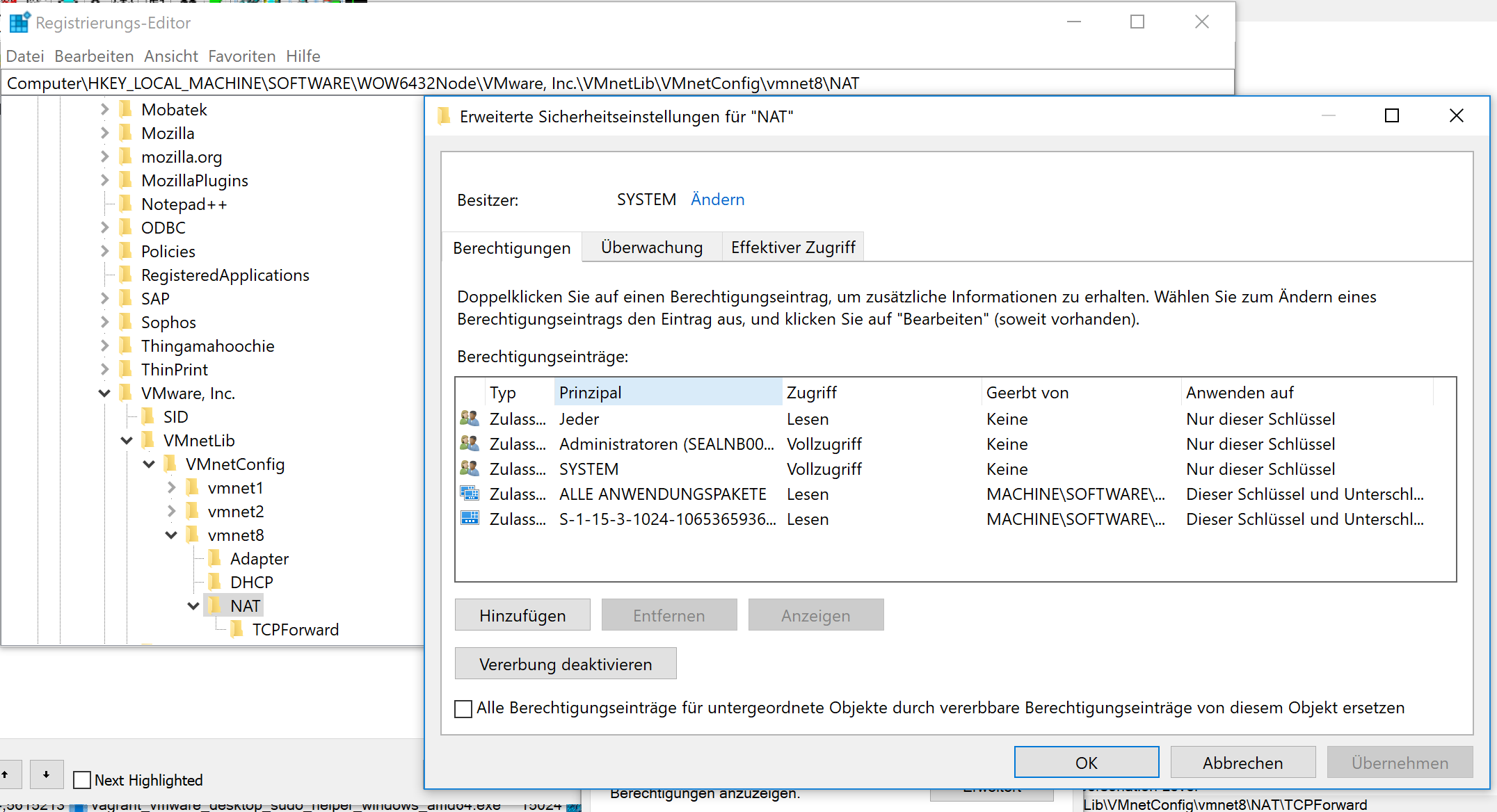
Some more information what I can see in regedit on both machines:
New laptop with VMware Workstation 14.1.0:
Registry NAT Security settings:
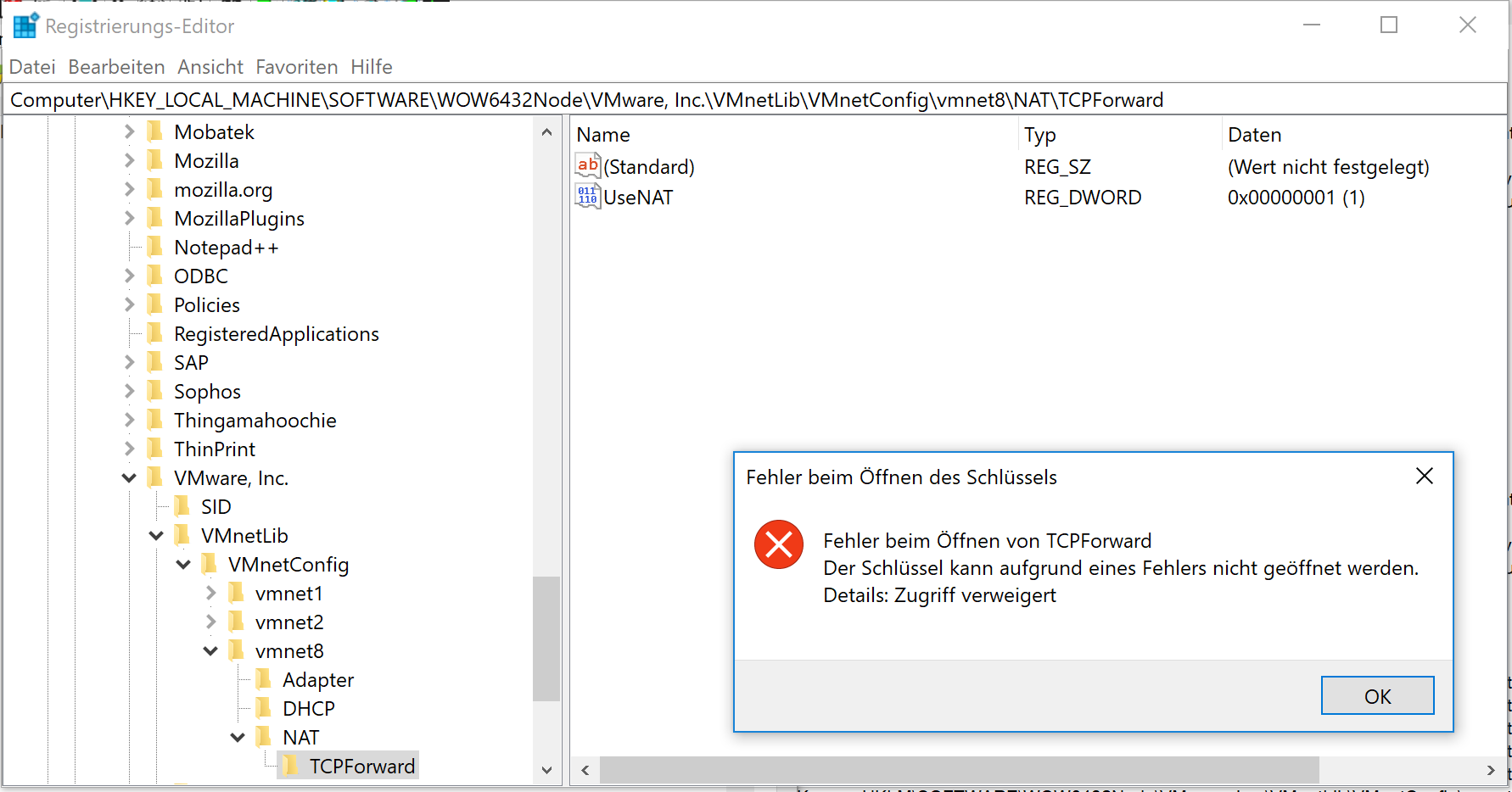
Click on TCPForward: Error in regedit
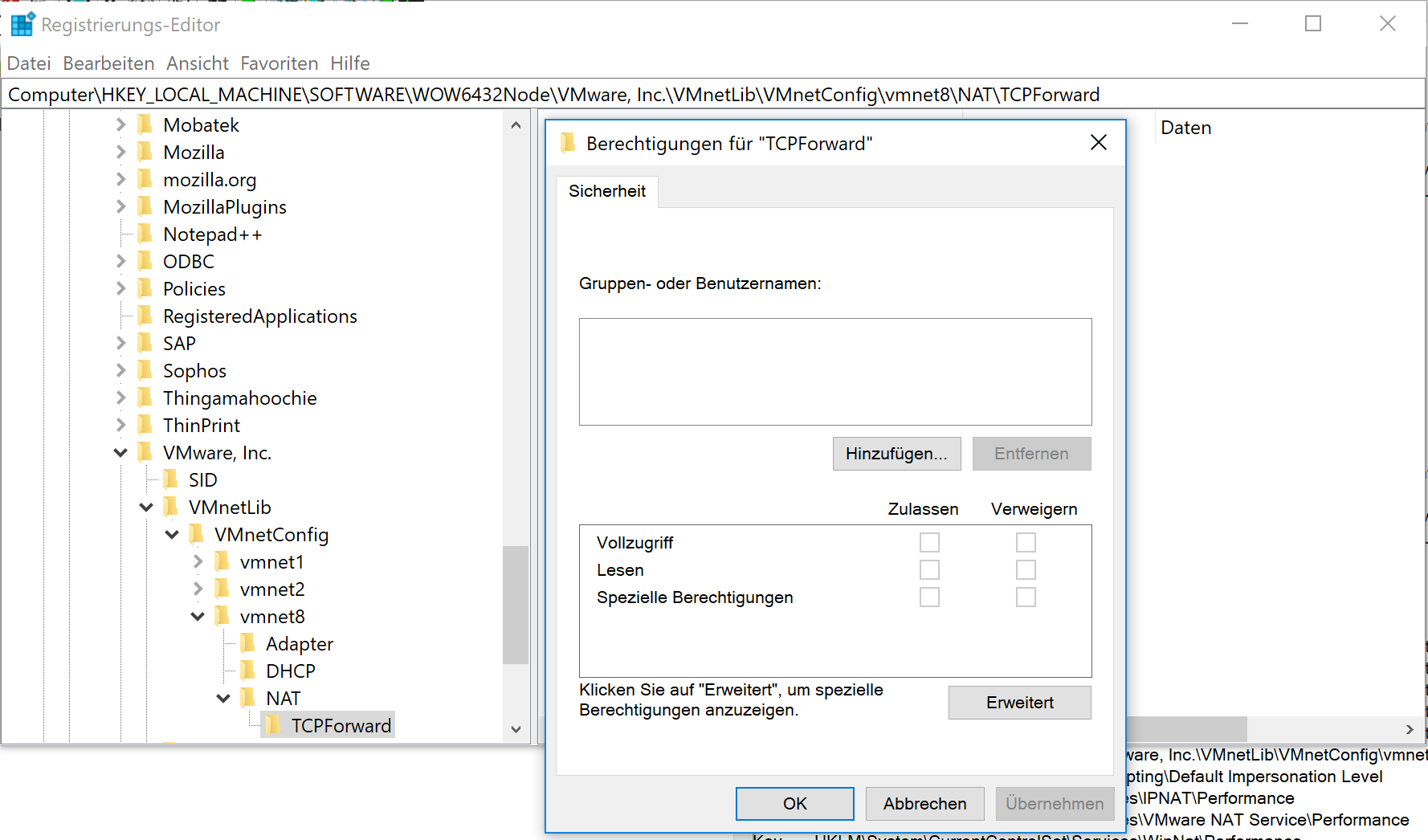
Registry TCPForward Security settings (empty, not shown):
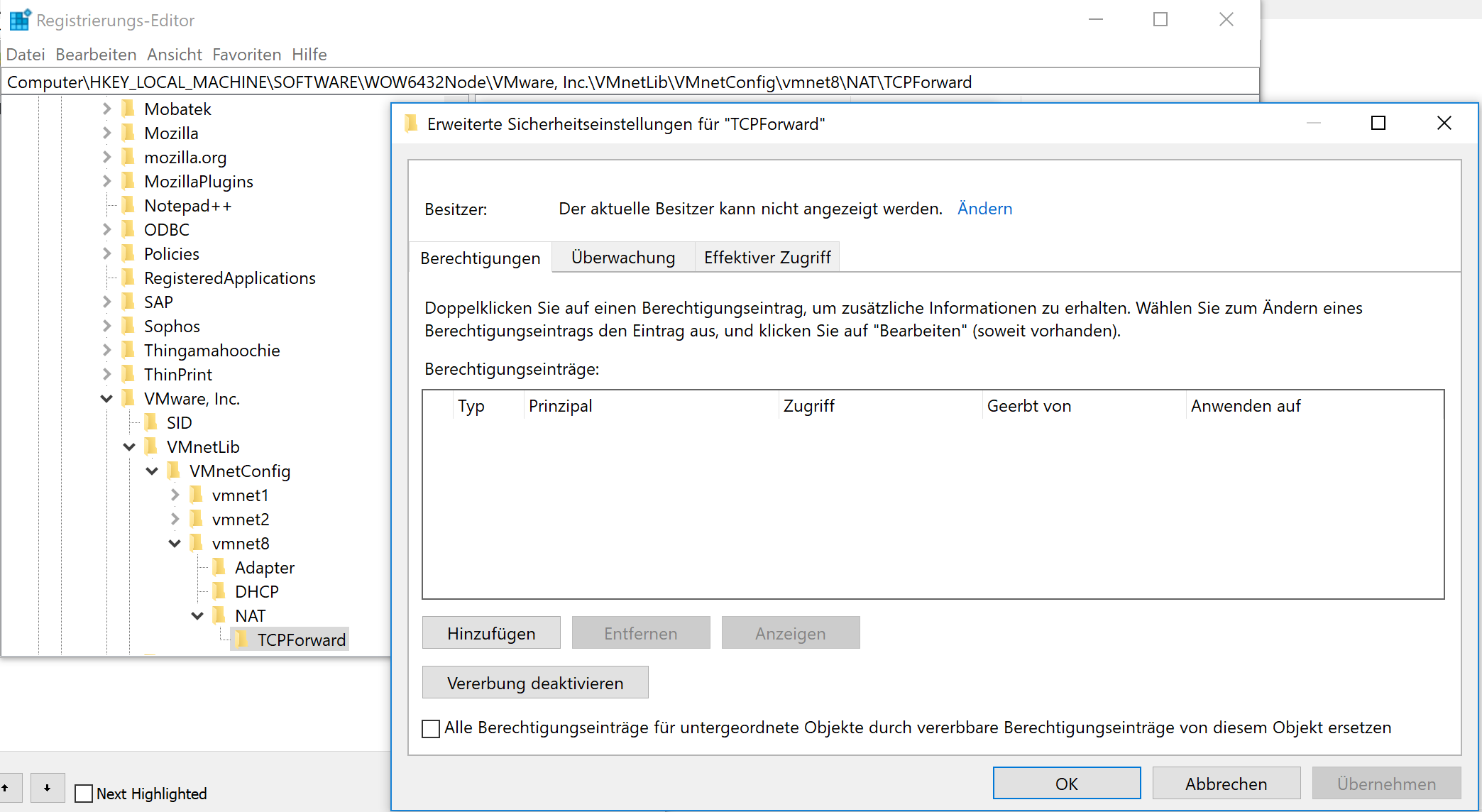
Registry TCPForward advanced security settings:
On the old laptop the owner of TCPForward is SYSTEM:
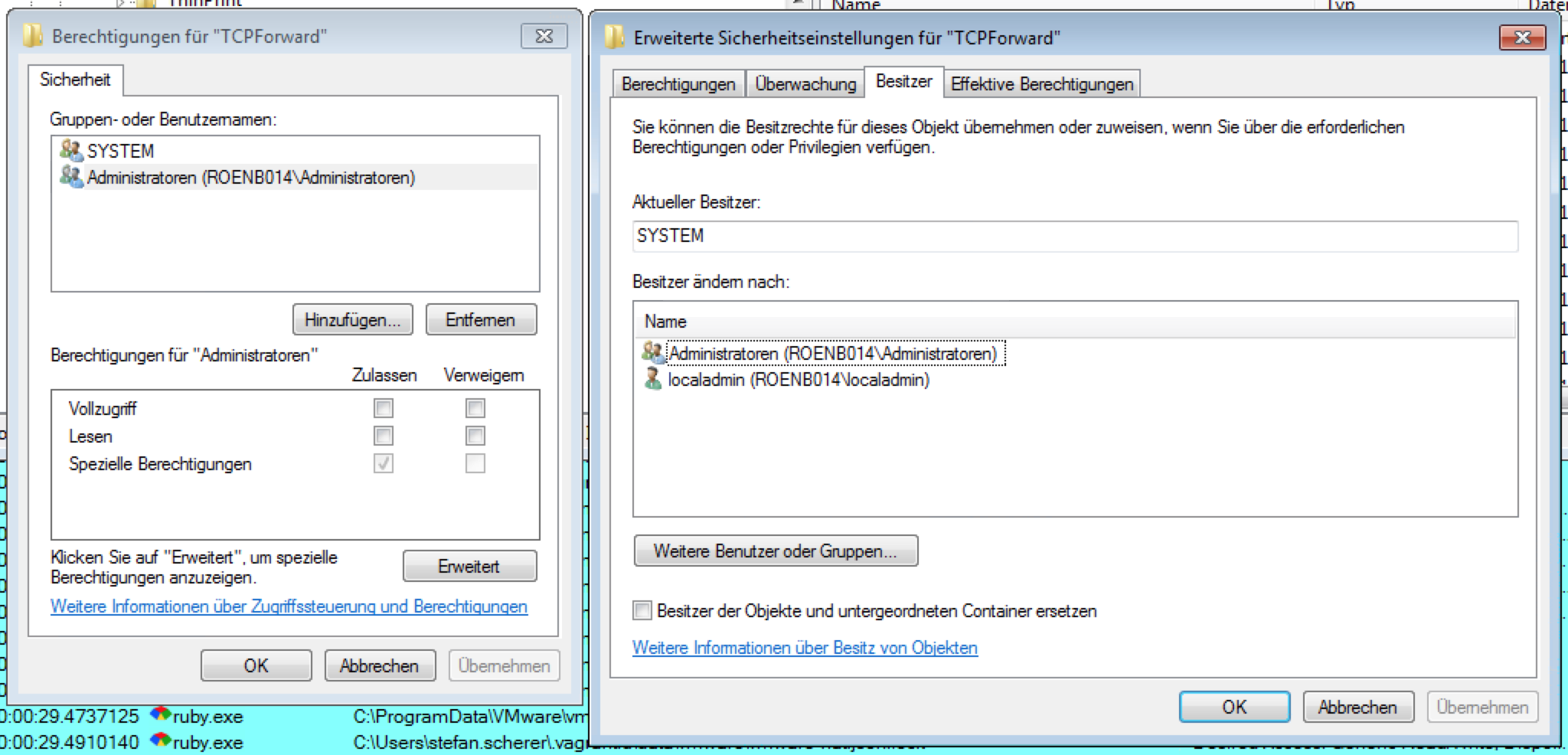
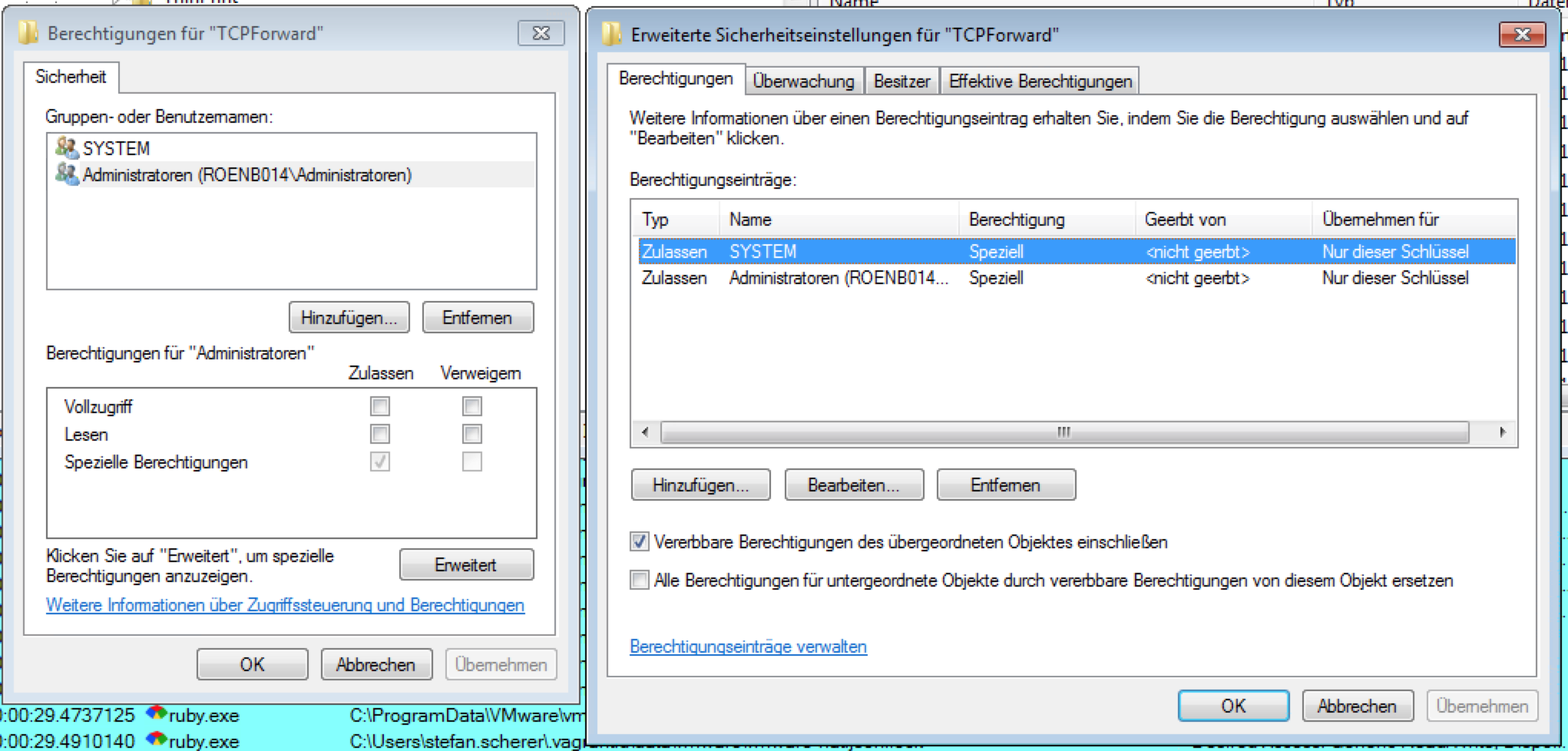
And the advanced security settings of TCPForward grants SYSTEM and Administrators special rights:
StefanScherer
on 9 Jan 2018
I had to start regedit with psexec.exe -s -i regedit.exe (the Sysinternals https://docs.microsoft.com/en-us/sysinternals/downloads/psexec tool) as user SYSTEM to see more details.
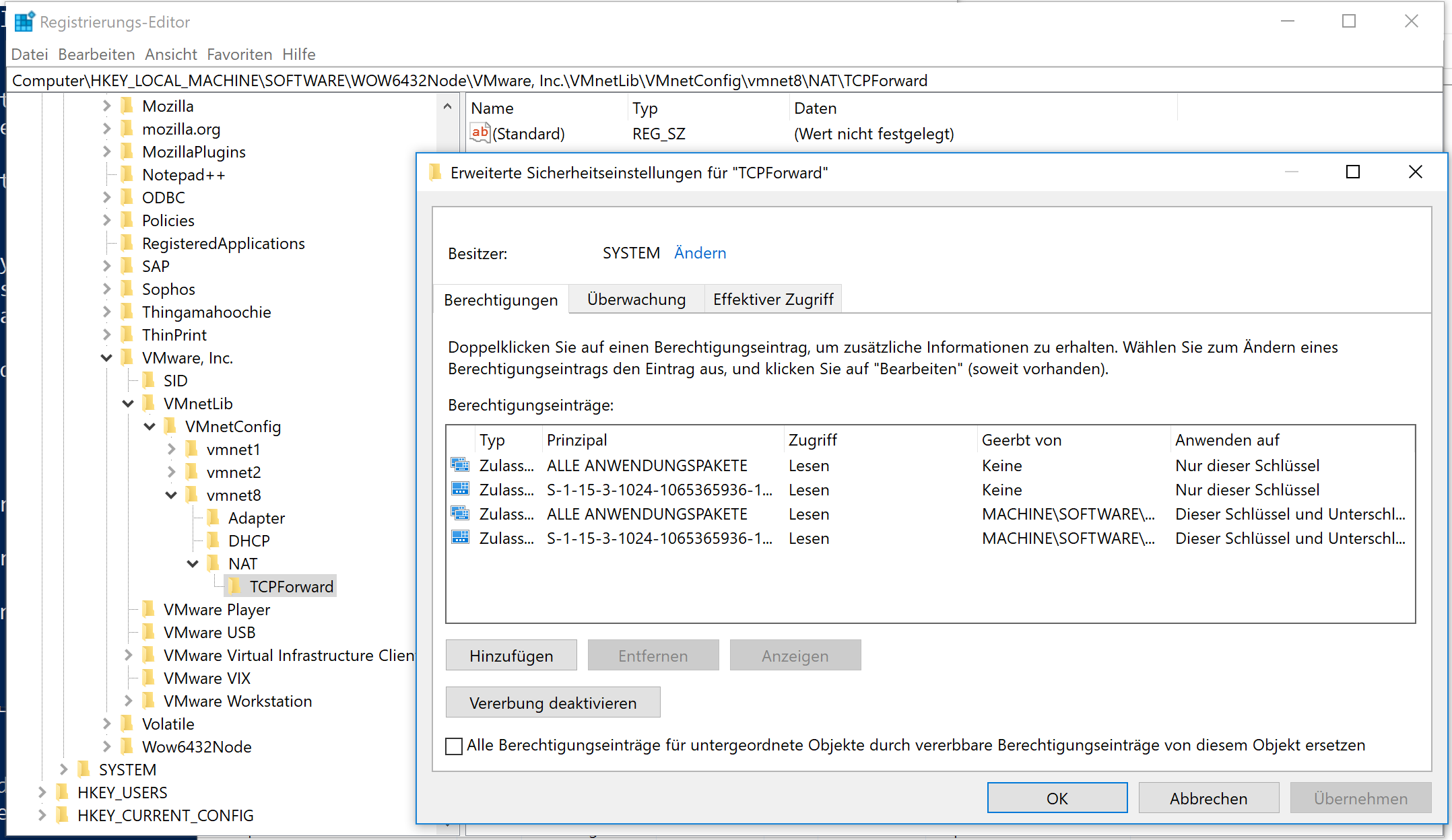
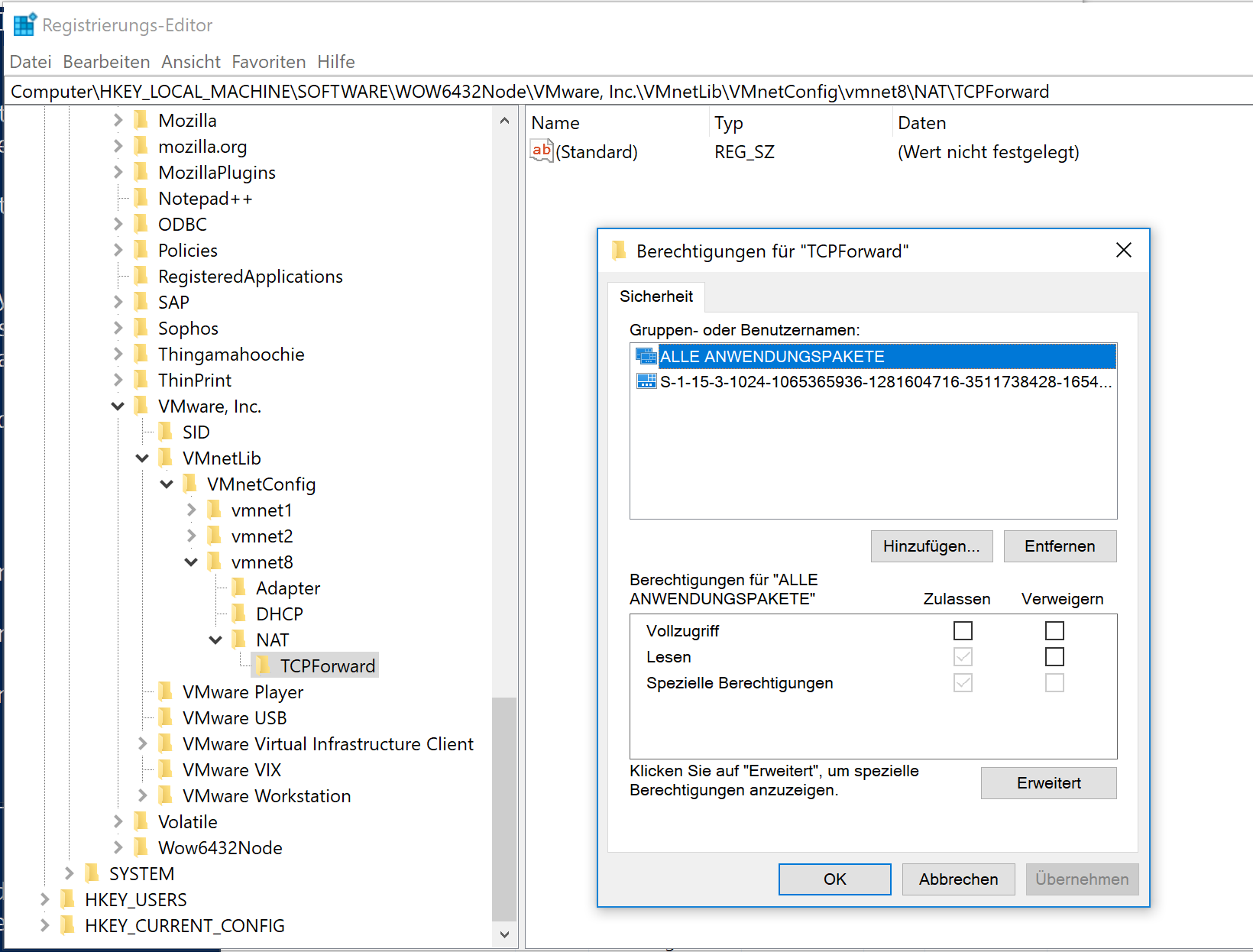
I have added the local administrators group with full access
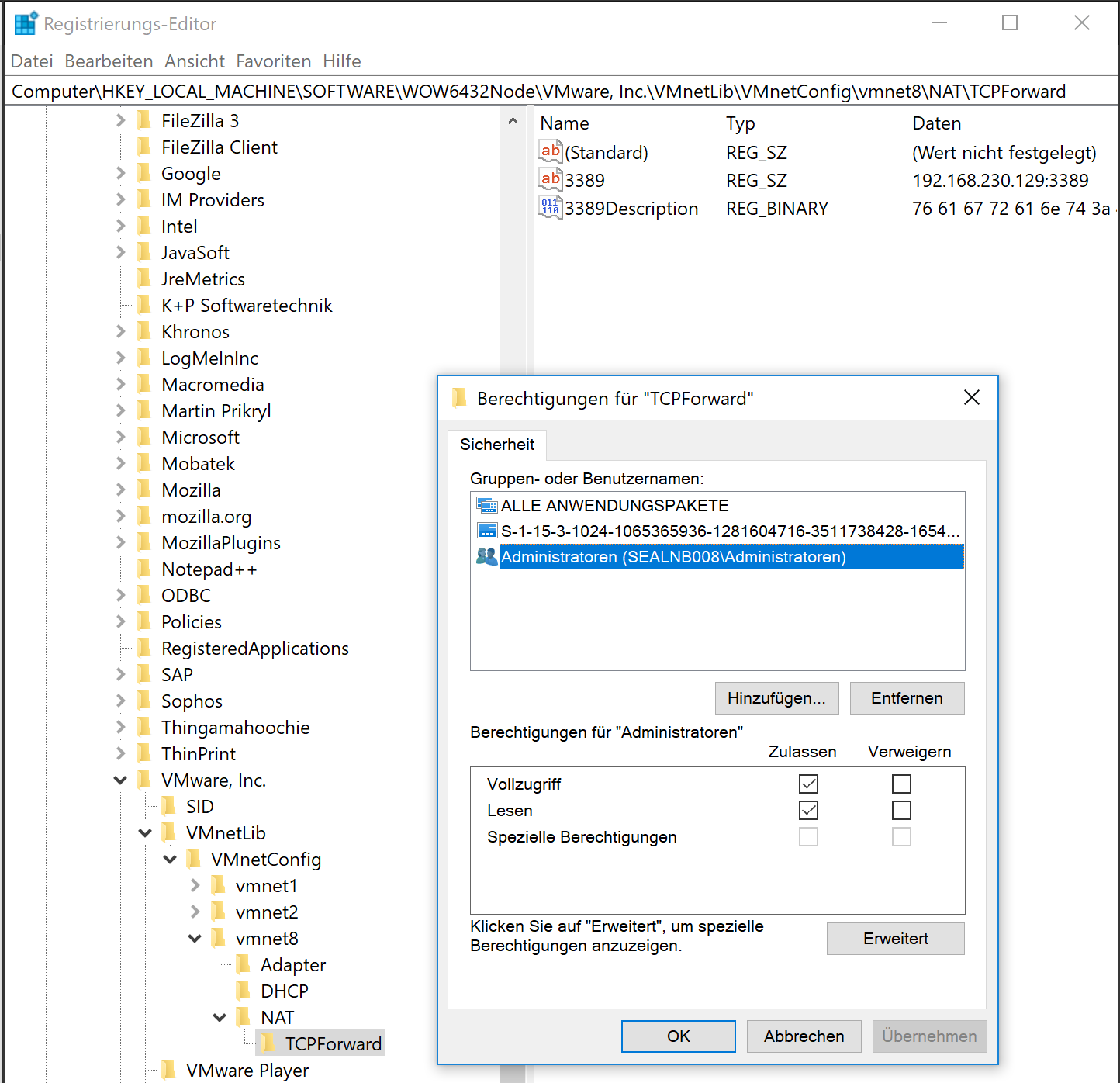
Then a vagrant up works again.
The question is when did that security setting change to deny access for local administrators?
So I'll "kill" my old laptop and install the update VMware Workstation 14.1.0 as well...
StefanScherer
on 9 Jan 2018
My old laptop still works after the update to VMware Workstation 14.1.0 and I can access the TCPForward registry key as an local administrator.
The granted access to TCPForward on my new laptop didn't solve the whole story on my Windows 10 laptop.
I now have the following problem on both laptops with VMware Workstation 14.1.0:
The sudo helper now can write the port forwarding, but vagrant up hangs at
    2016: WinRM transport: negotiate
Timed out while waiting for the machine to boot. This means that
Vagrant was unable to communicate with the guest machine within
the configured ("config.vm.boot_timeout" value) time period.

Maybe an option to turn off that NAT forwarding and just use the IP address of the VMware VM + WinRM port 5985 would simplify the communication.
StefanScherer
on 9 Jan 2018
Stefan,
I performed the steps you describe to "fix" the permissions on the TCPForward registry entry. While I had the permissions dialog open I clicked the "Advanced" button which showed me there were 2 entries for "ALL PACKAGES" and "Account Unknown", one was a direct add, the other was inherited from the parent object. I deleted the direct add permission entries as they were both above the "Administrators" entry in the list.
I then ran vagrant up using the hashicorp/precise64 box and the spin up proceeded to the point where shared folders were being configured and hung. This is a Linux box which uses SSH instead of WinRM but the spun up process still hung before the box was completely configured.
I was able to connect VMware Workstation to it and log in though so the VM was fully booted.
Update: I just installed VMware Workstation 14.1.1 on the troublesome machine. The spin up of precise64 proceeded as before and hung at the point of trying to configure shared folders but this time I was able to break out of vagrant using ctrl-c and was left with a running VM I could SSH into. I then examined the VM's shared folder settings in VMware Workstation and found them to be disabled.
I suspect the VMware Tools installed in the machine I've been testing with are too old and not compatible with Workstation 14.1.x.
I'm going to try a more modern box from the Vagrant Cloud and will update this thread with the results.
What I find really confusing is I've not had a single problem on my second virtualization test machine which is essentially identical to the one where I've had all the problems.
I just finished updating it to Workstation 14.1.1 and performed a spin up of hashicorp/precise64 with absolutely no issues.
WheelmanK
on 9 Jan 2018
Same here. I had to uninstall VMware Workstation 14.1.0 and ran choco install vmwareworkstation --version 14.0.0 --force.
Feels better now, but still have an issue running more than one Windows VM that tries to use port 55895 again.
StefanScherer
on 9 Jan 2018
So, the update I promised.
First I didn't try using a more modern box, I stuck with hashicorp/precise64.
My logic for doing this was that it spun up just fine on my second test machine so the VMware guest tools installed in it must be good.
My first step was to remove the existing copy of the box from the system using:
vagrant remove hashicorp/precise64 --all -f
This completed successfully.
I then issued vagrant up and as expected a new copy of the box was downloaded.
This time the spin up proceeded all the way to completion as expected and resulted in a fully operational running VM.
I then decided to try one of the Windows Server based docker machines I'd pulled from Vagrant Cloud and performed a spin up of symbols/windows_server_1709_docker.
This box uses your provisioning script to configure it to run docker.
The spin up completely successfully and I was able to use docker-machine to setup the host environment and query the docker versions.
I also attempted to spin up StefanScherer/windows_2016_docker while the 1709 VM was still running. This resulted in an error when VMware attempted to map the same shared folders into the second VM that were already mapped into the first. I've not tried this manually through the Workstation GUI but assume it should be possible. Most likely vagrant has a lock somewhere and issues the error when the second mapping is attempted. Once I halted the 1709 VM I was able to spin up the 2016 box after a little wrangling.
So, at least for me it appears the combination of "fixing" the registry entries, upgrading to VMware Workstation 14.1.1 and replacing what must have been a corrupted box has fixed my problem.
WheelmanK
on 9 Jan 2018
I'm looking into the permission issues/changes that you are seeing. With regards to your last comment and using the IP address directly:
Vagrant.configure(2) do |config|
  config.vm.box = 'BOX'
  config.vm.provider :vmware_workstation do |vmware|
    vmware.ssh_info_public = true
  end
end
I believe that should get you the workaround you're looking for.
 chrisroberts
on 9 Jan 2018
chrisroberts
on 9 Jan 2018
Thanks @chrisroberts, I'll try ssh_info_public = true. I have noticed that eg. vagrant rdp already uses the IP address of the VM + 3389 and does not need the port forwarding.
StefanScherer
on 9 Jan 2018
Today I tried the Security Update VMware Workstation 14.1.1 on my Windows 10 machine, but then the registry key is blocked again.
Get-Acl -Path "HKLM:\Software\WOW6432Node\VMware, Inc.\VMnetLib\VMnetConfig\vmnet8\NAT\TCPForward" | Format-List
the key one level up shows
Get-Acl -Path "HKLM:\Software\WOW6432Node\VMware, Inc.\VMnetLib\VMnetConfig\vmnet8\NAT" | Format-List


Path   : Microsoft.PowerShell.Core\Registry::HKEY_LOCAL_MACHINE\Software\WOW6432Node\VMware, Inc.\VMnetLib\VMnetConfig\vmnet8\NAT
Owner  : NT-AUTORITÄT\SYSTEM
Group  : NT-AUTORITÄT\SYSTEM
Access : Jeder Allow  ReadKey
         NT-AUTORITÄT\SYSTEM Allow  FullControl
         VORDEFINIERT\Administratoren Allow  FullControl
         ZERTIFIZIERUNGSSTELLE FÜR ANWENDUNGSPAKETE\ALLE ANWENDUNGSPAKETE Allow  ReadKey
         ZERTIFIZIERUNGSSTELLE FÜR ANWENDUNGSPAKETE\ALLE ANWENDUNGSPAKETE Allow  -2147483648
         S-1-15-3-1024-1065365936-1281604716-3511738428-1654721687-432734479-3232135806-4053264122-3456934681 Allow  ReadKey
         S-1-15-3-1024-1065365936-1281604716-3511738428-1654721687-432734479-3232135806-4053264122-3456934681 Allow  -2147483648
Audit  :
Sddl   : O:SYG:SYD:(A;;KR;;;WD)(A;;KA;;;SY)(A;;KA;;;BA)(A;OICIID;KR;;;AC)(A;CIIOID;GR;;;AC)(A;OICIID;KR;;;S-1-15-3-1024-1065365936-1281604716-3511738428-1654721687-432734
         479-3232135806-4053264122-3456934681)(A;CIIOID;GR;;;S-1-15-3-1024-1065365936-1281604716-3511738428-1654721687-432734479-3232135806-4053264122-3456934681)
I'll also try to narrow down the problem in our environment (domain, AV software, ...).
(#ITS-5944 for internal reference)
StefanScherer
on 12 Jan 2018
I now have set the ACL for "HKLM:\Software\WOW6432Node\VMware, Inc.\VMnetLib\VMnetConfig\vmnet8\NATTCPForward" manually in regedit.
Then I've updated my Vagrantfile in https://github.com/StefanScherer/windows-docker-machine/pull/18 to set ssh_info_public = true which helps me spinning up VM's again.
The port forwarding to 127.0.0.1 55985 is registered, but doesn't work for me.
So avoiding the NAT rules really helped me to be able to work with Vagrant + VMware again.
StefanScherer
on 12 Jan 2018
Got the same problem, any news on it?
 daBONDi
on 21 Jan 2018
daBONDi
on 21 Jan 2018
fyi, this is not vmware workstation 14.0 specific. I am experiencing this issue on v12.5.9 I'm unable to set the registry setting to be able to get around this issue. :/
 bdangit
on 23 Jan 2018
bdangit
on 23 Jan 2018
I've spun up a vanilla Windows 10 Enterprise Eval VM with nested hypervisor on my Mac.
- installed chocolatey
- choco install vmwareworkstation
- choco install vagrant
- vagrant plugin install vagrant-vmware-workstation
- vagrant plugin license vagrant-vmware-workstation
Spinning up a VMware Vagrant box inside that VM also does not work. Even as an admin I cannot access the registry key mentioned above. The "vagrant up" command hangs.
No domain, no extra software installed. So is it Windows 10 specific?
StefanScherer
on 25 Jan 2018
So I have tracked down the problem and monitored with procmon.exe (Sysinternals Process Monitor) which process reads or writes the TCPforward registry key.
In a fresh Windows 10 machine (Vagrantfile for Windows see https://github.com/StefanScherer/vagrant-sandbox/pull/2) I have installed VMware Workstation 14.1.1 and Vagrant 2.0.1. In the beginning there is no registry key for the TCPforward rules.

During the vagrant up I then see the vagrant_vmware_desktop_sudo_helper_windows_amd64.exe that creates the key. So it's obvious that the wrong ACL is written/created by the sudo helper:

We also opened a support ticket at VMware Support Request 18694341001, but got no further help there yet.
StefanScherer
on 31 Jan 2018
Issue persists in VMWare 14.1.1 build-7528167
==> mnode1: Cloning VMware VM: 'bento/ubuntu-16.04'. This can take some time...
==> mnode1: Checking if box 'bento/ubuntu-16.04' is up to date...
==> mnode1: Verifying vmnet devices are healthy...
==> mnode1: Preparing network adapters...
==> mnode1: Starting the VMware VM...
==> mnode1: Waiting for the VM to receive an address...
==> mnode1: Forwarding ports...
    mnode1: -- 22 => 2222
==> mnode1: Stopping the VMware VM...
==> mnode1: Deleting the VM...
C:/Users/chris/.vagrant.d/gems/2.3.4/gems/vagrant-vmware-workstation-5.0.4/lib/vagrant-vmware-workstation/driver.rb:2138:in `win_set_forwarded_port': Port forward registry set failure. (RuntimeError)
OUT:
ERR: Failed to add NAT port entry: Access is denied.
If you get bored of waiting, virtualbox installs fine alongside vmware; ended up doing that... vmware plugin was well worth the $70 😏
 ChrisMcKee
on 7 Feb 2018
ChrisMcKee
on 7 Feb 2018
That's disappointing that 14.1.1 doesn't fix it. Our custom boxes were all created with Workstation - switching to virtualbox is a change to our established norms.
 pezhore
on 9 Feb 2018
pezhore
on 9 Feb 2018
pezhore,
If you look at StefanScherer's last post you'll see it's not VMware Workstation that causes the problem, its the Vagrant VMware Workstation sudo helper program that creates the registry key(s) with incorrect ACLs.
There's a post toward the beginning of this issue where Stefan explains how to "fix" the permissions. I followed the outlined steps and the problem was eliminated for me. I also had to replace a corrupted VM but once I did that I was back up and running.
WheelmanK
on 9 Feb 2018
After attempting the registry permissions fixes and starting from scratch with a new vagrant box, I'm still having issues. As it's a Vagrant issue, is there any insight as to when hashicorp will release a fix? @WheelmanK ?
pezhore
on 9 Feb 2018
Hello,
Facing the same issue with vmware 14.1.1 and Vagrant 2.0.2.
Any plan to fix permissions issue with following registry key ?
HKLM:\Software\WOW6432Node\VMware, Inc.\VMnetLib\VMnetConfig\vmnet8\NAT\TCPForward
HKLM:\Software\WOW6432Node\VMware, Inc.\VMnetLib\VMnetConfig\vmnet8\NAT\UDPForward
 fjudith
on 6 Mar 2018
fjudith
on 6 Mar 2018
I just paid $80 for nothing?
 aaronfulkerson
on 17 Mar 2018
aaronfulkerson
on 17 Mar 2018
@aaronfulkerson there is a money back guarantee. I'm pretty much holding out in the hope they fix it
ChrisMcKee
on 17 Mar 2018
The manuel registry fix work for me as well, but as pert 2.0.3 release note, Vagrant did'nt by itself.
fjudith
on 17 Mar 2018
Hi there,
A new Vagrant VMware plugin has been released today. You can read more about it here:
https://www.hashicorp.com/blog/introducing-the-vagrant-vmware-desktop-plugin
If this error still occurs after upgrading, please let me know and I will investigate further. I have currently been unable to reproduce the behavior with the desktop plugin. I'll leave this issue open for now though in case any issues are encountered so they can be easily reported.
Cheers!
chrisroberts
on 27 Mar 2018
Thanks @chrisroberts
Will try this new plugin on my Windows 10 machine. But first I had to create a chocolatey package for the Vagrant VMware Utility so I can easily automate my installations ( choco install vagrant-vmware-utility ).
A first test on AppVeyor is already green https://ci.appveyor.com/project/StefanScherer/choco-vagrant-vmware-utility/build/1.0.0.2
StefanScherer
on 27 Mar 2018
Update went well on Windows 10, the new plugin works. I did some tests with Windows 2016 VM's. My exact steps can be found here as I have some legacy plugins as well (All I have to say: nokogori ;-)
StefanScherer
on 28 Mar 2018
@StefanScherer Just a note after looking at the steps you documented. You can use the vagrant plugin expunge command to remove installed plugins, or remove and attempt to re-install. Useful for times when Vagrant's internal Ruby version is updated or just wanting to scrub out all the installed plugins.
chrisroberts
on 28 Mar 2018
Thanks @chrisroberts I will try this the next time!
StefanScherer
on 28 Mar 2018
@StefanScherer Fixing the permission of the registry entry works for me. Thanks!
 svenbluege
on 3 Apr 2018
svenbluege
on 3 Apr 2018
I also had this problem using VMware Workstation Version 14.1.1, Vagrant version 2.0.3, vagrant-vmware-desktop version 1.0.2.
Under this registry branch:
HKEY_LOCAL_MACHINE\SOFTWARE\WOW6432Node\VMware, Inc.\VMnetLib\VMnetConfig\vmnet8\NAT
The the vagrant-vmware-utility.exe process was trying to gain full access to both TCPForward and UDPForward keys.
There was an existing TCPForward key but no UDPForward key. I was unable to determine the owner of the TCPForward key.
I set the owner of the TCPForward key to 'administrators'.
I created a UDPForward key and set its owner to 'administrators'.
I set permissions on the TCPForward and UDPForward keys to give full control to 'system'.
This allowed the vagrant-vmware-utility.exe process to modify those keys and I was able to run 'vagrant up' successfully.
 chrisnestrud
on 7 Apr 2018
chrisnestrud
on 7 Apr 2018
Same issue fresh install of all latest versions Vagrant, Workstation, and VMware plugin.
@chrisnestrud 's post resolved this issue.
PS C:\HashiCorp\Projects\puppet> vagrant up
Bringing machine 'puppet' up with 'vmware_desktop' provider...
Bringing machine 'node1' up with 'vmware_desktop' provider...
Bringing machine 'node2' up with 'vmware_desktop' provider...
==> puppet: Cloning VMware VM: 'centos/7'. This can take some time...
==> puppet: Checking if box 'centos/7' is up to date...
==> puppet: Verifying vmnet devices are healthy...
==> puppet: Preparing network adapters...
WARNING: The VMX file for this box contains a setting that is automatically overwritten by Vagrant
WARNING: when started. Vagrant will stop overwriting this setting in an upcoming release which may
WARNING: prevent proper networking setup. Below is the detected VMX setting:
WARNING:
WARNING:   ethernet0.pcislotnumber = "32"
WARNING:
WARNING: If networking fails to properly configure, it may require this VMX setting. It can be manually
WARNING: applied via the Vagrantfile:
WARNING:
WARNING:   Vagrant.configure(2) do |config|
WARNING:     config.vm.provider :vmare_desktop do |vmware|
WARNING:       vmware.vmx["ethernet0.pcislotnumber"] = "32"
WARNING:     end
WARNING:   end
WARNING:
WARNING: For more information: https://www.vagrantup.com/docs/vmware/boxes.html#vmx-whitelisting
==> puppet: Starting the VMware VM...
==> puppet: Waiting for the VM to receive an address...
==> puppet: Forwarding ports...
    puppet: -- 22 => 2222
Vagrant failed to apply the requested port forward. The following
error message was generated while attempting to apply the port
forward rule:

  Access is denied.

Please resolve any problems reported in the error message above and
try again.
 brianbrady
on 11 May 2018
brianbrady
on 11 May 2018
Has this been resolved as yet? Just bought the plugin and its still an issue :(
 elandmancrs
on 28 Aug 2018
elandmancrs
on 28 Aug 2018
Hi all. This has been resolved in the 1.0.4 release of the vagrant-vmware-utility. If it encounters a registry entry with invalid permissions/ownership state, it will now automatically fix it.
Cheers!
chrisroberts
on 31 Aug 2018
@chrisroberts,
The Vagrant download page for the VMware Utility
https://www.vagrantup.com/vmware/downloads.html
doesn't give access to version 1.0.4, it's still downloading version 1.0.2.
I was able to get it using the following link:
https://releases.hashicorp.com/vagrant-vmware-utility/1.0.4/vagrant-vmware-utility_1.0.4_x86_64.msi)
I haven't installed it yet and have manually edited the registry entries so won't comment on whether it actually fixes the problem.
WheelmanK
WheelmanK
on 31 Aug 2018
This was Hashicorps reply to my support call I logged to them...
"Hello
Some installations of VMWare on Windows have issues and have Reg Keys under system user instead of the admin user.
so when Vagrant tries to become admin to update the port fwd, it fails.
Can you check the owner of:
Computer\HKEY_LOCAL_MACHINE\SOFTWARE\WOW6432Node\VMware, Inc.\VMnetLib\VMnetConfig\vmnet8\NATTCPForward
This have help some users:
vmrun list issues
https://communities.vmware.com/thread/407702
Some regkey issues:
https://communities.vmware.com/thread/479121
Thanks
Alvaro."
Registry hack seems to be the only fix at the moment
elandmancrs
on 31 Aug 2018
@WheelmanK Thanks for the heads up. Download link is fixed.
chrisroberts
on 31 Aug 2018
Updating the choco package
https://github.com/StefanScherer/choco-vagrant-vmware-utility/pull/4 😀
StefanScherer
on 1 Sep 2018
I'm going to lock this issue because it has been closed for _30 days_ ⏳. This helps our maintainers find and focus on the active issues.
If you have found a problem that seems similar to this, please open a new issue and complete the issue template so we can capture all the details necessary to investigate further.
![hashibot[bot] picture](https://avatars.githubusercontent.com/in/8332?v=4&s=40) hashibot[bot]
on 29 Mar 2020
hashibot[bot]
on 29 Mar 2020
Related issues
 tomhking
·
3Comments
tomhking
·
3Comments
 Cbeck527
·
3Comments
Cbeck527
·
3Comments
 luispabon
·
3Comments
luispabon
·
3Comments
 rrzaripov
·
3Comments
rrzaripov
·
3Comments
 bbaassssiiee
·
3Comments
bbaassssiiee
·
3Comments
Most helpful comment
I also had this problem using VMware Workstation Version 14.1.1, Vagrant version 2.0.3, vagrant-vmware-desktop version 1.0.2.
Under this registry branch:
HKEY_LOCAL_MACHINE\SOFTWARE\WOW6432Node\VMware, Inc.\VMnetLib\VMnetConfig\vmnet8\NAT
The the vagrant-vmware-utility.exe process was trying to gain full access to both TCPForward and UDPForward keys.
There was an existing TCPForward key but no UDPForward key. I was unable to determine the owner of the TCPForward key.
I set the owner of the TCPForward key to 'administrators'.
I created a UDPForward key and set its owner to 'administrators'.
I set permissions on the TCPForward and UDPForward keys to give full control to 'system'.
This allowed the vagrant-vmware-utility.exe process to modify those keys and I was able to run 'vagrant up' successfully.